A node is an executable script or binary inside a package. It does a specific job like processing sensor data or controlling hardware.
rospy.init_node('hello_node') Creates a node
rospy.Rate() Controls loop frequency
rospy.is_shutdown() Checks if the node should exit
rosrun <package_name> <node_name> Run a single node
rosnode list Show all running nodes
rosnode info /<node_name> Inspect a node’s topics/services
rosnode list Find Node Names
A module for a function. Consists of several nodes. Each nodes cooperate together to accomplish a specific task.
my_package/
├── scripts/			# Python scripts (nodes)
├── src/                # C++ source files (nodes)
├── launch/             # Launch files
├── msg/                # Custom message definitions
├── srv/                # Custom service definitions
├── CMakeLists.txt      # Build config
└── package.xml			# Package metadata & dependencies
catkin_create_pkg <pkg_name> [deps] Create a new package
rospack list List all available packages
rospack find <pkg_name> Show path to a specific package
roscd <pkg_name> Quickly change directory to a package
The launch file is something to run several nodes.
<launch>
  <node name="my_node_1"
  pkg="my_package_1"
  type="my_script.py"
  output="screen" />
</launch>
roslaunch <package_name> <file.launch> Starts the launch file from the specified package
ROS topics enable nodes to communicate asynchronously by publishing and subscribing to messages.
A named channel for data, like a radio frequency
rostopic list List all active
rostopic echo <topic> Print messages being published to a topic
rostopic info <topic> Show message type, publishers, subscribers
rostopic type <topic> Show the message type used by a topic
rostopic pub <topic> <type> <msg> Manually publish a message to a topic
A node that sends data to a topic.
pub = rospy.Publisher('/chatter', String, queue_size=10) Create a publisher pub and topic /chatter
pub.publish("Hello ROS!") Publish a message
import rospy
from std_msgs.msg import String

rospy.init_node('talker')
pub = rospy.Publisher('chatter', String, queue_size=10)

rate = rospy.Rate(1)
while not rospy.is_shutdown():
    pub.publish("Hello ROS!")
    rate.sleep()
A node that receives data from a topic.
sub = rospy.Subscriber('/chatter', String, callback) Listen to the topic and trigger the callback function
import rospy
from std_msgs.msg import String

def callback(msg):
    rospy.loginfo("Received: %s", msg.data)

rospy.init_node('listener')
sub = rospy.Subscriber('chatter', String, callback)
rospy.spin()
In the callback function, msg is the message object automatically passed in by ROS — think of it as the actual message that was received.
The data format sent over topics.
For example std_msgs/String is a message type. It belongs to the std_msgs message package. And the data format is specified in the file std_msgs/String.msg
from std_msgs.msg import String although std_msgs is a package, but due to Python compile, it should be written as Message package.msg and then import the message type.
If there are several fields in the message type, first create a message instance: msg = String(), then assign values, then publish using pub.publish(msg).
A service in ROS1 is a synchronous communication mechanism used when a node needs to send a request and wait for a response. It's ideal for short, request-response interactions (e.g., "Turn on the motor", "Get robot position").
rosservice list listing all the services available
rosservice info /name_of_your_service get more information about any service
rosservice call /the_service_name TAB-TAB To call a service/to send a request
Service Client sends a request and waits for a response from the service server, the program will not move on until the response is returned.
import rospy
	from your_pkg.srv import YourService, YourServiceRequest

# Initialise a ROS node with the name service_client
rospy.init_node('client_node')

# Wait for the service client /trajectory_by_name to be running
rospy.wait_for_service('/your_service')

# Create the connection to the service
service_proxy = rospy.ServiceProxy('/your_service', YourService)

# Create an object of type TrajByNameRequest
req = YourServiceRequest()

# Fill the variable traj_name of this object with the desired value
req.param1 = value1
req.param2 = value2

# Send through the connection the name of the trajectory to be executed by the robot
resp = service_proxy(req)

# Print the result given by the service called
print(resp)
Service server responses to the request sent by the client.
#!/usr/bin/env python

import rospy
from your_pkg.srv import YourService, YourServiceResponse
# you import the service message python classes generated from Empty.srv.

def handle_service(req):
    rospy.loginfo(f"Received request: param1={req.param1}, param2={req.param2}")
    result = req.param1 + req.param2
    return YourServiceResponse(result=result)

rospy.init_node('server_node')

service = rospy.Service('/your_service', YourService, handle_service)
# the service name '/your_service' should be identical to the name in the client. "YourService" is a service type.

rospy.loginfo("Service [/your_service] is ready to receive requests.")
rospy.spin()
**REQUEST**


---

**RESPONSE**
- when node calls a service, it must wait until the service finishes
Actions are like asynchronous calls to services. When you call an action, you are calling a functionality that another node is providing.
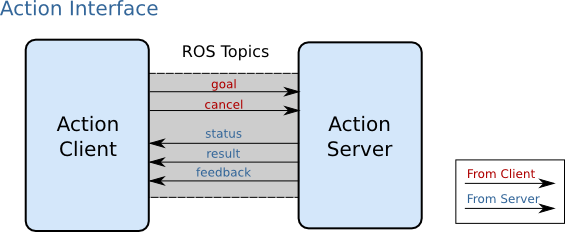
/action_server/cancel
/action_server/feedback
/action_server/goal
/action_server/result
/action_server/status
Every action server creates those 5 topics, so you can always tell that an action server is there because you identified those 5 topics.
rostopic list find which actions are available on a robot
Every action server creates those 5 topics, so you can always tell that an action server is there because you identified those 5 topics.
The node that calls to the functionality has to contain an action client. The action client allows a node to connect to the action server of another node. Calling an action server means sending a message to it
-
The message of a topic is composed of a single part: the information the topic provides.
-
The message of a service has two parts: the request and the response.
-
The message of an action server is divided into three parts: the goal, the result, and the feedback.
#! /usr/bin/env python import rospy import time import actionlib from my_action_pkg.msg import myAction, myGoal, myResult, myFeedback # definition of the feedback callback. This will be called when feedback is received from the action server # it just prints a message indicating a new message has been received def feedback_callback(feedback): # initializes the action client node rospy.init_node('action_client') # create the connection to the action server client = actionlib.SimpleActionClient('/my_action_server', myAction) # waits until the action server is up and running client.wait_for_server() # creates a goal to send to the action server goal = myGoal() goal.para = value # sends the goal to the action server, specifying which feedback function # to call when feedback received client.send_goal(goal, feedback_cb=feedback_callback) # Uncomment these lines to test goal preemption: #time.sleep(3.0) #client.cancel_goal() # would cancel the goal 3 seconds after starting # wait until the result is obtained # you can do other stuff here instead of waiting # and check for status from time to time # status = client.get_state() # check the client API link below for more info client.wait_for_result() print('[Result] State: %d'%(client.get_state())) -
Initialize the ROS node
-
Create the
ActionClientobject -
Wait for the Action Server to be available
-
Create and send a goal
-
Register a feedback callback function (optional)
-
Wait for the result or cancel the goal
-
Get the final result or goal status
get_result()
wait_for_result()
cancel_goal()
rostopic pub /[name_of_action_server]/goal [type_of_the_message_used_by_the_topic] [TAB][TAB]
rospy.logdebug()
rospy.loginfo()
rospy.logwarn()
rospy.logerr()
rospy.logfatal()
Get the logging data
rqt_console
rqt_plot is a graphical tool in ROS1 used to plot numeric data from ROS topics in real time.
rqt_graph is a graphical tool in ROS1 that visualizes the nodes and topics in your ROS system as a computation graph.
A rosbag is a file format (.bag) used in ROS to record, store, and replay ROS topic messages.
RViz (ROS Visualization) is a graphical tool in ROS1 for visualizing robot state, sensor data, coordinate frames, paths, and more.