Most important step in creating the look and feel of a mobile app is to determine the design language - the colors, the fonts, the animations, etc. By iterating on this first, we can more efficiently come to a design decision.
Some common design languages used by many apps are Material Design (from Google) and Cupertino Design (from Apple). While these would serve our purposes just fine, we would miss out on the opportunity to build the Umoja brand into the app. As such, it's a worthy endeavour to pursue a custom design language for this app.
Here is our first mockup:
The grey cards are not part of the design - they are placeholders for matches views, which will be created at a later date, once we get the design language settled.
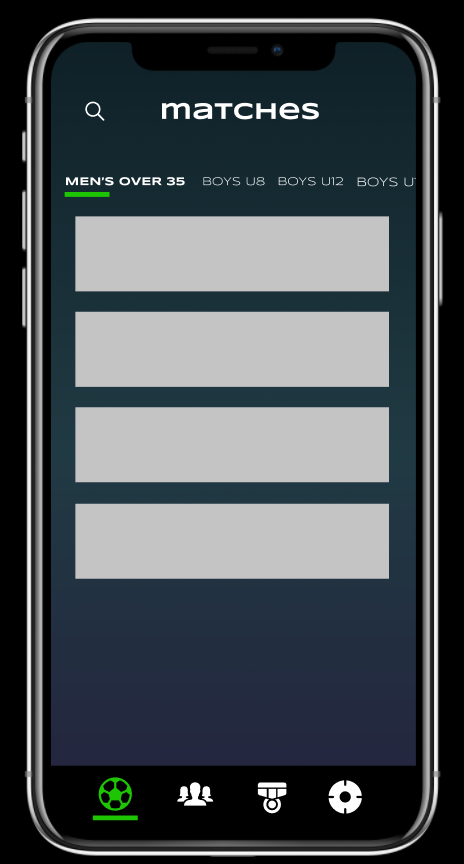
Properties:
Fonts used: Syncopate, Work Sans for body text (both free)
Colors used: Umoja Green (#1DC502), background is Moonlit Asteroid gradient ( #0f2027→ #203a43→ #2c5364)


Most important step in creating the look and feel of a mobile app is to determine the design language - the colors, the fonts, the animations, etc. By iterating on this first, we can more efficiently come to a design decision.
Some common design languages used by many apps are Material Design (from Google) and Cupertino Design (from Apple). While these would serve our purposes just fine, we would miss out on the opportunity to build the Umoja brand into the app. As such, it's a worthy endeavour to pursue a custom design language for this app.
Here is our first mockup:
The grey cards are not part of the design - they are placeholders for matches views, which will be created at a later date, once we get the design language settled.
Properties:
Fonts used: Syncopate, Work Sans for body text (both free)
Colors used: Umoja Green (#1DC502), background is Moonlit Asteroid gradient ( #0f2027→ #203a43→ #2c5364)