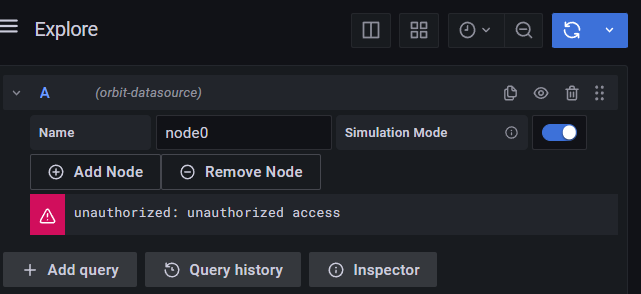
unauthorized access error from orbit-datasource plugin #15

Description

While setting up cosmos-web, I discovered that in Grafana I needed to go to Configuration -> Plugins and select the orbit-datasource plugin, then click Create a orbit-datasource data source. This caused orbit-datasource to appear in Grafana's Data sources list, and I was able to use the Cosmos Simulator panel to create some data in InfluxDB.
I updated the Orbit Display panel to use orbit-datasource and set the Name as node0 and checked the Simulation Mode toggle. After saving the panel, I receive a warning icon in Grafana with the message unauthorized: unauthorized access.
The error message from the InfluxDB logs is:
influxdb_1 | ts=2022-08-08T23:13:49.428872Z lvl=info msg=Unauthorized log_id=0cBtjPH0000 error="authorization not found"
And the related log entry from Grafana is:
grafana_1 | logger=plugin.myorg-orbit-datasource t=2022-08-08T23:13:49.428139216Z level=info msg="QueryData called" request="map[Headers:<nil> PluginContext:map[AppInstanceSettings:<nil> DataSourceInstanceSettings:map[BasicAuthEnabled:false BasicAuthUser: Database: DecryptedSecureJSONData:map[apiKey:REDACTED_MY_API_KEY] ID:4 JSONData:map[] Name:orbit-datasource UID:qnPO1mmVz URL: Updated:2022-08-08T23:03:10Z User:] OrgID:1 PluginID:myorg-orbit-datasource User:map[Email:admin@localhost Login:admin Name: Role:Admin]] Queries:[map[Interval:2e+10 JSON:map[constant:6.5 datasource:map[type:myorg-orbit-datasource uid:qnPO1mmVz] datasourceId:4 intervalMs:20000 isSimMode:true maxDataPoints:1044 opNodeList:[map[name: px:node.loc.pos.eci.s.col[0] py:node.loc.pos.eci.s.col[1] pz:node.loc.pos.eci.s.col[2] tag_name:beacon_type tag_value:posbeacon vx:node.loc.pos.eci.v.col[0] vy:node.loc.pos.eci.v.col[1] vz:node.loc.pos.eci.v.col[2]]] refId:A simNodeList:[map[frame:eci name:node0]]] MaxDataPoints:1044 QueryType: RefID:A TimeRange:map[From:2022-08-08T17:13:49.415Z To:2022-08-08T23:13:49.415Z]]]]"
I updated the plugin settings for orbit-datasource with a valid API Key and received the same error. Testing the datasource using the Save & test button works, but using the Explore option produces the same error. I have not added any value for the Path setting in the orbit-datasource configuration.