[JENKINS-76218] Old blue/red ball icons are back with recent UI changes (ribbon) #751

Description

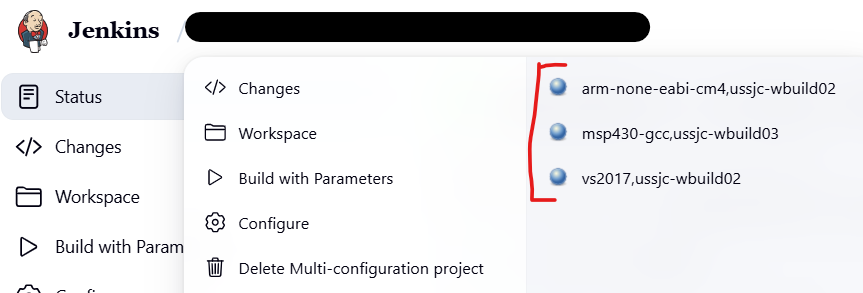
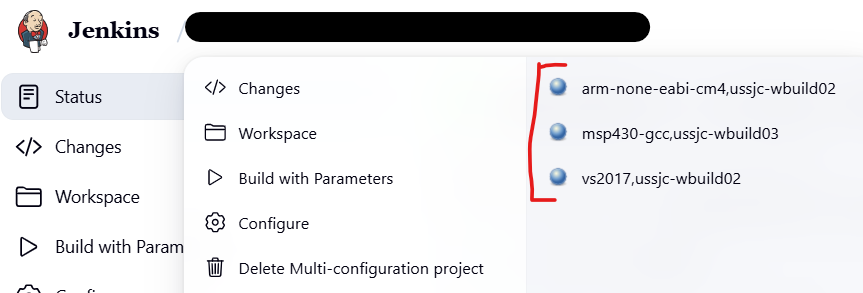
We see old Jenkins blue/red balls icons back in the ribbon modal job status (see attached screenshot).
Not sure if it is expected or not. Probably easy to fix, could do that if someone point me in the right direction.
How to reproduce
- Start a fresh new Jenkins instance (LTS 2.528.1)
- Install matrix-project plugin
- Create a multi configuration project, add a simple 'ls' shell step
- Execute the project
- In ribbon navigation bar, you should see the following

Originally reported by geoffroyjabouley, imported from: Old blue/red ball icons are back with recent UI changes (ribbon)
- assignee:
 kohsuke
- status: Open
- priority: Minor
- component(s): matrix-project-plugin
- resolution: Unresolved
- votes: 0
- watchers: 2
- imported: 2025-12-06
Raw content of original issue
We see old Jenkins blue/red balls icons back in the ribbon modal job status (see attached screenshot).
Not sure if it is expected or not. Probably easy to fix, could do that if someone point me in the right direction.
How to reproduce
- Start a fresh new Jenkins instance (LTS 2.528.1)
- Install matrix-project plugin
- Create a multi configuration project, add a simple 'ls' shell step
- Execute the project
- In ribbon navigation bar, you should see the following
environment
Jenkins LTS 2.516.3<br/>
Matrix Project plugin 870.v9db_fcfc2f45b_