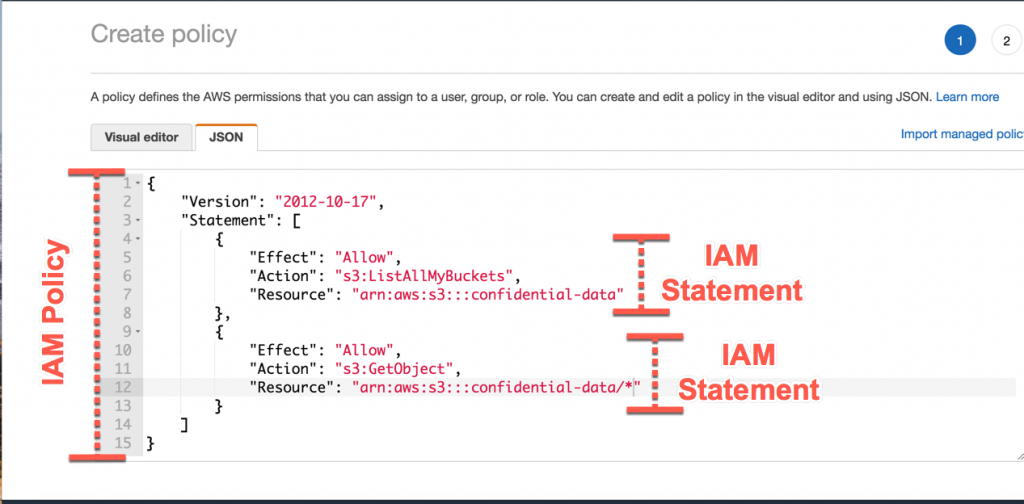
AWS IAM is way of creating an identity or a user and grouping them into groups or leaving them, making sure they are on a premission policy on what service to use in AWS. What I meant was that with IAM, you can create groups and then create users within such groups. Each user can be in multiple groups and each one of them have a permission policy on form of a JSON format. This JSON format states what service is AWS they have permission to use and how to use them. Making use of an AWS IAM account is better than using your root user account as this is more secure to use. But you cannot add groups in groups. The root user sohuld be only used for creating an IAM user but not be used for any other thing or shared. the users are people in an organization and they are part of a group Groups only contain users but not other groups Users may not be in any group and they can also be in multiple groups
AWS dated back to amazon e-commerce company where they felt the strength of their server infratrusture in 2002 and started innternally, It was in 2003 they realized they could make things such as IT for other people. In 2004, the AWS came up with a plan to create Amazon SQS and then upgraded to S3, EC2 in 2006. Now back today as they have taken over 47% of the cloud industry and have generated over 38 billion dollars in revenue, with Microsoft Azure being behind them taking up over 22% of the market

After controlling the market, they scattered a lot of regions and availability zones across the planet to ensure their services are worldwide and the issue of latency is a no no.
- Using the standard AWS console
- Using the AWS CLI(Command Line Interface) either on your device or the AWS CloudShell
- Using the AWS SDK

To use the amazon CLI you'll need to get your CLI installed from AWS website then after that, you'll configure your access keys. Try to make sure your access keys secrets are not revealed to someone else. then you type in the code below
aws --version
This is to check if your CLI installed successfully
Then after that you'll configure AWS, using the following command:
aws configure
Hello Cloud Enthusiasts! 👋 Today, let's take a deep dive into the functionalities of AWS CloudShell and the critical role Security Groups play in fortifying your AWS cloud infrastructure.
-
AWS CloudShell offers a convenient command line interface directly accessible from the AWS Management Console. No more dealing with installations or configurations – it's a hassle-free way to manage your AWS resources right from your browser.
How to Access AWS CloudShell:
Simply open CloudShell from the AWS Management Console. Leverage the AWS CLI directly in your browser for efficient resource management.
-
What are Security Groups? Security Groups act as virtual firewalls, managing inbound and outbound traffic to your AWS instances. They serve as the first line of defense for your cloud resources.
Granular Control: Define rules within Security Groups to control traffic based on sources, ports, and protocols. This granular control ensures that only authorized access is granted to your AWS resources.
-
Let's walk through the process of configuring Security Groups using AWS CloudShell:
Access AWS CloudShell from the console. Utilize the AWS CLI in the CloudShell for efficient security configurations.
-
Regular Review: Frequently review and update your Security Group rules to align with your evolving security requirements.
AWS CloudShell Benefits: Leverage AWS CloudShell for seamless command line access, making your security configurations more efficient and accessible.


Secure Shell (SSH) plays a crucial role in Amazon Web Services (AWS) by providing secure and encrypted communication for various tasks. Here are some specific uses of SSH in AWS:
- Purpose: SSH allows users to securely access and manage their AWS instances remotely.
- Benefit: This is particularly important for system administrators and developers who need to connect to their instances without compromising security.
- Purpose: SSH is used for secure file transfers between local machines and AWS instances.
- Benefit: Users can move files securely between their local environment and the cloud, ensuring the confidentiality and integrity of the transferred data.
- Purpose: SSH enables users to execute commands on AWS instances remotely.
- Benefit: This feature is essential for system administration, configuration management, and troubleshooting without requiring direct physical access to the servers.
- Purpose: SSH tunneling allows secure transmission of data between local machines and AWS instances.
- Benefit: Users can establish encrypted tunnels to transmit data, enhancing security for various applications, databases, or other services running on AWS.
-
Purpose: SSH supports key pair authentication, reducing reliance on passwords for accessing AWS instances.
- Benefit: Key pair authentication enhances security by using public and private key pairs, making it more resistant to unauthorized access compared to password-based authentication.
- Purpose: SSH can be used in conjunction with IAM roles to control access to AWS resources.
-
Benefit: This ensures that users and systems have the appropriate permissions to perform actions on AWS, following the principle of least privilege.
- Purpose: SSH is often used to access a bastion host (jump host), which serves as an intermediary for accessing other instances in a private subnet.
- Benefit: Bastion hosts add an additional layer of security by acting as a gateway for accessing resources in a secure manner.
Understanding and leveraging SSH in these scenarios contribute to a more secure and efficient management of AWS resources, ensuring the confidentiality and integrity of data and resources in the cloud environment.

EC2 Instance Connect (EIC) is a simple and secure method for connecting to your Amazon EC2 Linux instances using Secure Shell (SSH). It eliminates the need to manage SSH keys manually and offers enhanced security features.
-
No SSH Key Management: EIC generates one-time use SSH keys, eliminating the need to store and distribute permanent keys.
-
IAM-Based Access Control: You can control SSH access to instances using AWS Identity and Access Management (IAM) policies and principals, ensuring granular control over who can connect to which instances.
- Secure Logging: All connection attempts are logged to AWS CloudTrail, providing an audit trail for security and compliance.
- User Requests Connection: User initiates a connection request through the EC2 console, AWS CLI, or AWS SDKs.
- IAM Authorization: AWS verifies the user's IAM permissions to access the instance.
- One-Time SSH Key Generation: EIC generates a one-time SSH key pair and pushes the public key to the instance metadata.
- SSH Connection: The user's SSH client connects to the instance using the private key, and the instance validates the public key from the metadata.
- Session Establishment: Upon successful authentication, the SSH session is established, allowing interaction with the instance.

-
Enable EIC on the Instance: (if not already enabled)
  aws ec2 enable-instance-profile-on-instance \
  --instance-id instance-id \
  --instance-profile-name EC2InstanceConnect
-
Connect to Instance:
aws ec2-instance-connect send-ssh-public-key \ --instance-id instance-id \ --availability-zone availability-zone \ --instance-os-user ubuntu -
Additional Benefits:
Streamlined Access: Simplifies access for developers and administrators. Improved Security: Reduces security risks associated with managing SSH keys. Auditability: Provides clear records of SSH access for compliance and troubleshooting. Remember:
-
EIC is currently available for Linux instances only. It supports SSH connections for both interactive sessions and command execution. You can also use EIC to connect to instances using a web-based terminal in the EC2 console.
SOURCE: A medium blog
Imagine your cloud storage as a trusty toolbox. You need different tools for different jobs, and sometimes you need to expand your kit. Amazon EBS is like that magic toolbox that grows with you and adapts to your needs, with lightning-fast performance, limitless scalability, and unwavering reliability.
Supercharged Speed:

With EBS, data reads and writes happen in a blink, keeping your projects running smoothly like a well-oiled machine. Say goodbye to frustrating lag and hello to instant access!
Stretch Your Storage Legs:

No more worrying about running out of storage space! EBS expands effortlessly as your needs grow, ensuring you always have enough room for your ideas and data. Think of it as a bottomless storage bin for your digital treasures.
Fort Knox for Your Data:

EBS safeguards your data like a digital Fort Knox, with automatic backups and built-in redundancy that protect against unexpected bumps in the road. Rest assured, your information is always safe and sound.
Budget-Friendly Flexibility:

EBS offers a variety of storage plans to fit any budget, from budget-conscious beginners to high-performance power users. Choose the perfect option for your needs and watch your digital dollars stretch further.
Perfect for:
- Websites and Databases: Keep your online projects humming with stable, fast storage that handles all your data without breaking a sweat.
- Big Data Adventures: Dive into the world of massive datasets with confidence, knowing EBS can handle the heavy lifting and keep your analysis flowing smoothly.
- DevOps Dreams: Build, test, and deploy applications in record time with EBS's flexible storage options and effortless scaling.
Ready to ditch the clunky storage solutions and unlock the full potential of your cloud projects? Dive into the world of EBS and experience the difference!
Learn More:
- Official AWS EBS Documentation: https://docs.aws.amazon.com/AWSEC2/latest/UserGuide/AmazonEBS.html
- Get Started with EBS: [link to AWS EBS getting started guide]
- EBS Pricing: [link to AWS EBS pricing page]
Remember, EBS is like your partner in cloud crime, always there to support your projects and help you achieve your goals. So go forth, build, create, and innovate, knowing your data is in good hands!
Imagine a blueprint for your ideal cloud server. This blueprint includes the operating system, pre-installed software, and configurations you need to get your project running. That's what an Amazon Machine Image (AMI) is in the AWS cloud.
Think of it this way:
- Traditional VM: Like building a server from scratch, piece by piece, requiring time and effort.
- AWS AMI: Like using a prefabricated house – choose the design you like, move in quickly, and customize as needed.
Here are the key aspects of an AWS AMI:
- Template: It's a template containing the software and configuration of a server instance.
- Fast Deployments: Launch new server instances from the AMI in seconds, saving you time and effort.
- Variety: Choose from a massive library of pre-built AMIs for various operating systems and applications.
- Customization: Build and share your own custom AMIs with specific configurations tailored to your needs.
- Cost-Effective: Pay only for the resources you use with the chosen AMI instance type.
- Security: Leverage pre-baked security configurations and patch management for secure deployments.
Next, let's explore the different types of AMIs:
- Amazon-provided AMIs: Pre-built images for various OSes, software stacks, and applications.
- Community AMIs: Created and shared by other AWS users.
- Your own custom AMIs: Tailor-made images for specific needs and configurations.
In essence, AMIs are the building blocks for quick, flexible, and cost-effective deployments in the AWS cloud.
Imagine a file storage system that:
- Scales on demand: No need to pre-provision storage or worry about running out of space. It grows and shrinks automatically as your data needs change, just like magic!
- Eliminates servers: Ditch the clunky server racks and say goodbye to tedious server management. AWS EFS is fully serverless, letting you focus on your applications instead of the underlying infrastructure.
- Shares files effortlessly: Seamlessly share data across multiple Amazon Elastic Compute Cloud (EC2) instances, on-premises servers, and even containerized applications. Collaboration just got a whole lot easier!
- Delivers high performance: Get fast and consistent throughput for even the most demanding workloads, ensuring smooth operation and happy users.
- Keeps your data safe: Enjoy industry-leading security with features like encryption at rest and in transit, access control, and data durability that's practically unheard of (99.999999999%!).
- Pays only for what you use: No upfront costs or hidden fees. You only pay for the storage you actually use, making it a cost-effective solution for any budget.
That's AWS EFS in a nutshell! It's a revolutionary file storage service that simplifies data management in the cloud, making it ideal for a wide range of applications, from web and mobile apps to content management systems and big data processing.
Here's an image to help visualize what AWS EFS does:
Think of it as a bridge between your traditional on-premises storage and the limitless possibilities of the cloud. With AWS EFS, you can finally break free from the limitations of physical servers and embrace the agility, scalability, and cost-efficiency of cloud storage.
If you're interested in learning more, here are some helpful resources:
- AWS EFS website: https://aws.amazon.com/efs/
- AWS EFS documentation: https://docs.aws.amazon.com/efs/latest/ug/whatisefs.html
- Blog post: 5 Reasons to Use AWS EFS for Your Cloud Applications: https://aws.amazon.com/efs/customers/

The Amazon Application Load Balancer (ALB) is a managed service offered by Amazon Web Services (AWS) that helps you distribute incoming traffic across multiple targets, such as Amazon EC2 instances, containers, or IP addresses. Think of it as a sophisticated traffic cop for your cloud applications, ensuring smooth flow and preventing bottlenecks.
Here's how the ALB works:
- Distributes traffic: When a user visits your website or uses your application, their request hits the ALB. The ALB then intelligently routes the request to one of your available targets, ensuring everyone gets served quickly and efficiently.
- Scales on demand: As your traffic fluctuates, the ALB automatically scales up or down its resources to handle the load. This means you avoid paying for idle capacity during low traffic periods, and your users never experience slowdowns during peak times.
- Enhances security: The ALB offers built-in DDoS protection and TLS encryption to safeguard your applications from malicious attacks and protect sensitive data.
- Provides insights: The ALB offers detailed monitoring and reporting tools, giving you visibility into your traffic patterns and application health. This information helps you identify and troubleshoot issues before they impact your users.
Key benefits of using the ALB:
- Improved performance: Reduces website loading times and enhances user experience.
- Increased scalability: Adapts to fluctuating traffic without manual intervention.
- Enhanced security: Protects your applications from attacks and data breaches.
- Simplified management: Provides a centralized platform for managing your application infrastructure.
- Reduced costs: Pay only for the resources you use, thanks to automatic scaling.
Who can benefit from the ALB?
- Web developers: Distribute traffic across web servers to ensure optimal performance.
- App developers: Scale mobile and web applications effortlessly.
- DevOps engineers: Streamline application management and automate scaling.
- Anyone running cloud applications: Improve performance, security, and scalability.
In simple terms, the ALB is like having a highly trained traffic control center for your applications. It keeps traffic flowing smoothly, protects your applications from harm, and gives you full visibility into what's happening. This makes it a valuable tool for any organization running applications in the cloud.
I hope this explanation clarifies what the Amazon ALB is and how it can benefit you. If you have any further questions, feel free to ask!

Think of an Amazon Auto Scaling Group as a team of virtual servers working together to handle your application's workload, just like a group of friends helping each other with a task. Each server is like a friend, and the group scales up or down automatically based on your needs.
Here's how it works:
1. You set the desired number of servers in the group: This is like deciding how many friends you need to help with the task.
2. Servers automatically spin up or down: If your website traffic suddenly increases, new servers are added to the group like more friends pitching in. Conversely, if things quiet down, some servers can take a break or even leave the group.
3. Servers are always healthy and working: Just like reliable friends, Amazon Auto Scaling continuously monitors the health of each server and replaces any unhealthy ones quickly, ensuring your application keeps running smoothly.
4. You pay only for what you use: This is like splitting the bill among your friends. You only pay for the servers that are actually working, not for the ones on standby.
Benefits of using Amazon Auto Scaling Groups:
- Cost-effective: No more overpaying for unused resources.
- Highly available: Your application stays up and running even during traffic spikes.
- Scalable: Easily handle changing demand without manual intervention.
- Manageable: Simplify your infrastructure management and focus on your application.
Here's an analogy to help you visualize:
- Think of your website as a restaurant. During peak hours, you need more waiters (servers) to handle the influx of customers. But during off-peak hours, you don't need as many. Amazon Auto Scaling is like having a team of waiters who automatically show up when needed and disappear when they're not, saving you money on labor costs.
In short, Amazon Auto Scaling Groups take the guesswork out of server scaling, giving you a reliable and cost-effective way to handle fluctuating demand for your cloud resources.

Amazon Relational Database Service (RDS) is a managed database service that makes it easy to set up, operate, and scale relational databases in the cloud. It handles many of the common database administration tasks, freeing you to focus on your applications.
Key Features:
- Managed Service: RDS automates tasks like hardware provisioning, database setup, patching, backups, and replication.
- Multiple Database Engines: Supports popular database engines, including MySQL, PostgreSQL, MariaDB, Oracle, Microsoft SQL Server, and Amazon Aurora.
- High Availability: Offers Multi-AZ deployments for enhanced fault tolerance, ensuring your database remains available even in the event of a failure in one Availability Zone.
- Scalability: Allows you to easily scale your database instances vertically (up or down) or horizontally (by adding read replicas) as your needs change.
- Security: Provides features like encryption at rest and in transit, access control, and audit logging to protect your data.
- Cost-Effective: You pay only for the database resources you use, with no upfront costs or long-term commitments.
Example Code (Creating a MySQL Database Instance):
const AWS = require('aws-sdk');
const rds = new AWS.RDS();

const params = {
  DBInstanceIdentifier: 'my-database',
  DBInstanceClass: 'db.t2.micro',
  Engine: 'mysql',
  MasterUsername: 'myusername',
  MasterUserPassword: 'mypassword',
  AllocatedStorage: 5,
};

rds.createDBInstance(params, (err, data) => {
  if (err) {
    console.error(err);
  } else {
    console.log('Database instance created successfully:', data);
  }
});
Additional Information:
- Pricing: Based on the database engine, instance type, storage, and other factors. See the AWS RDS pricing page for details.
- Monitoring: Provides metrics and logs to monitor the health and performance of your database instances.
- Troubleshooting: Offers tools and resources to help you troubleshoot issues with your RDS instances.
- Integration with Other AWS Services: Integrates seamlessly with other AWS services, such as Amazon EC2, Amazon VPC, and AWS Lambda.
Image:

- Amazon Aurora is a relational database service offered by Amazon Web Services (AWS). It combines the familiar features of MySQL and PostgreSQL with the high performance, scalability, and reliability of a cloud-native engine.
- Think of it as a supercharged version of MySQL and PostgreSQL, built specifically for the cloud. This means it automatically scales, backs up, and recovers from failures, taking away the burden of managing your database infrastructure.
Key features:
- Blazing-fast performance: Aurora uses a distributed storage system and a custom storage engine to achieve significantly faster query speeds than traditional MySQL and PostgreSQL instances.
- Effortless scalability: You can easily scale your Aurora database up or down to meet your application's needs without any downtime or manual configuration.
- High availability and disaster recovery: Aurora automatically replicates your data across multiple Availability Zones (AZs) in your chosen region, ensuring that your database is always available and can recover quickly from any failures.
- Pay-per-use pricing: You only pay for the resources you use, making Aurora a cost-effective solution for both small and large applications.
- MySQL and PostgreSQL compatibility: You can choose to run your Aurora database with either MySQL or PostgreSQL compatibility, making it easy to migrate existing applications or build new ones with your preferred language.
Benefits:
- Reduced operational overhead: With Aurora, you spend less time managing your database infrastructure and more time focusing on your application.
- Improved application performance: Your applications will run faster and more smoothly with Aurora's high performance and scalability.
- Increased reliability and availability: Your data is always safe and accessible with Aurora's high availability and disaster recovery features.
- Reduced costs: You only pay for the resources you use with Aurora's pay-per-use pricing model.
Who is it for?
- Developers and IT professionals who want a high-performance, scalable, and reliable database solution for their cloud-based applications.
- Businesses of all sizes looking for a cost-effective way to manage their database infrastructure.
Resources:
- AWS Aurora website: https://aws.amazon.com/rds/aurora/
- AWS Aurora documentation: https://aws.amazon.com/blogs/aws/amazon-aurora-postgresql-serverless-now-generally-available/
- AWS Aurora blog: https://aws.amazon.com/blogs/aws/category/database/amazon-aurora/

7280499723226729771.mp4
- Managed in-memory data store service in the AWS cloud.
- Caches frequently used data to reduce database load and improve application performance.
- Offers multiple cache engines: Redis, Memcached, and Redis-compatible mode for DynamoDB.
- Key features:
- Blazing-fast performance (sub-millisecond latency)
- High scalability
- High availability
- Security
- Cost-effectiveness
- Ease of use
Use Cases:
- Caching database results
- Caching session data
- Caching web pages
- Caching application objects
- Real-time data processing
- Gaming
- Ad targeting
- IoT
- Machine learning
Code Examples (Redis):
Connecting to a Redis ElastiCache cluster:
import redis

client = redis.Redis(
    host='your-elasticache-cluster-endpoint',
    port=6379
)
Setting a value:
client.set('key', 'value')Getting a value:
value = client.get('key')Additional Information:
- Pricing: Pay per node, per hour.
- Security: Supports encryption at rest and in transit.
- Monitoring: Provides metrics for performance and health.


What is DNS?
Imagine the internet as a vast city with millions of buildings (websites). Each building has a street address (IP address), but we navigate using names (domain names). DNS is like the city's phone book, translating human-readable names (e.g., bard.ai) into their corresponding addresses (e.g., 93.184.216.34).
How does it work?
When you type a domain name, your computer sends a query to a network of servers called DNS resolvers. These resolvers then consult with other servers until they find the correct IP address for the website you requested. Once they have it, they send it back to your computer, and your browser can connect to the website.
Why is DNS important?
- Speed: DNS significantly reduces the time it takes to load websites by eliminating the need to search for IP addresses manually.
- Accuracy: It ensures you're always reaching the correct website, avoiding phishing scams and malicious websites.
- Security: Some DNS resolvers offer additional security features like malware filtering and parental controls.
- Efficiency: Without DNS, the internet would be a much slower and more confusing place.
Fun facts about DNS:
- There are millions of DNS servers around the world, working together 24/7 to keep the internet running smoothly.
- The first DNS server was created in 1983!
- Some countries have their own top-level domains, like .cn for China or .fr for France.
- You can actually change your DNS server to improve your internet speed or security.
Want to learn more?
I can share some interesting resources about DNS, like:
- Interactive DNS tutorial: https://www.cloudshark.org/captures/56802b91286a
- Video explaining DNS in simple terms: https://www.youtube.com/watch?v=72snZctFFtA
- Article about the history of DNS: https://cabulous.medium.com/domain-name-dns-resolution-how-it-works-bddafa0246ed

Overview:
Managed Domain Name System (DNS) service offered by Amazon Web Services (AWS). Provides highly available and scalable DNS resolution for your websites and applications. Supports a variety of features, including: Domain registration and management Routing traffic to different resources based on geographic location or other criteria Health checks to ensure your applications are available Monitoring and reporting Integration with other AWS services Benefits:
Simplified DNS management: No need to manage DNS servers manually. High availability and scalability: Route 53 is built on AWS infrastructure, ensuring its reliability and ability to handle large traffic volumes. Security features: Route 53 offers built-in security features like DNSSEC to protect your domains from unauthorized access. Cost-effectiveness: You only pay for the resources you use with Route 53's flexible pricing model. Integration with other AWS services: Route 53 integrates seamlessly with other AWS services, making it a valuable tool for building cloud-based applications. Use Cases:
Websites and web applications Mobile applications API endpoints Any other resource that requires a DNS name Additional Resources:
AWS Route 53 documentation: https://docs.aws.amazon.com/route53/
AWS Route 53 blog: https://aws.amazon.com/blogs/aws/category/networking-content-delivery/amazon-route-53/

Understanding the Purpose:
- Domain Name System (DNS): Translates human-readable domain names (e.g., www.example.com) into machine-readable IP addresses (e.g., 192.168.1.1), enabling users to access websites and web applications.
- Route 53: AWS's highly available and scalable cloud DNS service.
- EC2 Instance: A virtual server in AWS's Elastic Compute Cloud (EC2) service, hosting websites, applications, and other resources.
Benefits of Connecting EC2 Instance with Route 53:
- Simplified Domain Routing: Point your domain name to your EC2 instance's IP address within Route 53, eliminating reliance on external DNS providers.
- High Availability: Route 53's distributed DNS servers ensure domain accessibility even during outages.
- Scalability: Handles increased traffic with ease.
- Enhanced Security: DNSSEC for domain protection.
- AWS Integration: Seamless integration with other AWS services.
Prerequisites:
- An AWS account with an active EC2 instance.
- A registered domain name that you control.
General Steps:
- Access Route 53: Locate Route 53 within your AWS Management Console.
- Create Hosted Zone: Establish a hosted zone for your domain name.
- Obtain EC2 Instance IP Address: Find the public IP address of your EC2 instance.
- Create A Record: Within the hosted zone, create an A record mapping your domain name to the EC2 instance's IP address.
- Propagation Delay: Allow time for DNS changes to propagate globally (typically up to 48 hours).
Additional Considerations:
-
Elastic IP Addresses: Consider using Elastic IPs for static IP addresses that persist even if the instance is stopped or terminated.
-
Health Checks and Failover: Route 53 offers health checks and failover routing for high availability.
-
Traffic Flow Management: Route 53 can route traffic to multiple resources for load balancing or geolocation-based routing.
Here is a youtube video to guide you on that: https://youtu.be/cfzHfazXalo?si=W40ltcMAIoU1HFvn

While studying, you can enjoy programming memes: