An open-source, terminal-native coding agent built with TypeScript and Node.js.
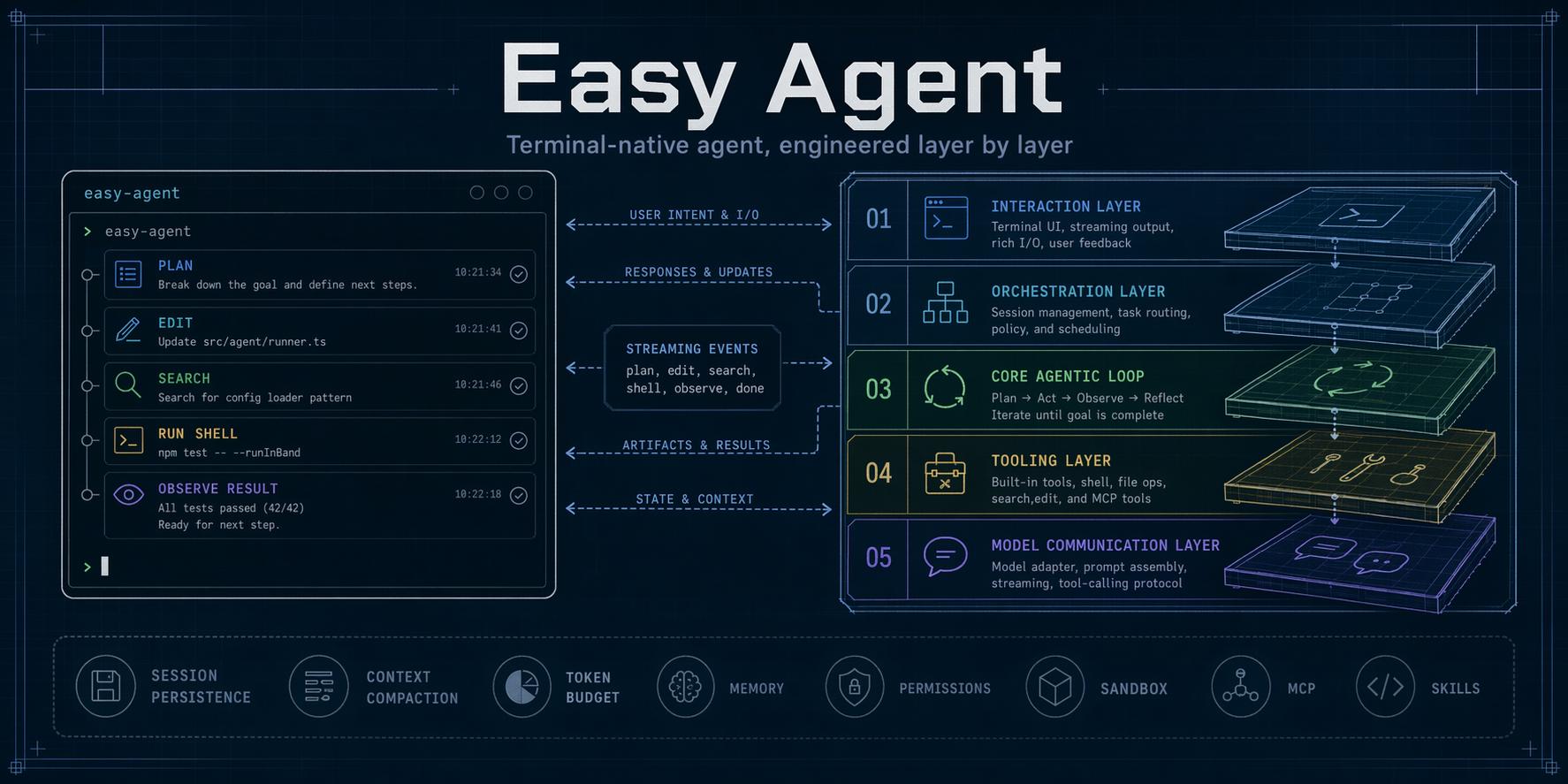
Easy Agent provides a Claude Code-style workflow in a readable, extensible codebase: streaming model conversations, local file and shell tools, permission modes, sessions, MCP, skills, sub-agents, Agent Teams, multimodal input, and plugins.
中文文档:README.zh-CN.md
Current stage: Stage 36 release candidate complete; first npm publication pending.
The implementation, tutorial article, and step/ snapshot tracks are complete through Stage 36. The single-file package, release verification, installer, user documentation, and tag-triggered publishing workflow are ready. The remaining release actions are publishing eagent to npm and running the post-publication registry cold checks.
Easy Agent follows a 37-stage roadmap that builds the system progressively from model communication to distribution.
| Stage | Area | Core snapshot | Status |
|---|---|---|---|
| 0 | Project scaffold | Project foundation | ✅ Done |
| 1 | LLM communication layer | step/step1.js |
✅ Done |
| 2 | React/Ink terminal UI | step/step2.js |
✅ Done |
| 3 | Tool interface and first tool | step/step3.js |
✅ Done |
| 4 | Core agentic loop | step/step4.js |
✅ Done |
| 5 | Complete core toolset | step/step5.js |
✅ Done |
| 6 | System prompt and context engineering | step/step6.js |
✅ Done |
| 7 | Permission control system | step/step7.js |
✅ Done |
| 8 | QueryEngine multi-turn orchestration | step/step8.js |
✅ Done |
| 9 | Session persistence and restore | step/step9.js |
✅ Done |
| 10 | Project memory system | step/step10.js |
✅ Done |
| 11 | Context compaction | step/step11.js |
✅ Done |
| 12 | Fine-grained token budget management | step/step12.js |
✅ Done |
| 13 | Plan Mode | step/step13.js |
✅ Done |
| 14 | TodoWrite session task tracking | step/step14.js |
✅ Done |
| 15 | Persistent task graph (V2) | step/step15.js |
✅ Done |
| 16 | MCP protocol support | step/step16.js |
✅ Done |
| 17 | Skills system | step/step17.js |
✅ Done |
| 18 | Sandbox | step/step18.js |
✅ Done |
| 19 | Sub-Agent and agent definitions | step/step19.js |
✅ Done |
| 20 | Background agents and worktree isolation | step/step20.js |
✅ Done |
| 21 | Agent Teams and multi-agent collaboration | step/step21.js |
✅ Done |
| 22 | Hooks lifecycle system | step/step22.js |
✅ Done |
| 23 | Output styles and user commands | step/step23.js |
✅ Done |
| 24 | Rendering experience upgrades | step/step24.js |
✅ Done |
| 25 | Configuration system improvements | step/step25.js |
✅ Done |
| 26 | File history and rewind | step/step26.js |
✅ Done |
| 27 | Error handling and resilience | step/step27.js |
✅ Done |
| 28 | Headless and pipe mode | step/step28.js |
✅ Done |
| 29 | Auto Mode classifier | step/step29.js |
✅ Done |
| 30 | Multi-provider support | step/step30.js |
✅ Done |
| 31 | Web, MultiEdit, MCP resources, and PowerShell | step/step31.js |
✅ Done |
| 32 | Multimodal image and screenshot input | step/step32.js |
✅ Done |
| 33 | Built-in command completion | step/step33.js |
✅ Done |
| 34 | Extended Thinking controls and display | step/step34.js |
✅ Done |
| 35 | Plugins and Marketplace | step/step35.js |
✅ Done |
| 36 | Packaging, publishing, and documentation | step/step36.js |
🚧 Release candidate |
Stage 36 has passed local typechecking, bundling, tarball boundary checks, isolated global installation, installer tests, real PTY startup, and npm publish --dry-run. Its final status will move to done after the first registry publication and cold npx eagent@latest verification.
Requirements: Node.js 22 or newer, npm, and credentials for at least one supported model provider.
Try it without installing:
export ANTHROPIC_AUTH_TOKEN="your-token"
npx --yes eagent@latest
Or install it globally:
npm install -g --ignore-scripts eagent
eagent
The long command name is also available:
easy-agent --helpAn npm-backed installer is available for macOS and Linux:
curl -fsSL https://raw.githubusercontent.com/ConardLi/easy-agent/main/install.sh | shThe installer checks Node.js, installs the same npm package with --ignore-scripts, verifies eagent on PATH, and does not install Node.js or run package lifecycle scripts for you.
For a raw Anthropic model name, environment variables are enough:
export ANTHROPIC_AUTH_TOKEN="your-token"
export ANTHROPIC_MODEL="claude-sonnet-4-20250514" # optional
eagent
Easy Agent also supports named Anthropic, OpenAI-compatible, Gemini, and local profiles. Put settings in ~/.easy-agent/settings.json for user-wide configuration or .easy-agent/settings.json for a project:
{
  "defaultModel": "gpt",
  "models": {
    "gpt": {
      "protocol": "openai-chat",
      "model": "gpt-5.1",
      "baseURL": "https://api.openai.com/v1",
      "apiKey": "${OPENAI_API_KEY}"
    },
    "gemini": {
      "protocol": "gemini",
      "model": "gemini-2.5-pro",
      "apiKey": "${GEMINI_API_KEY}"
    },
    "ollama": {
      "protocol": "openai-chat",
      "model": "qwen2.5-coder",
      "baseURL": "http://localhost:11434/v1"
    }
  }
}
Select a profile with eagent --model gpt or /model gpt inside the REPL.
| Environment variable | Purpose |
|---|---|
ANTHROPIC_AUTH_TOKEN |
Anthropic API token or compatible gateway token |
ANTHROPIC_BASE_URL |
Optional Anthropic-compatible endpoint |
ANTHROPIC_MODEL |
Default raw Anthropic model name |
OPENAI_API_KEY |
Referenced by OpenAI-compatible profiles |
GEMINI_API_KEY |
Referenced by Gemini profiles |
WEB_SEARCH_API_KEY |
Optional WebSearch provider key |
Run /config list, /model list, or /doctor to inspect the effective setup.
eagent                         # interactive REPL
eagent --model gpt             # select a model profile
eagent --plan                  # read-only planning mode
eagent --auto                  # classifier-assisted permission mode
eagent --resume                # resume the latest session
eagent --resume <session-id>   # resume a specific session
eagent -p "summarize this repo"                 # headless text output
eagent -p "list the tools" --output-format json # machine-readable output
git diff | eagent -p "review this patch"         # combine stdin and a prompt
Run eagent --help for every startup option. Useful REPL commands include:
| Command | Purpose |
|---|---|
/help |
List commands and shortcuts |
/model, /mode, /think, /effort |
Control model and reasoning behavior |
/config, /status, /doctor, /context |
Inspect configuration and runtime health |
/resume, /history, /export, /copy |
Work with sessions and output |
/rewind, /diff |
Inspect or restore file changes |
/permissions |
Inspect permission rules |
/skills, /agents, /hooks, /mcp |
Inspect extension registries |
/plugin, /marketplace |
Install and manage plugins |
/memory |
Inspect or edit project memory |
- File and code tools: Read, Write, Edit, MultiEdit, Glob, Grep, Bash, and PowerShell
- Web and external tools: WebFetch, WebSearch, MCP tools, and MCP resources
- Safe execution: allow/ask/deny rules, Plan Mode, Auto Mode, project trust, hooks, and shell sandboxing where supported
- Long-running work: TodoWrite, persistent task graphs, sub-agents, background runs, Git worktree isolation, and Agent Teams
- Context and continuity: session persistence, resume, compaction, token budgets, project memory, file checkpoints, and rewind
- Extensibility: skills, custom agents, slash commands, output styles, hooks, MCP servers, plugins, and static marketplaces
- Interfaces: interactive Ink UI, headless text/JSON/NDJSON output, images and screenshots, and multiple model protocols
Upgrade the global package, or re-run the installer:
npm install -g --ignore-scripts eagent@latestRemove it with:
npm uninstall -g eagentUser configuration and sessions under ~/.easy-agent/ are intentionally preserved when the npm package is removed.
- Run
eagent --versionand confirm Node.js withnode --version. - Run
/doctorinside Easy Agent to inspect credentials, settings, MCP, plugins, sandbox support, and writable paths. - Run
/statusand/config listto verify the active model and configuration sources. - If a global install succeeds but
eagentis not found, add the npm global bin directory associated withnpm prefix -gtoPATH, then open a new shell. - Report reproducible problems through GitHub Issues.
Never include API keys, .env contents, or private prompts in an issue.
Easy Agent keeps five runtime layers separate:
Terminal UI
    ↓
QueryEngine (multi-turn orchestration)
    ↓
Agentic Loop (reason → tool → observe)
    ↓
Tools and permission enforcement
    ↓
Provider API and streaming adapters
Packaging is the delivery layer around those five runtime layers. The published npm package is a readable ESM bundle with a source map and no runtime dependency tree.
The implementation and tutorial snapshot series are complete through Stage 35. Stage 36 packages the CLI for distribution and completes the public documentation.
git clone https://github.com/ConardLi/easy-agent.git
cd easy-agent
npm install
npm run dev
Useful checks:
npm run typecheck
npm run build
npm run test:stage36
npm run verify:release
npm publish --dry-run
The main source lives under src/; milestone snapshots live under step/. Build output under dist/ is generated and ignored by Git.
The project is still evolving quickly and is not accepting external pull requests yet. Issues with clear reproduction steps are welcome.