
Dream Factory is a RESTful API developed to manage users’ travel dreams. Each user can share their desired destinations, leave reviews, like other destinations, comunicate in live chat and interact with a secure and modern backend system. This backend project is built using Java, Spring Boot, and Spring Security. It implements authentication with JWT + Refresh Token, supports Cloudinary for image storage, and includes integrated email notifications, Web Socket for live chat. The system features reviews, likes/unlikes, and global exception handling to ensure a reliable and user-friendly API experience.
- 🗝 Key Features
- 👩🏻💻 Technologies Used
- 📁 Clone the Repository
- 📚 API Endpoints
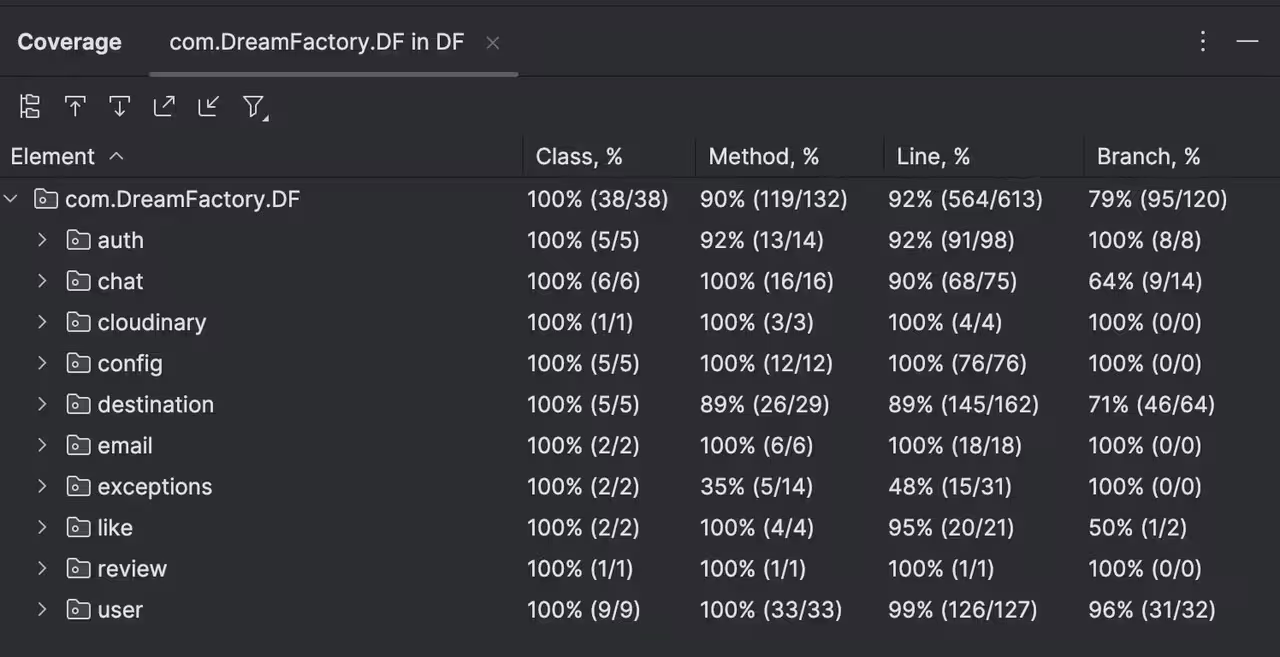
- 🏃🏻♂️ Running Tests
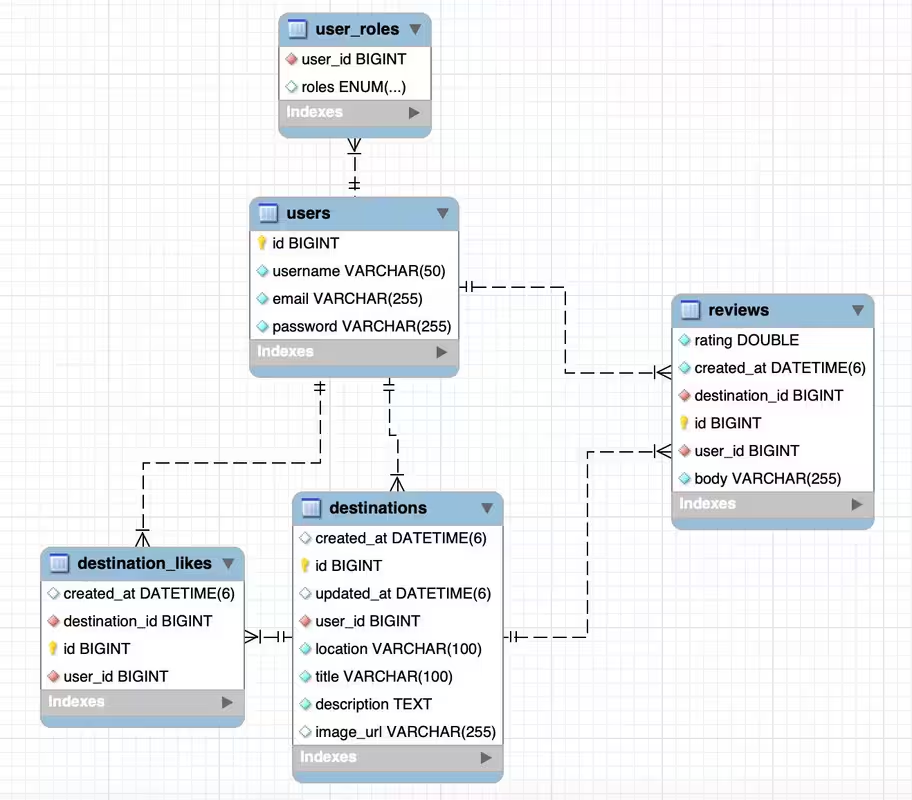
- 📊 EER Diagram
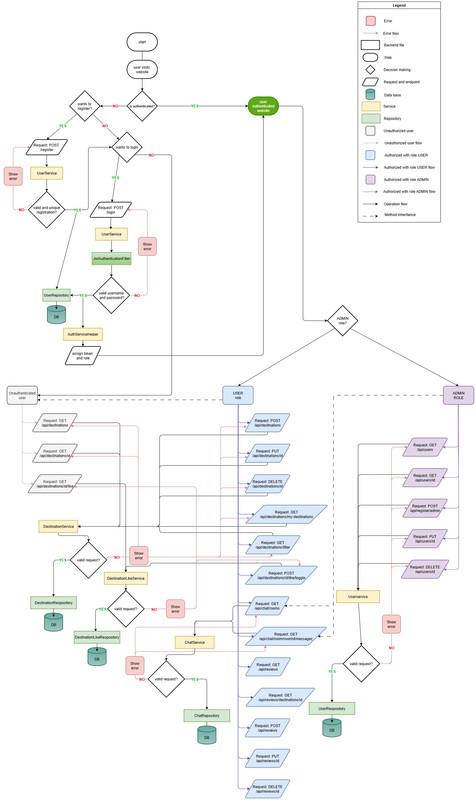
- 💬 Chat Flow Diagram
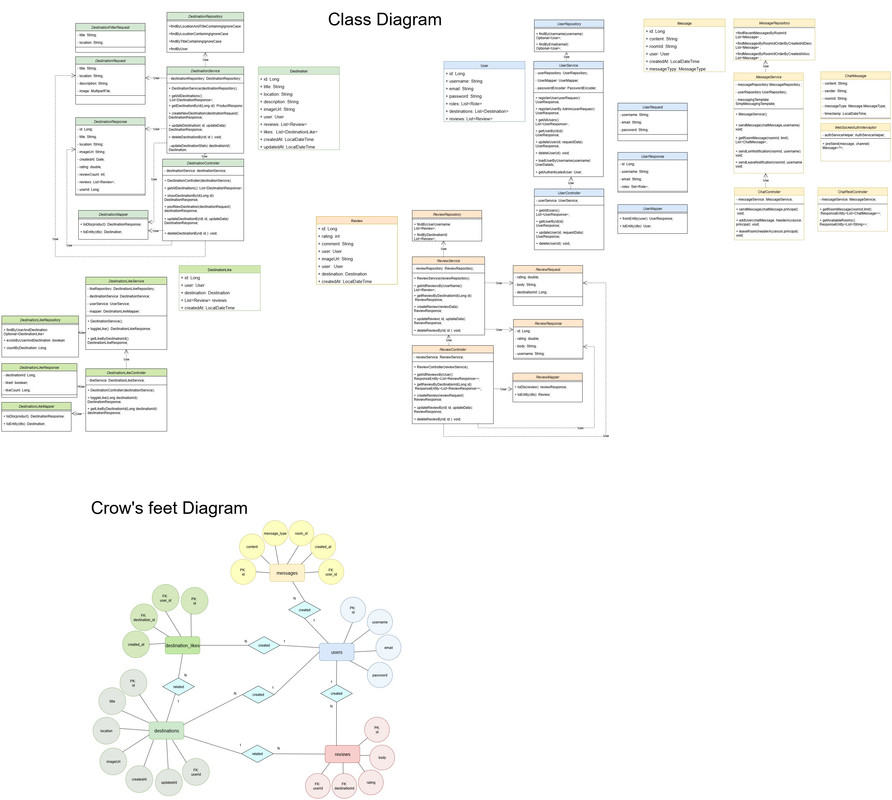
- 📦 Class Diagram
- 👥 Contributors
-
Authentication with JWT + Refresh Token
-
Route protection using JWT Bearer Token
-
User roles: USER and ADMIN
-
Implemented login, sign-up, and email notifications:
Email confirmation upon registration
Email notification upon submitting a review
-
User registration and login
-
Access to personal user data
-
Admin panel (for ADMIN users only):
-
View all registered users
-
Edit user roles and data
-
Delete users from the system
-
CRUD operations for destinations (only for the user's own data)
-
Admins can manage all destinations
-
Destination images are stored using Cloudinary
-
Filter destinations by title or location
-
Pagination of destination list
-
Sort destinations so that user’s own entries appear first
-
Reviews: users can leave comments, with email notification sent to the author
-
Like / Unlike: authenticated users can like or unlike destinations
- Integrated with Swagger UI for API visualization and testing
-
Global exception handling using @ControllerAdvice (GlobalExceptionHandler)
-
Returns structured and informative error messages










git clone https://github.com/Dream-Factory-T6/DreamFactory.git
cd DreamFactory./mvnw spring-boot:runor
mvn spring-boot:runAlternative Way to Run the Application If you are using an IDE such as IntelliJ IDEA,VS Code etc, you can simply click the “Run” button or run the main application class directly (the one annotated with @SpringBootApplication). For example, in IntelliJ IDEA, right-click the main class and choose "Run 'DfApplication...main()'".
POST /api/register— Create a new user.POST /api/auth/refresh— Refresh access token using refresh token.POST /api/register/admin— Create new user by user with role ADMIN.
GET /api/users— Get all users.GET /api/users/{id}— Get user by IDPUT /api/users/{id}— Update user by user with role ADMIN.DELETE /api/users/{id}— Delete user by ID
GET /api/destinations— Get all Destination.GET /api/destinations/{id}— Get Destination by ID.GET /api/destinations/filter— Get Destination by filter.GET /api/destinations/my-destinations- Get Destination by username.POST /api/destinations— Create new Destination.PUT /api/destinations/{id}— Update Destination by IDDELETE /api/cart/remove/{productId}— Delete Destination by product ID
GET /api/reviews— Get all reviews by username from Authorization.GET /api/reviews/destination/{id}— Get all reviews by Destination ID.POST /api/reviews— Create new review.PUT /api/reviews/{id}— Update review by ID.DELETE /api/reviews/{id}— Delete review by ID.
POST /api/destinations/{id}/likes/toggle— For Like/UnLike.GET /api/destinations/{id}/likes— Get all Likes by Destination ID.
GET /api/chat/room/{roomId}/messages— Get the latest messages from the roomGET /api/chat/rooms— Get a list of available rooms/chat.sendMessage— Send message/chat.addUser— Add user to room/chat.leaveRoom— Leave the room
Paula Calvo Garcia

Nadiia Alaieva
Anna Nepyivoda