Activity screen: live Claude Code session state from hooks#22
Conversation


Adds a host-side data path that surfaces live Claude Code session
state to the daemon (and onward to the device) without touching the
Anthropic API. A tiny hook script captures every TodoWrite / tool
boundary / prompt into ~/.clawdmeter/state.json, and the daemon
merges it into its BLE payload whenever either the API window or
the local state changes.

New: `daemon/clawdmeter_hook.py`
  * Registered as a Claude Code hook for `PreToolUse`, `PostToolUse`,
    `Stop`, `UserPromptSubmit`, and `SessionStart` events. Claude
    Code re-reads `~/.claude/settings.json` on every hook fire, so
    installation takes effect mid-session with no restart.
  * Reads the hook JSON from stdin, updates state.json under an
    advisory flock (multiple parallel sessions can fire concurrently),
    writes `{}` to stdout so Claude proceeds unaffected. Fail-open on
    parse error.
  * Per-session record carries:
      - `phase`: "running" while a turn is in flight, "idle" after
        Stop / SessionStart. PreToolUse / PostToolUse /
        UserPromptSubmit set running; only Stop resets to idle.
      - `current_tool`: tool name from most recent PreToolUse,
        cleared only on Stop / UserPromptSubmit (not on PostToolUse
        — clearing there would flicker the headline to "(idle)"
        between two tool calls in the same turn).
      - `last_user_prompt`: text of the most recent UserPromptSubmit,
        truncated to 120 chars.
      - `todos`: full TodoWrite payload when tool_name == "TodoWrite".
      - `cwd`, `project` (cwd basename), `model` (abbreviated).
  * Sessions idle longer than 15 minutes are pruned on next hook fire.

`daemon/claude_usage_daemon.py`:
  * `load_activity_sessions()` projects state.json into a compact
    over-the-wire schema (`p`/`m`/`la`/`td`, status 0/1/2, plus
    optional `u`/`t`/`ph`). `activeForm` is only sent on the
    in-progress todo to save bytes.
  * Connection loop tracks both `last_state_mtime` and the 60s API
    poll independently; either firing triggers a fresh push. Cached
    API fields are reused across state-only ticks so the device
    always gets a coherent merged view.
  * `_serialize_capped()` adapts payload size to the BLE single-attr
    512-byte spec cap with graduated trim: drop tail session's `u`
    first (cheapest UX loss), then trim its tail todos, then drop
    `t`, finally drop the whole session.
  * Byte counting uses `encoded.encode("utf-8")` length, not Python
    `str` length — important once user prompts can be CJK (1 char =
    3 bytes UTF-8) so the trim loop converges on actual on-wire size.
  * `json.dumps(..., ensure_ascii=False)` keeps CJK as 2–3 byte UTF-8
    instead of 6-byte `\uXXXX` escapes. ArduinoJson decodes either
    transparently; this just halves bandwidth for non-Latin prompts.
  * `write_payload` uses `response=True` (Write Request → ATT Long
    Write) so the device sees one onWrite per payload up to the
    spec cap.

`install-mac.sh`:
  * New step idempotently appends the hook command to five hook
    events in `~/.claude/settings.json`, preserving any existing
    hooks from other tools (e.g. vibe-island). Re-running is a no-op.

Co-Authored-By: Claude Opus 4.7 (1M context) <noreply@anthropic.com>
A third screen between Usage and Bluetooth, cycled to with tap (or
PWR). Renders the session-keyed state collected by the daemon's hook
integration in the prior commit. The headline answers "what is this
agent doing right now," the panel below answers "what's the plan."

Tap behaviour widened: previously a tap on Usage/Splash toggled
splash; now it cycles the full screen sequence
Splash → Usage → Activity → Bluetooth → Splash. PWR keeps its
existing per-screen cycle.

Multi-session navigation:
  * Title bar shows project on line 1 and model on line 2 (subtitle
    style), with an `N/M` page counter on the right colored by the
    current session's phase (green=running, dim=idle).
  * Horizontal swipe left/right cycles between sessions via LVGL's
    LV_EVENT_GESTURE on the screen root. `lv_indev_wait_release`
    debounces so one swipe = one session change.
  * Empty-state placeholder when no sessions are active or all are
    stale (>10 min idle), prompting "Start Claude Code in any
    terminal".

Per-session render:
  * Optional user-prompt row directly below the title (the most
    recent UserPromptSubmit text, one dim ellipsized line). Hidden
    when the daemon hasn't reported a prompt.
  * Headline (the focal point) sources in priority order:
        in-progress todo's activeForm
      → "Doing: <current_tool>"
      → "(idle)" when phase=idle
      → "(no todos)"
    So an all-completed todo list with a live tool call now reads
    "Doing: Bash" instead of looking finished.
  * Todo list windowed to 5 rows, centered on the in-progress item
    (slides to start/end edge when centering would overflow). Status
    icons via ASCII prefix ([x] / [>] / [ ]) coloured green / accent
    / dim. List + progress counter sit inside a rounded `make_panel`
    card, matching the Usage and Bluetooth screen design language.
  * Footer reports time since the daemon last saw activity.

Data types (`firmware/src/data.h`):
  * New ActivityData / SessionData / TodoItem structs (cap 3
    sessions × 10 todos × 64-byte content, ~5 KB total).
  * `phase_t` enum (PHASE_IDLE / PHASE_RUNNING) mirrors the daemon's
    0/1 ints.

Wire format (`firmware/src/main.cpp`):
  * `parse_json` now also populates an ActivityData out-param from
    the `sessions` array if present. Old payloads without sessions
    still work — UsageData fields are read as before.
  * `ui_update_activity` invoked after `ui_update` on every
    successful parse.

`firmware/src/ble.cpp`:
  * `BLE_BUF_SIZE` bumped from 512 to 4096 so onWrite buffers
    comfortably fit multi-session payloads with headroom; the BLE
    spec still caps a single attribute write at 512 bytes, which
    the daemon's `_serialize_capped` enforces.

Co-Authored-By: Claude Opus 4.7 (1M context) <noreply@anthropic.com>

|
Really cool concept. I played around a bit with making a control screen with some buttons on the touch screen but felt it was complicating the UI a bit. I like this idea, especially showing the to-do list and being able to follow along with the session. I'm wondering about one thing which is multiple sessions and how those are handled? If they are not handled in this PR might I suggest using the side buttons to navigate between sessions? Or a swipe action on the touch screen Also perhaps it could be good to make the install.sh script make the hook installation optional? Thanks for the PR and the screenshots! I actually have one of the 1.8" boards btw I'll have to test this on that one as well, it's a really nice small form factor, I'm able to fit it in the small pocket of my jeans which is fun. Is yours the waveshare model with two buttons and the curved glass display? Just thought of an extra feature, an optional sound played when a session idles could be fun, my colleague has his computer play the elevator doorbell sound from the TV show Severance which I thought was quite dystopian but funny. |
|
I hope it's ok to leave your PR open for a bit to collaborate on it. I want to flash the firmware on my end and test run this at work this week and get a feel for it on my end before merging but I'm totally sold on the idea! |
|
Also just had another UX thought sorry but it might be a good UX experience if this were not a separate screen but part of the main screen which could transform when sessions are active and transform back to the default screen when idle. Not sure what animations capabilities and limitations lvgl and the hardware have but it could be an interesting idea for a V2 of this feature don't think it's necessary for the initial version of this feature, maybe we'll get some ESP32 UX genius that does it for us for free 😄 |


Per upstream review feedback (HermannBjorgvin#22 ): rather
than parking the Activity view as a separately cycled screen, fold it
into the splash "default" screen. When the daemon reports active
sessions the splash transforms to show the per-session headline /
prompt / todo list; when all sessions go idle / stale the Clawd
animation cross-fades back in.

`firmware/src/ui.h`:
  * Drop `SCREEN_ACTIVITY` from the screen enum entirely. Activity now
    lives inside SCREEN_SPLASH.

`firmware/src/ui.cpp`:
  * New `apply_default_screen_state()` decides what's visible inside
    the splash slot based on `cached_activity.session_count`. Calls
    `lv_obj_fade_in/out` against splash root and activity container
    for a 280ms cross-fade transform.
  * `ui_show_screen()` resets opacity on both containers before
    switching screens so a leftover mid-fade doesn't leave anything
    invisible.
  * `ui_update_activity()` now triggers `apply_default_screen_state`
    so a freshly arriving session morphs the splash immediately
    rather than waiting for the next manual screen swap.
  * `ui_cycle_screen()` and `global_click_cb()` collapse from 4-way
    to 3-way cycles: Splash (morphable) → Usage → Bluetooth → Splash.
  * `activity_gesture_cb` swipe-to-cycle-sessions now gates on
    `current_screen == SCREEN_SPLASH` (since that's where Activity
    widgets live now).
  * Logo overlay still hidden on splash regardless of morph state —
    both the Clawd canvas and the Activity title want a clean left
    margin.

Co-Authored-By: Claude Opus 4.7 (1M context) <noreply@anthropic.com>
Per upstream review (HermannBjorgvin#22 ): the hook write to ~/.claude/settings.json
should be optional. Some users will want only the 5h/7d usage panels
without the per-session Activity view, or already have a busy
settings.json they'd rather hand-edit.

Adds a `[Y/n]` prompt before step 3b runs. Default stays "install"
to match prior behaviour; pressing `n` skips the settings.json write
entirely and continues with the rest of the installer (venv, plist,
launchctl load) unchanged.

Co-Authored-By: Claude Opus 4.7 (1M context) <noreply@anthropic.com>
Per upstream review feedback (HermannBjorgvin#22 ): rather
than parking the Activity view as a separately cycled screen, fold it
into the splash "default" screen. When the daemon reports active
sessions the splash transforms to show the per-session headline /
prompt / todo list; when all sessions go idle / stale the Clawd
animation cross-fades back in.

`firmware/src/ui.h`:
  * Drop `SCREEN_ACTIVITY` from the screen enum entirely. Activity now
    lives inside SCREEN_SPLASH.

`firmware/src/ui.cpp`:
  * New `apply_default_screen_state()` decides what's visible inside
    the splash slot based on `cached_activity.session_count`. Calls
    `lv_obj_fade_in/out` against splash root and activity container
    for a 280ms cross-fade transform.
  * `ui_show_screen()` resets opacity on both containers before
    switching screens so a leftover mid-fade doesn't leave anything
    invisible.
  * `ui_update_activity()` now triggers `apply_default_screen_state`
    so a freshly arriving session morphs the splash immediately
    rather than waiting for the next manual screen swap.
  * `ui_cycle_screen()` and `global_click_cb()` collapse from 4-way
    to 3-way cycles: Splash (morphable) → Usage → Bluetooth → Splash.
  * `activity_gesture_cb` swipe-to-cycle-sessions now gates on
    `current_screen == SCREEN_SPLASH` (since that's where Activity
    widgets live now).
  * Logo overlay still hidden on splash regardless of morph state —
    both the Clawd canvas and the Activity title want a clean left
    margin.

Co-Authored-By: Claude Opus 4.7 (1M context) <noreply@anthropic.com>
Per upstream review (HermannBjorgvin#22 ): the hook write to ~/.claude/settings.json
should be optional. Some users will want only the 5h/7d usage panels
without the per-session Activity view, or already have a busy
settings.json they'd rather hand-edit.

Adds a `[Y/n]` prompt before step 3b runs. Default stays "install"
to match prior behaviour; pressing `n` skips the settings.json write
entirely and continues with the rest of the installer (venv, plist,
launchctl load) unchanged.

Co-Authored-By: Claude Opus 4.7 (1M context) <noreply@anthropic.com>

|
Thanks for the thoughtful review — pushed two more commits addressing the feedback. PR is now 4 commits total. Main-screen transform → doneYou convinced me. New commit e3edacd ("Default screen morphs between splash animation and Activity content"):
The "no sessions" Activity placeholder from earlier screenshot 04 is now redundant — the splash animation IS the empty state. Removed from the PR description's screenshot list mentally. Optional hook install → doneNew commit c66097d: Multi-session navigation — already in this PRSorry I undersold this in the original description. Multi-session IS handled:
If you'd rather have side-button nav instead of / in addition to swipe (your suggestion in the review), happy to wire that — it'd be ~5 lines in Idle sound → fun, follow-upDefinitely fun. Open Island has the same feature (chime on tool finish). The 1.8" board has an ES8311 codec + PA + speaker pin populated so it's hardware-feasible there. I haven't checked your 2.16" board's audio path yet — does it have a speaker output, or just a piezo / nothing? Either way feels like its own scope, happy to ship as a separate PR once the rest of this lands. 1.8" boardConfirmed — mine is the Waveshare ESP32-S3-Touch-AMOLED-1.8: SH8601 display, FT3168 touch, XCA9554 IO expander, AXP2101 PMU, 2 buttons (BOOT + PWR), curved glass. Fits in a jeans coin pocket — I had the same "oh this is cute" moment. I've got the board ported on my fork ( V2 idea: dynamic-island-style transform on the Usage screen too?Just thinking out loud: same |
|
This is brilliant! Can't wait to test this out tomorrow. Thanks for the clarification on the multiple sessions I was reviewing this from my phone so I couldn't dive deep into the code sorry. The 1.8" seems to be a popular device and I've got a couple pull requests from people porting it but I've held off on merging any alternative hardware pull requests since it was a bit of an effort to review them all. I think it makes most sense to merge this PR as the 1.8" port. The dynamic island type UX would be the way to go I agree I also had that thought about pushing the loading bar down, and thinking about it now the Bluetooth screen doesn't really need to be it's own screen either I think we could probably just show it by default when not connected and maybe use the hold-power-button action when powering on to clear any previous pairings, it's a pattern people are used to with Bluetooth headphones already and it would eliminate the concept of having different screens which is a plus. I'll try this out tomorrow, really looking forward to seeing it in action! |
|
Tested this at work today, vibe coded a bash equivalent of your python daemon session handling to get it to work temporarily, probably not ideal in the long run to have two daemons but I think tackling it a future PR makes more sense. Maybe I'll create a PR into your branch with my bash Daemon. Here's a picture of the activity screen on the 2.16" device. I think my main feedback would be UX related, functionally it's really good. I noticed that my sessions didn't have a todo list a lot of the time.. I was kind of stuck doing more fine grained work today so didn't enter plan mode a lot unfortunately. I also had a couple sessions going and the fading animation when idle auto switching to showing a different session kind of drew the eye a lot to grab my attention, not sure if that's good or bad tbh. The other thing that stuck out was the text size, there's a bit of a readability issue that I think could be solved by increasing the text size a bit. Maybe consider removing the last active text on the bottom I feel like the information from that for me is less relevant generally but you may disagree? On the Todo lists maybe into display if there is a Todo list, and consider removing the box from around it, more room for larger text. Also consider scrolling text for the session title? And a thought on the doing section, maybe we should show information with it such as the command being run? I would even consider removing the last prompt display to give more space to it? Sorry for the barrage of comments, please tell me what you think, I'm kind of in brainstorming mode about what information to prioritize on such a small screen
|


Round of UX changes responding to PR HermannBjorgvin#22 review feedback:

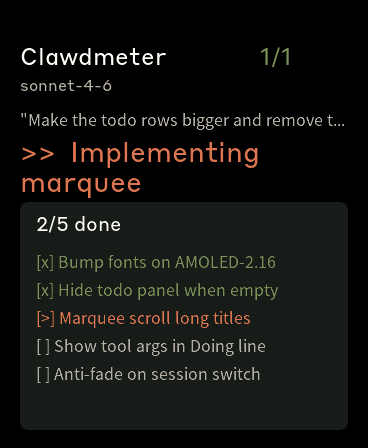
  * Bump fonts across the panel — model/prompt/todos 20→24,
    todo row height 30→34. Title stays at 28pt; what changes is
    that the title now marquee-scrolls (LV_LABEL_LONG_SCROLL_CIRCULAR)
    so long project|model strings stay legible without truncation.
  * Drop the "last active Xs ago" footer — the title row, last
    prompt, and headline already make session liveness obvious.
  * Hide the todo panel entirely when a session has no todos
    instead of showing an empty frame.
  * Extend the "Doing:" headline to "<tool> | <args>" so the user
    sees what command is actually mid-flight. The hook now records
    a short summary per tool (Bash command, file path, glob
    pattern, etc) into state.json as `current_tool_args`; the
    daemon forwards it as `ta` and the firmware paints it after
    the tool name. Tool-name only when args summary is empty.
  * Don't fade the Activity↔Splash morph on session re-renders
    (swipe, new BLE data with sessions still present) — only fade
    on the actual state transition between "no sessions" and
    "has sessions". Tracked with a static bool in
    apply_default_screen_state().
  * Drop the standalone "No active sessions" placeholder — the
    splash animation now is the empty state, so the placeholder
    label is redundant.

Daemon _serialize_capped() now drops fields in priority order
last → first: `u` (prompt) → `ta` (args) → tail todos → `t` (tool
name) → whole session. Keeps as many sessions visible as possible
when 3× full sessions overflow the 512-byte BLE attribute.

Co-Authored-By: Claude Opus 4.7 (1M context) <noreply@anthropic.com>
Round of UX changes responding to PR HermannBjorgvin#22 review feedback:

  * Bump fonts across the panel on both boards (1.8" title 20→24,
    2.16" model/prompt/todos 20→24, todo row height 24→26/30→34).
    On the 1.8" the prompt + todo rows stay at the 16pt CJK font;
    bumping them would require generating font_cjk_20 (~+1MB flash).
  * Drop the "last active Xs ago" footer — the title row, last
    prompt, and headline already make session liveness obvious.
  * Hide the todo panel entirely when a session has no todos
    instead of showing an empty frame.
  * Marquee-scroll the title row so long project/model strings
    survive without truncation.
  * Extend the "Doing:" headline to "<tool> | <args>" so the user
    sees what command is actually mid-flight. The hook now records
    a short summary per tool (Bash command, file path, glob
    pattern, etc) into state.json as `current_tool_args`; the
    daemon forwards it as `ta` and the firmware paints it after
    the tool name. Tool-name only when args summary is empty.
  * Don't fade the Activity↔Splash morph on session re-renders
    (swipe, new BLE data with sessions still present) — only fade
    on the actual state transition between "no sessions" and
    "has sessions". Tracked with a static bool in
    apply_default_screen_state().

Daemon _serialize_capped() now drops fields in priority order
last → first: `u` (prompt) → `ta` (args) → tail todos → `t` (tool
name) → whole session. Keeps as many sessions visible as possible
when 3× full sessions overflow the 512-byte BLE attribute.
|
Pushed Done
Two things we can discuss
Screenshots from the 1.8" board (368×448)
1.8" port
Happy to roll that in. The port is currently on my
I lean (1) since you said "merge this PR as the 1.8" port" but (2) is fine too. Dynamic-island BT screen
100% agreed, I'll prototype that after this PR settles. Hold-PWR-on-boot to clear pairings is a clean pattern. Probably a separate PR. Single daemon
Agreed. Either your bash daemon absorbs the hook protocol, or my python daemon picks up the OAuth + API polling, depending on which side has more to lose. Happy to take a look once you push the bash version. Idle soundStill up for it as a follow-up PR. Will check the 2.16" board's audio path before committing to a UX. |
Fair point I hadn't considered the continuity of it.
Also fair, if it's a useful signal for you then it's probably the same for others, and kind of helps to identify the session like you said.
I think merging #25 is the right call in hindsight yes. I was thinking that perhaps we should merge this PR into a sort of staging branch for the feature? I created a branch called Reason being is I think I would want to merge it with the new dynamic island UX and I wanted to have a go at seeing if I could help out there maybe adding the Lucide icons for todo's or seeing if I can work on that screenless UX idea so it would be good to be able to create a PR myself on the branch and get you as a reviewer on those. What do you think? |
|
Sounds great — done, just retargeted this PR from One small heads-up on the staging branch: once #25 lands on
🎉 — I'll wait for your review on #25. |
|
Will rebase after #25 is merged yes, just approved sorry I'm used to Azure DevOps at work so I didn't see the "approve" button where it normally is for me :D |

|
i merged your PR to my local dev version of clawmeter and with a few ajustments it works great, for Cli mode, I wonder if we can also grab the norml chat or cowork also had to create install windows and so on for this to register and trigger hooks i can supply if needed |

Branches three open PRs into one working stack on a Windows host with the
480x480 Waveshare AMOLED-2.16:

 - Base:           PR HermannBjorgvin#26 (dilbery's USB CDC transport)
 - Plus daemon:    cross-platform port + Windows hook-compat
 - Plus feature:   PR HermannBjorgvin#22 (tobby168's Activity screen / Claude Code hooks)
 - Plus 3 fixes:   firmware buffers + parse for multi-session payloads

Windows daemon port (vs PR HermannBjorgvin#26)
-------------------------------
daemon/claude_usage_daemon.py:
- find_port() on win32 uses pyserial list_ports filtered by USB VID
  (303A Espressif, 10C4 SiLabs, 1A86 WCH, 0403 FTDI). Locale-independent —
  works on non-English Windows where caption strings are translated.
- termios import + HUPCL clear gated to sys.platform != "win32".
- write_payload uses ensure_ascii=False so UTF-8 stays raw (em-dashes etc
  are 3 bytes instead of 6-byte \uXXXX escapes; smaller payloads, less
  pressure on ArduinoJson on the firmware side).

daemon/clawdmeter_hook.py (from PR HermannBjorgvin#22):
- fcntl is Unix-only; replace with msvcrt.locking on win32.

daemon/install_hooks_win.py (new):
- Windows analogue of install-mac.sh's inline-Python hook registration.
  Backs up settings.json before writing, idempotent.

Windows host scripts (from PR HermannBjorgvin#23): flash-win.ps1, install-win.ps1,
setup-win.ps1, uninstall-win.ps1, daemon/run-daemon.ps1. Brought along so
this branch is buildable + installable on Windows without cherry-picking.

Activity backport on USB CDC (vs PR HermannBjorgvin#22)
----------------------------------------
firmware/src/data.h:  PR HermannBjorgvin#22 ActivityData / SessionData / TodoItem structs.
firmware/src/ui.h:    +SCREEN_ACTIVITY enum + ui_update_activity() API.
firmware/src/ui.cpp:  PR HermannBjorgvin#22 init_activity_screen / render_activity /
                      activity_gesture_cb / ui_update_activity grafted onto
                      PR HermannBjorgvin#26's ui.cpp; cycle order Splash > Usage > Link >
                      Activity > Usage.
firmware/src/main.cpp: parse_json gets optional ActivityData* out-param;
                       sessions / todos extracted into the struct;
                       ui_update_activity() called after each successful parse.

daemon/claude_usage_daemon.py:
- load_activity_sessions() + state_file_mtime() from PR HermannBjorgvin#22.
- Main loop tracks last_state_mtime; payload includes "sessions" whenever
  the file changes OR a fresh API poll happens.

Three firmware fixes needed for multi-session payloads
------------------------------------------------------
Real-world payloads with 2 sessions x 5-10 todos each routinely hit
700-1000 bytes — well past anything PR HermannBjorgvin#26's defaults handled.

1. firmware/src/serial_link.cpp: LINE_BUF_SIZE / DATA_BUF_SIZE 192 -> 4096.
   192 was tuned for the ~120-byte Usage-only payload; longer lines were
   silently dropped at the line-accumulator level.

2. firmware/src/main.cpp: Serial.setRxBufferSize(4096) before Serial.begin.
   USB-CDC RX defaults to ~256 bytes; a 798-byte payload arrived as
   strlen=317 on the firmware side (truncated at receive). Bumping the
   buffer is the actual fix (CFG_TUD_CDC_RX_BUFSIZE redefine is ignored
   because Arduino-ESP32 overrides it via CONFIG_TINYUSB_CDC_RX_BUFSIZE).

3. firmware/src/main.cpp: parse_json is two-pass.
   - Pass 1 is a Filter()'d deserialization that only extracts the Usage
     scalars (s/sr/w/wr/st/ok). A tiny doc, always succeeds.
   - Pass 2 is a best-effort full parse for the "sessions" array. If it
     fails (oversized, mid-line truncation, unicode oddity) we leave
     ActivityData empty but still ACK the payload upstream — Usage stays
     intact, Activity falls back to its empty render state.

Tested
------
Waveshare ESP32-S3-Touch-AMOLED-2.16 on Windows 10 (Dutch locale, Realtek
BT 5.1 adapter unused, USB-C only). Two parallel Claude Code sessions on
the same host:
  - 11+ todos across two sessions, ~1KB payload, ACK'd reliably.
  - Activity screen renders project name, in-progress todo activeForm,
    counter coloured by phase, todo list windowed around the in-progress
    item. PWR cycles Usage <-> Link <-> Activity.
  - state.json updates on every PreToolUse/PostToolUse/UserPromptSubmit/
    Stop/SessionStart; daemon picks it up on its 5s tick.
Branches three open PRs into one working stack on a Windows host with the
480x480 Waveshare AMOLED-2.16:

 - Base:           PR HermannBjorgvin#26 (dilbery's USB CDC transport)
 - Plus daemon:    cross-platform port + Windows hook-compat
 - Plus feature:   PR HermannBjorgvin#22 (tobby168's Activity screen / Claude Code hooks)
 - Plus 3 fixes:   firmware buffers + parse for multi-session payloads

Windows daemon port (vs PR HermannBjorgvin#26)
-------------------------------
daemon/claude_usage_daemon.py:
- find_port() on win32 uses pyserial list_ports filtered by USB VID
  (303A Espressif, 10C4 SiLabs, 1A86 WCH, 0403 FTDI). Locale-independent —
  works on non-English Windows where caption strings are translated.
- termios import + HUPCL clear gated to sys.platform != "win32".
- write_payload uses ensure_ascii=False so UTF-8 stays raw (em-dashes etc
  are 3 bytes instead of 6-byte \uXXXX escapes; smaller payloads, less
  pressure on ArduinoJson on the firmware side).

daemon/clawdmeter_hook.py (from PR HermannBjorgvin#22):
- fcntl is Unix-only; replace with msvcrt.locking on win32.

daemon/install_hooks_win.py (new):
- Windows analogue of install-mac.sh's inline-Python hook registration.
  Backs up settings.json before writing, idempotent.

Windows host scripts (from PR HermannBjorgvin#23): flash-win.ps1, install-win.ps1,
setup-win.ps1, uninstall-win.ps1, daemon/run-daemon.ps1. Brought along so
this branch is buildable + installable on Windows without cherry-picking.

Activity backport on USB CDC (vs PR HermannBjorgvin#22)
----------------------------------------
firmware/src/data.h:  PR HermannBjorgvin#22 ActivityData / SessionData / TodoItem structs.
firmware/src/ui.h:    +SCREEN_ACTIVITY enum + ui_update_activity() API.
firmware/src/ui.cpp:  PR HermannBjorgvin#22 init_activity_screen / render_activity /
                      activity_gesture_cb / ui_update_activity grafted onto
                      PR HermannBjorgvin#26's ui.cpp; cycle order Splash > Usage > Link >
                      Activity > Usage.
firmware/src/main.cpp: parse_json gets optional ActivityData* out-param;
                       sessions / todos extracted into the struct;
                       ui_update_activity() called after each successful parse.

daemon/claude_usage_daemon.py:
- load_activity_sessions() + state_file_mtime() from PR HermannBjorgvin#22.
- Main loop tracks last_state_mtime; payload includes "sessions" whenever
  the file changes OR a fresh API poll happens.

Three firmware fixes needed for multi-session payloads
------------------------------------------------------
Real-world payloads with 2 sessions x 5-10 todos each routinely hit
700-1000 bytes — well past anything PR HermannBjorgvin#26's defaults handled.

1. firmware/src/serial_link.cpp: LINE_BUF_SIZE / DATA_BUF_SIZE 192 -> 4096.
   192 was tuned for the ~120-byte Usage-only payload; longer lines were
   silently dropped at the line-accumulator level.

2. firmware/src/main.cpp: Serial.setRxBufferSize(4096) before Serial.begin.
   USB-CDC RX defaults to ~256 bytes; a 798-byte payload arrived as
   strlen=317 on the firmware side (truncated at receive). Bumping the
   buffer is the actual fix (CFG_TUD_CDC_RX_BUFSIZE redefine is ignored
   because Arduino-ESP32 overrides it via CONFIG_TINYUSB_CDC_RX_BUFSIZE).

3. firmware/src/main.cpp: parse_json is two-pass.
   - Pass 1 is a Filter()'d deserialization that only extracts the Usage
     scalars (s/sr/w/wr/st/ok). A tiny doc, always succeeds.
   - Pass 2 is a best-effort full parse for the "sessions" array. If it
     fails (oversized, mid-line truncation, unicode oddity) we leave
     ActivityData empty but still ACK the payload upstream — Usage stays
     intact, Activity falls back to its empty render state.

Tested
------
Waveshare ESP32-S3-Touch-AMOLED-2.16 on Windows 10 (Dutch locale, Realtek
BT 5.1 adapter unused, USB-C only). Two parallel Claude Code sessions on
the same host:
  - 11+ todos across two sessions, ~1KB payload, ACK'd reliably.
  - Activity screen renders project name, in-progress todo activeForm,
    counter coloured by phase, todo list windowed around the in-progress
    item. PWR cycles Usage <-> Link <-> Activity.
  - state.json updates on every PreToolUse/PostToolUse/UserPromptSubmit/
    Stop/SessionStart; daemon picks it up on its 5s tick.

|
Thanks for this PR — the hook-driven session model is brilliant, and the cross-session "what is Claude actually doing right now" view turned out to be exactly the thing I wanted on my desk monitor. Even watching another concurrent Claude Code session's todo list update in real time on the device while I work is mildly addictive. Tested on real hardwareHardware: Waveshare ESP32-S3-Touch-AMOLED-2.16 (the 480×480 target — your PR description notes you only had the 368×448 portrait sibling on hand for screenshots). End-to-end verified: two parallel Claude Code sessions on the host stream simultaneously on the Activity screen — different cwds, both visible. PWR-button cycles Splash → Usage → Link → Activity. Counter colour switches green↔dim on phase changes. In-progress Branch with the working backporthttps://github.com/dsk2k/Clawdmeter/tree/usb-transport-win — single combined commit on top of PR #26's 1. Windows hook-script compat —
|

|
Looking promising! |


5 participants


Hi @HermannBjorgvin 👋 — back again with the next batch. Building on #18, this PR adds a third screen ("Activity") and a host-side hook integration that surfaces what every live Claude Code session is actually doing right now: which prompt the user just submitted, what tool is mid-execution, where each session is in its todo list, and whether the agent is still working or has stopped.
The whole approach — collecting session state via Claude Code's hooks and projecting it into a compact device-friendly view — is directly inspired by Open Island by @Octane0411, which does the same thing for a macOS Dynamic Island UI. The set of hook events to subscribe to, the per-session phase / current-tool / last-prompt model, and the IPC-via-file-handoff pattern are all things I learned from their architecture. No code copied — Open Island is GPLv3 Swift, our hook layer is a fresh Python + LVGL implementation written from scratch — but the design owes a lot to theirs.
Before / after
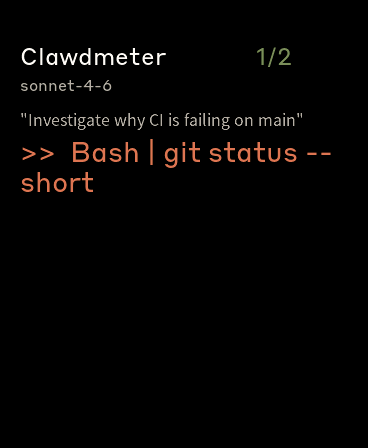
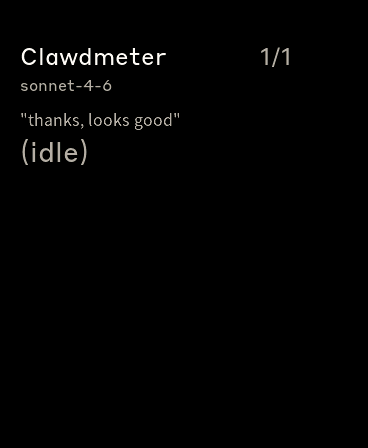
Doing: <tool>while the agent is still active.Screenshots
activeForm, panel lists the 5-row window centered on the in-progress item.Doing: Bash. Counter still green.(idle). Todo state preserved so you can see what was done.What's in here
daemon/clawdmeter_hook.py(new) — hook model adapted from Open IslandA tiny Claude Code hook entry point. Registered in
~/.claude/settings.jsonforPreToolUse/PostToolUse/Stop/UserPromptSubmit/SessionStartevents. On each fire it reads the JSON payload from stdin, updates~/.clawdmeter/state.jsonunder an advisory flock, and writes{}to stdout so Claude proceeds unaffected. Fail-open on parse error.Per-session record captures:
phase—runningwhile a turn is in flight,idleafter Stop / SessionStart.current_tool— most recent PreToolUse tool name, cleared only on Stop / UserPromptSubmit (not on PostToolUse — clearing there would flicker the headline to "idle" between two tools in the same turn).last_user_prompt— text of the most recent UserPromptSubmit, truncated to 120 chars.todos— full TodoWrite payload when applicable.cwd,project, abbreviatedmodel.Stale sessions (>15 min idle) pruned on next hook fire.
daemon/claude_usage_daemon.pyload_activity_sessions()projects state.json into a compact wire schema (p/m/la/td, status as int, optionalu/t/ph).activeFormonly included on the in-progress todo to save bytes.last_state_mtimeand the existing 60s API poll independently. Either firing triggers a fresh BLE push._serialize_capped()gracefully adapts payload size to the BLE 512-byte single-attribute spec cap by dropping the tail session'sufirst (cheapest UX loss), then trimming its tail todos, then droppingt, finally dropping the whole session.encoded.encode("utf-8")length — important once user prompts can be CJK (each CJK char is 3 bytes UTF-8) so the trim loop converges on the real on-wire size.ensure_ascii=Falsehalves bandwidth for non-Latin prompts.write_payloadusesresponse=Trueso bleak falls back to ATT Long Write for payloads up to the spec cap — the device sees one onWrite per payload rather than fragmented writes.Firmware
data.h: newActivityData/SessionData/TodoItemstructs +phase_t/todo_status_tenums (cap 3 sessions × 10 todos × 64-byte content, ~5 KB total).ui.h:SCREEN_ACTIVITYenum slot +ui_update_activity()public API.ui.cpp: Activity screen widget tree, swipe-cycle handler, headline fallback ladder, windowed todo rendering, rounded panel for progress + list.main.cpp:parse_jsonextended with optionalActivityData*out-param; readssessions/u/t/phif present. Old payloads still parse identically.ble.cpp:BLE_BUF_SIZE512 → 4096 so onWrite buffers fit multi-session payloads with headroom.Tap behaviour
Previously a tap on Usage/Splash toggled splash; the daemon-end was that nothing in the cycle reached the Bluetooth screen via touch. Now tap cycles the full sequence Splash → Usage → Activity → Bluetooth → Splash. PWR keeps its existing per-screen cycle. (Tap inside the Bluetooth reset zone still clears bonds; that handler consumes the click first.)
Test plan
waveshare_amoled_216env still builds cleanly with no warnings beyond the pre-existing ones_serialize_cappedshrinks a deliberately oversized 3-session payload below 480 bytes, preserves the most-recently-active session's full data{...,"sessions":[{"p":"…","ph":1,"t":"Bash","u":"…","td":[…]}]}to the firmware, Activity screen rendered the corresponding headline / prompt / todo list within a couple of seconds.phase=running, dim forphase=idle.ACT_TITLE_Y=50,ACT_FOOTER_Y=440, etc.) live in the sameACT_*block inui.cppand the screen should render the same content one font tier larger.Known follow-up (not in this PR)
refreshTokenalready stored in the same keychain blob — currently the user has toclaude /loginagain when the token expires.Credits
🤖 Generated with Claude Code