Hide messages in images, audio, and PDFs with military-grade encryption
- Multi-format stealth - Hide data in PNGs, WAV audio, and PDF metadata
- AES-256 + RSA encryption - Automatic key generation with
-xflag - Zero footprint - No visible file size or quality changes
- Dual interfaces - Graphical UI and command-line support
git clone https://github.com/Mistra1n/PhantomVault.git
cd PhantomVault
pip install -r requirements.txt# Encode with validation
python stego.py -e -t image -i input.png -o secret.png -m "hi" -x
python stego.py -e -t audio -i audio.wav -o secret.wav -m "audio secret"
python stego.py -e -t pdf -i doc.pdf -o secret.pdf -m "pdf hidden"
# Decode with validation
python stego.py -d -t image -i secret.png -x -k "YOUR_KEY"
python stego.py -d -t audio -i secret.wav
python stego.py -d -t pdf -i secret.pdf
Now you can use all the features:
# Encode with audio support
python src/stego.py -e -a -i examples/test.wav -o out.wav -m "audio test"
# Encode with encryption
python src/stego.py -e -i test.png -o enc.png -m "secret" -x
# Decode encrypted message
python src/stego.py -d -i enc.png -x -k "YOUR_ENCRYPTION_KEY"
# Decode audio
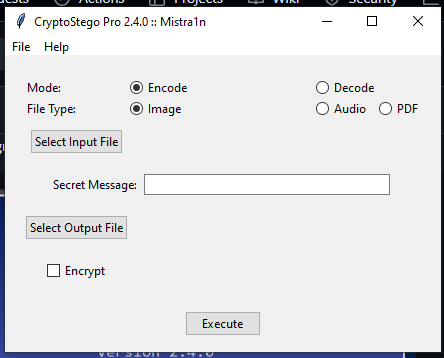
python src/stego.py -d -a -i out.wavpython src/gui_app.py 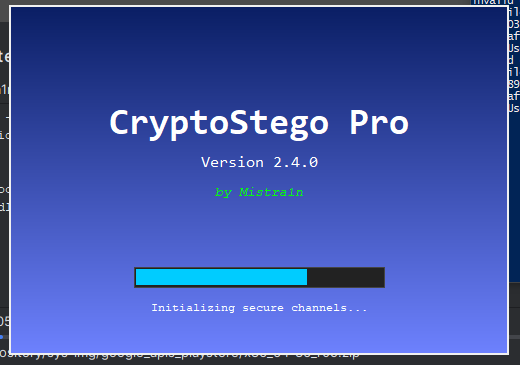
Steps:
1 Select mode (Encode/Decode)
2 Choose file type
3 Input secret message or load file
4 Toggle encryption
# Encode with encryption
python src/stego.py -e -t image -i cat.png -o secret.png -m "Kenya Zimmerman" -x

# Decode
python src/stego.py -d -t image -i secret.png -k YOUR_KEY 📦Supported Formats
Format         Requirements       Max Capacity
-----------------------------------------------
Images         PNG/BMP, 24-bit     3 bits per pixel
Audio          WAV,16-bit mono     1KB per second
PDF            Unencrypted         Metadata only

Key Points:
WAV files must begin with "RIFF" header
Use 16-bit mono WAVs for best compatibility
The wave module is strict about file formats
SoX (Sound eXchange) is great for generating test files
if error in .WAV Create a valid test WAV file:
# Using SoX (install first: https://sourceforge.net/projects/sox/)
sox -n -r 44100 -b 16 examples/test.wav trim 0.0 5.0
First create a valid test file:
# Generate a proper test WAV (5 seconds of silence)
sox -n -r 44100 -b 16 -c 1 examples/test.wav trim 0.0 5.0
Then run your command:
python src/stego.py -e -a -i examples/test.wav -o out.wav -m "test"
Command Reference
Flag   Description's

-e	    Encode mode
-d	    Decode mode
-t	    Type (image,audio,pdf)
-i	    Input file path
-o	    Output file path
-m	    Message to hide
-x	    Enable encryption
-k	    Decryption key
This tool is for authorized security testing and educational purposes only.
❗ Unauthorized use may violate:
1 Computer Fraud and Abuse Act (CFAA)
2 General Data Protection Regulation (GDPR)
3 Local privacy laws
Always obtain written permission before testing on systems you don't own.
Bulk Processing
# Encode all images in a folder (Linux/Mac)
find ./documents/ -name "*.png" | parallel python src/stego.py -e -t image -i {} -o ./secrets/{}
Debugging
# Verbose output
python src/stego.py -e -t audio -i song.wav -vvv Contributions are welcome! If you have ideas for improvements or have found a bug, feel free to create an issue or submit a pull request on GitHub.
- Fork the repository.
- Create your feature branch:
git checkout -b feature/my-new-feature - Commit your changes:
git commit -am 'Add some feature' - Push to the branch:
git push origin feature/my-new-feature - Create a new Pull Request.
This project is licensed under the MIT License. See the LICENSE file for details.