A comprehensive digital solution for recipe management, automated shopping list creation, and social cooking interaction. This Spring Boot application helps users organize their cooking, reduce food waste, and share culinary experiences through a modern REST API.
- Project Overview
- Architecture & Technology Stack
- Project Structure
- Database Schema
- API Endpoints
- Testing
- Getting Started
- API Documentation
- Docker Configuration
- Configuration
- Performance & Monitoring
- Completed Features
- CI/CD Pipeline
- Future Features
- Contributing
- License
- Team
MyKitchen Hub is a full-featured recipe management platform that enables users to:
- Create, manage, and share recipes with detailed ingredients and instructions
- Generate automated shopping lists from selected recipes
- Interact socially through comments, likes, and favorites
- Upload and manage recipe images via Cloudinary integration
- Receive email notifications and PDF shopping lists
- Secure authentication with JWT tokens





- Email: Spring Mail with Gmail SMTP
- PDF Generation: Apache PDFBox
- Spring Boot Web, Data JPA, Security, Mail, WebSocket
- MySQL Connector
- JWT implementation (jjwt 0.12.6)
- Cloudinary SDK
- Apache PDFBox
- Lombok
- Bean Validation
- Spring Dotenv
- H2 Database (testing)src/main/java/femcoders25/mykitchen_hub/
├── auth/ # Authentication & Security
│ ├── config/ # Security configuration
│ ├── controller/ # Auth endpoints
│ ├── dto/ # Auth DTOs
│ ├── filter/ # JWT filters
│ └── service/ # Auth services
├── cloudinary/ # Image management
├── comment/ # Comment system
├── common/ # Shared utilities
│ ├── dto/ # Common DTOs
│ └── exception/ # Custom exceptions
├── email/ # Email services
├── favorite/ # Favorite recipes
├── ingredient/ # Ingredient management
├── like/ # Like/dislike system
├── recipe/ # Recipe management
├── shoppinglist/ # Shopping list system
├── swagger/ # API documentation
└── user/ # User management
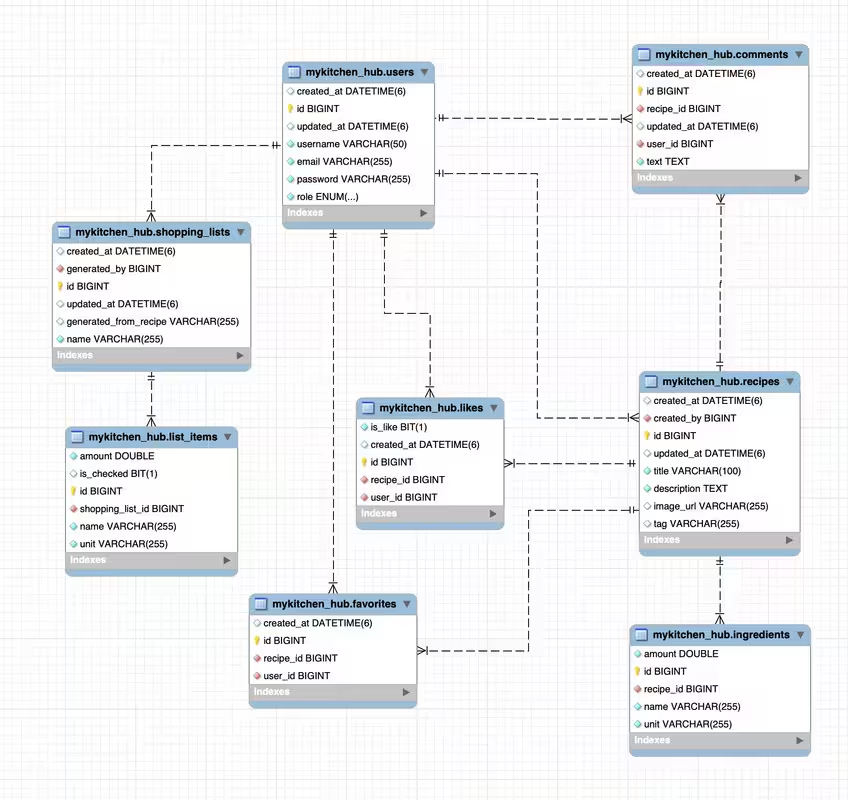
- User: User accounts with roles and authentication
- Recipe: Recipe information with metadata
- Ingredient: Recipe ingredients with quantities
- ShoppingList: Generated shopping lists
- ListItem: Individual items in shopping lists
- Comment: User comments on recipes
- Like: User likes/dislikes on recipes
- Favorite: User favorite recipes
- User → Recipes (One-to-Many)
- Recipe → Ingredients (One-to-Many)
- User → ShoppingLists (One-to-Many)
- ShoppingList → ListItems (One-to-Many)
- Recipe → Comments (One-to-Many)
- User → Comments (One-to-Many)
- Recipe → Likes (One-to-Many)
- User → Likes (One-to-Many)
- Recipe → Favorites (One-to-Many)
- User → Favorites (One-to-Many)
POST /register- User registrationPOST /login- User loginPOST /refresh- Refresh JWT tokenPOST /logout- User logout
GET /- Get all users (Admin)GET /{id}- Get user by IDPOST /- Create user (Admin)PUT /{id}- Update userDELETE /{id}- Delete user (Admin)
GET /- Get all recipes (with pagination, search, filtering)GET /{id}- Get recipe by IDPOST /- Create recipe (with image upload)PUT /{id}- Update recipeDELETE /{id}- Delete recipe
GET /- Get user's shopping listsGET /{id}- Get shopping list by IDPOST /- Create shopping list from recipesPUT /{id}- Update shopping listDELETE /{id}- Delete shopping list
GET /- Get recipe commentsPOST /- Create commentDELETE /{commentId}- Delete comment
POST /- Like/dislike recipeDELETE /- Remove like
POST /- Add to favoritesDELETE /- Remove from favorites
- Unit tests for all service layers
- Integration tests
- Controller tests with MockMvc
- Security tests for authentication
- Email service tests
- PDF generation tests
# Run all tests
mvn test

# Run specific test class
mvn test -Dtest=RecipeServiceTest- Java 21
- Maven 3.6+
- MySQL 8.0+
- Cloudinary account (for image storage)
- Gmail account (for email functionality)
Create a .env file in the project root:
# Database Configuration
DB_URL=jdbc:mysql://localhost:3306/mykitchen_hub
DB_USERNAME=your_username
DB_PASSWORD=your_password

# Server Configuration
SERVER_PORT=8080

# JWT Configuration
JWT_SECRET=your_jwt_secret_key_here
JWT_EXPIRATION=86400000
JWT_REFRESH_EXPIRATION=604800000

# Email Configuration
[email protected]
EMAIL_PASSWORD=your_app_password

# Cloudinary Configuration
CLOUDINARY_CLOUD_NAME=your_cloud_name
CLOUDINARY_API_KEY=your_api_key
CLOUDINARY_API_SECRET=your_api_secret
CLOUDINARY_DEFAULT_IMAGE_URL=http://localhost:8080/images/logo.png# Clone the repository
git clone <repository-url>
cd mykitchen_hub
# Set up environment variables
cp .env.example .env
# Edit .env with your configuration
# Run the application
mvn spring-boot:run# Build and run all services (app + database)
docker-compose up --build
# Run in background
docker-compose up -d --build
# Stop all services
docker-compose down
# View logs
docker-compose logs -f
# Rebuild only the app service
docker-compose up --build appOnce the application is running, access the Swagger UI at:
- Swagger UI: http://localhost:8080/swagger-ui.html
- API Docs: http://localhost:8080/api-docs
The application uses a multi-stage Docker build:
FROM eclipse-temurin:21-jre
WORKDIR /app
COPY target/*.jar app.jar
EXPOSE 8080
CMD ["java", "-jar", "app.jar"]
Key Features:
- Base Image: Eclipse Temurin JRE 21 (lightweight, production-ready)
- Working Directory:
/appfor clean container structure - Port Exposure: 8080 for Spring Boot application
- JAR Execution: Runs the compiled Spring Boot JAR file
app:
  build: .
  ports:
    - "8080:8080"
  environment:
    - DB_URL=${DB_URL_DOCKER}
    - DB_USERNAME=${DB_USERNAME}
    - DB_PASSWORD=${DB_PASSWORD}
    - SERVER_PORT=${SERVER_PORT}
    - EMAIL=${EMAIL}
    - EMAIL_PASSWORD=${EMAIL_PASSWORD}
  depends_on:
    - db
restart: unless-stoppeddb:
image: mysql:8.0
environment:
MYSQL_ROOT_PASSWORD: ${DB_PASSWORD}
MYSQL_DATABASE: mykitchen_hub
ports:
- "3306:3306"
volumes:
- mysql_data:/var/lib/mysql
restart: unless-stopped# Start all services
docker-compose up
# Start in background
docker-compose up -d
# View logs
docker-compose logs -f app
docker-compose logs -f db
# Stop all services
docker-compose down
# Stop and remove volumes (deletes database data)
docker-compose down -v# Build application image
docker build -t mykitchen-hub .mysql_data: Persistent storage for MySQL database- Location:
/var/lib/mysqlin container - Purpose: Ensures data persistence across container restarts
- Create MySQL database:
mykitchen_hub - Update database credentials in
.env - Application will auto-create tables on startup
- Create account at cloudinary.com
- Get API credentials from dashboard
- Update Cloudinary variables in
.env
- Enable 2-factor authentication on Gmail
- Generate app-specific password
- Update email credentials in
.env
- Comprehensive logging with SLF4J
- Request/response logging
- Error tracking and monitoring
- Performance metrics logging
- JWT token-based authentication
- Password encryption with BCrypt
- CORS configuration for frontend integration
- Input validation and sanitization
- SQL injection prevention with JPA
- JWT-based authentication with refresh tokens
- Role-based authorization (USER, ADMIN)
- Password encoding with BCrypt
- Token blacklist for secure logout
- User registration and login endpoints
- Spring Security configuration with CORS support
- Complete user CRUD operations
- User profile management
- Email validation and uniqueness checks
- Welcome email notifications
- User role management
- Pagination for user listings
- Full recipe CRUD operations
- Recipe search and filtering
- Pagination and sorting
- Image upload via Cloudinary integration
- Recipe categorization with tags
- Ingredient management with quantities and units
- Recipe validation and error handling
- Automated shopping list generation from recipes
- Ingredient consolidation and merging logic
- Shopping list CRUD operations
- Email delivery of shopping lists
- PDF generation for shopping lists
- List item management with checkboxes
- Comment system for recipes
- Like/dislike functionality
- Favorite recipes system
- User interaction tracking
- Social engagement metrics
- SMTP email configuration (Gmail)
- Welcome email templates
- Shopping list email notifications
- HTML email templates with embedded logo
- PDF attachment support
- Email error handling and logging
- Cloudinary integration for image storage
- Image upload validation (size, format, type)
- Automatic image optimization
- Default image fallback
- Image deletion and replacement
- Support for multiple image formats (JPG, PNG, GIF, WebP)
- MySQL database integration
- JPA/Hibernate ORM
- Database schema auto-generation
- Data validation with Bean Validation
- Transaction management
- Database relationships and constraints
- RESTful API design
- Swagger/OpenAPI documentation
- Comprehensive API documentation
- Request/response examples
- Error handling and status codes
- API versioning support
- Unit test framework setup
- Integration test configuration
- Test data initialization
- Mock service testing
- Security test configuration
- H2 in-memory database for testing
- Docker containerization
- Docker Compose configuration
- Maven build configuration
- Environment variable management
- Logging configuration
- GitHub Actions CI/CD pipeline
- Automated testing and building
- Docker Hub integration
This project includes a comprehensive CI/CD pipeline using GitHub Actions with three main workflows:
Triggers:
- Push to
mainordevelopbranches - Pull requests to
mainordevelopbranches
Features:
- ✅ Java 21 setup with Eclipse Temurin
- ✅ Maven dependency caching for faster builds
- ✅ Application compilation and JAR packaging
- ✅ Build artifact upload for deployment
✅ Build Application
  ✅ Checkout code
  ✅ Set up JDK 21
  ✅ Cache Maven dependencies
  ✅ Build with Maven
  ✅ Build JAR
  ✅ Upload build artifacts
Triggers:
- Push to
mainordevelopbranches - Pull requests to
mainordevelopbranches
Features:
- ✅ MySQL 8.0 service for integration testing
- ✅ Unit and integration test execution
- ✅ Test report generation with JUnit format
- ✅ Test result artifacts upload
- ✅ Database health checks
✅ Test Application
  ✅ Checkout code
  ✅ Set up JDK 21
  ✅ Cache Maven dependencies
  ✅ Start MySQL service
  ✅ Run unit tests
  ✅ Generate test report
  ✅ Upload test results
Triggers:
- Git tags starting with 'v' (e.g., v1.0.0)
- Manual workflow dispatch
Features:
- ✅ Multi-platform Docker builds (linux/amd64, linux/arm64)
- ✅ Docker Hub integration with automated login
- ✅ Semantic versioning support
- ✅ GitHub releases creation
- ✅ Build cache optimization
- ✅ Docker image metadata and labels
✅ Release and Deploy
  ✅ Checkout code
  ✅ Set up JDK 21
  ✅ Build application
  ✅ Set up Docker Buildx
  ✅ Log in to Docker Hub
  ✅ Extract metadata
  ✅ Build and push Docker image
  ✅ Create Release
You can view our project on DockerHub: tizzifona/mykitchen_hub
Available Tags:
latest- Latest stable releasev1.0.0- Specific version tagsmain- Latest from main branchdevelop- Latest from develop branch
Pull Command:
docker pull tizzifona/mykitchen_hubTo enable the CI/CD pipeline, configure these secrets in your GitHub repository:
- DOCKER_USERNAME - Your Docker Hub username
- DOCKER_PASSWORD - Your Docker Hub access token
How to set up secrets:
- Go to your GitHub repository
- Navigate to Settings → Secrets and variables → Actions
- Click "New repository secret"
- Add the required secrets
Pre-commit checks:
# Run the same checks as CI locally
./mvnw clean compile test package
Docker build test:
# Test Docker build locally
docker build -t mykitchen-hub:local .
docker run -p 8080:8080 mykitchen-hub:local
Note: All pull requests will automatically trigger the CI pipeline for testing and validation.
- Frontend part with very cute design - Modern, responsive web interface with intuitive user experience
- Base of ingredients - You will not have to create, just add it to your recipe!
- Comprehensive ingredient database with nutritional information
- Auto-complete ingredient suggestions
- A collection of authentic recipes from Nadiia - Curated traditional recipes with cultural context
- Recipe categories by cuisine - Italian, Mexican, Asian, Mediterranean, etc.
- Weekly meal planning with nutritional analysis - Complete meal planning solution
- Nutritional analysis and calorie tracking
- Shopping list generation from meal plans
- Recipe sharing and collaboration - Share recipes with friends and family
- User profiles and following - Follow favorite cooks and discover new recipes
This project is part of the FemCoders Bootcamp individual project.
Developed as an individual project for FemCoders Bootcamp 2025.
MyKitchen Hub - Making cooking organized, social, and efficient! 🍳