Update: 26 Nov 2020: Thanks to a suggestion from Avi Srivastava, gb_read now uses the clap crate for command-line processing. As a result, the syntax for specifying an alternate file on the command line has changed. See step 4 below for details.
This project was created to accompany a Nature Toolbox article (published 1 Dec 2020) on the use of Rust in science. It uses the gb-io crate for parsing a GenBank-formatted file, counting the genes, and translating them.
To use:
- If you have not installed the Rust programming language, do so here.
- Clone this GitHub repository. Click the green "Code" button above the file listing and select "Open with GitHub Desktop". Or, from the command line, execute
git clone https://github.com/jperkel/gb_read.git. - Build the application, using Rust's build tool/package manager, Cargo. From the command line, execute
cargo run. (If you do not have gb-io and other required libraries (or 'crates') installed, this step will do so for you.) - By default, the program will parse the included file
nc_005816.gb. However, the user can specify another filename at the command line, eg:cargo run pbr322cargo run -- -i pbr322.gb. (pbr322.gband two additional example files,puc19.gbandcircdna.gb, are included in this repository.) - By default, the program uses a three-letter amino acid code (e.g., Met for methionine). Use
-oto use a one-character code instead, e.g.,cargo run -- -o -i pbr322.gb. - To create and view auto-generated documentation for this project, execute
cargo doc --open. - To run the program's test suite, execute
cargo test.
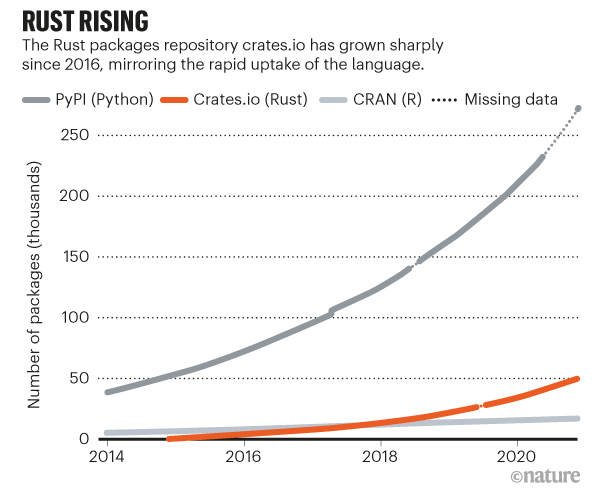
The R Markdown notebook, Growth_of_cratesio.Rmd, recreates the "Rust rising" graphic included in the article.