| Category | EEG |
|---|---|
| Measures | Brain activity (through electrical signals) |
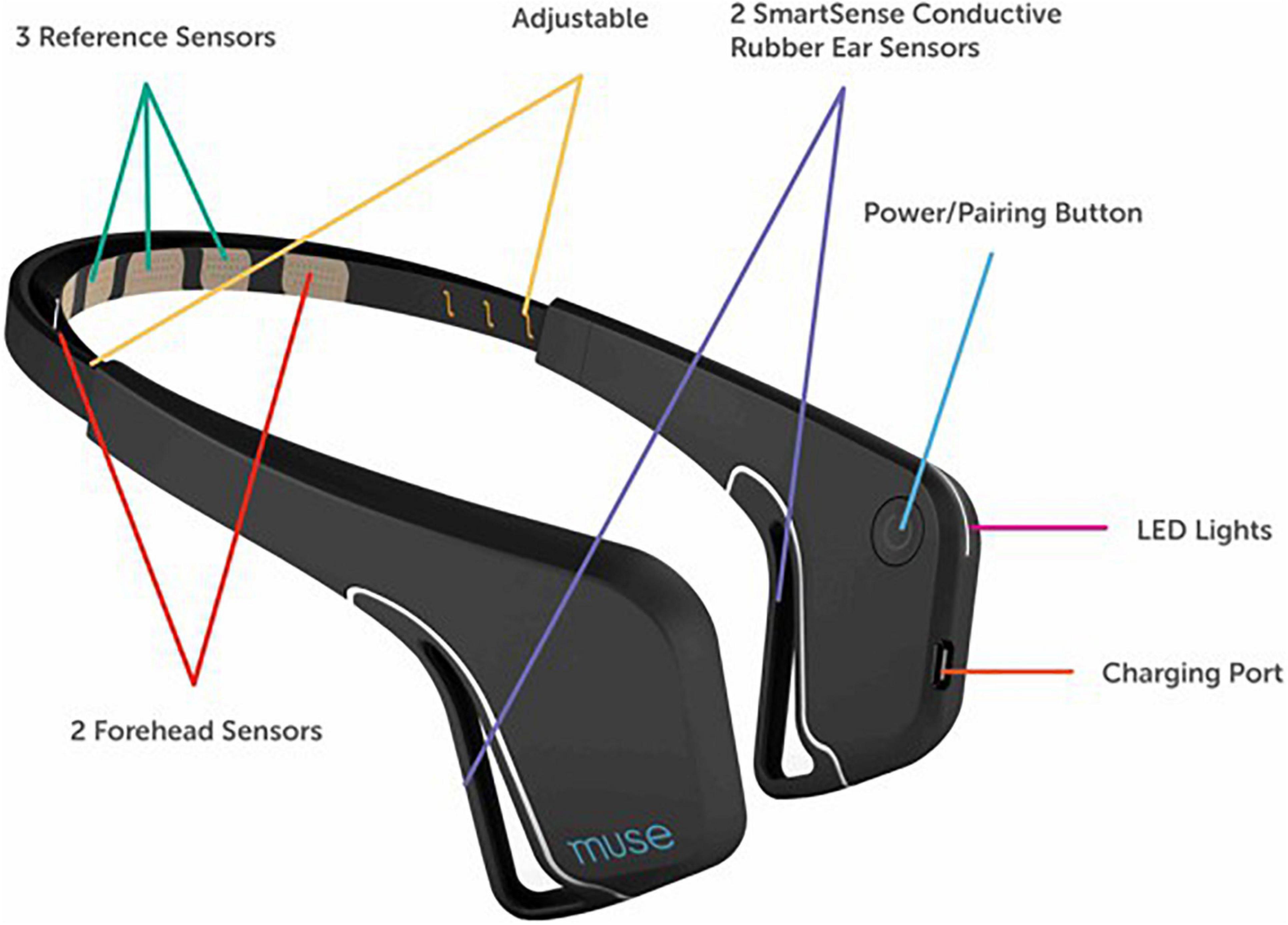
| Summary | Intended for real-time biofeedback during meditation, the Muse 2 records brain activity using EEG, as well as heart rate and breath data. It has seven electrodes (see this labeled image - it's for the original Muse, not the Muse 2, but the electrode placement is similar). Though its commercial purpose is for meditation, it's been used in research, as it is inexpensive but still effective enough to produce good data. Because of the location of the sensors, you may notice interference due to blinks. |
| Components | - Headset - BLED112 Bluetooth dongle (needed for Windows or Mac) - this is a small dongle that plugs into the USB port of your laptop. Be careful not to lose the dongle! Remember to remove it from your laptop and return to the box after use. |
| Setup Instructions | See this BCI workshop for setup instructions and starter code. Also see this guide. When you are around other people also using the Muse, make sure you are connecting to the correct device - take note of its MAC address. |
| Additional Resources | MuseLSL Starter Code Muse 2 Research using Muse Using Muse: Rapid Mobile Assessment of Brain Performance |
| Category | EEG |
|---|---|
| Measures | Brain activity (through electrical signals) |
| Summary | The Gelfree BCI Electrode Cap uses saline-based electrodes in a mesh cap to acquire EEG data. Recommended for people who already have some experience with BCIs. |
| Components | - streamlined, comfortable cap with adjustable chinstrap - labelled Ag-AgCl electrodes/cables - measuring utensils for saline conductive solution - saline retaining Hydro-link conductive inserts - cotton swabs for scalp preparation - towel for mess-free clean-up Note - this list is from the product page, check the actual box in case contents are different. |
| Setup Instructions | Gelfree Electrode Cap Guide: OpenBCI Documentation |
| Additional Resources | Gelfree BCI Electrode Cap Kit Product Page Research that uses OpenBCI hardware (including some with electrode cap) |
| Category | Nerve Stimulation |
|---|---|
| Result | Stimulates nerves using transcutaneously applied current(patches on the skin) |
| Summary | The TENS(Transcutaneous Electrical Nerve Stimulation) 3000 is a nerve stimulation device that has traditionally been used as a non-invasive, drug-free method of treating pain. |
| Components | - Case - TENS Unit - Batteries - Electrode Wires + 4 Electrodes |
| Setup Instructions | IMPORTANT: Read the instructions and warnings carefully! Do not place the electrodes anywhere the current could pass through your heart or brain (for example, do not place them on opposite sides of your body). Do not apply TENS over neck region(carotid arteries), heart region, or over brain area. TENS is not recommended for people with known heart disease or implanted electronic device without physical evaluation of risk. 1. Straight connector of wire connects to electrode patch. Bent end of wire connects to TENS unit. 2. For pain management, put area of pain in between all electrodes used. video instruction  Also see the operating manual linked in additional resources. |
| Additional Resources | https://www.tenspros.com/assets/images/manuals/TENS-3000-dt3002-Manual.pdfhttps://www.youtube.com/watch?v=EB3d57MXtG8 |
| Category | VR |
|---|---|
| Input | Accelerometer, gyroscope |
| Summary | The Oculus Quest 2 is a VR headset from Meta with two touch controllers. |
| Components | - VR Headset - Two Touch Controllers - Charging Cable - Two AA Batteries - Power Adapter - Glasses Spacer |
| Setup Instructions | Get Started Developing for the Oculus Quest Platform |
| Additional Resources | Unity Starter Code OpenXR Unity SDK Tutorial Oculus Quest 2 Product Page |
| Category | Health tracker |
|---|---|
| Measures | Activity;Fitness;Heart rate;Nutrition;Sleep |
| Summary | The Fitbit is a health tracker worn on the wrist, and collects data from user inputs and sensors. The data can be accessed with the Fitbit web API. |
| Components | - Fitbit - Charger |
| Setup Instructions | FitBit developer guide |
| Additional Resources | Documentation |