A full-stack YouTube clone application built using React, TypeScript, Node.js, and Express. This project replicates some of the core functionalities of YouTube including video browsing, searching, and playing, providing a modern and responsive UI.
🚀 Live Demo: youtube-frontend-d3ou.onrender.com
- 🔍 Search for videos
- 🎥 Watch videos using embedded players
- 🧭 Browse trending or default videos
- ⚡ Responsive and modern UI
- 🔁 Backend API integration with dynamic data
- 🧱 Scalable architecture
Frontend:
- React
- TypeScript
- HTML/CSS
- Axios
Backend:
- Node.js
- Express
- REST API
Deployment:
- Render (for hosting frontend and backend)
Languages:
- TypeScript (73.3%)
- JavaScript (24.1%)
- HTML (1.5%)
- CSS (1.1%)
youtube/
├── backend/                # Backend source code
│   ├── controllers/        # Route logic (optional)
│   ├── routes/             # Express routes
│   ├── models/             # Data models (if using DB)
│   ├── middleware/         # Auth, logging, etc.
│   ├── utils/              # Utility functions
│   ├── config/             # Environment and config
│   ├── index.js            # Entry point
│   └── package.json        # Backend dependencies
│
├── frontend/               # Frontend source code
│   ├── public/             # Static assets
│   └── src/
│       ├── assets/         # Images, videos, etc.
│       ├── components/     # Shared UI components
│       ├── pages/          # Individual screens/views
│       ├── services/       # API calls
│       ├── utils/          # Frontend utilities
│       ├── App.tsx         # App root
│       └── index.tsx       # React DOM entry
│   └── package.json        # Frontend dependencies
│
├── .gitignore
├── README.md
└── LICENSE- Node.js (v14 or higher)
- npm or yarn
-
Clone the repository:
git clone https://github.com/Rogshivam/youtube.git cd youtube -
Install dependencies: Frontend:
cd frontend
npm install
Backend:
cd ../backend
npm install
1. Start the backend server:
cd backend
npm start
Start the frontend:
cd ../frontend
npm start
Frontend will run at: http://localhost:3000
Backend will run at: http://localhost:5000 (or as configured)
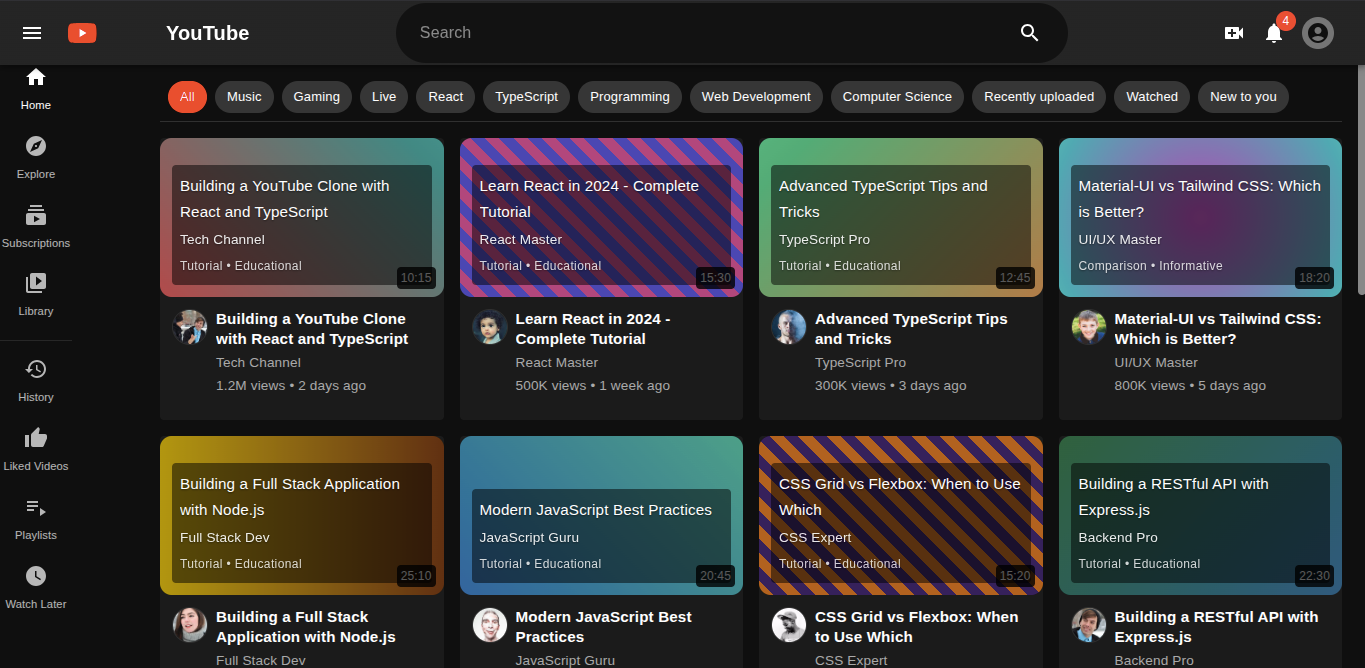
Home Page Video Player
Contributions are what make the open-source community such an amazing place to learn, inspire, and create. Any contributions you make are greatly appreciated.
-
Fork the Project
-
Create your Feature Branch (git checkout -b feature/AmazingFeature)
-
Commit your Changes (git commit -m 'Add amazing feature')
-
Push to the Branch (git push origin feature/AmazingFeature)
-
Open a Pull Request
Distributed under the MIT License. See LICENSE for more information.
Developer: Shivam GitHub: @Rogshivam