GHAT: Guarding Hill Accidents with Technology
In hilly and ghat regions, accidents are a frequent occurrence due to sharp curves, blind spots, and low visibility caused by adverse weather conditions like fog and heavy rain. Wildlife crossings and insufficient real-time monitoring systems further increase the risk of collisions, making these roads particularly dangerous for drivers.
This project, GHAT: Guarding Hill Accidents with Technology, aims to implement an advanced accident prevention system tailored specifically for such challenging terrains. By leveraging image processing techniques, YOLO (You Only Look Once) object detection models in MATLAB, and Arduino-based real-time alert systems, we seek to address these critical issues.
- Road accidents at hairpin curves, S-curves, and blind spots in ghat regions: Drivers often face challenges while navigating sharp turns and blind spots, making it difficult to detect oncoming vehicles, which can lead to dangerous head-on collisions. Surveys show that 10% of total accidents occur in S-curves, with 13% of fatalities also happening in these regions.
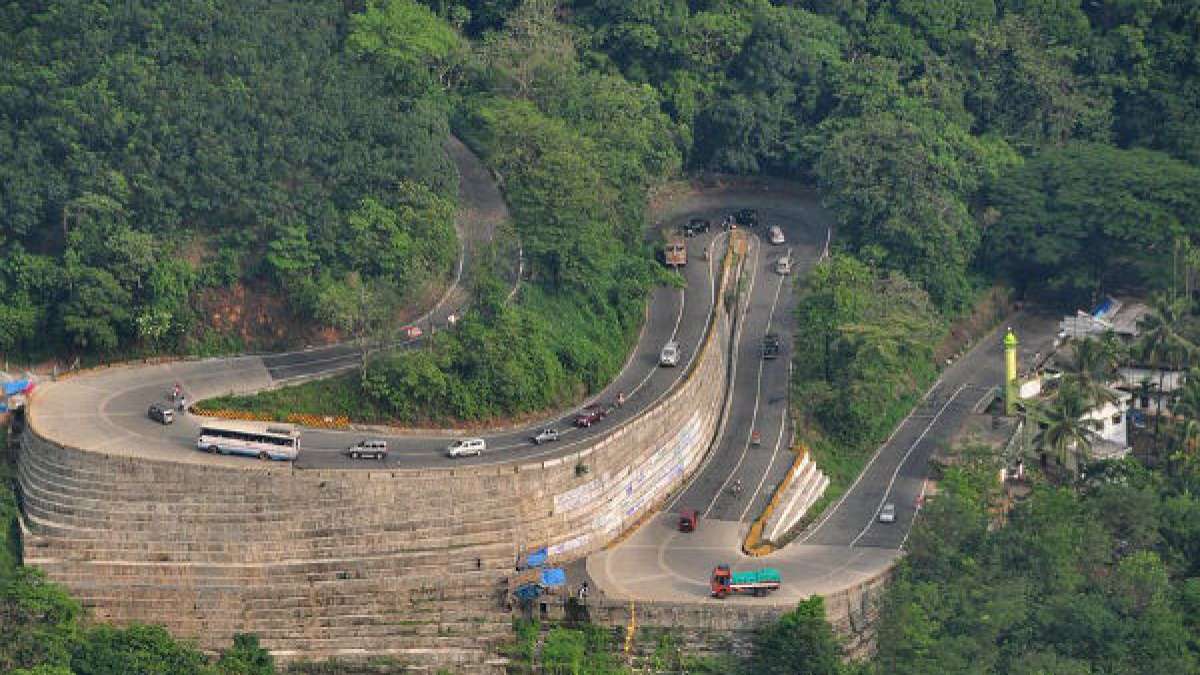
ghat road
- Presence of wildlife in ghat regions leading to accidents: Ghat roads often pass through wildlife habitats, where animals such as elephants, tigers, and wild buffalo may wander onto the road. The sudden appearance of wildlife can cause serious accidents if not detected early.

elephant blocking the road
Develop a safety system to prevent road accidents in ghat regions
-
Prevent accidents at blind spots: Implement real-time vehicle detection and alert systems at sharp curves and blind spots to reduce head-on collisions, ensuring that drivers are notified of oncoming vehicles in critical areas.
-
Enable real-time hazard monitoring: Utilize cameras and sensors to continuously monitor the road for accidents, wildlife(elephant) crossings, and illegal activities, providing timely alerts to drivers and authorities to prevent potential dangers.
This project focuses on creating a real-time monitoring system for accident prevention in hilly regions using MATLAB for image processing and YOLO for object detection. The identified objects trigger signals sent to Arduino, which controls LED signals to alert drivers.

We are using a webcam as the camera module. The webcam captures live video streams of the road, which are processed in MATLAB.
- The resolution of the webcam is set to
1280x720for better accuracy. - MATLAB captures frames from the webcam for further processing.

camera module
We utilize YOLOv4, a pretrained object detection model, for identifying vehicles, animals, and other hazards. The YOLO model is loaded in MATLAB, and the objects detected include:
- Vehicles: Cars, bikes, buses, and trucks.
- Wildlife: Animals such as elephants, deer, and dogs.

YOLO MODEL
- Object Detection: YOLO identifies objects in the video frames.
- Filtering: Detected objects are filtered into categories like cars, animals, etc.
- Annotation: Bounding boxes and labels are added to the objects, which are displayed in MATLAB.

analysing the live frame
Based on the detected objects, the system generates a unique code word for each type of object:
1: Motorbike2: Car3: Truck or Bus4: Animal0: No object detected or only face detected
These code words are sent to the Arduino via serial communication.
to interface matlab with ardiuno just connect ardiuno port with pc matlab automatically detects with the help of COM port MATLAB communicates with Arduino through a serial connection. Based on the received code word, Arduino performs the following actions:
- Turns on the red LED for vehicles.
- Turns on the animal-specific LED for wildlife.
- Switches between red, green, and white signals based on object types.
- Code
1(Bike): Red LED is turned on for 2 seconds. - Code
2(Car): Red LED is turned on for 3 seconds. - Code
3(Truck/Bus): Red LED is turned on for 5 seconds. - Code
4(Animal): Animal-specific LED is turned on for 7 seconds. - Code
0: Green LED is kept on, signaling a clear path.

ardiuno interfacing
In MATLAB, the detected objects are displayed in a separate window. Frames are annotated with:
- Bounding boxes around the detected objects.
- Labels indicating the type of object (e.g., "Car," "Animal").
The live video feed with annotations helps in debugging and visualizing the detected hazards.


% Initialize webcam
cam = webcam; % Use the first available webcam for live video feed

% Set up figure for displaying detected objects
hFig = figure;
hAx = axes('Parent', hFig);

% Load YOLO detector (use a pre-trained YOLOv4 model)
detector = yolov4ObjectDetector('csp-darknet53-coco'); % Pre-trained YOLOv4 model

% Increase input resolution for better accuracy
cam.Resolution = '1280x720'; % Set higher resolution

% Setup serial communication with Arduino
serialPort = 'COM11'; % Replace with your Arduino's port
arduino = serial(serialPort, 'BaudRate', 9600); % Create serial object
fopen(arduino); % Open serial port connection

% Detection hold time (in seconds) to avoid rapid switching
detectionHoldTime = 3;
lastDetectionTime = datetime('now'); % Timestamp of the last detection
currentSignal = '0'; % Initialize the signal to green

while true
    % Capture an image from the webcam
    frame = snapshot(cam); % Capture a single frame

    % Detect objects using YOLOv4 detector
    [bboxes, scores, labels] = detect(detector, frame, 'Threshold', 0.3); % Adjust threshold for sensitivity

    % Filter objects by type
    bikeIdx = ismember(labels, {'motorbike'});
    carIdx = ismember(labels, {'car'});
    truckIdx = ismember(labels, {'truck', 'bus'});
    animalIdx = ismember(labels, {'elephant', 'tiger', 'lion', 'deer', 'bear', 'wolf', 'cheetah', 'leopard', 'cat', 'dog', 'cow', 'horse', 'sheep', 'zebra', 'giraffe'});

    % Get bounding boxes for each type
    bikeBboxes = bboxes(bikeIdx, :);
    carBboxes = bboxes(carIdx, :);
    truckBboxes = bboxes(truckIdx, :);
    animalBboxes = bboxes(animalIdx, :);

    % Determine the signal to send based on detections
    if ~isempty(animalBboxes)
        % Wild animal detected
        newSignal = '4'; % Send signal '4'
    elseif ~isempty(truckBboxes)
        % Truck or bus detected
        newSignal = '3'; % Send signal '3'
    elseif ~isempty(carBboxes)
        % Car detected
        newSignal = '2'; % Send signal '2'
    elseif ~isempty(bikeBboxes)
        % Bike detected
        newSignal = '1'; % Send signal '1'
    else
        newSignal = '0'; % No motion or only face detected, send green signal
    end

    % Update the signal only if it changes
    if ~strcmp(currentSignal, newSignal)
        currentSignal = newSignal;
        fprintf(arduino, currentSignal); % Send the signal to Arduino
        lastDetectionTime = datetime('now'); % Update detection time
    end

    % Annotate frame with bounding boxes for detected objects
    annotatedFrame = frame;
    if ~isempty(bikeBboxes)
        annotatedFrame = insertObjectAnnotation(annotatedFrame, 'rectangle', bikeBboxes, 'Bike', 'FontSize', 18, 'TextColor', 'black', 'Color', 'yellow');
    end
    if ~isempty(carBboxes)
        annotatedFrame = insertObjectAnnotation(annotatedFrame, 'rectangle', carBboxes, 'Car', 'FontSize', 18, 'TextColor', 'black', 'Color', 'blue');
    end
    if ~isempty(truckBboxes)
        annotatedFrame = insertObjectAnnotation(annotatedFrame, 'rectangle', truckBboxes, 'Truck/Bus', 'FontSize', 18, 'TextColor', 'black', 'Color', 'green');
    end
    if ~isempty(animalBboxes)
        annotatedFrame = insertObjectAnnotation(annotatedFrame, 'rectangle', animalBboxes, 'Animal', 'FontSize', 18, 'TextColor', 'black', 'Color', 'red');
    end

    % Display the result with bounding boxes and labels
    imshow(annotatedFrame, 'Parent', hAx);
    title(hAx, 'Detection: Vehicles, Faces, Wild Animals');

    % Pause briefly for better display
    pause(0.1);

    % Check if the figure is closed to stop the loop
    if ~ishandle(hFig)
        break;
    end
end

% Clear the webcam and close the serial connection when done
fclose(arduino);
delete(arduino);
clear cam;// Pin Definitions
const int RED_LED = 10; // Pin connected to red LED
const int GREEN_LED = 13; // Pin connected to green LED
const int ANIMAL_LED = 8; // Pin connected to animal detection LED
void setup() {
// Configure pins as outputs
pinMode(RED_LED, OUTPUT);
pinMode(GREEN_LED, OUTPUT);
pinMode(ANIMAL_LED, OUTPUT);
// Start serial communication
Serial.begin(9600);
}
void loop() {
// Check if there is any incoming data from the serial port
if (Serial.available() > 0) {
char command = Serial.read(); // Read the received command
// If there's a signal (for bike, car, truck, or animal), turn off green LED
if (command == '1' || command == '2' || command == '3' || command == '4') {
digitalWrite(GREEN_LED, LOW); // Turn off green LED
handleDetection(command); // Handle other LED actions (red/animal)
}
else if (command == '0') {
// If only face detected (no vehicles/animals)
digitalWrite(GREEN_LED, HIGH); // Turn on green LED
resetOtherLEDs(); // Turn off other LEDs (red, animal)
}
}
}
void handleDetection(char command) {
// Reset LEDs
resetOtherLEDs();
switch (command) {
case '1': // Bike detected
digitalWrite(RED_LED, HIGH);
delay(2000); // 1-second delay for bike
break;
case '2': // Car detected
digitalWrite(RED_LED, HIGH);
delay(3000); // 2-second delay for car
break;
case '3': // Truck/Bus detected
digitalWrite(RED_LED, HIGH);
delay(5000); // 5-second delay for truck/bus
break;
case '4': // Animal detected
digitalWrite(ANIMAL_LED, HIGH);
delay(7000); // 3-second delay for animal
break;
default:
break;
}
}
// Function to turn off all LEDs except green
void resetOtherLEDs() {
digitalWrite(RED_LED, LOW);
digitalWrite(ANIMAL_LED, LOW);
}- Input: Live video feed from the webcam is processed in MATLAB.
- Detection: YOLO identifies vehicles, wildlife, and other hazards in real time.
- Code Generation: MATLAB generates specific code words for detected objects.
- Arduino Communication: The code word is sent to Arduino via serial communication.
- Signal Control: Arduino controls the traffic lights (red, green, white) or animal LED based on the code word.
- Output: Real-time signals alert drivers of potential hazards on the road.
- Real-Time Monitoring: Detects vehicles and animals using YOLO in MATLAB.
- Automated Alerts: Sends signals to Arduino for traffic light control.
- Scalability: The system can be adapted for various accident-prone regions.
- Ease of Use: Users can replicate the system by downloading MATLAB, installing necessary add-ons, and interfacing with Arduino.
To run the system, ensure the following MATLAB add-ons are installed:
- Computer Vision Toolbox
- Deep Learning Toolbox
- MATLAB Support Package for USB Webcams
- MATLAB Support Package for Arduino Hardware
- Image Processing Toolbox
- Parallel Computing Toolbox
- Statistics and Machine Learning Toolbox
- GPU Coder (optional for YOLO optimizations)
- Webcam (e.g., USB Webcam or ESP32-CAM)
- Arduino Uno
- LEDs (Red, Green, White, and Animal-Specific)
- Download and install MATLAB with the required add-ons.
- Use the provided MATLAB code to process video and generate code words.
- Upload the provided Arduino code to your Arduino Uno.
- Connect the hardware as per the circuit diagram (just add leds for defiend pins).
- Run the MATLAB script and observe the real-time hazard detection and LED signals.
| Name | Role / Contribution | |
|---|---|---|
| Nandeesh K S | field and technical research | nandeeshnandi107@gmail.com |
| Priya R Dharani | Technical support | 1dt22ec071@dsatm.edu.in |
| Sneha S patil | Technical support | 1dt22ec095@dsatm.edu.in |
| Prof. Dr. R V Manjunath | Guide | manju.aps@gamil.com |
| Shravana H S | Technical support | shravanahs97@gmail.com |