1.7 Authentication
HealthMonitor API is not secure by default but since version 3.4.0.0 it supports basic authentication. To enable this feature you must specify Password field in the registration request body:
{
  "Name": "Google",
  "Address": "http://google.com",
  "MonitorType": "http",
  "Group": "Externals",
  "Password": "Some_password"
}
Note: Length of the password should be at least 8 chars.
There are three types of credentials for authorization:
- Endpoint credentials (where username=EndpointId and password is specified via registration)
- Admin credentials (stored in Api.SelfHost.config)
- Monitor credentials (stored both in Api.SelfHost.config and Monitors.SelfHost.config)
Endpoint credentials allow to perform such requests:
- POST api/endpoints/{id}/health
- DELETE api/endpoints/{id}
- PUT api/endpoints/{id}/tags
Admin credentials allow to perform such requests:
- DELETE api/endpoints/{id}
- PUT api/endpoints/{id}/tags
And Monitor credentials allow to perform:
- POST api/endpoints/health
- POST api/monitors/register
To send authorized request you should provide Authorization Header like this:
new AuthenticationHeaderValue("Basic", Convert.ToBase64String(Encoding.ASCII.GetBytes($"{endpointId}:{Password}")))If endpoint was registered with password then you should use it in the body of every next registration request, not in authorization header.
To make it easier to perform auth on swagger you can use special form:
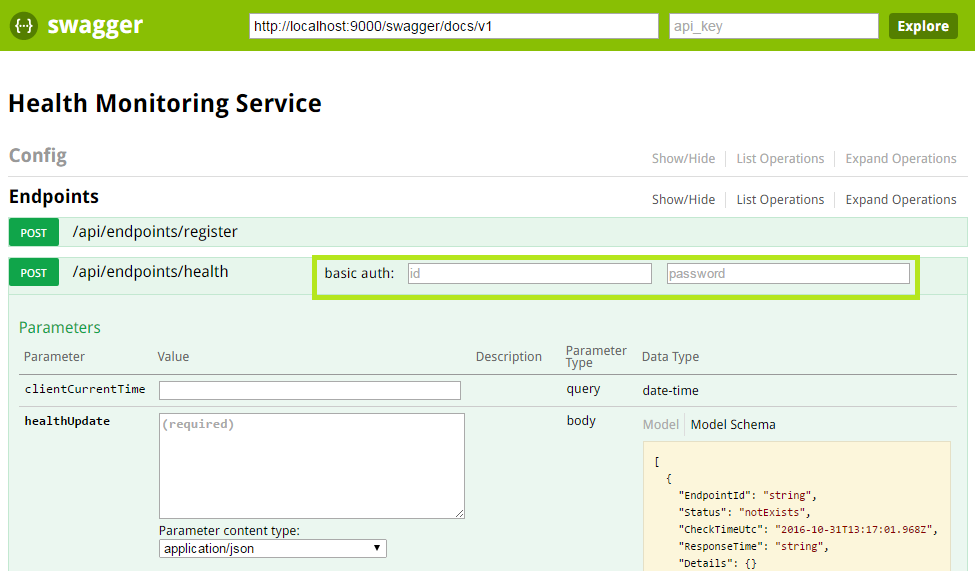 This form appears only for urls which can reply with 401 or 403 statuses.