
Automate LinkedIn job search and ranking using Bright Data Scraper API and OpenAI scoring! Effortlessly find, score, and review the best job matches for your profile.


- Automated LinkedIn Job Scraping: Uses Bright Data's LinkedIn Job Listings API to collect relevant job postings.
- AI-Powered Job Scoring: Ranks job matches using OpenAI—each job is scored from 0 to 100 based on your unique profile & preferences.
- Batch Processing: Efficiently handles large job datasets by batching API requests and scoring jobs in manageable chunks.
- Customizable Search Criteria: Tune job search parameters and exclusion lists in an easy-to-edit JSON config.
- Human-Readable CSV Output: Get all results with AI scores and comments exported for easy review and sharing.
- Quick Insights: See the top job matches at a glance with brief, AI-generated comments.
- Python 3.8+ 🐍
- Bright Data API token 🔑
- OpenAI API key 🔑
- Clone this repository:
git clone https://github.com/brightdata/linkedin-job-hunting-assistant
cd linkedin-job-hunting-assistant- Install dependencies:
pip install -r requirements.txt
- Create a
.envfile in the project root with your API keys:
OPENAI_API_KEY=your_openai_api_key
BRIGHT_DATA_API_KEY=your_bright_data_api_key
Create a config.json in the root directory with fields matching your preferences.
For example:
{
  "location": "New York, NY",
  "keyword": "Data Scientist",
  "country": "US",
  "time_range": "past week",
  "experience_level": "senior",
  "remote": "yes",
  "jobs_to_not_include": ["intern", "entry level", "recruiter"],
  "profile_summary": "Senior Data Scientist with strong background in machine learning, seeking impactful projects.",
  "desired_job_summary": "A leadership or senior IC role in data science working on production models."
}
Adjust or add other fields (e.g. company, location_radius, job_type) as needed.
Discover the supported configuration fields in the LinkedIn Job Listings API docs. Then, remember to add these fields:
profile_summary: Describe your professional history, skills, goals, etc. in a few words.desired_job_summary: Describe what you are looking for in a few words.
The above two fields help the OpenAI scoring process assign the right score to selected job listings.
Run the job assistant from your terminal:
python assistant.py --config_file config.json --jobs_number 25 --batch_size 5 --output_csv jobs_scored.csv
Arguments:
--config_file: Path to your configuration JSON (default:config.json)--jobs_number: Number of jobs to fetch (default:20)--batch_size: Number of jobs to score at once (default:5)--output_csv: Output filename for results (default:jobs_scored.csv)
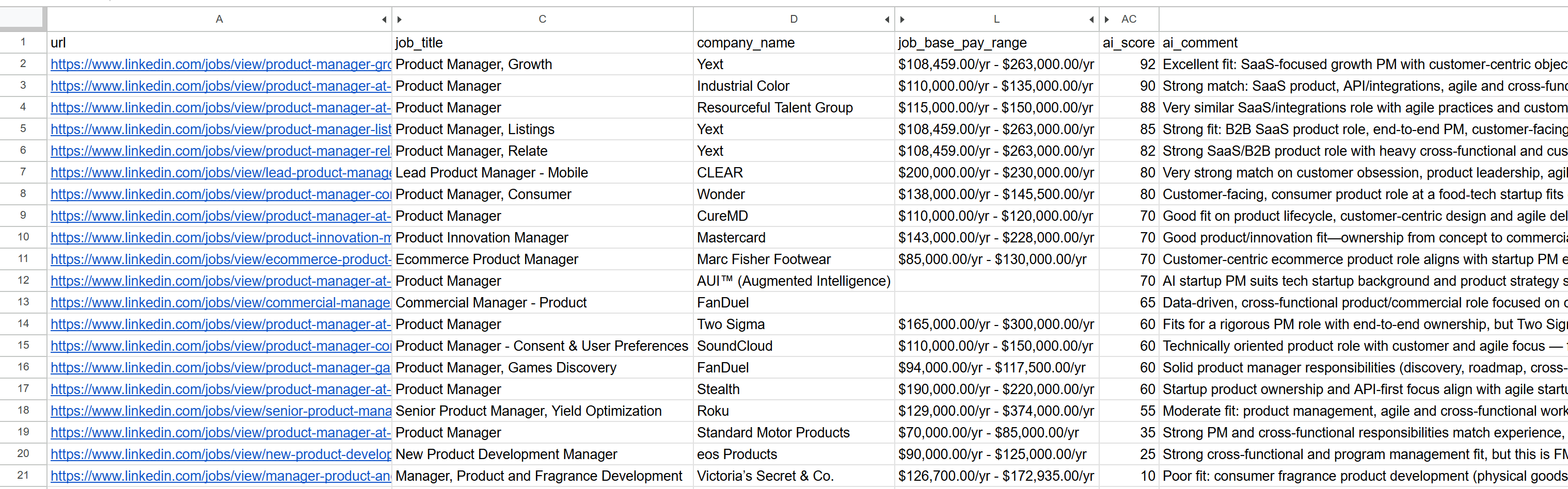
All job records, ranked by AI-match score and annotated with comments, are exported to your chosen CSV file (e.g. jobs_scored.csv).
- Prompt engineering: Fine-tune how OpenAI is prompted for scoring in the
score_jobs_batch()function.
- Make sure your API keys are correct and set in
.env. - Ensure your prerences are set in
config.json. - The Bright Data LinkedIn dataset ID and discover mode are configured in the code. Change the API integration code only if you know what you're doing!
- Respect API rate limits.
- If you hit validation errors, check your config file matches the required fields from the Pydantic schema.
Happy job hunting! 🚀