- Live receiver updates — receiver configuration and telemetry pushed to clients via SSE instead of polling
- Real-time AOI synchronization — AOI mutations broadcast to all connected clients for instant updates
- Incremental DOM patching — efficient client-side updates without full page refresh
- Heartbeat monitoring — detects and closes stale connections automatically
- Complete frontend rewrite — new design token CSS system, restructured layout, and rewritten JS/CSS for a modern look
- Status bar — Cesium toolbar integrated into a persistent status bar with pipeline stats (receiver count, intersection rate, cluster count)
- Hamburger menu — stays in status bar and morphs into X on toggle
- New typography — switched to Geist/Geist Mono fonts with ~15% larger type scale
- Signal filters — scroll wheel support on sliders, thicker slider tracks, settings persist across page refresh via localStorage
- Responsive mobile layout — full mobile UI with drawer navigation, bottom sheet, status strip, and responsive breakpoint at 768px
- Mobile scrub bar — touch-friendly LOB history scrub bar with orientation-aware layout (portrait/landscape) and 44px touch targets
- Mobile filters and history — labels match desktop, scrub bar auto-shows/hides with history mode
- Transmitter data refreshes on map after AOI/exclusion rule changes
- Points and billboards clamped to ground — prevents depth clipping issues
- Robust receiver error handling — automatic backoff, auto-reactivation, and error status in WebUI
- LOB history timeline — replay historical LOB data using CesiumJS timeline/animation controls with flash and accumulate display modes, preset time ranges, and timeline highlights showing when LOBs were recorded
- AOI circle drawing rewritten — smooth real-time preview while dragging, circles persist correctly after saving
- Fixed clicking on intersection points inside AOIs — points are no longer hidden behind AOI polygons
- LOB lines no longer disappear when an individual receiver goes inactive; only that receiver's LOBs are affected
- Confidence ellipses now display correct size and orientation — fixed rotation and axis scaling errors
- Fixed DBSCAN process deadlock — clustering no longer hangs under load; fixed associated semaphore leak
- Fixed multiprocessing crashes — switched to forkserver mode, resolving fork-after-thread deprecation warnings and forkserver argument passing
- Eliminated race conditions in receiver data access and AOI data fetching (proper locking throughout)
- Fixed DOA angle normalization — bearings near 0°/360° boundary are now handled correctly in all cases
- Clustering skipped gracefully when auto-epsilon computes zero (e.g., insufficient data points)
- Gzip compression — web server responses are now gzip-compressed, reducing bandwidth usage for CZML and other payloads
- Auto-epsilon calculation is dramatically faster — replaced O(n²) Python distance loops with scipy
cdist - Cluster extraction optimized with numpy boolean masks instead of Python loops
- AOI data cached — eliminated redundant SQLite connections on every intersection computation
- Thread-safe queues replace shared mutable state for inter-thread communication
- Fixed XML External Entity (XXE) vulnerability in receiver XML parsing
- Migrated CLI argument parsing from deprecated
optparsetoargparse(same options, same behavior) - Added database indexes for query performance
- Replaced magic numbers with named constants
- Removed substantial amount of dead/commented-out code across Python and JS
- For previous changes see the Change Log.
- Please see the Quickstart Guide
- Python >= 3.10
- numpy
- scikit-learn
- python-geojson
- czml3
- Version should be >= 3.0.0
- Note: czml3 has moved from poliastro to Stoops-ML and uses Pydantic v2 with strict validation
Cesium Ion TokenCreate a single line file namedaccesstoken.txt- Turns out you can use a public token, you just can't use Cesium Assets. Most people don't need to use assets.
- The token is optional with --access_token=accesstoken.txt
- Preferred: KrakenSDR Software
- Alternatively: Extended XML KerberosSDR Software
- This is available for both Qt4 (original version) and Qt5 (Ubuntu 20.04+). Just check out the appropriate branch.
- -d FILE, --database=FILE
- Name of new or existing database to store intersect information.
- If a database doesn't exist one is created.
- Post processing math is done against the entire database.
-
-r FILE, --receivers=FILE
- List of receiver URLs
- Do not include quotes. Each receiver should be on a new line.
-
-g FILE, --geofile=FILE
- GeoJSON Output File
- Conventional file extension: .geojson
-
-e Number, --epsilon=Number or "auto"
- Max Clustering Distance, Default "auto".
- 0 to disable clustering.
- Point spread across a larger geographical area should require a smaller value.
- Clustering should be disabled for moving targets.
-
-c Number, --confidence=Number
- Minimum confidence value, default 10
- Do not compute intersects for LOBs less than this value.
-
-p Number, --power=Number
- Minimum power value, default 10
- Do not compute intersects for LOBs less than this value.
-
-m Number, --min-samples=Number or "auto"
- Minimum samples per cluster. Default "auto"
- A higher value can yield more accurate results, but requires more data.
-
--plot_intersects
- Plots all the intersect points in a cluster.
- Only applies when clustering is turned on.
- This creates larger CZML files.
-
-o, --offline
- Starts program with receiver turned off.
- Useful for looking at stored data when you can't connect to receivers.
-
--access_token=FILE
- Path to a single-line file containing your Cesium Ion access token.
- Optional; required only if you want Cesium World Terrain or other Ion assets.
-
--ip=IP ADDRESS
- IP Address to serve from. Default 127.0.0.1.
- WARNING: Binding to a non-loopback address exposes all mutating endpoints without authentication. Put it behind a reverse proxy if you do this.
-
--port=NUMBER
- Port number to serve from. Default 8080.
-
--debug
- Enable DEBUG-level logging and Bottle's debug mode.
-
--log-file=PATH
- Also write logs to this file (rotated at 10 MB, 5 backups kept).
- Stderr logging continues regardless.
-
--no-lob-history
- Disable LOB history recording.
- Single-receiver triangulation still records LOBs (it needs them).
Once the program is running, browse to 127.0.0.1:8080 or whatever IP/Port Number you specified.
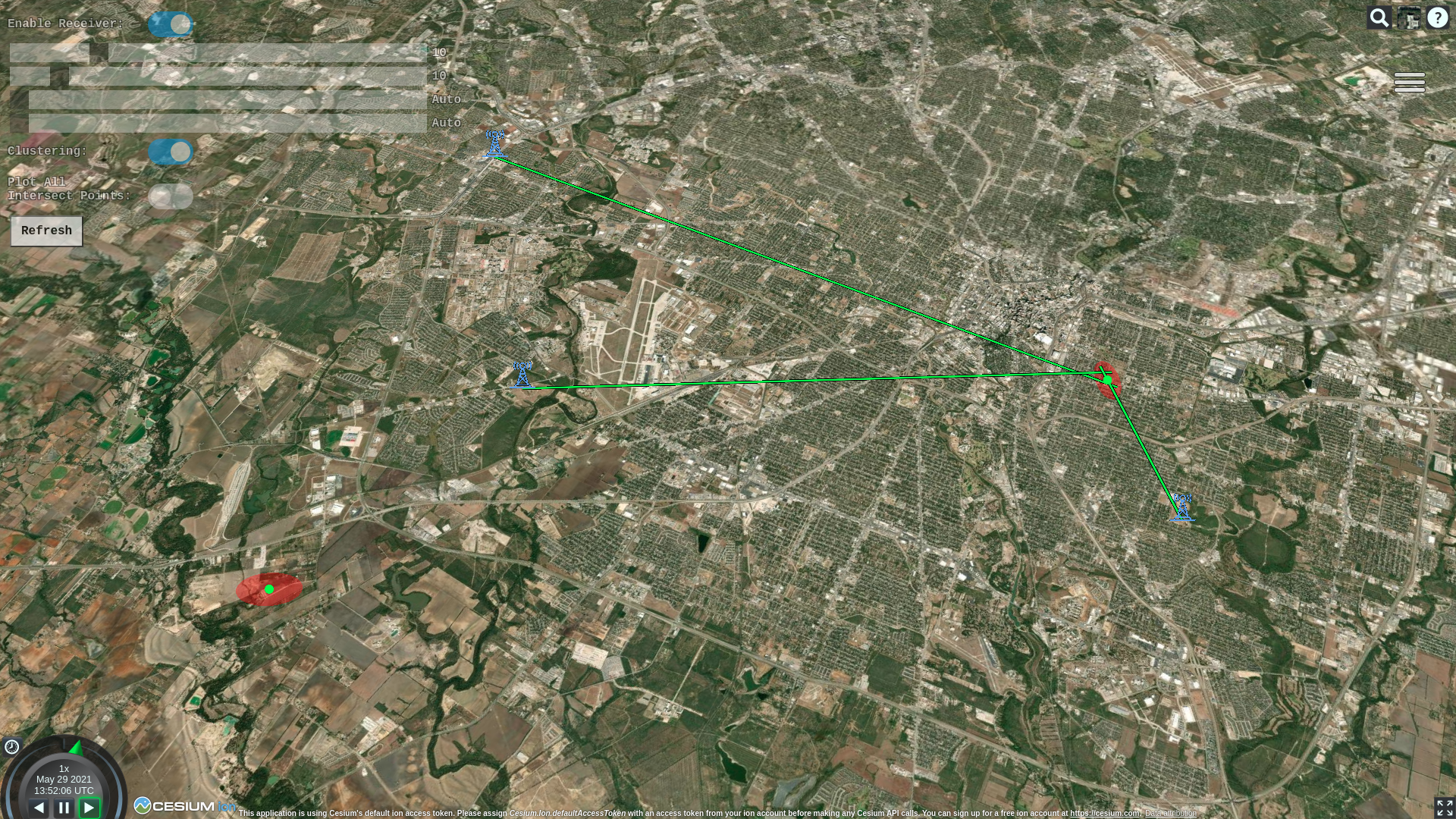
- A red ellipse represents the significant majority of the intersections in a particular cluster. It makes up the full area where the transmitter is most certainly located.
- The large green dot at the center of the ellipse is the likely location of the transmitter. It is simply computed as the mean of all intersections in that cluster.
- The smaller dots, if turned on vary in color from red to green. These dots are the individual intersections. The color represents the age relative to the full data set. Red is older, green is newer. This is very helpful for following moving targets.
- LOBs can either be red, orange, or green.
- Red means neither power nor confidence are above threshold.
- Orange means either power or confidence, but not both are above threshold.
- Green means power and confidence are above threshold.
Tower and car icons made by Freepik from www.flaticon.com