A visual Kanban board VS Code extension for managing Beads issues directly in your editor. View, create, edit, and organize your .beads issues with an intuitive drag-and-drop interface.





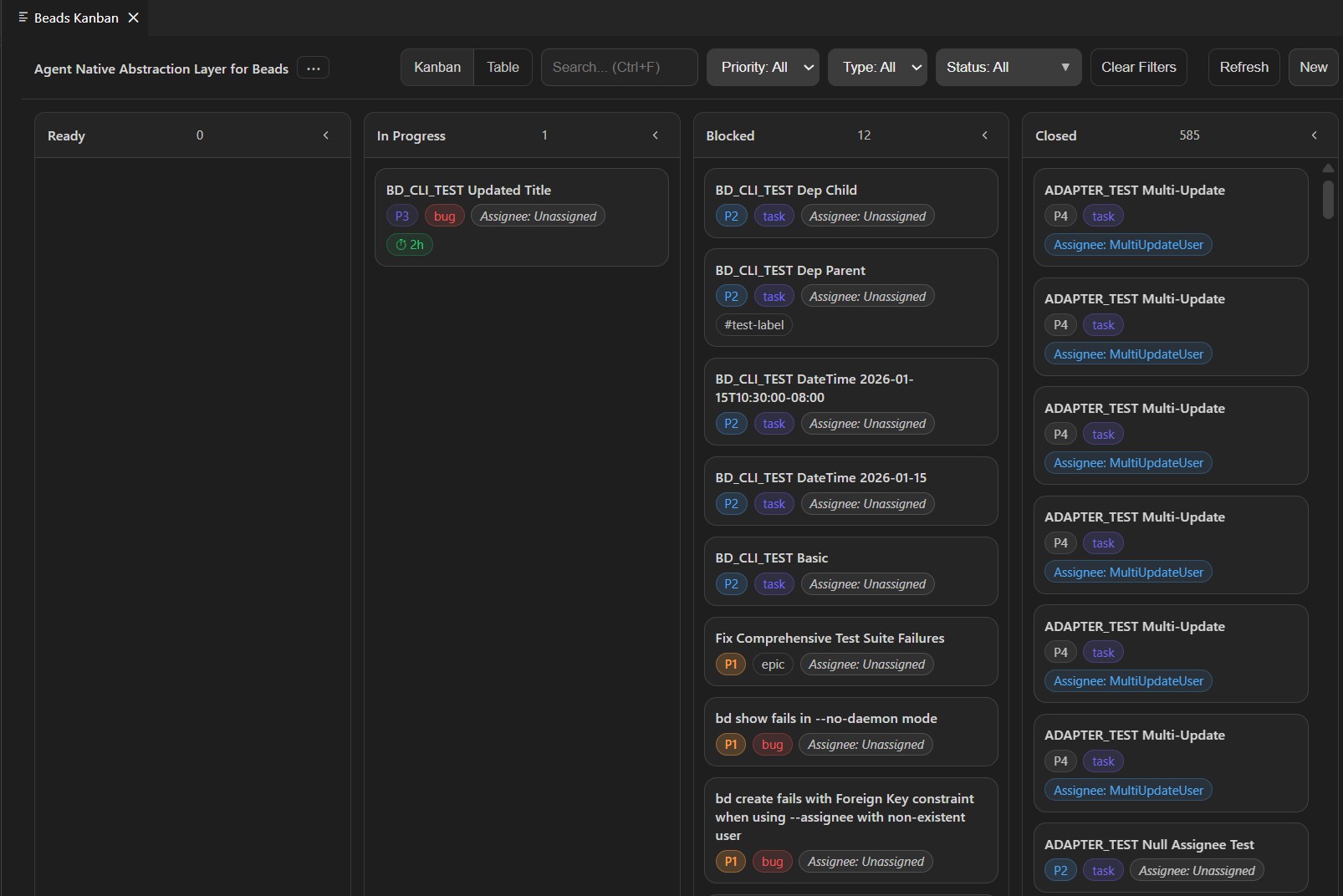
Drag-and-drop cards between columns to manage your workflow.
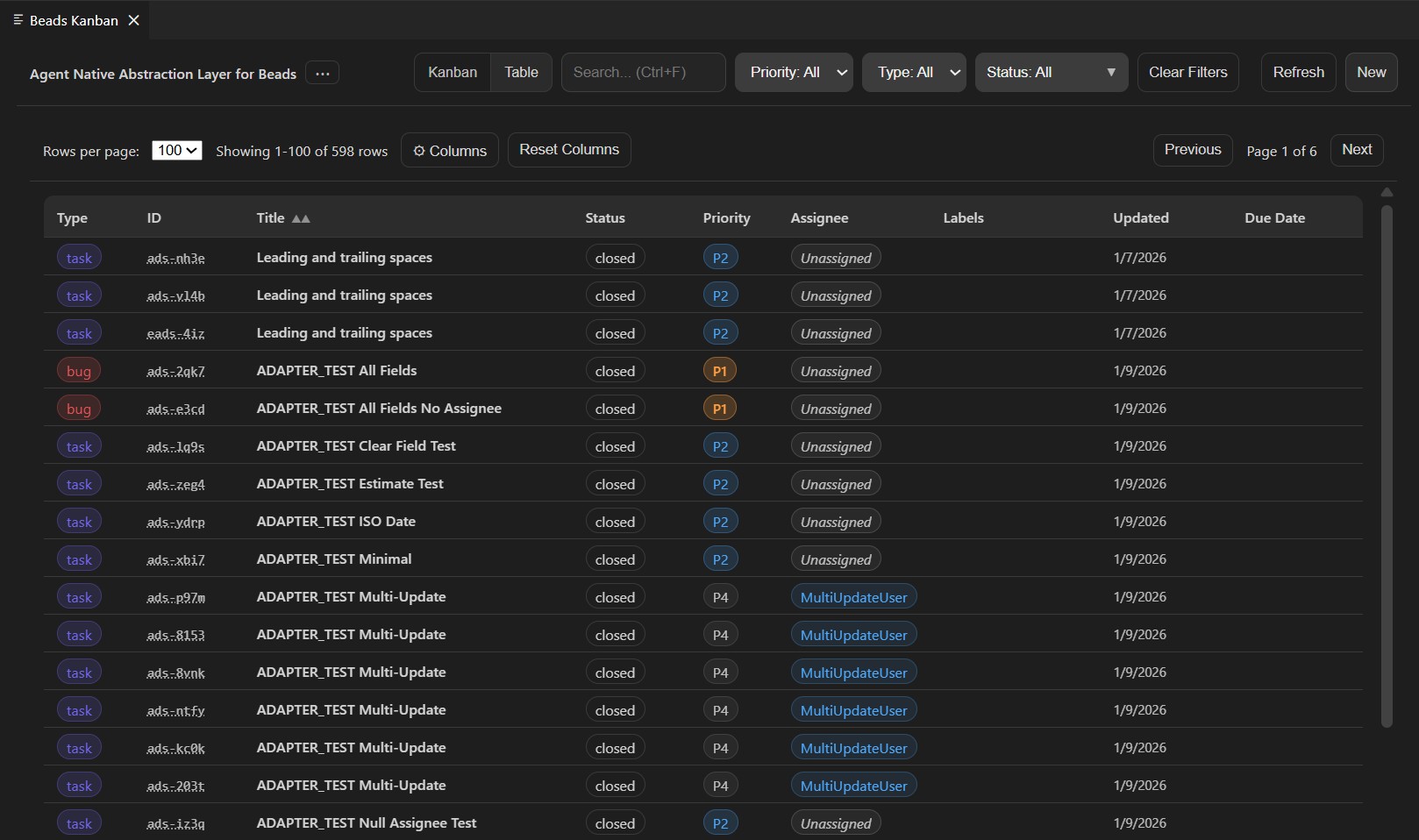
Sort, filter, and customize columns for detailed issue management.
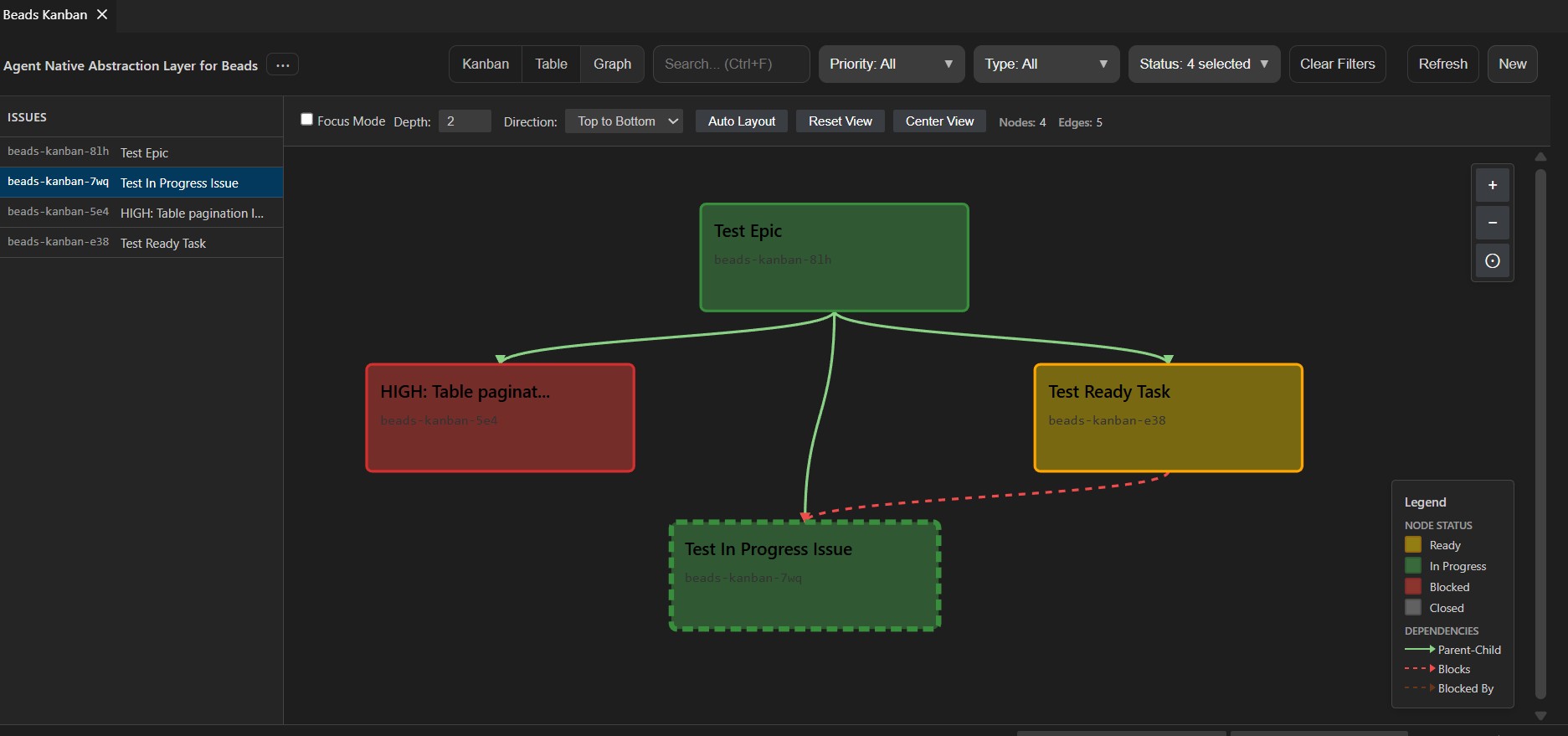
Visualize issue relationships and dependencies with an interactive graph.
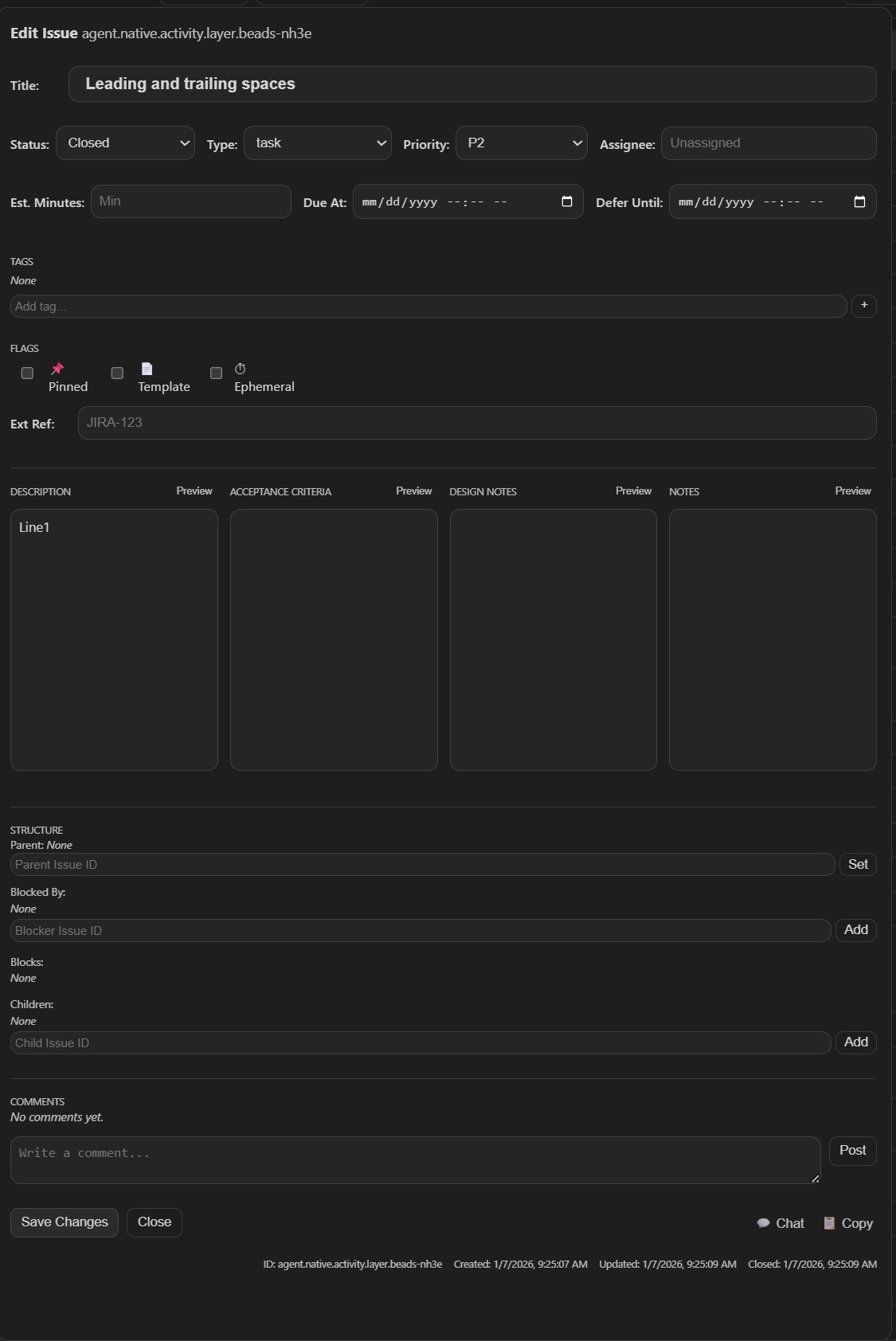
Comprehensive issue editing with all metadata fields, dependencies, and comments.
✨ Visual Kanban Board
- Drag-and-drop cards between columns (Ready, In Progress, Blocked, Closed)
- Real-time updates with your
.beadsdatabase - Incremental loading for large issue databases (10,000+ issues)
📊 Table View
- Sortable columns with multi-column sorting (Shift+Click)
- Customizable column visibility
- Pagination with configurable page sizes
- Filter by priority, type, status, and search
🔗 Dependency Graph
- Interactive visualization of issue relationships
- Hierarchical layout with parent-child and blocking dependencies
- Focus mode to explore specific issues and their dependencies
- Drag nodes, zoom/pan controls
- Color-coded by status with visual legend
🔧 Full Issue Management
- Create, edit, and update issues
- Add comments, labels, and dependencies
- Markdown support with live preview
- Rich metadata fields (priority, assignee, estimated time, etc.)
⚡ Daemon Integration
- Uses
bdCLI daemon for all database operations - Auto-starts daemon when extension loads
- Efficient incremental data loading
- Download the latest
.vsixfile from Releases - In VS Code:
Extensions > ... > Install from VSIX... - Select the downloaded file
- Reload VS Code
- Open VS Code Extensions view (
Ctrl+Shift+X) - Search for "Beads Kanban"
- Click Install
- Beads CLI (
bd): Required for all database operations. Install from github.com/steveyegge/beads - The extension auto-starts the
bddaemon when needed
-
Initialize Beads in your project (if not already done):
bd init
-
Open the Kanban board:
- Command Palette (
Ctrl+Shift+P): "Beads: Open Kanban Board" - Or use the status bar button
- Command Palette (
-
Start managing issues:
- Create issues with the "New" button
- Drag cards between columns to update status
- Click cards to view/edit details
- Switch to Table view for sorting and filtering
Beads is an AI-native issue tracking system that lives directly in your codebase. Issues are stored in .beads/*.db SQLite files and sync with git, making them perfect for AI coding agents and developers who want issues close to code.
Learn more: github.com/steveyegge/beads
| Setting | Default | Description |
|---|---|---|
beadsKanban.bdPath |
"" |
Absolute path to bd CLI. Leave empty to use system PATH. |
beadsKanban.doltPath |
"" |
Absolute path to dolt. Leave empty to use system PATH. |
beadsKanban.readOnly |
false |
Enable read-only mode (no edits) |
beadsKanban.initialLoadLimit |
100 |
Issues per column on initial load |
beadsKanban.pageSize |
50 |
Issues to load when clicking "Load More" |
beadsKanban.preloadClosedColumn |
false |
Load closed issues on initial load |
beadsKanban.lazyLoadDependencies |
true |
Load dependencies on-demand |
- Node.js 20+
- VS Code 1.90+
# Clone the repository
git clone https://github.com/davidcforbes/beads-kanban.git
cd beads-kanban

# Install dependencies
npm install

# Compile
npm run compile

# Run tests
npm test

# Package VSIX
npx @vscode/vsce package- Press
F5to launch Extension Development Host - Make changes to source files
- Press
Ctrl+Shift+F5to reload extension - Use
npm run watchfor automatic compilation
# Run all tests
npm test

# Watch mode
npm run test:watch

# Coverage report
npm run test:coverage

# Integration tests
npm run test:adapterThe extension uses a clean architecture with three main layers:
- Extension Host (
src/extension.ts): Command registration, webview lifecycle, message routing - Data Adapter (
src/daemonBeadsAdapter.ts): CLI-based daemon adapter for all database operations - Webview UI (
src/webview/board.js,src/webview/editForm.js,media/styles.css): Reactive UI with incremental loading
See CLAUDE.md for detailed architecture documentation.
The extension includes a standalone visual test server for automated UI testing with Chrome DevTools MCP:
# Launch the test server (opens Chrome with the board rendered using mock data)
npm run test:visual-server

# Light theme variant
npm run test:visual-server -- --theme=light

# Server only (no Chrome auto-launch)
npm run test:visual-server -- --no-chrome
The server renders the exact same webview HTML/CSS/JS as the VS Code extension, with a mock VS Code API that responds to all message types. Chrome DevTools MCP agents can then automate visual validation across all views (Kanban, Table, Graph, dialogs).
See scripts/seed-test-data.sh for creating representative test data in a real .beads database.
Contributions are welcome! This is an actively maintained fork where the original author became non-responsive.
- Fork the repository
- Create a feature branch (
git checkout -b feature/amazing-feature) - Commit your changes (
git commit -m 'Add amazing feature') - Push to the branch (
git push origin feature/amazing-feature) - Open a Pull Request
- Follow existing code style (use ESLint)
- Add tests for new features
- Update documentation as needed
- Keep commits focused and well-described
This project is a fork of the original work by sebcook-ctrl. When the original author became non-responsive, this repository was established to continue active development and accept community contributions.
Original Project: agent.native.activity.layer.beads
MIT License - see LICENSE file for details.
Copyright (c) 2024 Agent Native Kanban Contributors Original work Copyright (c) 2024 sebcook-ctrl
Made with ❤️ for the Beads community
Questions? Open an issue or start a discussion!