Releases: drivardxrm/LookupDropdown.PCF
Release list
v2.0.0.4

v2.0.0.3
- Switch the control to React 19
- Updated FluentUI (@fluentui/react-components) to v9.70.0 (react 19 compatible)
- Adjusted styling for disabled state
v2.0.0.2
Fix for : #42 : Add spacer before the placeholder when no values are selected, to blend with other out-of-box form controls
Remove required on 'sortByTextValue' parameter as it was causing control upgrade issues.
Upgrade to Storybook 8
v2.0.0.1
Adjust css for #41
Use icon for dismiss action instead of text = Better UX for multilingual support
v2.0.0.0
🚀 New Major Release 2.0.0.0
💪 Complete refactoring with FluentUI v9
Blends well with Model driven apps New Look

🆕 New Feature : Added filtering capabilities

v1.0.0.10
PR #38 Added multiple languages support , thanks to @marctre123
- Supports showing different fields values based on user's language setting using the existing customtext property
- Backward compatible with existing fonctionnality of customtext property
- Added localization for French using resx
- New Parameter sortByTextValue : sort by displayed text instead of using lookup view default sort order
Contributors

Assets 4
v1.0.0.9
CSS fixes
- Accomodate long record names
- Improvements and fixes for mobile experience
v1.0.0.8
- Fix for #12 :
If a value was previously entered on a record and removed from the displayed view, the value is not cleared.
The value is still displayed (in italic) but is not selectable on the dropdown.
It prevents the control to wipe-out the value and acts like the out of the box feature.
Ex.
Value that was previously saved on the record but is removed from the view (ex. inactivation) is still showing but in italic
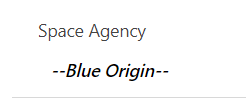
Value not available for selection
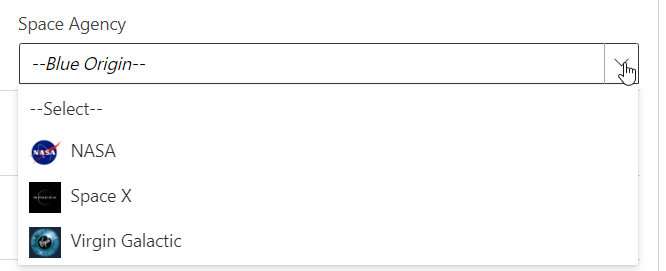
thanks @ChloeM17 for raising the issue
-
Upgrade to React 18
-
Upgrade to tanstack/react-query 4
Contributors

Assets 4
v1.0.0.7
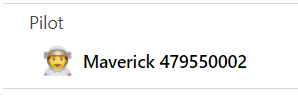
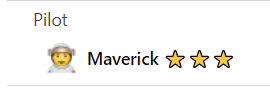
Enhancement : #10 Support complex column types in CustomText
Ex. Referencing a Choice field
Before
After
v1.0.0.6
Bug fix : null exeption introduced in v1.0.0.5 reported in #6