Below are some Bug Report samples that I wrote while working on previous projects.
Priority & Severity: P2-High
Description: When trying to login with the correct credentials, nothing happens. The user is not logged in and no error message is displayed.
Steps to Reproduce
- Go to www.website.com/login
- Add a correct user/pass
Expected Result: User should be able to login and is taken to his profile page.
Actual Result: User is not logged and no error appears.
Test Data User: radu & Pass: 123456
Priority & Severity: P4-Normal
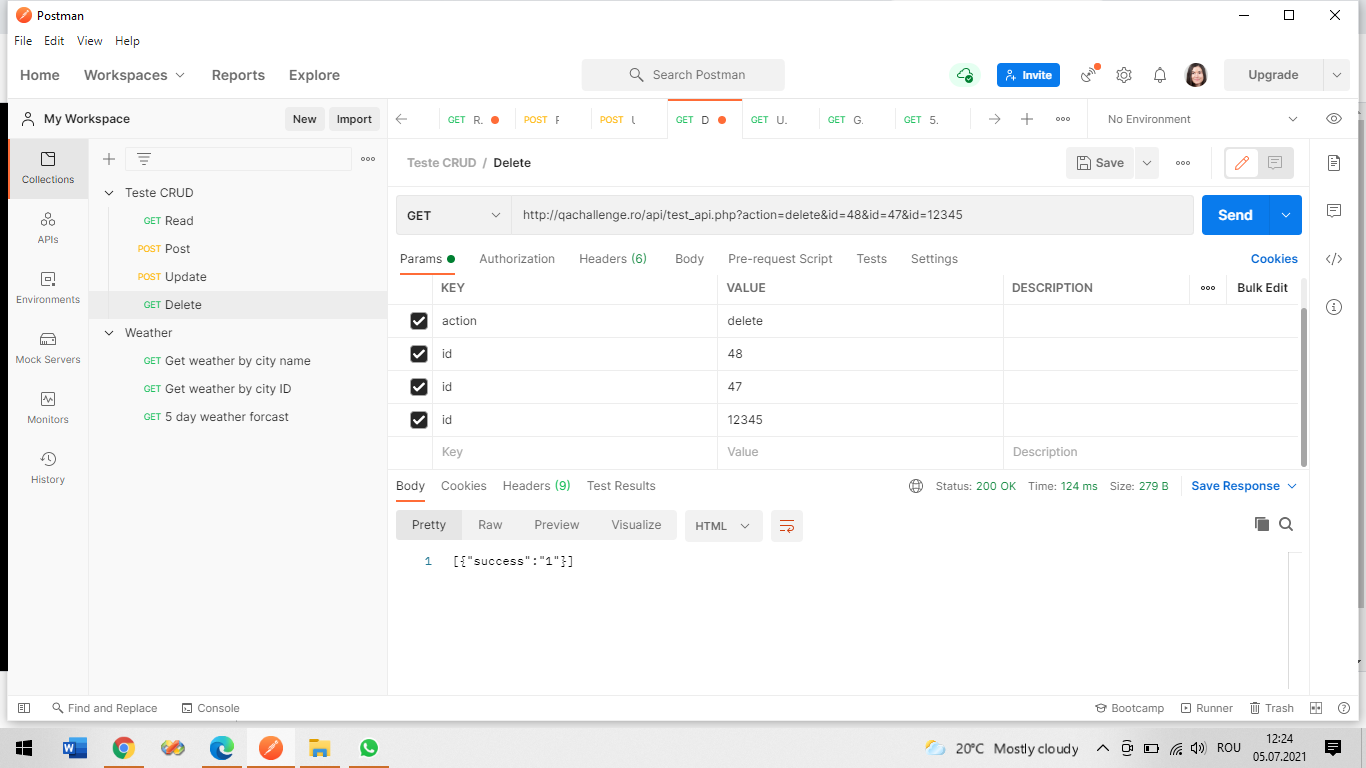
Description: After adding an item in to the cart the user can't see how many items are inside the cart near the cart icon/navigation.
Steps to Reproduce
- Go to www.demoblaze.com
- Login with the correct credentials
- Access the first category Phones
- Click on Samsung galaxy s6 5.Click Add to Cart button
- Click the Ok button
Expected Result: User should be able to see that the item was added in the cart by visualizing a number near the cart.
Actual Result: The cart doesn't display the number of items inside it.
Test Data User: User: eleuzun & Pass :123456
Priority and Severity: P2 - High
Description: When pressing the purchase button it endlessly displays the Thank you for your purchase message and an id number for the order. When pressing again the purchase button it changes the id number for the same order.
Steps to Reproduce
- Go to www.demoblaze.com
- Press on Samsung galaxy s6
- Click Add to cart
- Click Ok button
- Click on Cart
- Press the Place Order button
- Fill in the required fields
- Press the Purchase button
- Press again on Purchase button (don’t press OK)
Expected Result: The buyer should be allowed to press only one time the Purchase button and should be able to receive once a Thank you for your order message an ID number for his order and an email with the purchase details (AWB, invoice, a tracking number and a tracking link) .
Actual Result: The buyer is allowed to press the Purchase button endlessly and receives a Thank you for your order message with different ID numbers without an email and order details.
Test Data:
Place Order details : Name : Elena, Country : Romania, City: Brașov, Credit card: 123456789, Month: 14, Year :2025
Priority and Severity: P4-Medium
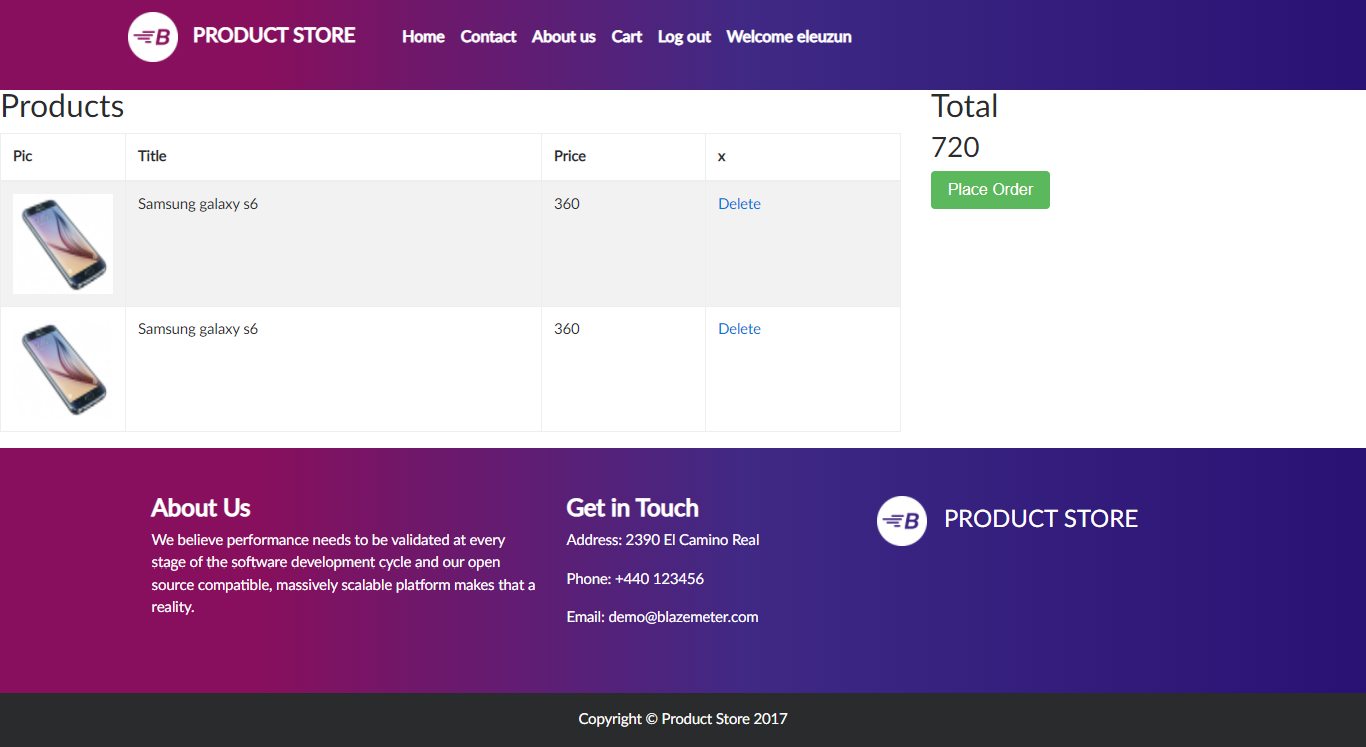
Description: The user should be able to change the quantity of an item in the cart by clicking on the quantity field.
Steps to Reproduce
- Go to www.demoblaze.com
- Press on Samsung galaxy s6
- Add to cart
- Press the OK button
- Click on Cart
Expected Result: The user should be allowed to change the quantity of an item in the cart.
Actual Result: The shopping cart doesn’t have a quantity field and the user can’t update the quantity of an item.
Priority and Severity: P1- Critical
Description: The user should be able to access his account using his credentials username and pass.
Steps to Reproduce
- Go to https://www.globalsqa.com/angularJs-protractor/BankingProject/#/login
- Click Customer Login
- Click --Your Name-- field
- Select a user
- Click the Login button
Expected Result: The user should be able to access his profile by inserting his name and password.
Actual Result: The user can access his profile using only his user without using a password.
Test Data: User:Elena Uzun
Priority and Severity: P5 Low
Description: When the user is trying to acces the link the page can not be displayed.
Steps to Reproduce
- Go to https://www.primariatechirghiol.ro/
- Go to Info Turism
- Press the Cazare option
- Press Villa Bella
Expected Result: When pressing Villa Bella, the user is redirected to a web page where he can find the desired info about the accommodation.
Actual Result: When pressing Villa Bella, the user is redirected to a web page where “The site can't be reached info is displayed.”
Priority and Severity: P4 Low
Description: When accessing the web page with an incorrect or misspelled word a 404 Error Page is not created.
Steps to Reproduce
- Go to www.primariatechirghiol.ro
- Insert a misspelled word in the URL - “jjjjjjjiiiii”
- Click Enter
Expected Result: When accessing the web page with an incorrect or misspelled word a Custom 404 Error Page should provide helpful content that encourages users to explore the site further.
Actual Result: When accessing the web page with an incorrect or misspelled word a Custom 404 Error Page is not created. An “Error 404 - Not Found” message is displayed on the page.
Priority and Severity: P4 Normal
Description: The user should be able to insert only numbers in the required fields.
Steps to Reproduce
- Go to https://www.globalsqa.com/angularJs-protractor/ConsumptionCalculator/
- Type in numbers inside the required fields
Expected Result: The user should be able to insert only numbers in the required fields.
Actual Result: The user can insert numbers and the letter "e" inside the required fields.
Priority and Severity: P5 Low
Description: After accessing the app, the user should visualize a "No smoking" picture on the left side of the screen.
Steps to Reproduce
Expected Result: On the left side of the screen there should be a "No smoking" picture.
Actual Result: The "No smoking" picture is not displayed on the left side of the screen.

Priority & Severity: P3 High
Description: The price should be indicated with a currency symbol.
Steps to Reproduce:
Expected Result: Each product should have a price-tag indicated with a currency symbol.
Actual Result: The price does not have a currency symbol.
Priority & Severity: P1 Critical
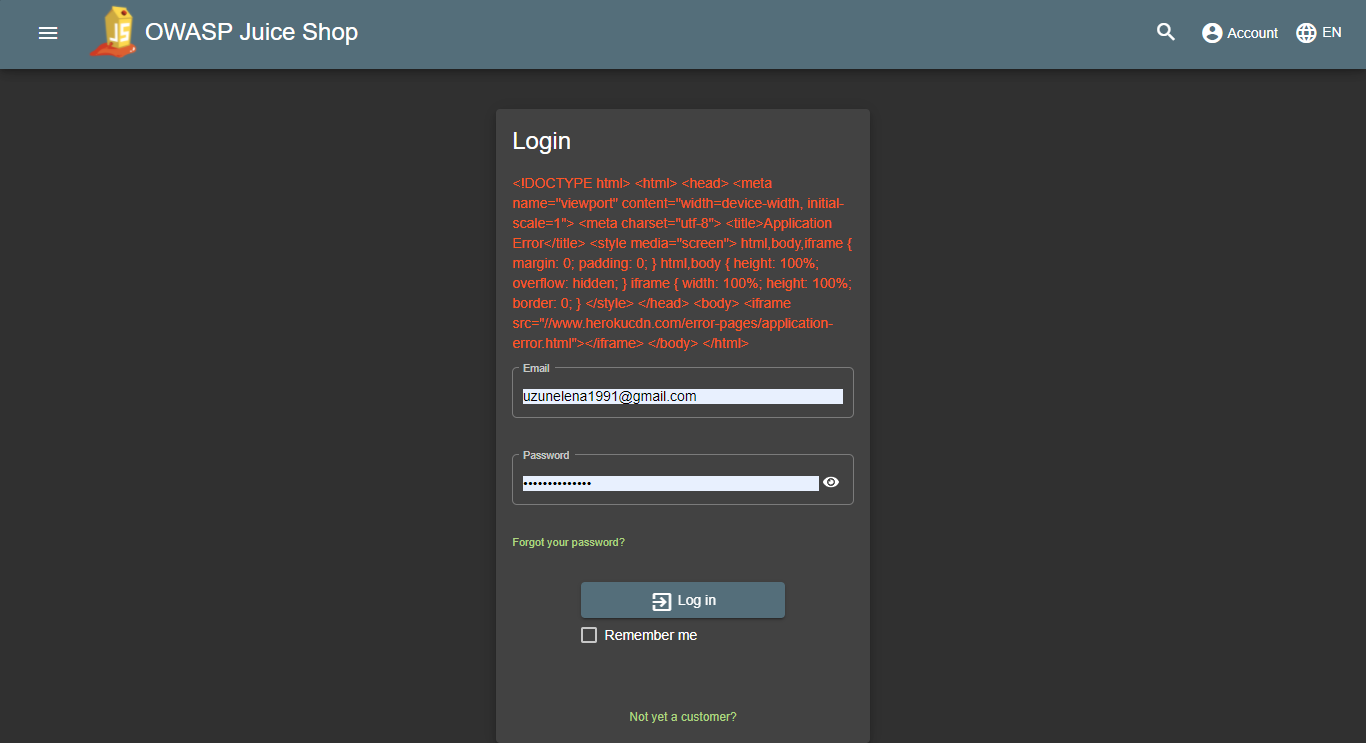
Description: When trying to login an error message appears.
Steps to Reproduce
- Go to https://juice-shop.herokuapp.com/#/
- Click Account
- Click Login 4, Use the correct credentials
- Click Log in button
Expected Result: The user should be able to login and acces his profile page.
Actual Result: The user can not login and an error message appears.
Test Data:
Email: [email protected]
Pass : eleuzun
Priority & Severity: P3 High
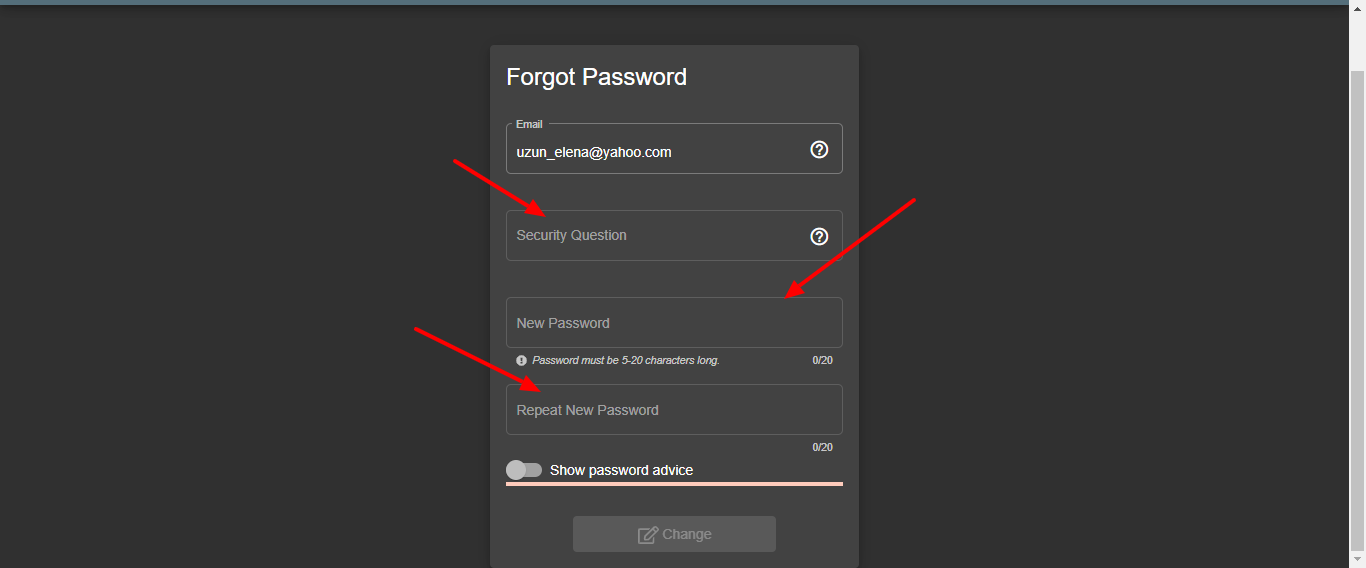
Description: The user should be able to reset his password by filling the required fields,
Steps to Reproduce
- Go to https://juice-shop.herokuapp.com/#/
- Click Account button
- Click Login button
- Click on Forgot your password?
- Fill in the required fields
Expected Result: The user should be able to insert the required information in each section.
Actual Result: The user can fill in the required information only in the Email section. The user can not acces other sections.
Priority and Severity: P4 Normal
Description: When changing the language in the API, the value ''Clouds'' can not be translated in the required language.
Steps to Reproduce
- Go to https://identity.getpostman.com/login
- Sign in with the correct credentials
- Click on Workspaces
- Click on My Workspace
- Click on Weather
- Click on Get weather by city name
- Change the value of lang
- Check the response
Expected Result: The value ''Clouds'' is translated in the required language.
Actual Result: The value ''Clouds'' is not translated in the required language.
Test Data: Email or Username: [email protected] Pass: Brasov2014
Priority and Severity: P5 Low
Description: When trying to delete a non-existing user ID an error message should appear on the screen.
Steps to Reproduce
- Go to https://identity.getpostman.com/login
- Sign in with the correct credentials
- Click on Workspaces
- Click on My Workspace
- Click on Teste CRUD
- Click on Delete
Expected Result: When inserting a non-existing user ID and click on Send button, an error message should appear on the screen.
Actual Result: When inserting a non-existing user ID and click on Send button, a ''[{"success":"1"}]'' appears on the screen.
Test Data: Email or Username: [email protected] Pass: Brasov2014