

A collection of advanced, QA-verified Blueprints and configuration templates for Home Assistant, designed for robustness and maintainability.
The complete, privacy-first and fully local alternative to Life360 for Home Assistant. This suite provides advanced location tracking with rich notifications and ensures your devices stay powered up.
The heart of the system. An advanced automation blueprint designed to track arrivals and departures with precision, style, and reliability.
Key Features:
- 📸 Dynamic Notifications: Displays the user's profile picture (with smart fallback to a brand logo).
- 📍 Clickable Maps: Open the location map directly from the notification action.
- ⏱️ Duration Logging: Tracks time spent at a location (e.g., "Left Work after 8h 30m").
- 🛡️ Defensive Logic: Handles GPS drift ("flapping") and gracefully ignores unavailable/unknown states.
- 🤫 Privacy & Quiet Mode: Configurable quiet hours to mute notifications at night.
📋 Click to view Configuration Variables
| Input | Description | Required | Default |
|---|---|---|---|
persons_to_track |
List of person entities to monitor. | ✅ | - |
zones_to_track |
List of zones that trigger notifications. | ✅ | - |
notify_primary |
Primary notification service (e.g., notify.mobile_app_iphone). |
✅ | - |
home_zone_alias |
Friendly name for Home (e.g., "Home" or "Hemma"). | ❌ | "Home" |
stability_delay |
Seconds to wait before confirming zone change (prevents false alarms). | ❌ | 0 |
use_quiet_hours |
Enable to mute notifications during night. | ❌ | false |
branding_logo |
URL to fallback image if user has no profile picture. | ❌ | (Included) |
click_url |
Action when clicking "Map" button. | ❌ | /lovelace/map |

Reliable tracking requires power. This blueprint monitors the devices used by the Person Tracker Suite and warns you before they go dark.
Key Features:
- 🧠 Anti-Spam Logic: Intelligently alerts only once per discharge cycle (prevents constant nagging).
- 📱 Unified Branding: Uses the same visual identity and logo as the Tracker.
- ⚙️ QA-Verified: Optimized
parallelexecution to handle multiple devices reporting simultaneously without errors.
📋 Click to view Configuration Variables
| Input | Description | Required | Default |
|---|---|---|---|
battery_sensors |
List of battery sensors to monitor. | ✅ | - |
threshold |
Percentage level to trigger alert. | ❌ | 15% |
notify_service |
Notification service to send alerts to. | ❌ | (Empty) |
notification_logo |
URL for the notification icon/image. | ❌ | (Included) |
actions |
Additional actions to run (e.g., TTS, light flash). | ❌ | [] |
We have included a pre-configured dashboard view (YAML) tailored for this tracker suite. It features a status overview, battery monitoring, timeline, and a Google Map history view.
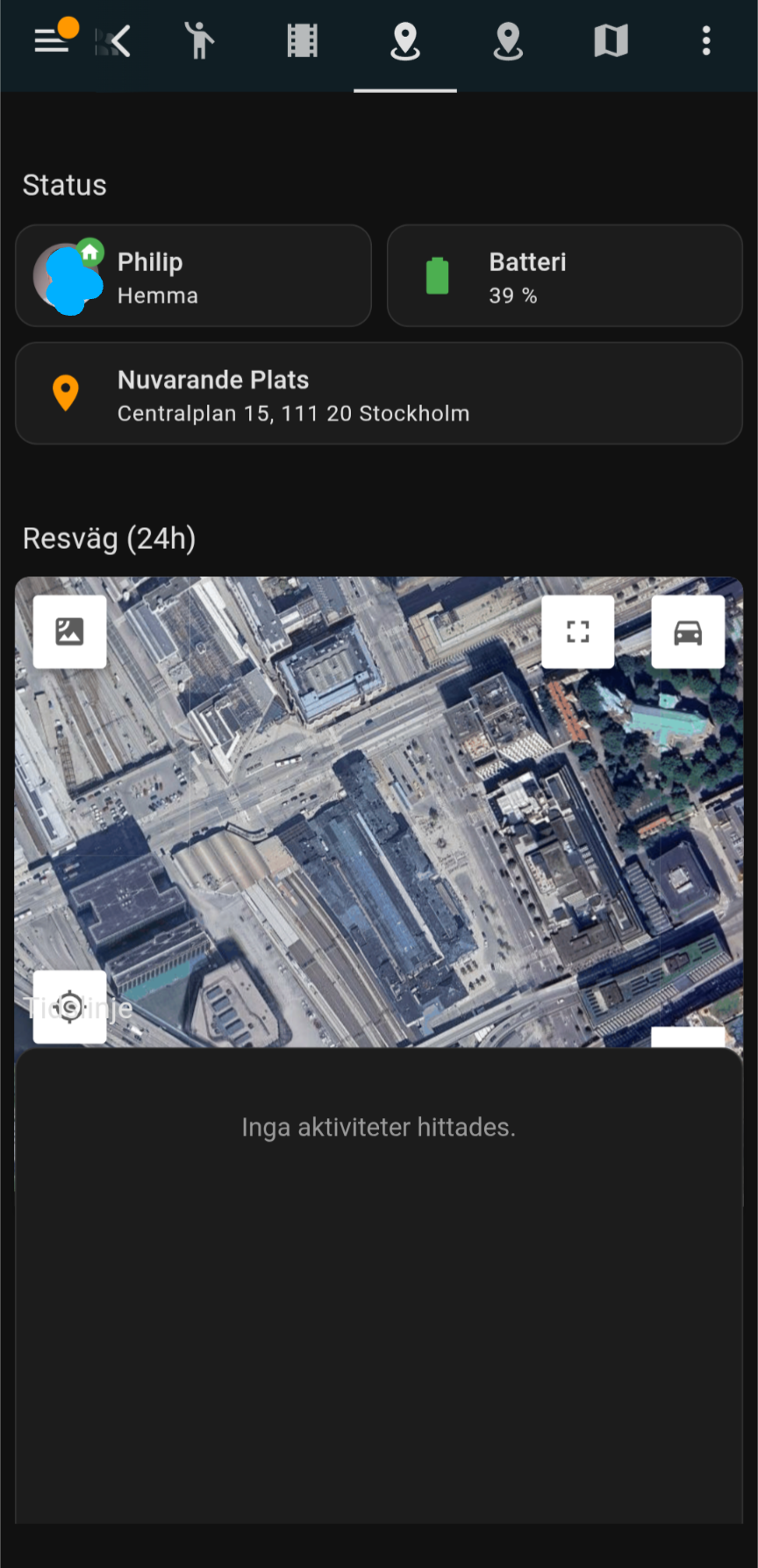
When you copy the dashboard YAML code, you must replace the following placeholders with your specific entities:
| Placeholder | Description | Example |
|---|---|---|
person.your_name |
The main person entity you want to track on the map. | person.philip |
sensor.your_device_battery_level |
The battery sensor of the tracked device. | sensor.pixel_9_battery_level |
sensor.your_device_geocoded_location |
Sensor providing the address text (from Companion App or integration). | sensor.pixel_9_geocoded_location |
YOUR_GOOGLE_MAPS_API_KEY |
Required. Your personal API Key from Google Cloud Platform. | AIzaSyD... |
Requirements (HACS):
- Google Maps Card (Required for history map)
- card-mod (Required for text styling)
Download: View Dashboard YAML
- Install Companion App: Ensure the Home Assistant Companion App is installed on your devices for location reporting.
- Import Blueprints: Click the badges above to import the automations directly into Home Assistant.
- Create Automations: Set up your person/zone tracker and battery monitor using the imported blueprints.
- (Optional) Dashboard: Copy the dashboard YAML code to a new view in your Lovelace dashboard.
Issue: History or Logbook is empty/inconsistent. If your person entity updates are missing from the logbook, it is often due to phone battery optimizations killing the Home Assistant app in the background.
Fix for Android (Pixel/Samsung):
- Go to Settings -> Apps -> Home Assistant.
- Tap Battery.
- Change setting to Unrestricted (or "Don't optimize").
- Ensure Location permission is set to "Allow all the time".
This is a complex, multi-user alarm clock blueprint designed as a separate, powerful utility. It simulates a natural sunrise while providing dynamic media playback (e.g., via Music Assistant / MASS).
Key Features:
- ☀️ Sunrise Simulation: Dynamic light fade-in over a user-defined period (minutes).
- 🔊 Dynamic Media: Plays local media files at a custom volume (set per alarm).
- 👤 Multi-User Ready: Designed to be easily cloned for multiple people using a simple prefix and template system.
- 📆 Schedule Control: Day-of-week activation is controlled via dashboard toggles (Input Booleans).
📋 Click to view Configuration Variables (Blueprint Inputs)
| Input | Description | Required | Default |
|---|---|---|---|
person_entity |
Entity of the person to check (alarm only runs if person is 'home'). | ✅ | - |
alarm_time_entity |
input_datetime helper for the main sound alarm time. |
✅ | - |
alarm_enabled_entity |
input_boolean master toggle for the alarm. |
✅ | - |
target_light |
The light entity used for the sunrise fade effect. | ✅ | - |
light_offset_entity |
input_number defining the duration of the light fade (in minutes). |
✅ | - |
media_player_select |
input_select helper containing the available speaker entity IDs. |
✅ | - |
media_file_select |
input_select helper listing the available media filenames. |
✅ | - |
day_monday...day_sunday |
Individual input_boolean helpers used to enable/disable the alarm per day. |
✅ | - |
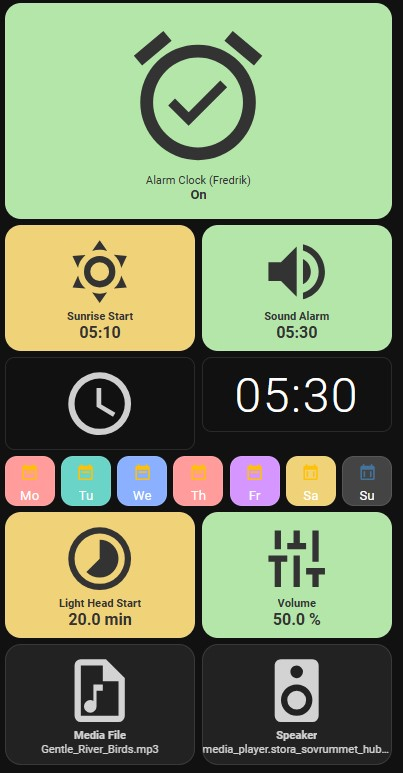
This Blueprint requires external helpers to function. Use the provided templates for easy setup.
| Asset Type | File Path | Purpose |
|---|---|---|
| Helper Template | packages/advanced_alarm_clock_template.yaml | Required. YAML template to quickly create all necessary input_* helpers (input_boolean, input_number, etc.). Requires replacing the [PREFIX] placeholder. |
| Dashboard View | dashboards/advanced_alarm_clock_dashboard_template.yaml | YAML for a customized Lovelace view designed to control all helper entities easily. Requires replacing [[PREFIX]] and [[NAME]] placeholders. |
Developed with ❤️ and 🤖 using AI-assisted coding & QA.