



| Image Dataset Pipeline | Text Dataset Pipeline |
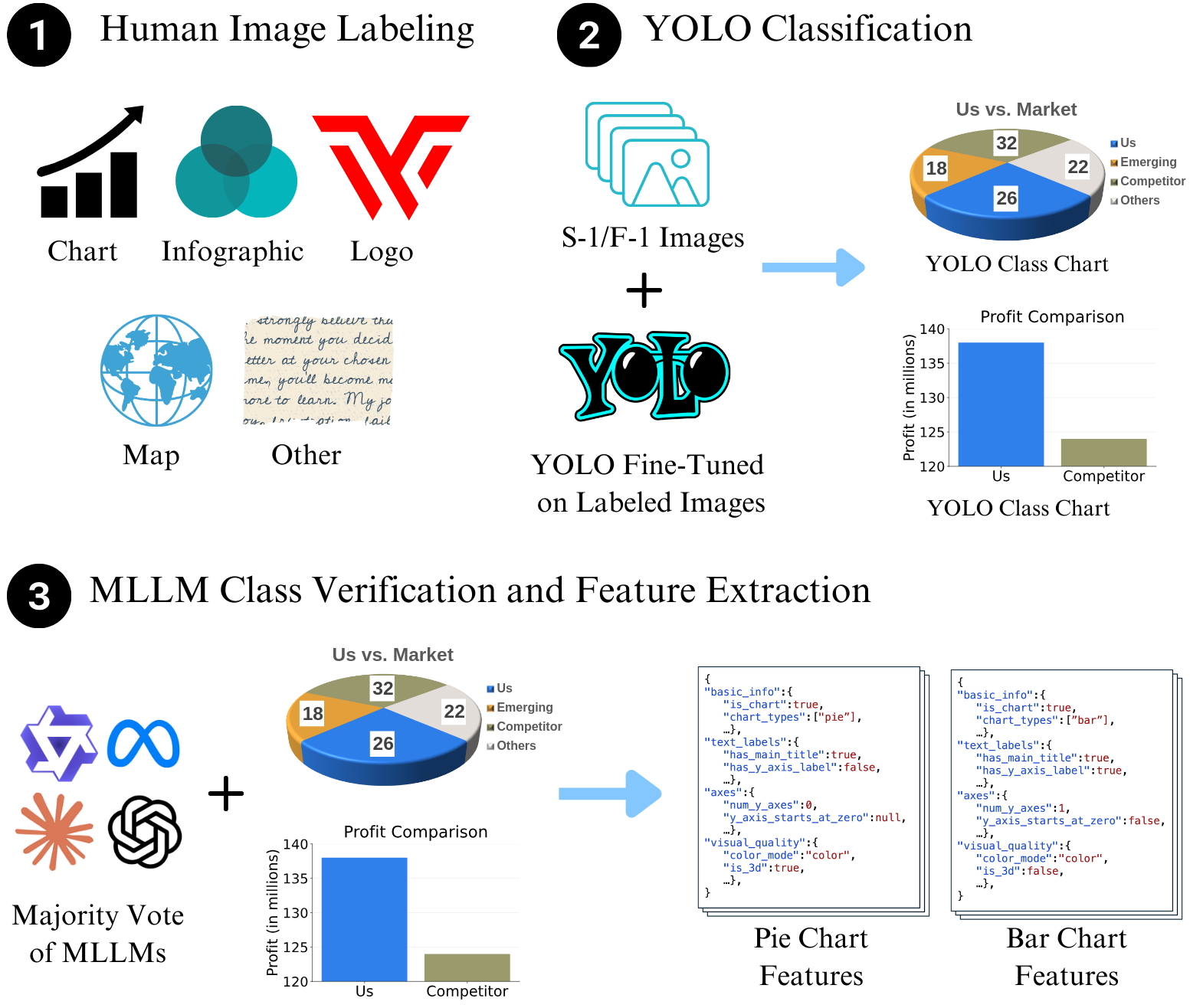
|
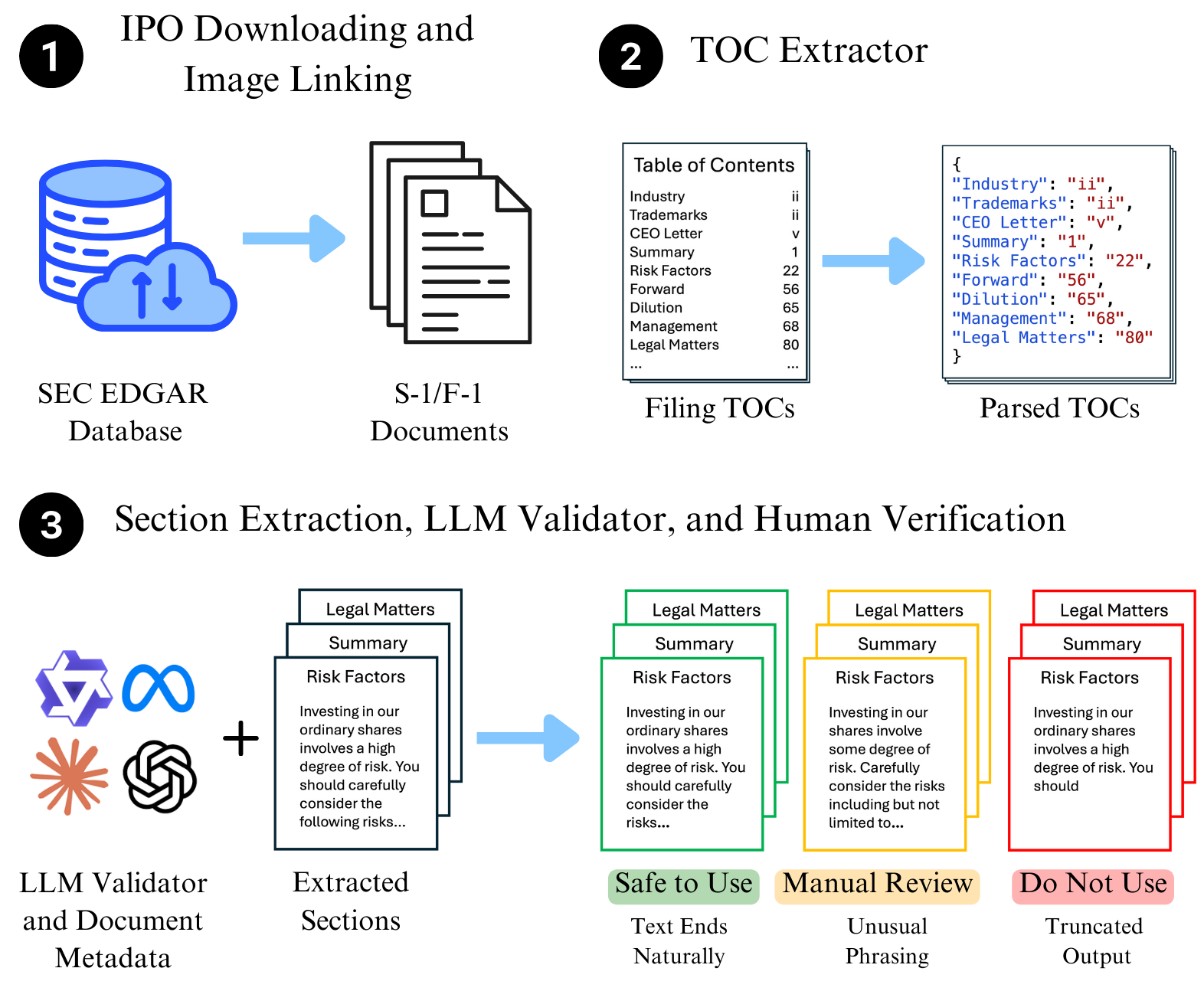
|
pip install ipo-minefrom download import IPODownloader, Company
downloader = IPODownloader(
email="example@gmail.com",
company="Your Example Organization"
)
company = Company.from_ticker("SNOW")
company_filings = downloader.download_ipo(
company,
limit=1,
save_filing=True,
save_images=False,
verbose=True
)
filing = company_filings.filings[0]results = parser.parse_company(
ticker="SNOW",
validate=False
)You can use the command-line interface to download and parse filings without writing Python code.
Download the latest S-1 filing for a company:
ipo-mine download SNOW --email your@email.com --org "Your Org"Options:
--limit N: Download previous N filings (default: 1)--images: Download and extract images from the filing--all: Download all available IPO filings for the ticker
Parse a downloaded filing into section-specific files:
ipo-mine parse SNOWOptions:
--validate: Enable LLM-based validation of extracted sections--provider: LLM provider (anthropic, openai, google, huggingface)--mode: Validation mode (binary, likert)
Run LLM validation on existing parsed text files to check for truncation or completeness.
ipo-mine validate SNOW --provider anthropicYou can choose from the following providers (requires API keys):
| Provider | Argument | Env Variable |
|---|---|---|
| Anthropic (Claude) | --provider anthropic |
ANTHROPIC_API_KEY |
| OpenAI (GPT-4o) | --provider openai |
OPENAI_API_KEY |
| Google (Gemini) | --provider google |
GOOGLE_API_KEY |
| HuggingFace | --provider huggingface |
HUGGINGFACE_API_KEY |
- Binary (
--mode binary): Returns "Yes" (Valid) or "No" (Truncated/Incomplete). Default. - Likert (
--mode likert): Returns a confidence score from 1 (Incomplete) to 5 (Complete).
The CLI will look for API keys in this order:
- Command Line Argument:
--api-key "sk-..." - Environment Variable: e.g.,
export OPENAI_API_KEY="sk-..." - Interactive Prompt: If neither is found, the CLI will securely prompt you to enter the key (input is hidden).
Validate using OpenAI with Likert scale:
ipo-mine validate TSLA --provider openai --mode likertValidate using Google Gemini with explicit key:
ipo-mine validate TSLA --provider google --api-key "your-api-key"- The SEC requires a descriptive User-Agent. Provide a real organization name and your email.
download_iporeturns aCompanyFilingsobject; usecompany_filings.filings[0]to pass aFilinginto the parser.- The parser automatically chooses HTML or text parsing based on the filing URL.
If you use IPO-Mine, please cite:
@misc{galarnyk2026ipominetoolkitdatasetsectionstructured,
      title={IPO-Mine: A Toolkit and Dataset for Section-Structured Analysis of Long, Multimodal IPO Documents},
      author={Michael Galarnyk and Siddharth Lohani and Vidhyakshaya Kannan and Sagnik Nandi and Aman Patel and Liqin Ye and Arnav Hiray and Rutwik Routu and Prasun Banerjee and Siddhartha Somani and Sudheer Chava},
      year={2026},
      eprint={2605.28714},
      archivePrefix={arXiv},
      primaryClass={cs.CL},
      url={https://arxiv.org/abs/2605.28714},
}