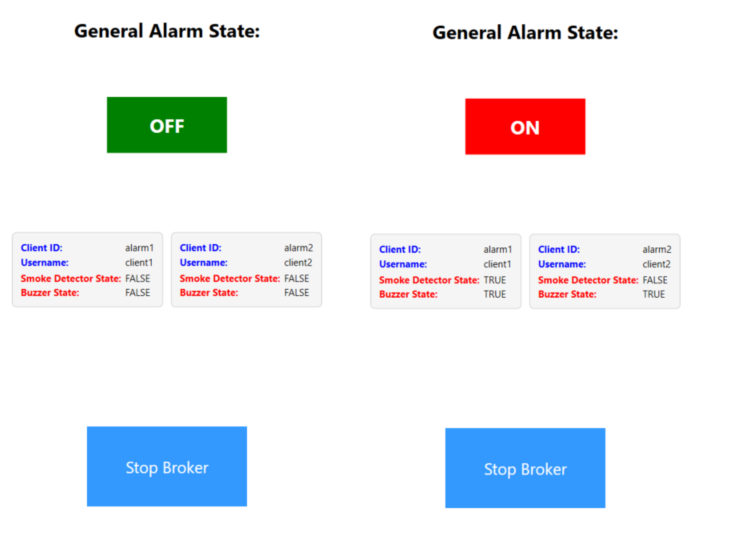
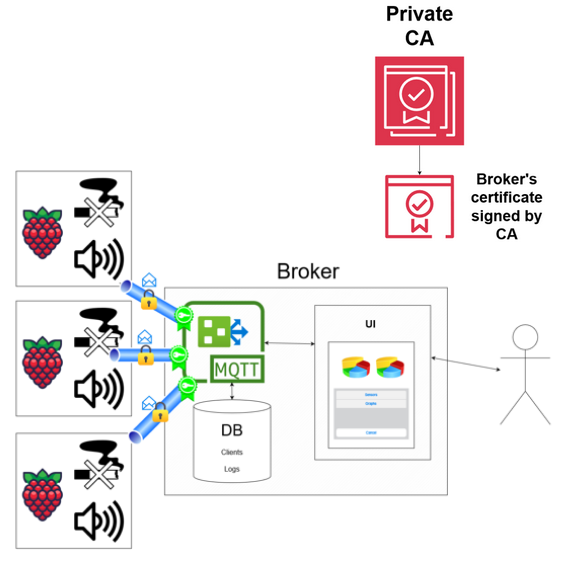
The MQTT Smoke Alarm 🚨 System is a study project designed to demonstrate the use of C# in developing a simple IOT alarm system. This system is capable of detecting smoke using Raspberry Pi sensors and triggering alarms when necessary. It leverages MQTTnet for communication, C# for application logic, PKI (MQTT over TLS 🔐) for secure communication, and utilizes .NET 7 for compatibility. Additionally, a simple WPF-based GUI is provided for managing the broker 🖥️. More information in the report!
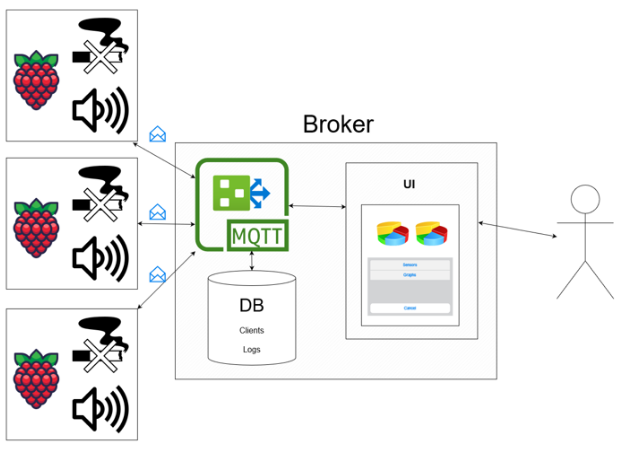
This solution consists of three main projects:
The Client project represents the Raspberry Pi client. It is responsible for collecting sensor data, detecting smoke, and communicating with the broker using MQTT over TLS for secure data transfer. Clients can be deployed both on Windows and Linux.
The BrokerGUI project serves as the central communication hub that manages multiple clients and their respective sensors. It provides a graphical interface developed with WPF for interacting with the broker. It allows to monitor clients' sensors state and displays alarm state. Use of WPF makes it work only on Windows.
The PKIGenerator project is responsible for generating the necessary Public Key Infrastructure (PKI) for both clients and the broker.
- MQTTnet (4.3.1.873): MQTTnet is used for MQTT communication between the broker and clients.
- .NET 7: The project utilizes .NET 7
- Python 3.9 or higher
- Python lib: gpiozero
- pythonnet package https://www.nuget.org/packages/pythonnet/
If you don't have real hardware to install client on, there is a possibility to start simulated clients with mocked sensor data with containers. Firstly, generate PKI by launching PKIGenerator project. Then, just run powershell script
"run_simulated_client_docker_containers.ps1"
The script takes your WiFi address and uses it as an input for clients. It also sets BROKER_IP_ADDRESS Windows environmental variable that is used by docker-compose.yml (which is used to deploy clients) and broker. After setting BROKER_IP_ADDRESS env variable there it might be required to restart VS.
Make sure that username, password you use is in db.json file in broker.
Firstly, generate PKI by launching PKIGenerator project. Then, modify initial parameters of client so it has proper broker ip. Config is initialized in Client/Program.cs.
Assuming you run latest RaspbianOS, you will have to install dotnet 6. To do so, follow this link how_to_install_dotnet_on_ARM , and follow step 2. After installation check that dotnet is installed with 'dotnet --version'. You can then build the client with 'dotnet build <path_to_client.cs>' and run it with 'dotnet <path_to_built_dll>' commands. The default path to the built .dll file is probably '<repo_dir>/Client/bin/Debug/net6.0.0/Client.dll'.
You will also need to install pythonnet NuGet package, as well as Python3.9 and pythonnet package via 'python3 -m pip install pythonnet'
Check if the program starts, it should start but not be able to connect. After that set environment variables like this: 'export USERNAME=client1 && export PASSWORD=password1' 'export BROKER_IP_ADDRESS=<your_broker_ip_address>'
To be able to use pythonnet we also need to export the path to python shared library as an environment variable (see: https://github.com/pythonnet/pythonnet ) 'export PYTHONNET_PYDLL=/usr/lib/arm-linux-gnueabihf/libpython3.9.so' If the path is incorrect you can use linux 'find' utility to locate it: 'find / -name libpython3.9.so'
If the broker is started and both devices are on the same network, client should connect.