
Kyo-so (Kyoso / 協奏) is an MCP-native, ACP-powered multi-agent review gate for AI coding workflows.
The Japanese word 協奏 translates to concerto in English: multiple independent players performing one coordinated piece.
It coordinates Codex and Claude reviewers for:
- implementation plan review
- security review with CISA Secure by Design gates
- diff review after implementation
Kyoso does not apply code changes.
All three review tools run the same pipeline: scan for secrets, snapshot the workspace read-only, run the reviewer ensemble in parallel over ACP, then aggregate findings, apply gates, and decide.
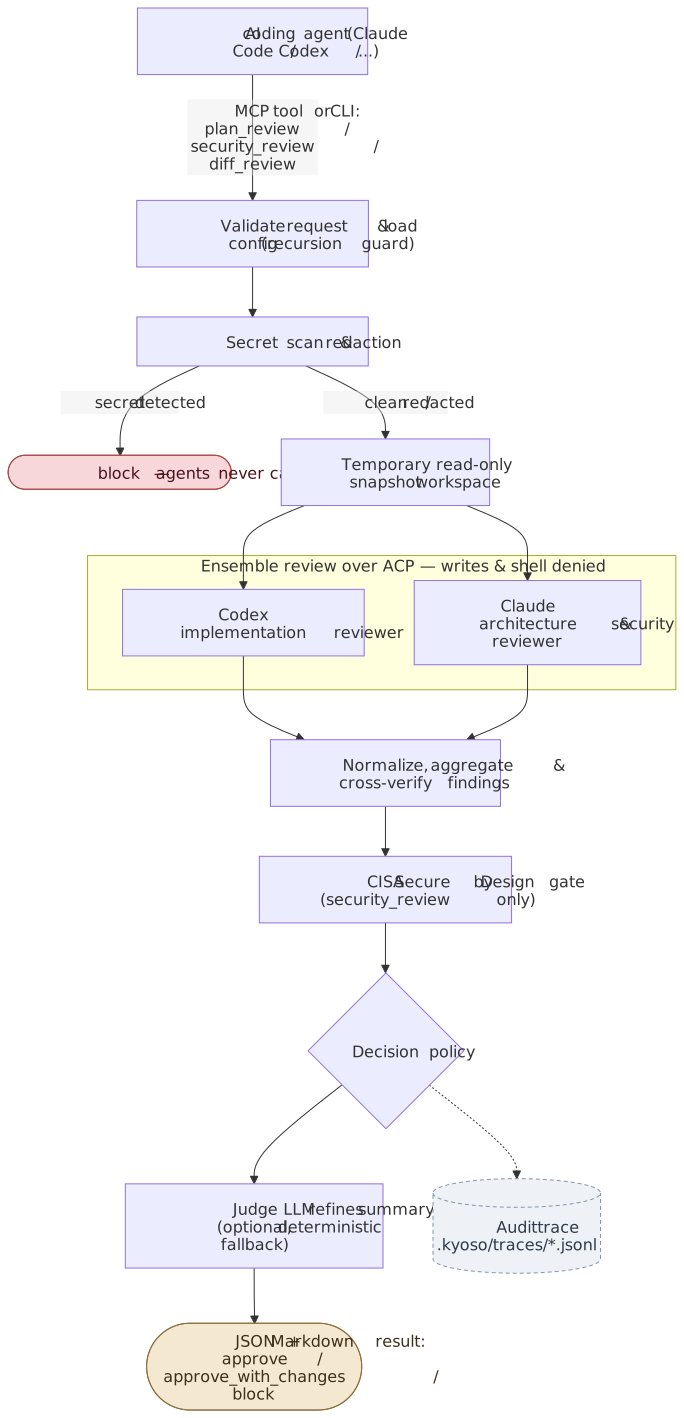
With a single backend enabled, one agent runs as combined_reviewer instead of the two-role ensemble (see Single-backend mode). The Mermaid sources for this diagram live in docs/assets/.
No global install is required. Run Kyoso through npx or bunx. Running the packaged CLI requires Node.js 20 or newer.
| Mode | Installs | MCP | Clients |
|---|---|---|---|
| Marketplace Plugin | Skill plus local stdio MCP | Yes | Codex / Claude Code |
| CLI plus Skill-only | npm CLI plus Skill | No | Codex / Claude Code |
| Manual setup | Manual MCP registration plus Skill | Yes | Codex / Claude Code |
When in doubt, pick the Marketplace Plugin: two commands install the Skill and the MCP server together. Follow the Codex or Claude Code steps below. To switch between modes later, see Migration.
The Plugin bundles the Skill and an MCP definition pinned to an exact published Kyoso CLI version; it does not bundle the CLI itself. Its first MCP start needs network access to npm. A cached package may work offline, but offline startup is not guaranteed. The manifest's Read capability is display metadata, not additional filesystem authorization.
The Plugin Skill declares the bundled kyoso MCP server as a dependency, so explicit Kyoso reviews are directed through MCP rather than a CLI fallback. If you disable the bundled Plugin MCP, treat the Plugin Skill as unavailable: re-enable it, or remove the Plugin and install CLI plus Skill-only instead. The Plugin is not a CLI-fallback mode.
For OpenRouter key forwarding through the Plugin, see Codex OpenRouter project opt-in.
# Global CLI and Codex Skill
npm install -g @kyo-so/cli
kyoso setup codex --write --skill-only --global

# Project CLI and Codex Skill
npm install -D @kyo-so/cli
npx kyoso setup codex --write --skill-only
Replace codex with claude-code for Claude Code. Dry-run remains the default. --skill-only never reads or writes MCP configuration and cannot be combined with --runner or --command.
Skill-only intentionally does not declare an MCP dependency. When it reaches an npx or bunx package-runner fallback, Codex Auto mode can request a sandbox network escalation approval; installing kyoso on PATH avoids that fallback.
- Prepare Claude authentication.
claude setup-tokenSet CLAUDE_CODE_OAUTH_TOKEN from that command, or set ANTHROPIC_API_KEY for direct API billing.
- Install the Marketplace Plugin (recommended).
/plugin marketplace add hokupod/kyoso
/plugin install kyoso@kyoso
The Plugin installs the Kyoso review Skill and a local stdio MCP server pinned to a released CLI version. When you install the Plugin, kyoso setup claude-code is not required.
- Alternatively, register MCP and install the review skill.
npx -y --package=@kyo-so/cli kyoso setup claude-code --write
bunx --package @kyo-so/cli kyoso setup claude-code --write
For manual MCP registration, use examples/claude-code-mcp.json.
- Verify the setup.
npx -y --package=@kyo-so/cli kyoso doctor
bunx --package @kyo-so/cli kyoso doctor- Ask for a review from Claude Code.
Use Kyoso plan_review on this plan before implementation.
- Prepare Codex authentication.
codex login- Install the Marketplace Plugin (recommended).
codex plugin marketplace add hokupod/kyoso
codex plugin add kyoso@kyoso
You can also select Kyoso from the Codex desktop Plugins page or /plugins; refresh or restart the desktop app if a newly added marketplace is not visible. Check the installation with codex plugin list --marketplace kyoso --json, and remove the Plugin with codex plugin remove kyoso@kyoso. When you install the Plugin, kyoso setup codex is not required.
Codex Auto mode may reject Kyoso tool calls that require approval. To pre-approve them for your account, see Codex approval prompts.
- Alternatively, register MCP and install the review skill.
npx -y --package=@kyo-so/cli kyoso setup codex --write
bunx --package @kyo-so/cli kyoso setup codex --write- Verify the setup.
npx -y --package=@kyo-so/cli kyoso doctor
bunx --package @kyo-so/cli kyoso doctor- Ask for a review from Codex.
Use Kyoso diff_review on the current diff. I need a second opinion before merging.
Manual setup examples are kept in examples/codex-config.toml and examples/claude-code-mcp.json.
The package-runner execution paths always select the package and executable separately: npx -y --package=@kyo-so/cli kyoso and bunx --package @kyo-so/cli kyoso. Add a complete SemVer pin after the package name when a workflow needs one, for example @kyo-so/cli@0.16.7. The examples below abbreviate an already installed executable as kyoso. Naming note: the npm package is @kyo-so/cli (matching the product name Kyo-so), while the installed CLI command is the shorter kyoso.
The Bun fallback is verified on Bun 1.3.14. On an older Bun, use the npx form or an installed kyoso; do not rely on Bun inferring a binary from a multi-bin package.
kyoso plan --goal "Review this OAuth callback plan" --plan plan.md
kyoso security --goal "Review this auth diff" --diff changes.patch
kyoso diff --base main --head HEAD --focus architecture --set agents.claude.effort=high
kyoso doctor
kyoso init
kyoso setup codex
kyoso setup claude-code
kyoso setup codex --write --skill-only
kyoso setup claude-code --write --skill-onlyReview results always use stdout: Markdown by default and JSON with --json.
Progress and errors use stderr, so structured output remains pipe-safe.
kyoso plan --goal "Review this plan" --plan plan.md --json --progress jsonl \
  >result.json 2>progress.jsonl
--progress auto|plain|jsonl|off defaults to auto: it shows plain,
line-oriented progress only when stderr is a TTY. Use plain to force
human-readable stderr output, jsonl for one typed event per stderr line, or
off to suppress progress. Progress never includes prompts, selected-file
contents, diffs, or model message/thought text.
Press Ctrl-C once to request graceful cancellation of the review and its ACP child agents; Kyoso exits with status 130 after cleanup. Press it a second time to force immediate exit.
For MCP tools, Kyoso sends notifications/progress only when the client supplies
a progressToken in request metadata. Each request receives its own monotonically
increasing sequence and no total, because review work is dynamic. Kyoso supports
MCP progress notifications when the client requests them; whether progress is
displayed is controlled by the MCP client.
An MCP notifications/cancelled request aborts the review, including primary and
verification ACP subprocesses and an in-flight LLM judge. A cancelled tool call is
not converted into a normal review result. MCP stdout remains JSON-RPC only.
Review an implementation plan with selected code:
kyoso plan \
  --goal "Review the OAuth callback implementation plan" \
  --plan plan.md \
  --file src/auth/callback.ts
Read the result from the top down: Decision is the deterministic gate outcome, Coverage shows which required lenses and perspectives ran, and each finding's disposition says whether it blocks or only informs the review (see Review contract and finding admission).
Run a CISA Secure by Design security review against a patch:
kyoso security \
  --goal "Review auth changes for tenant isolation and secure defaults" \
  --diff changes.patch \
  --json
In JSON output, cisaSecureByDesign shows the configured dimensions and whether gate enforcement is enabled. Raw backend dimension statuses are ignored for computation and decision; accompanying notes remain advisory. Kyoso computes statuses from admitted findings. An enforced fail in customer security outcomes blocks the review.
Register Kyoso with Codex or Claude Code as an MCP server, then call plan_review from the client:
# See examples/codex-config.toml
[mcp_servers.kyoso]
command = "npx"
args = ["-y", "--package=@kyo-so/cli", "kyoso", "mcp"]
Example client request:
Use Kyoso plan_review on this plan and the selected auth files. I need a second opinion before implementing.
npx -y --package=@kyo-so/cli kyoso mcp --network model_only
bunx --package @kyo-so/cli kyoso mcp --network model_only
When --network is omitted, Kyoso uses model_only. This means Kyoso expects only model-provider traffic from backend agents. It is a policy-level constraint, not OS-level network isolation.
Kyoso exposes exactly these MCP tools:
plan_reviewsecurity_reviewdiff_review
MCP stdout is reserved for protocol messages. Logs go to stderr or local audit traces.
The bundled kyoso-review skill is intentionally narrow. It should trigger only when you explicitly ask for Kyoso, multi-agent review, plan review, security review, CISA Secure by Design review, or diff review.
The Skill uses the first available path: Kyoso MCP tools, an installed kyoso on PATH, npx -y --package=@kyo-so/cli kyoso, then bunx --package @kyo-so/cli kyoso. The package-runner fallbacks may need network access and can resolve a newer unpinned release, so an installed CLI is the normal MCP-less path. If a typed review contract contains non-goals or accepted risks and MCP is unavailable, the Skill stops because the CLI fallback can preserve only focus.
kyoso setup codex --write --skill-only copies the canonical Skill directory to .agents/skills/kyoso-review/ by default. Add --global to copy it to ~/.agents/skills/kyoso-review/.
kyoso setup claude-code --write --skill-only copies it to .claude/skills/kyoso-review/ by default. Add --global to copy it to ~/.claude/skills/kyoso-review/.
Managed installs record the canonical directory digest and CLI version in .kyoso-install.json. Exact current or known historical copies are adopted and updated automatically. A changed or unknown copy is reported as a conflict and left untouched; --force can replace that managed Skill. Its only manual-MCP exception is the limited migration below: it never rewrites custom or unknown registrations, global/nested registrations outside the selected safe target, or Marketplace Plugin/cache entries.
Run kyoso setup codex or kyoso setup claude-code first to inspect the existing registration. Dry-run and --write preserve every existing MCP entry. --write --force migrates an exact recognized legacy npx Kyoso command with a generated-safe environment to the explicit package-and-executable form shown above. For an exact legacy bunx command, omitting --runner preserves it without probing; use --write --runner bunx --force to verify Bun and migrate it to explicit bunx, or --write --runner npx --force to intentionally migrate it to npx. Each migration keeps a complete SemVer pin when the legacy command had one. A current explicit bunx registration can be checked with --write --runner bunx; setup verifies Bun without changing the registration bytes.
--force can replace a managed Skill and migrate only the safe exact legacy MCP entries under the runner policy above. It never changes an entry with execution-altering environment fields such as NODE_OPTIONS, a custom --command entry, an unknown structure, global or nested registrations outside the selected safe target, or a Marketplace Plugin/cache. kyoso doctor reports preserved entries as legacy, custom-unverified, or unknown rather than ready; repair those entries manually from the examples, then rerun doctor.
Every review includes a non-removable safety floor: correctness, regression, security boundaries, secrets/injection, data integrity, and public contract. Kyoso also adds supply-chain, privacy, and resource-amplification lenses when the review shape calls for them. User-global reviewPolicy.additionalLenses can add more lenses; it cannot remove the floor.
MCP and library callers can pass a typed reviewContract; CLI callers can add repeatable --focus <lens> values:
{
  "reviewContract": {
    "focus": ["architecture"],
    "nonGoals": ["Do not redesign the public CLI in this change"],
    "acceptedRisks": [
      {
        "findingFingerprint": "sha256:aaaaaaaaaaaaaaaaaaaaaaaaaaaaaaaaaaaaaaaaaaaaaaaaaaaaaaaaaaaaaaaa",
        "rationale": "Tracked for the next release"
      }
    ]
  }
}
Only explicit caller-owned values may define non-goals and accepted risks. Repository constraints, plans, diffs, and files remain untrusted context and cannot change review policy. Non-goals bound optional scope but never change disposition through agent-supplied policy labels. Accepted risks affect Medium findings only by exact validated fingerprint. Neither suppresses Critical or High safety findings.
Kyoso recalculates every finding's evidence quality, relation to the reviewed change, stable fingerprint, and disposition:
| Disposition | Meaning |
|---|---|
gate |
Concrete Critical/High issue introduced or worsened by the change. |
actionable |
Concrete Medium issue introduced or worsened by the change. |
advisory |
Optional/Low/Info, accepted Medium, or Medium that is pre-existing, partial, or insufficiently proven. |
disputed |
Critical/High that is refuted, low-confidence, insufficiently proven, pre-existing, or independently unresolved; requires human judgment. |
Only gate and actionable findings affect the deterministic decision. A disputed finding makes completion incomplete and must not be auto-fixed. coverage records required/attempted lenses, required/completed perspectives, and whether independent cross-model review occurred. Tests to Add contains at most three concrete regression tests; generic commands and broad test-suite requests are omitted.
Kyoso loads config in this order:
- built-in defaults
- user global TOML:
$XDG_CONFIG_HOME/kyoso/config.toml, or~/.config/kyoso/config.toml - project TOML:
<cwd>/kyoso.toml - CLI flags such as
--networkand repeatable overrides such as--set agents.claude.effort=high
plan, security, and diff accept repeatable --set <key>=<value> overrides. Values set on the CLI take precedence over config files, including when --ignore-config is used.
Unknown keys are rejected. Boolean and numeric config keys are converted to their schema types; string keys remain strings. The complete config is then validated.
Project kyoso.toml is declarative and does not require trust approval. It can set safe project-scoped keys such as agent enabled / model / effort / role / timeoutS, the Codex-only provider, OpenRouter model, or retry-policy override after user-global authorization, workspace byte limits and additive workspace.deny, verification settings, advisory judge settings, and tightening-only security/network/CISA settings.
entrypoints.*, tools.*, and reviewPolicy.* are user-global policy. A disabled entrypoint or tool returns a structured policy block before agents start. firstClassClient = "codex", workspace.readOnly = true, network.mediatedWeb.enabled = false, and audit.includeFileContents = false are fixed or reserved values; unsupported values are rejected instead of acting as no-ops.
Global TOML is for user-owned settings that can launch commands or forward environment variables:
[agents.codex]
command = "bunx"
args = ["@agentclientprotocol/codex-acp"]

[agents.codex.env]
CODEX_CONFIG = '{"model":"gpt-5.5"}'
kyoso.config.ts is deprecated but still supported for compatibility. It is loaded only after trust-on-first-use approval; trusted hashes are stored in ~/.kyoso/trusted-configs.json. If both kyoso.toml and kyoso.config.ts exist, Kyoso uses TOML and ignores the TypeScript config.
Agent keys: agents.<codex|claude>.<enabled|model|effort|role|timeoutS>. The legacy-compatible timeoutMs input remains accepted. Codex also supports agents.codex.provider: "openrouter" selects the external provider, while "default" resets an inherited OpenRouter selection to normal Codex behavior; Claude has no provider setting. agents.codex.openRouter.streamIdleTimeoutS, streamMaxRetries, and requestMaxRetries configure the selected OpenRouter transport only; streamIdleTimeoutMs remains accepted. Selecting the provider or changing that retry policy from a project requires the global-config-only agents.codex.allowProjectProvider allowlist; see Codex OpenRouter project opt-in for the full rules. The command, args, and env keys are also global-config-only (see Files and precedence).
Omit agents.<name>.model or agents.<name>.effort to use each agent's own default. Codex uses the local Codex config, such as ~/.codex/config.toml (or $CODEX_HOME/config.toml when CODEX_HOME is set); Claude uses the adapter default.
For available model names, see the Claude models overview and the Codex models list.
[agents.codex]
model = "gpt-5.5"
effort = "medium"

[agents.claude]
model = "claude-sonnet-5"
effort = "high"
Kyoso maps model pins to adapter-supported configuration:
- Claude: sets
ANTHROPIC_MODELwhen not already set inagents.claude.envor a whitelisted parent env. - Codex: sets
CODEX_CONFIG={"model":"..."}whenCODEX_CONFIGis not already set. To combine other Codex session config with a model pin, setagents.codex.env.CODEX_CONFIGdirectly.
Effort works differently: Kyoso does not set an env var for it. Instead, it sends an ACP session/set_config_option request to the backend agent once per session, before the first prompt: configId: "effort" for Claude, configId: "reasoning_effort" for Codex. Valid values depend on the backend agent version and the selected model (for example, Claude only exposes effort levels for models that support them). Kyoso does not validate effort values itself; if the backend agent rejects the request or does not support it, Kyoso logs it to stderr and continues the review.
First authorize project-level OpenRouter routing in user global config:
# ~/.config/kyoso/config.toml
[agents.codex]
allowProjectProvider = ["/absolute/path/to/project"]
Then opt in only in the project that needs OpenRouter:
# <project>/kyoso.toml
[agents.codex]
provider = "openrouter"
model = "openai/o4-mini"

[agents.codex.openRouter]
streamIdleTimeoutS = 90
streamMaxRetries = 3
requestMaxRetries = 2
model is required and must not be blank when provider = "openrouter". It is an OpenRouter model ID; Kyoso does not validate the catalog or whether that model supports tool calling, so confirm tool support with the provider.
agents.codex.openRouter is experimental. streamIdleTimeoutS is a number of at least 1 second that converts exactly to integer milliseconds; streamMaxRetries and requestMaxRetries are integers from 0 through 100, where 0 disables that retry class. These fields require provider = "openrouter"; omitting them leaves the corresponding Codex runtime defaults unchanged. Retry regenerates an unfinished Codex turn rather than resuming its bytes; pre-retry partial output is discarded and never reaches final results.
allowProjectProvider applies to a project provider, a project model override while OpenRouter is inherited, and a project agents.codex.openRouter.* override while OpenRouter is inherited; its list must contain the absolute canonical directory containing the resolved project configuration file, not the invocation cwd or a lexical path, with no descendant or glob matching. A project configuration file (including trusted kyoso.config.ts) and an allowlist entry that resolve through symlinks to that directory match; entries resolving elsewhere, or unresolvable paths, fail closed. A user-global provider = "openrouter" needs no allowlist entry. An explicit CLI pair of --set agents.codex.provider=openrouter and --set agents.codex.model=<model> in the same invocation is also allowed without it; a project model cannot supply the CLI override's model. allowProjectProvider is not a --set path and legacy boolean values are rejected.
When a user-global config selects OpenRouter, a project can explicitly opt out with provider = "default". This reset needs neither a model nor authorization, clears the inherited OpenRouter model unless the same layer explicitly supplies a normal Codex model, clears inherited OpenRouter retry policy, and prevents OpenRouter key forwarding for that project. A retry policy in the same reset layer remains invalid because it requires provider = "openrouter".
Set the key in the process environment that starts the Codex or Claude client running Kyoso. A direct environment variable is the primary path; a secret manager such as 1Password is optional and is not a Kyoso dependency:
export OPENROUTER_API_KEY="<secret>"The key is never stored in kyoso.toml, Git-managed configuration, Audit traces, or review output. Kyoso forwards it only to the Codex child when this provider is selected, whether it comes from the Kyoso process or explicit agents.codex.env. When provider is omitted or provider = "default", Kyoso deliberately withholds both sources; a non-empty explicit agents.codex.env.OPENROUTER_API_KEY also produces a sanitized warning that it was withheld. The same warning is emitted for a non-empty key in another child configuration, such as agents.claude.env, because only the selected Codex OpenRouter child can receive it. Omitting provider preserves the existing Codex login, OPENAI_API_KEY, CODEX_API_KEY, and CODEX_CONFIG behavior; removing the line returns to that behavior.
The Marketplace Plugin exposes the OPENROUTER_API_KEY variable name to its MCP process without storing a credential value. GUI clients may not inherit a shell export. Create a new manual MCP registration with kyoso setup <client> --write --with-openrouter, restart the client, then run kyoso doctor to confirm that the Kyoso process can detect the key. kyoso setup preserves an existing MCP entry instead of rewriting it, so existing registrations need the opt-in allowlist updated manually from the examples.
New manual MCP registrations omit OPENROUTER_API_KEY by default. Add it only with --with-openrouter after intentionally selecting the provider; existing registrations are never rewritten. The kyoso setup ... --with-openrouter output and the manual setup examples remain user-managed client-registration templates. In a Claude Code registration, ${OPENROUTER_API_KEY} must be expanded by the client; Kyoso ignores only a whole unexpanded credential placeholder — ${NAME}, $NAME, or %NAME%, with optional surrounding whitespace — and emits a sanitized warning containing only the variable name. Values with any other text are preserved. The same rule applies to custom credential-like names ending in _KEY, _TOKEN, _SECRET, or _PASSWORD; non-credential templates are preserved.
Prefer this user-authorized project-scoped opt-in. A global provider = "openrouter" is inherited by projects until a project sets provider = "default"; merely omitting provider does not unset it. The fixed OpenRouter Responses API preset is beta; custom endpoints, provider routing, fallbacks, and judge integration are not exposed. When configured, streamIdleTimeoutS is normalized to internal streamIdleTimeoutMs; that value, streamMaxRetries, and requestMaxRetries map only to stream_idle_timeout_ms, stream_max_retries, and request_max_retries. Omitted fields are absent from CODEX_CONFIG. To keep the key bound to that preset, OpenRouter mode rejects a CODEX_CONFIG with a top-level profile or profiles field and rejects a non-object model_providers value before launching the child. For an object value, it replaces model_providers with only the fixed kyoso-openrouter entry and emits a sanitized warning with the discarded-entry count only; provider IDs and configuration values never appear. Apart from those rejected fields, it preserves unrelated CODEX_CONFIG fields outside model, model_provider, and model_providers, so no foreign provider configuration can select an endpoint with the key. Claude remains on its configured provider, and the judge does not use OPENROUTER_API_KEY.
After user-global authorization, a project kyoso.toml can select the external provider or override its inherited OpenRouter model and route review context to it. For an untrusted repository, use --ignore-config and pass only the needed CLI options explicitly.
The real Codex ACP/OpenRouter smoke is release-gated and never runs in tests. Only after explicit network and billing approval, export the key in the client environment and run:
KYOSO_OPENROUTER_ACP_SMOKE=release KYOSO_OPENROUTER_MODEL=<model> safe-chain bun run smoke:openrouter:codex-acpIt accepts no CLI arguments, uses the pinned Codex ACP adapter, and creates fresh empty temporary workspace, HOME, and CODEX_HOME directories so it cannot use the calling repository or cached Codex login. It returns only a fixed success or failure message without writing the key or model to config, temporary artifacts, or output. This credentialed smoke checks only interoperability; retry correctness is covered by the release-only KYOSO_CODEX_ACP_MOCK_SSE=1 local mock SSE integration gate.
Codex uses the local codex login when available. No API key is required for the default subscription-backed path.
Claude supports two auth paths:
ANTHROPIC_API_KEY: direct Anthropic API billingCLAUDE_CODE_OAUTH_TOKEN: subscription auth fromclaude setup-token
If both Claude credentials are set, Kyoso forwards only CLAUDE_CODE_OAUTH_TOKEN to the Claude child agent by default. Set agents.claude.auth.preferApiKey: true to forward only ANTHROPIC_API_KEY.
Default child-agent env allowlist:
| Agent | Provider env |
|---|---|
| Codex | CODEX_API_KEY, OPENAI_API_KEY, CODEX_HOME, CODEX_ACCESS_TOKEN |
| Claude | ANTHROPIC_API_KEY, CLAUDE_CODE_OAUTH_TOKEN, ANTHROPIC_MODEL, ANTHROPIC_BASE_URL, CLAUDE_CONFIG_DIR, CLAUDE_CODE_USE_BEDROCK, CLAUDE_CODE_USE_VERTEX, CLAUDE_CODE_USE_FOUNDRY |
OPENROUTER_API_KEY is deliberately absent from the normal Codex allowlist. It is copied from the Kyoso process only for agents.codex.provider = "openrouter"; a missing or empty key prevents the Codex child from starting and returns a structured failed agent result, allowing another reviewer to continue in degraded mode.
To minimize credential exposure, OpenRouter mode also removes OPENAI_API_KEY, CODEX_API_KEY, and CODEX_ACCESS_TOKEN from the Codex child; CODEX_HOME remains available for local adapter state. Its local login cache can therefore still be read by the adapter, so this is defense in depth rather than credential isolation.
Kyoso also forwards minimal runtime env needed to launch subprocesses: PATH, HOME, TMPDIR, TEMP, TMP, LANG, LC_ALL, SHELL, USER, USERNAME, and SystemRoot.
Subscription-only setup:
- Codex: use local
codexlogin - Claude: run
claude setup-token, then setCLAUDE_CODE_OAUTH_TOKEN - Judge: the default
deterministic_onlymode needs no API key (see Judge) - To disable an explicit LLM-judge opt-in, set
judge.mode = "deterministic_only"orjudge.provider = "none"
Team admins should also check organization Usage credits. If credits are enabled, billing behavior beyond subscription limits is controlled outside Kyoso.
Kyoso can run when only Claude or only Codex is available. Disable the missing backend in kyoso.toml using examples/claude-only.toml or examples/codex-only.toml.
In single-agent mode, the remaining backend runs once as combined_reviewer and covers both implementation and architecture/security perspectives. JSON output includes reviewMode: "single_agent", agentsUsed, and coverage.independentReview: false; Markdown output states that cross-model verification was not performed. Set user-global reviewPolicy.multiAgentRequired = true to make this degraded coverage incomplete and block.
This mode does not provide independent cross-model validation and may retain self-review bias. It still provides a separate read-only review process, temporary snapshots, adversarial review prompts, secret scanning, and deterministic gates.
Every review has user-global hard ceilings for model calls, total wall time, and streamed agent text (message and thought chunks). Streamed text also has a lower soft-warning threshold, while findings per agent is a soft target:
[reviewBudget]
maxModelCalls = 4
maxTotalWallTimeS = 660
warnAgentOutputBytes = 524288
maxAgentOutputBytes = 1048576
maxFindingsPerAgent = 10
skipOptionalPhasesWhenTokenUsageUnknown = false
reviewBudget is user-global only: project kyoso.toml and --set cannot change it. MCP and library requests may lower a ceiling through options.reviewBudget, never raise it. The 512 KiB warning is non-blocking, the 1 MiB limit cancels the call, and the ten-finding target does not discard additional material findings. Unknown token usage warns and continues by default; an explicit user-global true preserves strict optional-phase skipping. Kyoso reserves both primary reviewers before starting either one, uses any residual calls for verification, and treats the LLM judge as advisory. The default judge mode is deterministic_only.
The result includes completion, executionBudget, and requestFingerprint; Markdown and Audit show call counts, wall time, message/thought/total output bytes, and reported, partial, or unknown token usage. Each completed model call can also expose executionIdentity, separating the Kyoso route and requested model from provider-reported identity; requested-only values are never presented as provider reports. If completion.status is incomplete, Kyoso returns a normal block result with retryable: false: the block means review coverage is incomplete, not that a code defect was established. Do not automatically retry the same fingerprint. At one review checkpoint, the bundled Skill permits one initial pass and one confirmation pass only after material fixes; a third pass requires explicit user approval.
Prefer numeric seconds inputs: agent timeoutS, OpenRouter streamIdleTimeoutS, verification.timeoutS, judge.timeoutS, user-global reviewBudget.maxTotalWallTimeS, request options.maxAgentTimeoutS, request options.reviewBudget.maxTotalWallTimeS, and library option progressHeartbeatS. Existing *Ms inputs remain accepted without a runtime warning, while resolved config, execution, results, and Audit remain in milliseconds.
Seconds may be fractional only when multiplication by 1,000 produces a safe integer number of milliseconds: 1.5 and 0.001 are valid, while 0.0001 is not. Timeouts are positive; only progressHeartbeatS = 0 disables heartbeat. When both units appear in one layer or request object, both values are validated and S wins. Config layer precedence is applied first, so a later project or CLI Ms value still overrides an earlier global S value.
Default agent timeouts are 600 seconds for both Codex and Claude; the verification round defaults to 90 seconds. The review-wide deadline defaults to 660 seconds (reviewBudget.maxTotalWallTimeS), leaving the standard 60-second finalization margin after the default parallel primary phase. Each phase uses the remaining deadline rather than extending it. kyoso doctor reports the configured sequential phase time and a recommended review-wide deadline with a 10% or 60-second margin, whichever is larger. It includes an LLM judge timeout only when the judge mode permits it and a direct-provider credential is available.
This repository's 15-minute primary plus 15-minute verification dogfooding preset uses the following user-global override:
[reviewBudget]
maxTotalWallTimeS = 2100
The Codex Plugin and newly generated manual Codex registrations use tool_timeout_sec = 2160, leaving 60 seconds beyond that 35-minute Kyoso deadline. Existing manual registrations are preserved by kyoso setup and must be updated manually. The Claude Code Plugin manifest does not set a client tool timeout; launch Claude Code with the equivalent millisecond value, then restart the client:
MCP_TOOL_TIMEOUT=2160000 claudeIncreasing the client timeout does not extend Kyoso's internal review-wide deadline. For other presets, keep the client timeout longer than reviewBudget.maxTotalWallTimeS.
Verification keys: verification.<enabled|maxFindings|timeoutS>. The legacy-compatible timeoutMs input remains accepted. Optional finding verification is disabled by default:
[verification]
enabled = false
maxFindings = 5
timeoutS = 90
# global config only; project kyoso.toml cannot set this
allowDemotion = false
When enabled, Kyoso asks the agent that did not report each high/critical single-source finding to try to refute it. Verification is annotate-only: it can update confidence and notes, but never changes severity. A refuted or otherwise unresolved material finding becomes disputed; skipped, failed, budget-exhausted, or overflowed verification leaves it not_verified and returns incomplete coverage. This preserves the original risk signal instead of letting a second model silently demote it. allowDemotion is accepted for compatibility but reserved; either value has no demotion effect.
Judge keys: judge.<mode|provider|timeoutS>. The legacy-compatible timeoutMs input remains accepted. Judge LLMs are optional and default to mode = "deterministic_only"; credentials alone do not start a judge call. Set mode = "deterministic_plus_llm" plus OPENAI_API_KEY or CODEX_API_KEY for OpenAI, or ANTHROPIC_API_KEY for Anthropic. Optional overrides:
OPENAI_BASE_URL: OpenAI-compatible API base URLKYOSO_OPENAI_JUDGE_MODEL: OpenAI judge model, defaultgpt-5.4-miniKYOSO_ANTHROPIC_JUDGE_MODEL: Anthropic judge model, defaultclaude-haiku-4-5
Judge defaults intentionally use lightweight models. For a stronger judge, set KYOSO_ANTHROPIC_JUDGE_MODEL to a Sonnet-class model such as claude-sonnet-5.
On supported POSIX runtimes, Audit traces are written below the user state base ($XDG_STATE_HOME when absolute, otherwise $HOME/.local/state):
<state-base>/kyoso/workspaces/<sha256(realpath(cwd))>/<logical audit.directory>/<yyyy-mm-dd>/<traceId>.jsonl
audit.directory is a logical relative directory (default: .kyoso/traces), not a directory in the workspace. Existing workspace .kyoso/traces files are not migrated or deleted automatically.
Generate a read-only budget report from the installed package by supplying an absolute trusted trace directory explicitly:
kyoso-budget-report --trace-dir /absolute/path/to/traces --jsonFrom a source checkout, use the package script:
bun run audit:budget-report -- --trace-dir /absolute/path/to/traces --jsonThe report recursively reads regular .jsonl files only, skips symlinks, and never infers a trace path. It groups calls by agent, kind, provider route, requested model, and requested/reported identity status; reports separate all-call and normal-path nearest-rank p50/p95/p99/max byte distributions, token-usage reporting rates, output-warning/limit rates, and completion/skip reasons; and never converts bytes into estimated tokens or cost. A normal-path call explicitly has resultStatus = "completed" and no errorCode; ambiguous historical events remain in all-call statistics only. Top-level byte distributions and output-warning/hard-limit call rates use primary and verifier calls; judge calls remain in all-call and per-execution totals but do not dilute recalibration metrics. Warning call rates include only warning events correlated to a completed call with the same trace, kind, and agent; duplicate or orphan warning events are reported separately. The JSON exposes fixed ingestion bounds as inputLimits, and the command aborts instead of truncating when file, byte, line, event, call, review, warning, group, reason, or directory bounds are exceeded. Traversal runs in a dedicated worker whose validated current directory is bound to the supplied root's device and inode; recursive descent revalidates each directory identity, so replacing and restoring the lexical root cannot redirect reads. File reads use no-follow, non-blocking opens and never consume beyond the discovered size; the report aborts when the platform cannot provide those open capabilities. Metadata sanitization is defense in depth, so supply only an operator-trusted trace directory. For recalibration, keep a soft warning at least twice the normal-path p99, place the hard breaker well above the warning so its normal trigger rate stays near zero, and inspect unknown token-usage rates by provider/model before changing policy.
Raw agent output is disabled by default. audit.includeFileContents is reserved and fixed to false; file contents are never persisted through that setting. If audit.includeRawAgentOutput is enabled, traces may persist sensitive review output; delete old traces according to your local retention policy. On Windows or an environment without proven safe filesystem capabilities, Audit trace writing stays disabled and the review returns a sanitized warning (see Safety Model).
Kyoso MVP uses a disposable temporary snapshot and policy-level write denial. It is not a full OS sandbox. Do not run Kyoso against untrusted repositories unless you understand the risk.
Secret detection is best-effort. If Kyoso detects a likely secret in the request, selected files, or diff, it redacts the value and blocks before backend agents run by default.
Kyoso does not store provider credentials. Child agent environment variables are allowlisted.
Repository content, plans, diffs, and selected files are treated as untrusted data in backend prompts. Kyoso wraps them in <untrusted-content> tags and tells agents not to follow instructions found inside. Final decisions are derived from schema-constrained findings; agents cannot write files or run commands, and the judge cannot change the deterministic decision.
Finding titles are normalized to concise English for aggregation; evidence, recommendations, and summaries can remain in the user's language.
Audit traces use a trusted user state root rather than a workspace-controlled path. On supported POSIX runtimes, Kyoso uses an absolute $XDG_STATE_HOME when available, otherwise $HOME/.local/state, only after ownership, permission, containment, and symlink checks succeed. It never silently falls back to another location: if verification or safe open fails, Audit writing is disabled for that review and a sanitized warning is returned while the review continues.
Windows, and environments where the required filesystem capabilities cannot be proven, disable Audit writing fail closed. A hostile process running as the same OS user that can modify the trusted state root or rename an already verified inode is outside this guarantee; protecting against that threat requires an OS sandbox or native dirfd-based support.
- Move any project
tools.*settings fromkyoso.tomlto user-global config. Project-owned tool availability is now rejected so repository content cannot disable reviews.
- Manual MCP to CLI plus Skill: install the CLI and Skill first, then run
codex mcp remove kyosoorclaude mcp remove kyoso --scope local|project|user. - CLI plus Skill to Plugin: add the Plugin, confirm it is enabled, then remove the manual MCP registration. Manually copied Skills are not removed automatically.
- Plugin to CLI plus Skill: install the CLI and Skill first, then run
codex plugin remove kyoso@kyoso. - CLI plus Skill back to manual MCP: run
kyoso setup codex --writeorkyoso setup claude-code --write.
- MCP timeout: keep the client timeout longer than the review-wide deadline. For the 35-minute preset, use 2160 seconds in Codex or
MCP_TOOL_TIMEOUT=2160000in Claude Code. See Timeouts. - Fresh npm release: minimum-package-age protection in tools such as safe-chain may briefly block
npx -y --package=@kyo-so/cli@<version> kyosoafter publish. Wait for the exact version instead of falling back tolatestor an ambientkyoso. - Deprecated TypeScript config: untrusted
kyoso.config.tsis skipped unless you pass--trust-config; preferkyoso.toml. - OpenRouter key missing: confirm a non-empty Codex
model, anOPENROUTER_API_KEYforwarded to the Kyoso process, and a restarted client; runkyoso doctor. Marketplace Plugin0.4.0and later forward this variable name to the Kyoso process; earlier versions do not. Existing MCP registrations are not rewritten by setup.
Codex Auto mode may reject Kyoso tool calls that require approval. To pre-approve them for your account, add the following to ~/.codex/config.toml (or $CODEX_HOME/config.toml when CODEX_HOME is set). Only do this if you trust Kyoso and accept that selected code and review context may be sent to the configured external model providers. The Plugin does not enable this by default.
[plugins."kyoso@kyoso".mcp_servers.kyoso.tools.diff_review]
approval_mode = "approve"

[plugins."kyoso@kyoso".mcp_servers.kyoso.tools.plan_review]
approval_mode = "approve"

[plugins."kyoso@kyoso".mcp_servers.kyoso.tools.security_review]
approval_mode = "approve"
When Kyoso is registered directly as an MCP server (kyoso setup codex --write or manual setup) instead of the Plugin, use the mcp_servers.kyoso keys without the plugins."kyoso@kyoso". prefix:
[mcp_servers.kyoso.tools.diff_review]
approval_mode = "approve"

[mcp_servers.kyoso.tools.plan_review]
approval_mode = "approve"

[mcp_servers.kyoso.tools.security_review]
approval_mode = "approve"For local development:
nix develop
safe-chain bun install
safe-chain bun run typecheck
safe-chain bun test
safe-chain bun run build
safe-chain bun run pack:verify
The Nix dev shell pins Node.js 24 and the nixpkgs-provided Bun version. After reviewing .envrc, you can also run direnv allow once and let it load the shell automatically. CI remains pinned to Bun 1.3.14; the current nixpkgs Bun version may differ slightly, but flake.lock keeps local shells reproducible.
The test suite includes credential-free MCP stdio and ACP subprocess integration coverage. pack:verify additionally starts the packed dist/bin/kyoso.js MCP server and checks the published bundle's protocol handshake.
Known distribution risk: @modelcontextprotocol/server has no stable release yet; Kyoso currently pins a prerelease API, so MCP SDK API changes may require a follow-up release. Run manual real-agent dogfooding before releases that bump @modelcontextprotocol/server, @agentclientprotocol/sdk, or pinned ACP adapters.
Debug environment variables:
KYOSO_TEST_FAKE_AGENTS=1: test-only fake ACP agents; do not set in production.KYOSO_KEEP_TEMP=1: keep temporary snapshots for local debugging.
Kyoso is licensed under the GNU Affero General Public License v3.0 or later (AGPL-3.0-or-later).
Kyoso is intended to be used as a separate CLI or MCP server process. Embedding, importing, or linking Kyoso into another program may have different license implications.
Copyright (C) 2026 Hokuto TAKEMIYA (hokupod).