Test #6
Open
Test #6
Conversation
This file contains hidden or bidirectional Unicode text that may be interpreted or compiled differently than what appears below. To review, open the file in an editor that reveals hidden Unicode characters.
Learn more about bidirectional Unicode characters


jzuken
reviewed
May 23, 2018
| textField.setText("You win =)"); | ||
| Button ok = CreateElements.createButton(gridPane, 100, 100, 2, 6, "Exit"); | ||
| ok.setOnAction(actionEvent -> { | ||
| Platform.exit(); |

There was a problem hiding this comment.
было бы неплохо что-то говорить пользователю всё же. а то вот ввёл я нечётное N, а оно просто закрылось молча
| * @return true - if exist close cells, else - false | ||
| */ | ||
| public boolean isEmptyButtons(String[] buttons) { | ||
| for (String button : buttons) { |
There was a problem hiding this comment.
это можно было бы красиво записать одной строчкой через стрим
| openButton.setDisable(true); | ||
| } else { | ||
| openButton.setText(openString); | ||
| button.setText(((Integer) values[i]).toString()); |
There was a problem hiding this comment.
ну вообще предполагалось, что текст на кнопке сразу будет виден, как только на кнопку нажали. а то сейчас надо нажать обе, и только потом мелькнут значения
|
|
||
|
|
||
| }); | ||
| primaryStage.setScene(new Scene(gridPane, 600, 400)); |
There was a problem hiding this comment.
минимальный размер формы тоже стоит задавать, а то получается вот так:
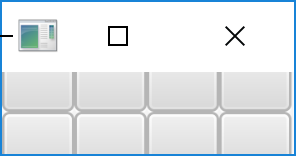

|
9 баллов |
Sign up for free
to join this conversation on GitHub.
Already have an account?
Sign in to comment


Add this suggestion to a batch that can be applied as a single commit.
This suggestion is invalid because no changes were made to the code.
Suggestions cannot be applied while the pull request is closed.
Suggestions cannot be applied while viewing a subset of changes.
Only one suggestion per line can be applied in a batch.
Add this suggestion to a batch that can be applied as a single commit.
Applying suggestions on deleted lines is not supported.
You must change the existing code in this line in order to create a valid suggestion.
Outdated suggestions cannot be applied.
This suggestion has been applied or marked resolved.
Suggestions cannot be applied from pending reviews.
Suggestions cannot be applied on multi-line comments.
Suggestions cannot be applied while the pull request is queued to merge.
Suggestion cannot be applied right now. Please check back later.
No description provided.