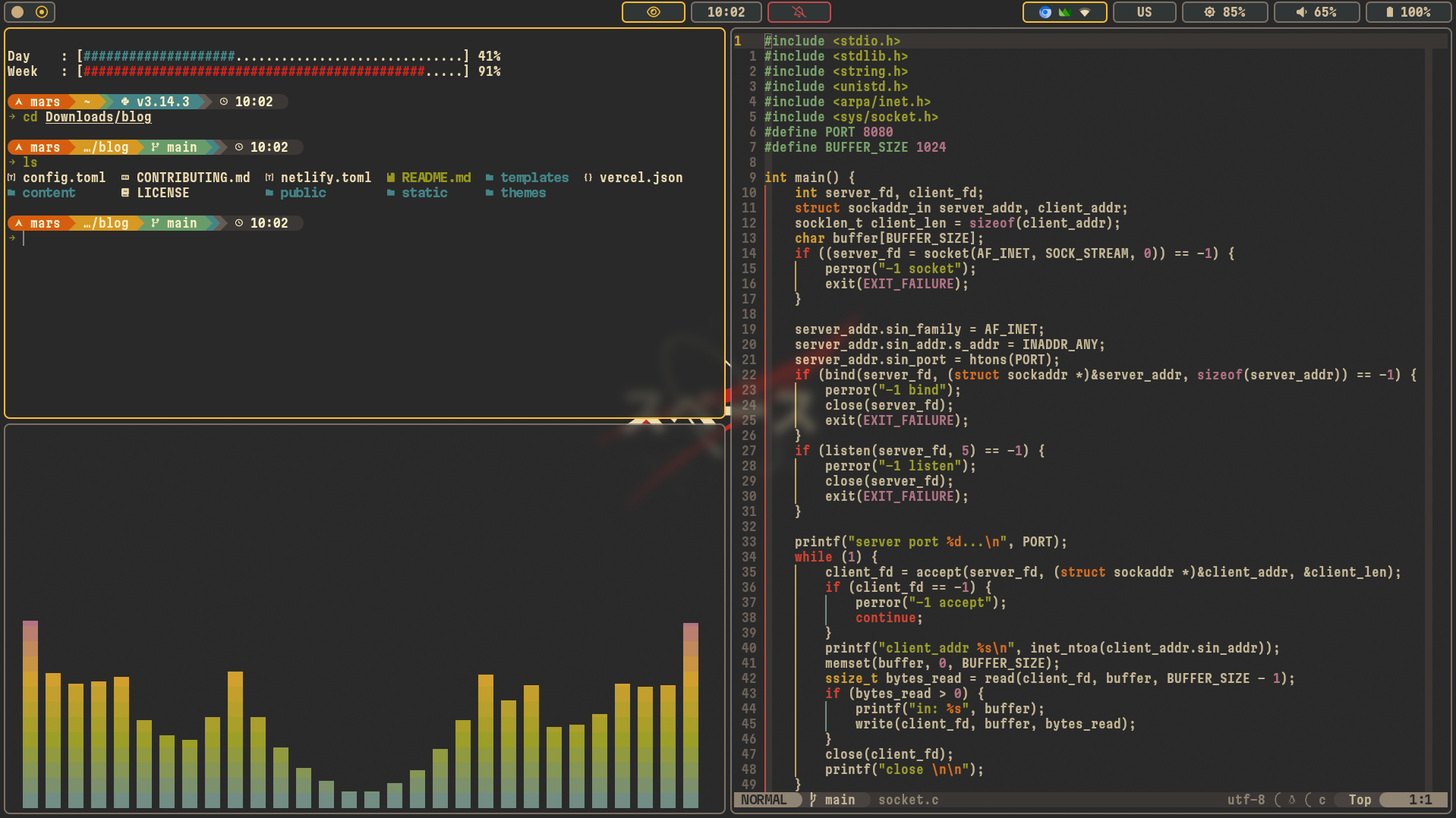
Repository files navigation advanced dots (arch x wayland)
note
sway and hyprland are configured identically - they use same keybindings, scripts and programs
the repo must be cloned into the home directory (e.g. /home/user/wayland)
Super + TTerminal
Super + BBrowser
Super + FFile Manager
Super + OApp Launcher
Super + Shift + GObsidian (notes)
Super + YDashboard
Super + WChange wallpaper
Super + Shift + PColor picker
Super + Shift + VClipboard (history)
Super + Shift + WScreenshot
Super + XClose window
Super + EFloat / tile
Super + Shift + FFullscreen
Super + CChange split direction
Super + NSplit horizontal
Super + MSplit vertical
Super + ZFocus previous window
Super + SShow scratchpad
Super + Shift + SSend window to scratchpad
Super + H or Super + ←Focus left
Super + L or Super + →Focus right
Super + K or Super + ↑Focus up
Super + J or Super + ↓Focus down
Super + Shift + H or Super + Shift + ←Move left
Super + Shift + L or Super + Shift + →Move right
Super + Shift + K or Super + Shift + ↑Move up
Super + Shift + J or Super + Shift + ↓Move down
Super + REnter resize mode (border turns red)
H or ←Shrink width
L or →Expand width
K or ↑Shrink height
J or ↓Expand height
Escape or EnterExit resize mode
Alt + 1 … 6Switch to workspace 1–6
Super + Shift + 1 … 6Move window to workspace 1–6
F1 — MuteToggle mute
F2 — Vol–Volume down
F3 — Vol+`Volume up
F4 — Mic muteToggle mic mute
F7 — Play/PausePlay / Pause
F8 — PrevPrevious track
F9 — NextNext track
F5 — Bright–Brightness −10%
F6 — Bright+`Brightness +10%
Super + QSystem menu (logout, reboot, lock)
Super + Shift + QLocal Recall
Power buttonSystem menu
Super + BackspaceReload config (Sway only)
Ctrl + OOpen Yazi file manager (cd on exit)
↑ / ↓History search
HomeBeginning of line
EndEnd of line
DeleteDelete char under cursor
Ctrl + →Jump word forward
Ctrl + ←Jump word backward
Esc EscAdd sudo to previous command
Ctrl + TFuzzy find files (fzf)
Alt + CFuzzy cd into directory (fzf)
Ctrl + RFuzzy search command history (fzf)
..cd ..
...cd ../..
wipLocal ip
gipPublic ip
pypython3
trash <file>Move to ~/.local/share/Trash
hg <query>Bash history grep
portsOpen ports
pathPATH
tempProc temp
yccYandex cli config
gitsShow edited and untracked git files
chrome-proxyChromium via proxy
dpiProxy
cpp <file.cpp>compile with g++ -std=c++17 and run
Ctrl + Shift + CCopy to clipboard
Ctrl + Shift + VPaste from clipboard
Ctrl + BNew window (same cwd)
Ctrl + HLaunch tmux session (script)
Ctrl + WClose window
Ctrl + Shift + LeftPrevious tab / focus window left
Ctrl + Shift + RightNext tab / focus window right
Ctrl + Shift + UpMove tab up / focus window up
Ctrl + Shift + DownMove tab down / focus window down
Alt + LeftWord jump left
Alt + RightWord jump right
Ctrl + APrefix (replaces default Ctrl + B)
Prefix + |Split pane vertically
Prefix + -Split pane horizontally
Prefix + H/J/K/LFocus pane left/down/up/right
Prefix + Shift + H/J/K/LResize pane left/down/up/right (repeatable)
Prefix + Ctrl + CNew session
Prefix + XKill session (with confirmation)
Prefix + RReload config
vBegin selection (copy mode)
yCopy selection (copy mode)
About
my .s
Topics
Resources
License
Stars
Watchers
Forks
You can’t perform that action at this time.