World's first n8n client that manage workflow collections inside VSCode/Cursor/Antigravity
- Walkthrough video: n8n atom + Antigravity: vibe building workflow (feel like vibe coding)
- Website: www.atom8n.com
- Download the client extension: n8n Atom 3.0
- Join Our Community: Discord, Facebook
- Nodejs installation:
npx -y @atom8n/n8n@latest
Or docker:
docker volume create n8n_data

docker run --pull=always -it --rm --name n8n-atom -p 5888:5888 -v n8n_data:/home/node/.n8n atom8n/n8n:fork


n8n Atom is the world's first n8n client that manages workflow collections directly inside VSCode, Cursor, and Antigravity.
Key Features:
- File-Based Workflows: Convert n8n workflows into file format (.n8n) that can be committed to GitHub, enabling proper version control and collaboration
- Native Editor Integration: Full drag-and-drop n8n UI embedded directly in your editor, forked from the official n8n front-end
- AI-Powered Workflow Building: Leverage AI coding agents (like Antigravity) to iteratively build and improve workflows by editing the workflow JSON files directly
- Seamless Workflow Management: Create, edit, execute, and manage n8n workflows without leaving your development environment
- Local Development: Works with local n8n server instances, perfect for development and testing workflows before deploying to production
Why n8n Atom? The main motivation behind this project was to make workflows file-based, so they can be committed to GitHub and version controlled like regular code. This also allows developers to leverage AI coding assistants to efficiently build and iterate on workflows, transforming the manual UI-based workflow creation process into a code-driven, version-controlled development experience.
Perfect For:
- Developers who want to version control their n8n workflows Teams looking to integrate workflow development into their existing development workflow
- Users of Antigravity, Cursor, or VSCode who want a unified development environment
- Anyone who wants to leverage AI coding agents to build and improve workflows programmatically
As a developer working frequently with n8n workflows, I realized a core problem: workflows couldn't be managed like code.
The problems I faced:
- Workflows were stored in n8n's database, making version control impossible
- Every change required manual UI work, which was time-consuming and error-prone
- No way to review changes before deploying
- Couldn't leverage AI coding agents to build workflows automatically
- Had to switch between multiple tools, breaking my development flow
The inspiration: I wanted to bring workflows into the file-based world so they could be committed to GitHub and version controlled like regular code. This would also allow developers to leverage AI coding assistants to efficiently build and iterate on workflows.
The journey: I spent 2 days "vibe coding" with Antigravity to build the MVP. The experience was incredible, I could input 100% in natural language and build workflows seamlessly, just like coding. In those 2 days, I:
- Forked the front-end from the official n8n repository
- Integrated n8n UI into a VSCode extension
- Implemented a file-based workflow system (.n8n format)
- Created the world's first extension to manage n8n workflows in an editor

- "I've been waiting a long time for an extension like this, I think it's awesome"
- "Being able to version control workflows like regular code changes everything"
- "The workflow is incredibly powerful when used with other tools like Kanban and Thor Client"
- "This feels like you materialized the vision of turning VS Code into a true AI cockpit"



n8n is a workflow automation platform that gives technical teams the flexibility of code with the speed of no-code. With 400+ integrations, native AI capabilities, and a fair-code license, n8n lets you build powerful automations while maintaining full control over your data and deployments.
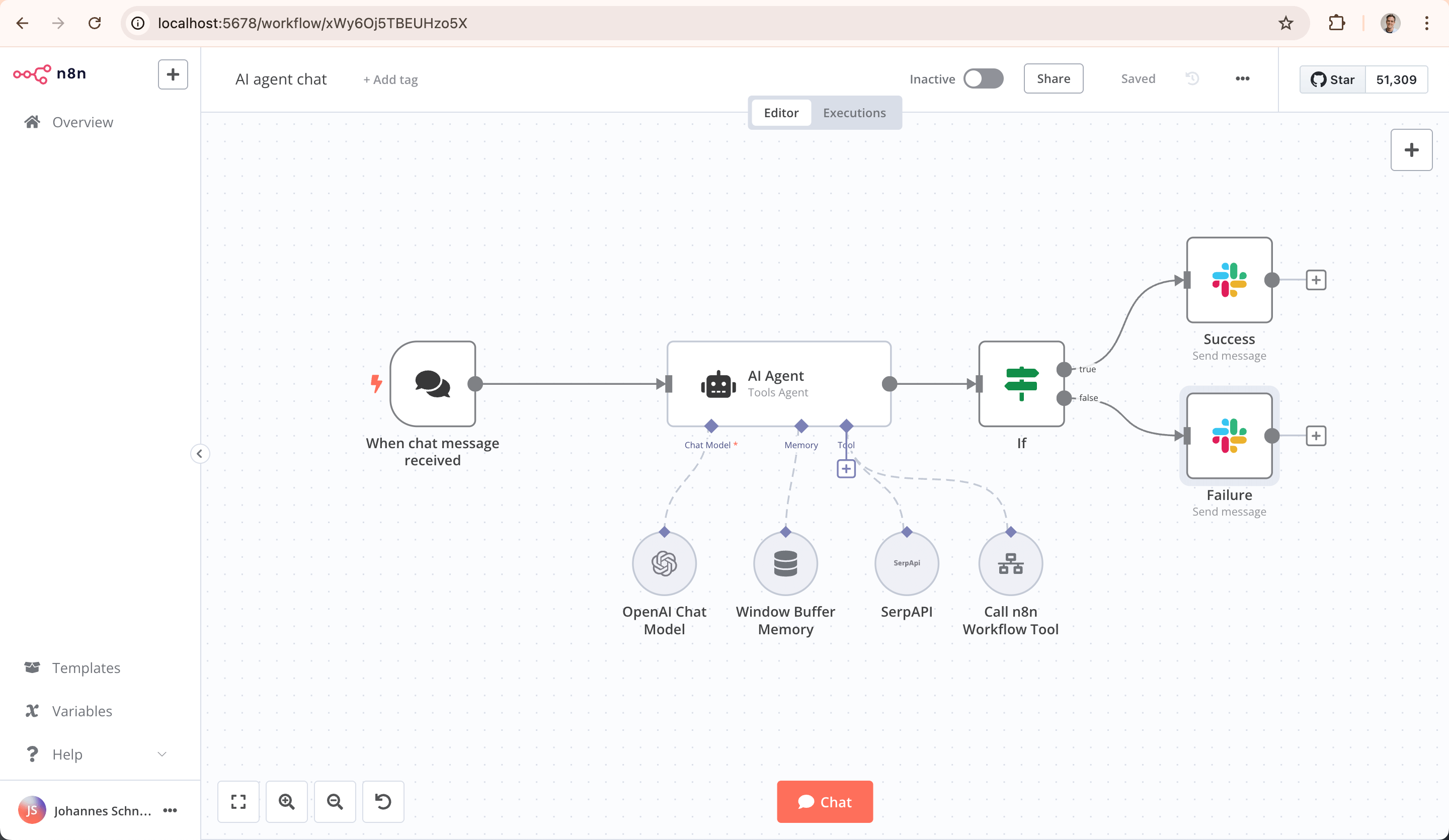
- Code When You Need It: Write JavaScript/Python, add npm packages, or use the visual interface
- AI-Native Platform: Build AI agent workflows based on LangChain with your own data and models
- Full Control: Self-host with our fair-code license or use our cloud offering
- Enterprise-Ready: Advanced permissions, SSO, and air-gapped deployments
- Active Community: 400+ integrations and 900+ ready-to-use templates
Try n8n instantly with npx (requires Node.js):
npx n8n
Or deploy with Docker:
docker volume create n8n_data
docker run -it --rm --name n8n -p 5888:5888 -v n8n_data:/home/node/.n8n docker.n8n.io/n8nio/n8n
Access the editor at http://localhost:5888
- 📚 Documentation
- 🔧 400+ Integrations
- 💡 Example Workflows
- 🤖 AI & LangChain Guide
- 👥 Community Forum
- 📖 Community Tutorials
Need help? Our community forum is the place to get support and connect with other users: community.n8n.io
n8n is fair-code distributed under the Sustainable Use License and n8n Enterprise License.
- Source Available: Always visible source code
- Self-Hostable: Deploy anywhere
- Extensible: Add your own nodes and functionality
Enterprise licenses available for additional features and support.
Additional information about the license model can be found in the docs.
Found a bug 🐛 or have a feature idea ✨? Check our Contributing Guide to get started.
Want to shape the future of automation? Check out our job posts and join our team!
Short answer: It means "nodemation" and is pronounced as n-eight-n.
Long answer: "I get that question quite often (more often than I expected) so I decided it is probably best to answer it here. While looking for a good name for the project with a free domain I realized very quickly that all the good ones I could think of were already taken. So, in the end, I chose nodemation. 'node-' in the sense that it uses a Node-View and that it uses Node.js and '-mation' for 'automation' which is what the project is supposed to help with. However, I did not like how long the name was and I could not imagine writing something that long every time in the CLI. That is when I then ended up on 'n8n'." - Jan Oberhauser, Founder and CEO, n8n.io
