



- Overview
- Features
- Technologies Used
- Getting Started
- Usage
- Project Structure
- Deployment
- Contact
- Acknowledgments
The AI Meeting Summarizer is a powerful web application designed to streamline your post-meeting workflows. It leverages state-of-the-art Artificial Intelligence to automatically transcribe spoken meeting audio and generate concise, actionable summaries. Say goodbye to manual note-taking and missed key points – focus on the discussion, and let the AI handle the rest!
This project aims to provide a robust solution for:
- Converting raw meeting audio into accurate text transcripts.
- Extracting the most important information, decisions, and action items.
- Saving valuable time for individuals and teams.
The output is categorized into:
- 📌 Pain Points
- 🛑 Objections
- ✅ Next Steps
- ⏳ Timeline
- Audio Transcription: Upload audio files (e.g., MP3, WAV) and get accurate text transcripts using advanced Speech-to-Text models.
- AI-Powered Summarization: Utilizes large language models to condense lengthy transcripts into clear, coherent, and concise summaries.
- Key Information Extraction: Automatically identifies and highlights critical decisions, action items, and discussion points.
- User-Friendly Interface: An intuitive web interface for easy audio upload, transcription, and summary viewing.
- Scalable Backend: Designed with a modular backend for easy integration of different AI models and future enhancements.
- Secure API Key Handling: Emphasizes best practices for managing sensitive API keys.
This project is built using a modern stack to ensure performance, scalability, and ease of development.
Backend:
- Python: The core programming language.
- [FastAPI]: FastAPI for high performance.
- [Speech Recognition Library]: WHISPER For converting audio to text.
- [Large Language Model (LLM) API]: Used 'gemini-1.5-flash-latest' for text summarization, Hugging Face API for fast trancription.
python-dotenv: For managing environment variables.
Frontend:
- [React]: React + Tailwind CSS for dynamic user experience.
Deployment & Hosting:
- GitHub: Code hosting.
- Render: Cloud platform for deploying the web service.
Follow these instructions to set up and run the AI Meeting Summarizer on your local machine.
Before you begin, ensure you have the following installed:
- Python 3.9+
- pip (Python package installer)
- Git
-
Clone the repository:
git clone [https://github.com/mesumittiwari/AI-Meeting-Summarizer.git](https://github.com/mesumittiwari/AI-Meeting-Summarizer.git) cd AI-Meeting-Summarizer -
Create and activate a virtual environment:
python -m venv venv
# On Windows
.\venv\Scripts\activate
# On macOS / Linux
source venv/bin/activate
-
Install backend dependencies: Navigate into the
backenddirectory and install the required Python packages.cd backend pip install -r requirements.txt cd .. # Go back to the project root
Make sure you have a
requirements.txtfile in yourbackenddirectory. If not, generate one from your current environment:# In the backend directory pip freeze > requirements.txt
This project uses environment variables to manage sensitive API keys. You need to create a .env file in the backend directory.
-
Create a
.envfile: In thebackend/directory, create a new file named.env(note the leading dot). -
Add your API keys: Populate the
.envfile with your API keys. Replace the placeholder values with your actual keys.# backend/.env # Example for OpenAI API Key OPENAI_API_KEY=your_openai_api_key_here # Example for Hugging Face API Token (if used, e.g., for inference API) HF_ACCESS_TOKEN=your_huggingface_access_token_here # Add any other API keys or environment-specific variables your backend needs
IMPORTANT: Never commit your
.envfile to version control. It is already included in.gitignorefor your security.
Once the dependencies are installed and environment variables are set, you can start the backend server.
-
Navigate to the
backenddirectory:cd backend -
Start the server: (Choose the command based on your backend framework: FastAPI with Uvicorn, Flask with Gunicorn, etc.)
If using FastAPI with Uvicorn:
uvicorn main:app --host 0.0.0.0 --port 8000 --reload
(
main:appassumes your FastAPI app instance is namedappinmain.py)If using Flask with a simple Python script:
python app.py
(
app.pywould be your main Flask application file)The backend server should now be running, typically accessible at
http://127.0.0.1:8000(or the port you configured).
-
Navigate to the
frontenddirectory:cd ../frontend # From the backend directory, or cd frontend from project root
-
Install frontend dependencies (e.g., for a React app):
npm install # or yarn install -
Start the frontend development server:
npm start # or yarn startThe frontend application should then open in your browser, usually at
http://localhost:3000.
- Access the Application: Open your web browser and navigate to the frontend URL (e.g.,
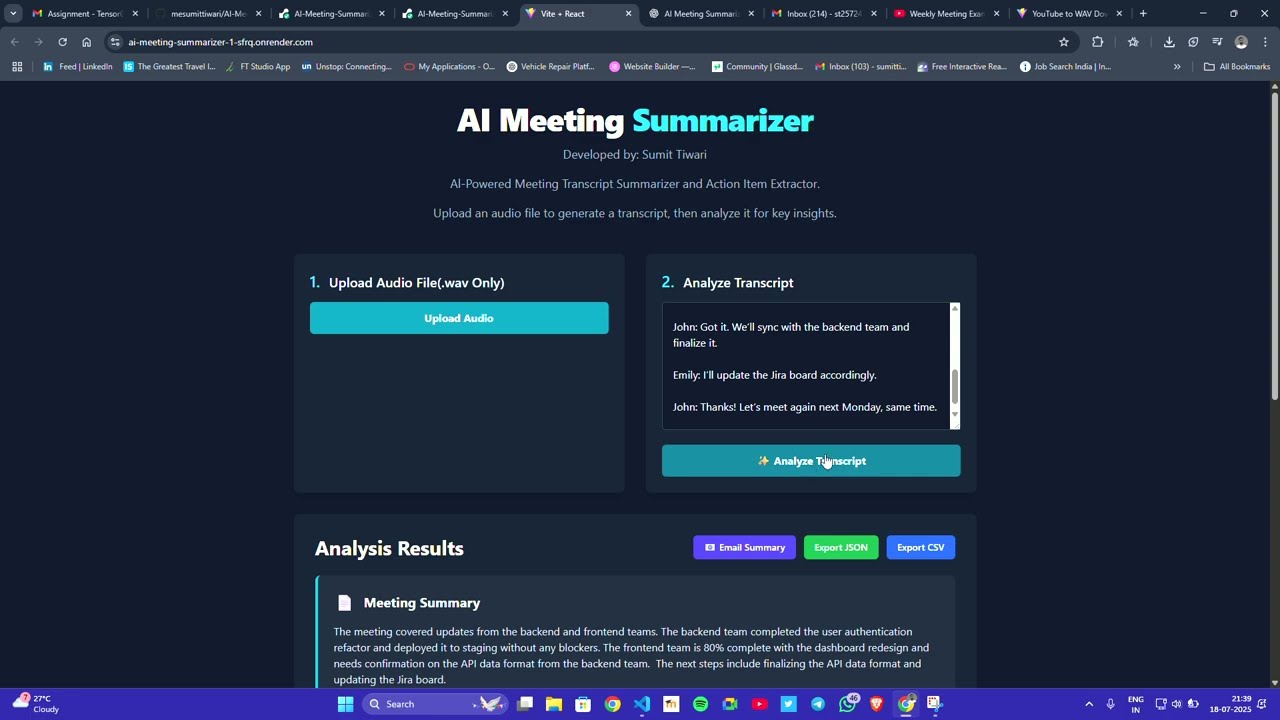
http://localhost:3000). - Upload Audio: Use the provided interface to upload your meeting audio file (e.g., MP3, WAV).
- Process: It will automatically generate trancscription of uploaded auddio file. Click the "Copy to Analysis Input" button. The application will then:
- Take transcription as text input.
- Process the transcript with the AI model.
- Display the generated summary and extracted key points.
- View Summary: Read the concise summary and review the extracted action items.
- You can dowload the summarised text in CSV and JSON format.
- You can e-mail it to a predefined receiver email from your email (see envrironment variables for more clarity).
AI-Meeting-Summarizer/
│── backend/
│   ├── main.py
│   ├── requirements.txt
│   └── ...
│── frontend/
│   ├── src/
│   ├── package.json
│   └── ...
│── README.md
- User uploads a
.mp3,.wav, or similar audio file via the frontend. - The file is sent to the backend for processing.
- Backend converts audio to
.wavif required usingffmpeg. - Whisper (Hugging Face) processes the audio and generates the transcript (text).
- The transcript is sent to Google Gemini (
gemini-1.5-flash-latest). - Gemini generates a structured summary categorized into:
- Pain Points
- Objections
- Next Steps
- Timeline
- Results are displayed in the frontend UI.
- Users can optionally:
- Download the output as CSV or JSON.
- Email the summary.
The AI Meeting Summarizer is deployed on Render for backend hosting and can be accessed live via the following link:
🔗 Live App: AI Meeting Summarizer
Deployment Steps (if self-hosting):
-
Backend Deployment:
- Push the backend code to your GitHub repository.
- Link your repository to a hosting platform such as Render, Railway, or Heroku.
- Configure environment variables (API keys, etc.) in the platform’s settings.
- Deploy and note the backend API URL.
-
Frontend Deployment:
- Update API endpoints in the frontend code to point to the deployed backend.
- Deploy the frontend using Vercel, Netlify, or Render.
- Link your domain or use the default deployment URL provided by the hosting service.
-
Testing:
- Test both frontend and backend integrations to ensure smooth performance.
- Verify file uploads, summarization accuracy, and API connections.
Sumit Tiwari
📩 Email: sumittiwari2414@gmail.com
🔗 GitHub: mesumittiwari
A huge thank you to all the amazing technologies, platforms, and people who made this project possible:
- Google Gemini API – for providing powerful summarization capabilities.
- Hugging Face – for robust transcription models like Whisper.
- FastAPI – for creating a high-performance backend.
- React and Tailwind CSS – for building a fast and responsive frontend.
- Render – for reliable cloud deployment.