Sneak is a minimalist, versatile Vim motion plugin that jumps to any location specified by two characters.
It works with multiple lines, operators (including repeat .
and surround), keymaps, visual mode, unicode ("multibyte"),
and macros. Many details have been carefully balanced to minimize
friction between intent and action.
The plugin chooses sane defaults, easily changed via <Plug> mappings
(see :help sneak).
New Option: Use Sneak as a minimalist alternative to EasyMotion:
let g:sneak#streak = 1
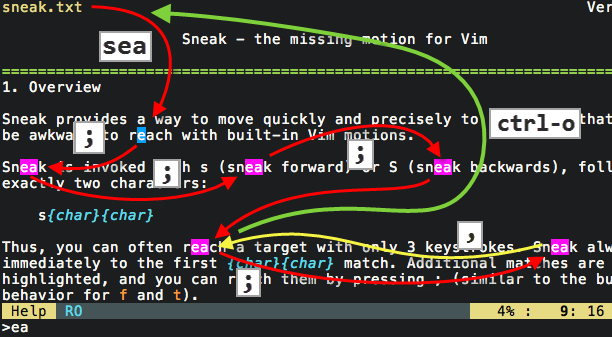
Sneak is invoked with s followed by exactly two characters:
s{char}{char}
- Press
sabto move the cursor immediately to the next instance of the text "ab".- Additional matches, if any, are highlighted until the cursor is moved.
- Press
;to go to the next match (orsagain, ifs_nextis enabled; see:help sneak). - Press
3;to skip to the third match from the current position. - Press
ctrl-oor``to go back to the starting point.- This is a built-in Vim motion; Sneak adds to Vim's jumplist
only on
sinvocation—not repeats—so you can abandon a trail of;or,by a singlectrl-oor``.
- This is a built-in Vim motion; Sneak adds to Vim's jumplist
only on
- Press
s<Enter>at any time to repeat the last Sneak-search. - Press
Sto search backwards.
Sneak can be scoped to a column of width 2×[number] by prefixing s
with a number.
- Press
5sxyto go immediately to the next instance of "xy" within 5 columns of the cursor.- A highlight block indicates the vertical scope.
Sneak is invoked with operators
via z (because s is taken by surround.vim).
- Press
3dzqtto delete up to the third instance of "qt".- Press
.to repeat the3dzqtoperation. - Press
2.to repeat twice. - Press
d;to delete up to the next match. - Press
4d;to delete up to the fourth next match.
- Press
- Press
ysz))]to surround in brackets up to)).- Press
;to go to the next)).
- Press
- Press
gUz\}to upper-case the text from the cursor until the next instance of the literal text\}- Press
.to repeat thegUz\}operation.
- Press
l  f  t  %  'm  }  ]m  ]]  M  L     /
                                 ^
                                 |
                               sneak
Vim's built-in motions cover many special cases, but it's awkward to move across
several lines to an arbitrary position: f is restricted to the current line,
and / is clunky for medium-distance motion.
Compare Sneak to Vim's built-in / and other plugins:
- minimum of 3 keystrokes
- repeat motion via
;and, - repeat operation via
. - move anywhere, even offscreen
- jump immediately to first match
- only the initial invocation adds to the jumplist
- preserves default behavior of
f t F T ; , - avoids noise in
/history - count prefix invokes vertical scope
- always literal:
s\*jumps to the literal\* - supports mbyte-keymaps (#47)
- Manual installation:
- Copy the files to your
.vimdirectory (_vimfileson Windows).
- Copy the files to your
- Pathogen
cd ~/.vim/bundle && git clone git://github.com/justinmk/vim-sneak.git
- Vundle
- Add
Bundle 'justinmk/vim-sneak'to .vimrc - Run
:BundleInstall
- Add
- NeoBundle
- Add
NeoBundle 'justinmk/vim-sneak'to .vimrc - Run
:NeoBundleInstall
- Add
- vim-plug
- Add
Plug 'justinmk/vim-sneak'to .vimrc - Run
:PlugInstall
- Add
If you want to repeat Sneak operations (like dzab) with dot .,
then repeat.vim is required.
For the same reason that Vim has motions
like f and t: common operations should use as few keystrokes as possible.
/ab<cr>requires 33% more keystrokes thansab- Sneak remembers only the initial position in the Vim jumplist—so you can explore a trail of matches via
;, then return to the start with a singlectrl-oor`` - Sneak doesn't clutter your search history
- Sneak is always literal (no need to escape special characters)
- Sneak has smarter, subtler highlighting
- Sneak Streak-Mode
- Sneak is fifty times more precise than
fort - Sneak moves vertically
- Sneak highlights matches in the direction of your search
You can specify any mapping for Sneak (see :help sneak).
By the way: cl is equivalent to s, and cc is equivalent to S.
    nmap f <Plug>Sneak_s
    nmap F <Plug>Sneak_S
    xmap f <Plug>Sneak_s
    xmap F <Plug>Sneak_S
    omap f <Plug>Sneak_s
    omap F <Plug>Sneak_S
Sneak provides <Plug> convenience-mappings for f and t 1-character-sneak.
These mappings do not invoke streak-mode, even if you have it enabled.
    "replace 'f' with 1-char Sneak
    nmap f <Plug>Sneak_f
    nmap F <Plug>Sneak_F
    xmap f <Plug>Sneak_f
    xmap F <Plug>Sneak_F
    omap f <Plug>Sneak_f
    omap F <Plug>Sneak_F
    "replace 't' with 1-char Sneak
    nmap t <Plug>Sneak_t
    nmap T <Plug>Sneak_T
    xmap t <Plug>Sneak_t
    xmap T <Plug>Sneak_T
    omap t <Plug>Sneak_t
    omap T <Plug>Sneak_T
Sneak is intended to replace the so-called f-enhancement plugins.
You can use both, but Sneak won't be able to hook into f, which means
; and , will always repeat the last Sneak.
Sneak tries to be well-behaved and annoyance-free. If you find a bug, please report it, and perhaps include the output of:
:call sneak#debug#report()
Sneak is tested on a 10-MB, 400k-lines, syntax-highlighted file with Vim 7.2.330, 7.3, 7.4.
Copyright © Justin M. Keyes. Distributed under the MIT license.