




Also check out Frolic Chat! It's another F-Chat Rising fork, and we're big fans on it ourselves.
This repository contains a continuation of the heavily customized F-Chat Rising, a version of the mainline F-Chat 3.0 client.
In a non-exhaustive list, Horizon has these features!
- Profile matching automatically compares your profile with others to determine with whom you are compatible.
- Automatic ad posting repeatedly posts and rotates ads on selected channels.
- Link previews popup shows a preview of an image / video when you hover your mouse over a link.
- Caching speeds up profile loads and other actions.
- Smart filters let you choose what kind of ads and posts you see in the chat.
Horizon aims to be an opinionated fork of F-Chat Rising. Instead of aiming solely to be a more customized fork of the original client, we aim to:
-
Maintain Cross-Platform Compatibility
Ensure full functionality across Linux, Windows, and macOS without bias toward any specific platform. -
Show Function Over Form
Prioritize features, usability, and reliability over appearance. Adopt modern feature sets and evolving standards. -
Be Community-Driven
Foster an open, collaborative development environment guided by the community. See CONTRIBUTING.md for details. -
Have Safe and High-Quality Code
Enforce strict code quality standards, specifically in readability, maintainability, and safety. -
Be Simple by Default, Powerful When Needed
All additional features should be optional, and when possible, disabled by default. -
Have a Fork-Friendly Foundation
Establish a solid base that can be easily adapted for future forks with different objectives. -
Retain Core Features
Maintain all core functionality from the original Rising project.
It should be known that this project aligns closely with the ideaology of KDE
Horizon can be installed on all major operating systems (Minus BSDs.)
- Download the installer for your architecture:
- Run the downloaded installer and follow the on-screen instructions.
(Maybe one day we'll support winget~)
Warning
Due to that nature of Mac, MacOS builds are experimental. Please contact me if you have any issues.
Since we currently don't have a paid developer license (and MacOS by default blocks unsigned apps downloaded from the internet), you may need to manually allow the app in your command line or System Settings.
-
Download the installer. There are both versions specific to Intel (pre-2020) and Apple Sillicon Macs, and a 'Universal' one that works on both.
-
Open the downloaded .dmg file and drag the application to your Applications folder. If you get a warning saying
"Horizon" is damaged and can't be opened. You should move it to the Bin.while attempting to open Horizon, continue past step 2: -
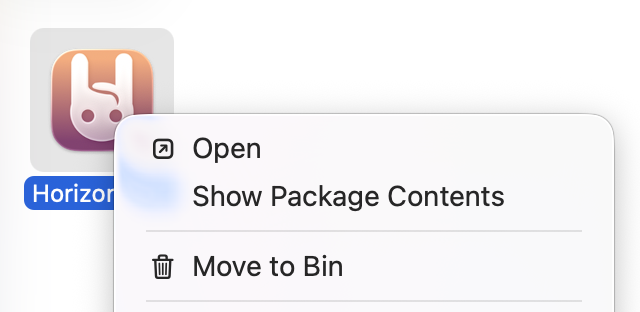
Open the Applications folder in your finder, and hold the Ctrl key while clicking the Horizon icon, and select "Open".
-
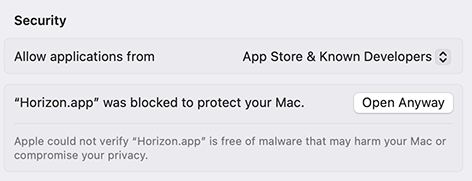
The warning should appear like normal, but if you then go to System Settings > Privacy and Security, Horizon should appear as a blocked app. Clicking "Open Anyway" should add it to the whitelist and let you use it as normal.
Or if you're more of a Terminal hero:
- Open your Terminal app
- Type the following command and press Enter:
xattr -d com.apple.quarantine /Applications/Horizon.app- Now the app should open as expected.
This is unfortunately unresolvable unless we either get a paid developer license from Apple, or if users disable the Gatekeeper whitelist from their system altogether– which we do not recommend you do.
Horizon has excellent Linux support. Read more at horizon-packages.
| Distro | Info | Maintainer(s) |
|---|---|---|
 |
link | @CodingWithAnxiety |
  |
 |
astrayblackcat, KenwoodFox, @CodingWithAnxiety |
  |
Available under releases | The Horizon Developers |
  |
Available under releases | The Horizon Developers |
- Download the
.debfile for your architecture. - Install:
sudo dpkg -i F-Chat.Horizon-linux-<arch>.deb
- Download the
.rpmfile for your architecture: - Install using your package manager:
- Fedora/RHEL/CentOS:
sudo dnf install F-Chat.Horizon-linux-<arch>.rpm
- openSUSE:
sudo zypper install F-Chat.Horizon-linux-<arch>.rpm
- Generic RPM:
sudo rpm -i F-Chat.Horizon-linux-<arch>.rpm
- Fedora/RHEL/CentOS:
- Download the AppImage for your architecture:
- Make it executable, then run:
chmod +x F-Chat.Horizon-linux-<arch>.AppImage
./F-Chat.Horizon-linux-<arch>.AppImage
- Download the
.tar.gzfor your architecture: - Extract and run:
tar -xzf F-Chat.Horizon-linux-<arch>.tar.gz
cd F-Chat.Horizon-linux-<arch>
./F-Chat.Horizon
Note
The AUR package currently doesn't support ARM.
- With an AUR helper:
yay|paru|etc -S fchat-horizon-bin
- Manually:
git clone https://aur.archlinux.org/fchat-horizon-bin.git
cd fchat-horizon-bin
makepkg -si
When you first load F-Chat Horizon, you'll notice its interface is closely similar to the original client. However, note the added menus:
- Ad Editor: Located underneath your profile, entering the Ad editor will open an additional menu. Here you can edit the ads you want to post!
- Assign a 'tag' to your ads. You can use the 'post ads' function to post ads of specific tag types into specified channels.
- Post Ads: Located under the Ad Editor, clicking this button will open the ad posting dialog. You can select the tags and channels for your ads.
- Settings: Horizon adds additional settings under the settings button.
- The Horizon tab: Contains general settings for Horizon
- The Smart Filters tab: Here you can configure the smart filters. Be aware that this is a work in progress!
The wiki, while still a work in progress, has additional information on using Horizon
[!INFO] Our FAQ section, for both the Readme and the website, is in the process of being fully rewritten.
Please read CONTRIBUTING.md
Our codebase has received contributions from the following people:
- French: Azthenor, Fragile, Xav
- German: ForgetfulTragedy, Peel
- Hungarian: Firespark
- Italian: Clovermoth
- Spanish: A Day with a Carrot, Dess
- UWUnglish (we're so sorry): @CodingWithAnxiety, @FatCatClient