This project implements a custom Dynamic Window Approach (DWA) local planner for TurtleBot3 navigation in ROS2 Humble with Gazebo simulation.
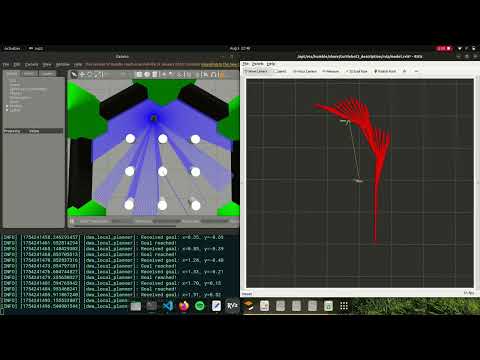
- Ubuntu 22.04 LTS
- ROS2 Humble
- Python 3.10+
- Gazebo 11
# Add ROS2 repository
sudo apt update && sudo apt install curl gnupg lsb-release
sudo curl -sSL https://raw.githubusercontent.com/ros/rosdistro/master/ros.asc | sudo apt-key add -
echo "deb [arch=$(dpkg --print-architecture)] http://packages.ros.org/ros2/ubuntu $(lsb_release -cs) main" | sudo tee /etc/apt/sources.list.d/ros2.list > /dev/null

# Install ROS2 Humble
sudo apt update
sudo apt install ros-humble-desktop
sudo apt install ros-humble-gazebo-ros-pkgs
sudo apt install ros-humble-cartographer
sudo apt install ros-humble-cartographer-ros
sudo apt install ros-humble-navigation2
sudo apt install ros-humble-nav2-bringupsudo apt install ros-humble-turtlebot3*Add to your ~/.bashrc:
source /opt/ros/humble/setup.bash
export TURTLEBOT3_MODEL=burger
export GAZEBO_MODEL_PATH=$GAZEBO_MODEL_PATH:/opt/ros/humble/share/turtlebot3_gazebo/models
Then reload:
source ~/.bashrcmkdir -p ~/ros2_ws/src
cd ~/ros2_ws/src
git clone https://github.com/mohittalwar23/dwa_local_planner.git
cd ~/ros2_ws
colcon build --packages-select dwa_local_planner
source install/setup.bashTerminal 1 - Launch Gazebo world:
ros2 launch turtlebot3_gazebo turtlebot3_world.launch.pyTerminal 2 - Launch RViz for visualization:
ros2 launch turtlebot3_bringup rviz2.launch.pyTerminal 3 - Launch the DWA planner:
ros2 run dwa_local_planner dwa_plannerIn RViz:
- Add MarkerArray display with topic
/dwa_trajectories - Use the "2D Goal Pose" tool to set a target destination
- Watch the robot navigate while avoiding obstacles
View debug messages:
ros2 topic echo /rosoutCheck current velocity commands:
ros2 topic echo /cmd_velThe DWA algorithm implemented here follows these steps:
- Dynamic Window Generation: Sample velocity commands (linear and angular) within the robot's dynamic constraints
- Trajectory Prediction: For each velocity sample, predict the robot's trajectory over a time horizon
- Cost Evaluation: Evaluate each trajectory using a multi-objective cost function:
- Goal Distance: Distance from trajectory endpoint to goal
- Obstacle Avoidance: Minimum distance to obstacles along trajectory
- Path Smoothness: Velocity magnitude and angular velocity penalties
- Best Command Selection: Choose the velocity command with the lowest total cost
Total Cost = α * goal_cost + β * obstacle_cost + γ * velocity_cost
Where:
α = 1.0(goal weight)β = 2.0(obstacle weight)γ = 0.1(velocity weight)
Key configurable parameters:
max_linear_vel: 0.5 m/smax_angular_vel: 1.5 rad/slinear_acceleration: 2.0 m/s²angular_acceleration: 3.0 rad/s²prediction_time: 3.0 secondsdt: 0.1 seconds (simulation step)goal_tolerance: 0.2 meters
- Robot not moving: Check if goal is set and within reasonable distance
- Oscillating behavior: Reduce angular velocity samples or adjust cost weights
- Collision with obstacles: Increase obstacle cost weight or reduce prediction time
- RViz not showing trajectories: Ensure MarkerArray topic
/dwa_trajectoriesis added
- Increase responsiveness: Reduce
dtorprediction_time - Smoother paths: Increase velocity cost weight
- Better obstacle avoidance: Increase obstacle cost weight
- Faster goal reaching: Increase goal cost weight
dwa_local_planner/
├── dwa_local_planner/
│   ├── __init__.py
│   └── dwa_planner.py
├── launch/
│   └── dwa_navigation.launch.py
├── package.xml
├── setup.py
└── README.md
- Simple Navigation: Place goal in open space
- Obstacle Avoidance: Navigate around static obstacles in Gazebo world
- Narrow Passages: Test navigation through doorways