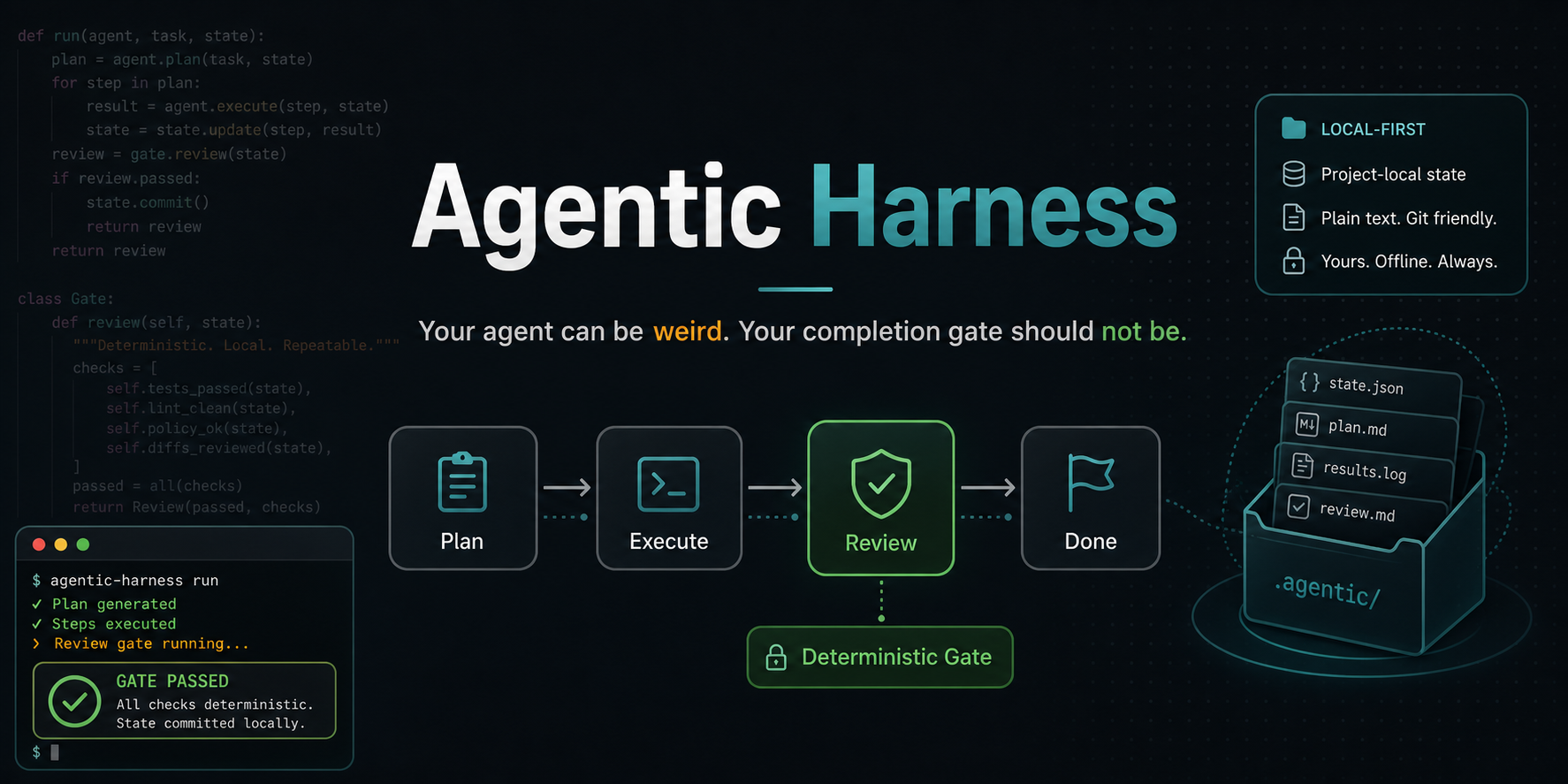




Let your coding agent work. Make it prove the result.
A coding agent saying “done” is not proof that the task is done. Agentic Harness adds a completion gate to Codex, OpenCode, Aider, CodeWhale, or a compatible local/cloud model. It keeps the objective, records the work, runs a check you control, and only then reports Verified done.
- Keep your agent. The harness wraps the tools and models you already use.
- Choose the proof. Tests, lint, builds, or another deterministic command decide whether the result is accepted.
- Keep the evidence. Every run leaves a project-local, redacted report you can inspect or commit with the work.
- Choose your runtime. Use the embedded worker, an installed coding app, or an operator-owned OpenAI-compatible endpoint such as vLLM.
- Stay local by default. The GUI binds to loopback, and local model paths do not require a cloud service.
Install the released CLI and browser interface:
pipx install local-agentic-harness
cd /path/to/your/project
agentic-harness gui
The browser opens on Home. Describe the result in a normal sentence, choose how much effort it deserves, and use Settings once to connect an installed coding app, local AI, or cloud AI. Commands, endpoints, and model details stay under advanced disclosures until you need them.
No account or AI setup yet? Click Try safe demo in the app, or run:
agentic-harness run-demo fix-tests /tmp/agentic-harness-demo --forceThe demo begins with a failing test and a worker that claims success too early. The independent gate rejects the claim, a second attempt repairs the project, and the final report shows why the result was accepted. It is a controlled mechanics demo, not evidence about model quality. See the complete terminal demo script.
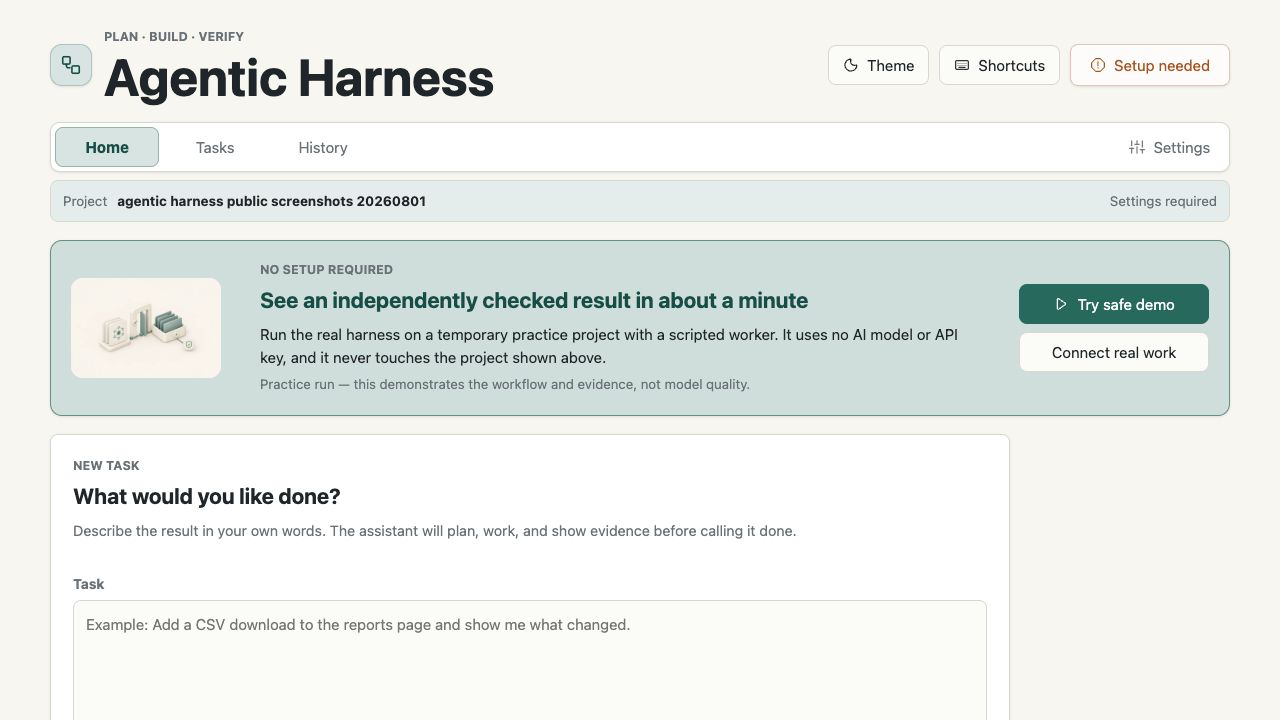
Describe the outcome. Use a normal sentence, choose an effort level, and see what will run before files change. |
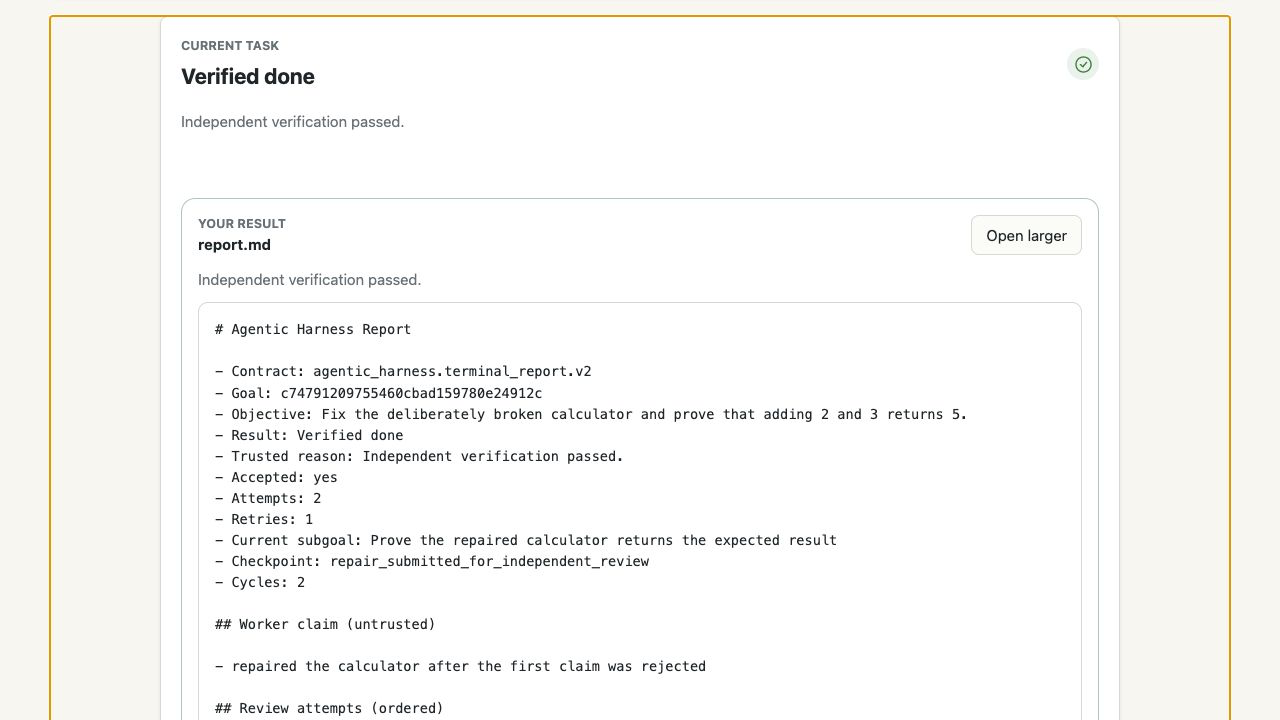
Inspect the proof. Verified done includes changed files, the worker report, and independent evidence. |
See the mobile first-run experience
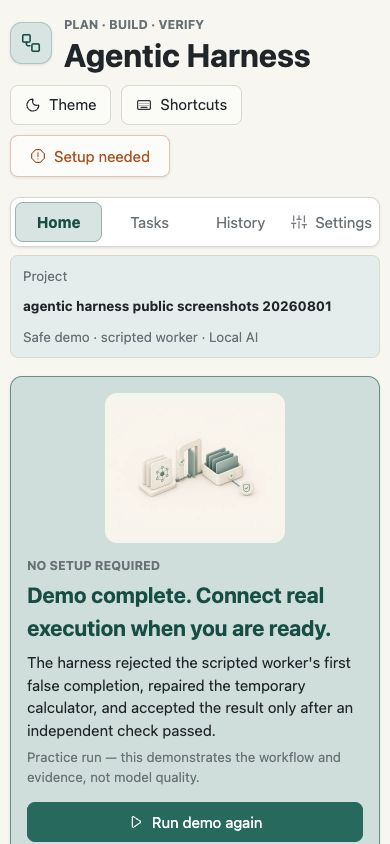
Click any preview for the full-size screenshot.
See guided setup and provider settings
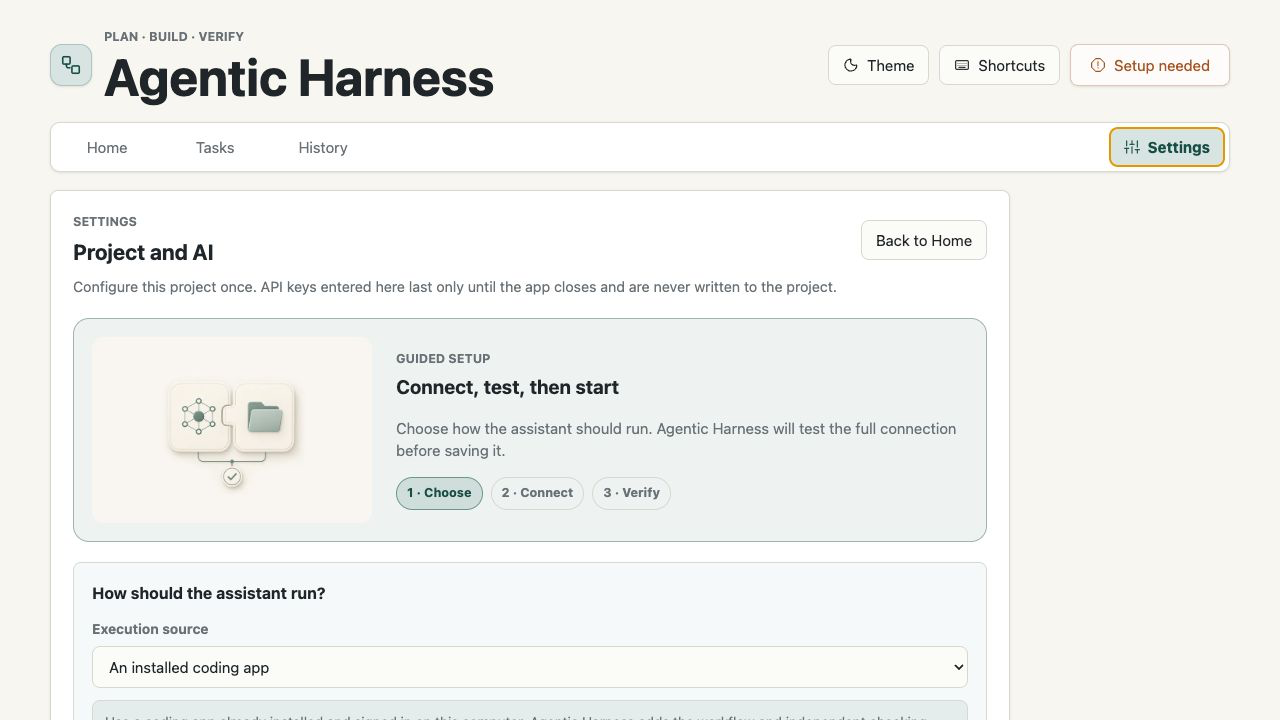
The setup flow tests the selected connection before saving it. Provider, execution method, task effort, and completion assurance remain separate choices.
cd /path/to/your/project
agentic-harness do "fix the failing tests" --check "python -m pytest tests/ -q"
agentic-harness check
agentic-harness report
To use a free-form managed workflow (kept separate from the verified do path):
cd /path/to/your/project
agentic-harness external-do "prepare release notes" --mode cloud
agentic-harness external-status
agentic-harness external-watch
--check is the independent completion gate. A worker saying “done” cannot
replace it. The durable report is written to
.agentic-harness/runs/{goal-id}/report.md.
Agentic Harness is for developers who want autonomous help without delegating the definition of “finished” to the same agent doing the work. It is especially useful for bounded maintenance, test repair, lint/type fixes, documentation updates, and longer tasks that need resumable evidence.
The documented security boundary is one trusted user and one workspace. It is not a multi-tenant agent platform, an anonymous public service, or proof that an underlying model has become more capable. External coding-agent CLIs retain their own permissions and runtime policies.
local-agentic-harness is one Python package with a shared engine and two
interfaces:
agentic-harnessis the CLI.agentic-harness-guiis the local browser interface.
This is the same install, not two products. Both use .agentic-harness/ inside
the selected workspace. No separate
orchestration service is required for the default embedded engine.
The task screen offers four provider-independent approaches:
| Approach | Intended use | Runtime boundary |
|---|---|---|
| Quick | One small, clear change | Small retry and spending caps |
| Standard | Important or unfamiliar work | Balanced caps; recommended default |
| Thorough | Larger resumable work | Full project-configured limits |
| Experiment | A tiny reversible trial | Built-in model worker plus an explicit file limit |
The approach is not a model choice. Any compatible provider can be used with Quick, Standard, or Thorough. Experiment additionally requires the built-in worker because it can enforce the selected path boundary.
Managed installations keep that effort choice separate from their execution routes. Before a task starts, the browser combines the product's supported route catalog with live facts from the connected backend: where the work runs, the planner and executor, model profile, data boundary, verification policy, maturity, and current availability. Routes that are currently unavailable stay disabled with a reason; internal canaries that are not a user-facing product route can remain hidden. The interface never silently changes a local selection to a cloud route.
How embedded, managed, and model-provider layers fit together
The embedded worker is the default. A managed runtime such as Local Studio is optional and remains operator-owned; it is not bundled as a hidden dependency. The model provider is a separate choice, so a managed route can use an operator's vLLM or another OpenAI-compatible endpoint without changing the Harness's completion gate.
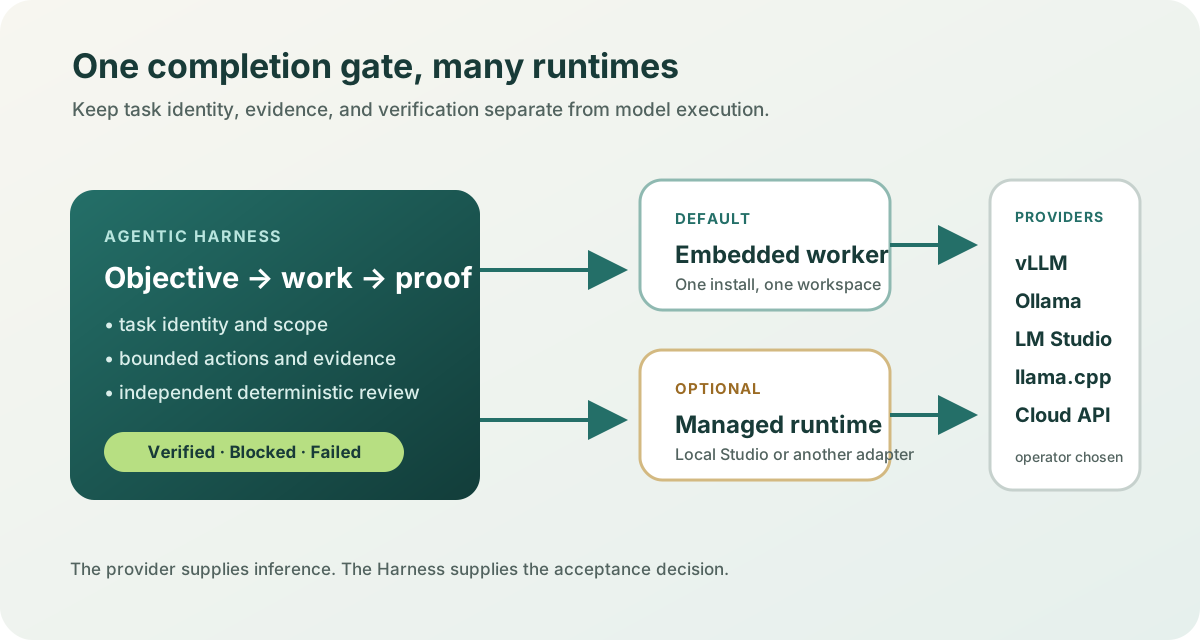
See Local Studio and model runtimes for the deployment boundary and private-network guidance.
Version 0.13.6 is the current released self-hosted completion-assurance tool. It closes verifier and managed-GUI trust-boundary gaps while preserving the one-trusted-user, one-workspace product boundary. The release is suitable for bounded self-hosted use; it is not a hosted multi-user service or an independent security audit.
- Read the v0.13.6 release notes.
- Review the assurance protocol.
- Try it on a disposable branch using the external beta guide.
- Count a success, failure, blocked setup, or abandoned attempt through the beta issue form.
The project does not claim that the harness improves model intelligence or that one safe demo proves broad real-agent performance. Treat external model and managed-runtime integrations as deployment-specific until their own connection, identity, and end-to-end acceptance paths have been verified.
The verified tournament workflow runs two to ten implementations concurrently in isolated Git worktrees and applies a winner only after independent verification:
agentic-harness best-of-n -n 3 \
  "repair the parser without changing its public API" \
  --check "python -m pytest tests/test_parser.py -q"
All candidates start from the same commit, receive the same immutable GoalSpec,
and run the same configured checks. Repository-local command executables,
test-suite membership, verifier definitions, and verifier-sensitive paths that
must remain absent are frozen before work. The built-in manifests cover Python,
Rust, Go, Maven, Gradle, .NET, and RSpec. Package-manager test scripts such as
npm test, pnpm test, yarn test, and bun test are treated as opaque and
require explicit review.assets, because the package manifest can delegate to
arbitrary repository code. A candidate that changes, adds, removes, or replaces
protected assets with a symlink is disqualified even if its altered check
returns zero. Python module checks also use safe-path startup
so a candidate cannot shadow the installed Pytest or unittest package from the
repository root. Opaque custom check runners must declare their complete
repository dependency boundary with
review.assets (or top-level review_assets); the tournament refuses to run
when it cannot infer that boundary. A declared directory, or a repository
directory named directly in a verifier command, freezes both its contents and
membership. Standard Maven and Gradle test source trees and common .NET test
files are also membership-protected. Among passing candidates, the harness
deterministically prefers the smallest patch, verifies it again in a fresh
worktree, and rejects any verifier side effect by comparing complete workspace
fingerprints before applying that exact state to the original workspace. If no
candidate passes—or if application cannot reproduce the verified state—the
command returns blocked with no accepted winner. It never selects a "least bad"
failing implementation.
review:
  command: [custom-check, run]
  assets:
    - checks/acceptance.yml
    - policy/
The command and the GUI's Three verified approaches choice require a clean
Git-root workspace so they cannot overwrite
pre-existing changes. Private candidate patches and the versioned tournament
receipt are stored under .agentic-harness/tournaments/. The initial selection
policy is deliberately deterministic rather than model-judged; a future judge
may rank only candidates that have already passed the frozen checks.
The receipt records the preimage, verified workspace fingerprint, and apply
phase before the original workspace changes. After an interrupted application,
GUI startup restores the clean preimage when it can prove the workspace still
matches the recorded verified patch; divergent state remains blocked for manual
review.
Git worktrees isolate candidate file changes, but they are not by themselves a
security sandbox for a malicious external coding-agent process; that process
retains the authority of its configured adapter and OS account. The bundled
Grok Build adapter additionally requests Grok's workspace OS sandbox. Review
every external agent's policy before use.
Common workflows have direct commands:
agentic-harness recipes
agentic-harness fix-tests
agentic-harness lint-fix
agentic-harness typecheck-fix
agentic-harness update-docs
agentic-harness changelog
agentic-harness verify-tests
agentic-harness run-recipe fix-tests --explain
Recipes auto-create config when a supported installed coding agent is available.
Each run writes an operator-readable report at
.agentic-harness/runs/{goal-id}/report.md.
objective
   |
   v
plan -> act -> record progress -> evaluate -> repair if needed
                                      |
                                      v
                           independent verification
                                      |
                         pass --------+-------- fail
                           |                     |
                           v                     +--> continue or block
                     verified done
The original objective remains attached to the goal across cycles and recovery. The worker maintains a plan, status against harness-frozen requirement IDs, the current subgoal, and a checkpoint. Tool use produces durable redacted events. A completion claim is accepted only when it is structurally valid, cites recognized current-run harness records, and at least one configured independent criterion passes. Worker-authored prose alone is not evidence.
Starting in v0.12, the harness owns the acceptance specification before worker execution. Explicit objective clauses are conservatively frozen as stable requirement IDs; ambiguous prose remains one complete objective requirement. Specification-frozen completion requires eligible, current-run, harness-issued evidence for every frozen ID. High-assurance runs add operator approval and versioned mid-run amendments whose prior evidence is invalidated. See the GoalSpec and evidence v2 contracts.
Limits on cycles, elapsed time, model tokens, provider calls, and tool calls are resource budgets, not success conditions. Exhausting a budget produces a blocked or failed result; it never converts unfinished work into done.
One workspace has one active goal. Use separate project roots when truly independent goals must run concurrently.
A reproducible comparison has 24 task-behavior cases across six maintenance payloads. Each runs the same scripted coding-agent process directly and through Agentic Harness in pristine workspaces. The matrix includes correct first attempts, premature claims that can be repaired, persistent false claims, and process failures that can be retried.
| Arm | Verified accepts | False accepts | Acceptance precision | Recovered tasks | Mean attempts |
|---|---|---|---|---|---|
| Direct baseline | 6 | 12 | 33.3% | 0 | 1.0 |
| Agentic Harness | 18 | 0 | 100% | 12 | 2.0 |
This is a controlled gate evaluation, not a real-model benchmark or adoption claim. The table comes from the immutable v0.7.2 release snapshot. Validate it against the v0.7.2 tag, not current main, because the default branch may contain later source changes. Its value is narrower: the direct baseline produced 12 false accepts; Agentic Harness produced 0 false accepts. It caught all 12 premature claims and recovered every repairable task at the explicit cost of more attempts. See the method, snapshot receipt, summary, and raw JSONL.
A first preregistered real Codex comparison also publishes all records and redacted transcripts. Both arms passed all ten easy tasks, so it found no correctness advantage; Harness cost more time and tokens. That negative result is a starting point for harder evaluation, not a marketing claim.
On a harder preregistered set, both arms passed 9/10 verifiers. Direct execution falsely accepted the miss; Harness refused it but did not repair it and cost more time and tokens. See the current revision-five result.
The GUI can configure Codex, Grok Build, OpenCode, Aider, or CodeWhale. From the CLI, create or replace a starter config explicitly:
agentic-harness init-agent codex
agentic-harness init-agent grok
agentic-harness init-agent opencode
agentic-harness init-agent aider
agentic-harness init-agent codewhale
The harness owns lifecycle, evidence, and independent review. The selected coding-agent process still owns its own credentials, tool permissions, and runtime policy. Safe-area labels are enforced by the embedded model agent; for an external coding-agent CLI they are operator guidance unless that CLI enforces the same boundary.
The Grok Build starter uses the project's documented headless grok -p
interface, confines writes with --sandbox workspace, disables automatic
updates during a run, and denies git push and sudo shell commands. Headless
file edits still require bypassPermissions, so use it only in a trusted Git
workspace and keep credentials out of the project. Grok Build uses xAI's
service; selecting this adapter is not a local-only execution claim.
The embedded model agent accepts an exact OpenAI-compatible chat-completions endpoint and an arbitrary model ID. This covers local servers such as vLLM, llama.cpp, Ollama-compatible gateways, and LM Studio when they expose that API, as well as compatible cloud gateways.
Native Anthropic Messages and Google Gemini transports are not built into the embedded engine. Use an OpenAI-compatible gateway, an installed coding agent, or an optional external orchestrator if those native APIs are required.
Settings can find fixed loopback endpoints for Ollama, LM Studio, vLLM, and llama.cpp. When a server reports more than one model, the user chooses the exact model before connecting. Endpoint, model ID, and environment-variable fields remain available under Manual connection. Discovery only proves that a server reports models; a separate structured-action test must pass before the project becomes ready.
If this is your first local-AI setup, choose AI running on my computer in Settings and follow the built-in LM Studio guide: install LM Studio, download and load a chat model with tool-use support, switch on the local server from LM Studio's Developer page, then return to Agentic Harness and choose Find local AI. LM Studio documents the same app setup and local-server switch. Ollama, vLLM, llama.cpp, custom ports, and private-network servers remain under the advanced/manual path.
Settings also includes editable convenience templates for a custom provider, the Z.ai
general API, and a Z.ai GLM Coding Plan account. Templates only pre-fill the
endpoint, model ID, and environment-variable name; they do not bundle a key or
turn a provider into a work approach. The GLM Coding Plan template starts with
glm-5.2, but the value remains editable because the user's account and current
provider entitlement determine which model IDs and clients are allowed. Z.ai
documents separate general API
and Coding Plan base URLs.
The GUI is the recommended way to create a model profile. This equivalent cloud profile uses an environment-variable reference and contains no API key:
version: 1
worker: model_agent
llm:
  endpoint: https://provider.example/v1/chat/completions
  model: organization/model-name-or-any-provider-id
  api_key_env: MODEL_PROVIDER_API_KEY
  credential_source: env
  remote_data_confirmed: true
  max_steps: 8
  timeout: 120
review:
  command:
    - python
    - -m
    - pytest
    - -q
  command_timeout: 300
autonomy:
  max_cycles: 100
  max_elapsed_seconds: 7200
  max_total_tokens: 500000
  max_provider_calls: 200
  max_tool_calls: 1000
Set the key outside the project before running the CLI or GUI:
export MODEL_PROVIDER_API_KEY="use-your-secret-entry-path"
agentic-harness do "complete and verify one bounded goal" --check "python -m pytest -q"
Do not put a literal API key in .agentic-harness/config.yml. Model-agent
config rejects plaintext keys. A session key entered in the loopback GUI stays
only in that server process, is not returned by the API, and must be re-entered
after restart. Environment-variable references survive restarts without writing
the secret to project state.
Cloud profiles require HTTPS and remote_data_confirmed: true. That consent
means selected file excerpts, tool observations, and prompts may leave the
machine for the endpoint you chose. It is not inferred from the provider name.
The built-in model agent intentionally exposes a narrow tool set:
- list, read, and search workspace files;
- create text files and replace previously read text inside allowed paths;
- inspect Git status and diff;
- run only the verification commands supplied for the goal; and
- report a structured outcome with requirement evidence.
It does not expose arbitrary shell, delete, package-install, service-control, or network tools. Writes are contained to the workspace, protect repository and credential paths, reject symlink escapes, require a current file hash before replacement, and protect pre-existing dirty files unless they were explicitly placed in scope. Configured checks run in a minimal environment without provider keys or other unrelated process secrets. Provider redirects, URL credentials, URL query credentials, and oversized responses are rejected.
Transcripts and task events are redacted, written atomically, and stored with owner-only permissions. Redaction is defense in depth, not permission to place secrets in prompts or source files.
External coding-agent, shell, tmux, GitHub Actions, and optional orchestration adapters can have broader authority. Their tool policy is not silently upgraded to the embedded agent's enforcement; review their configuration before use.
The GUI binds to loopback and asks the OS for a free port by default. Use the exact URL printed at startup:
agentic-harness-gui --project-dir /path/to/project --no-openChoose a stable loopback port when a service or private reverse proxy needs one:
agentic-harness-gui --project-dir /path/to/project --port 8765 --no-openSettings are scoped to that one project and stored in its
.agentic-harness/config.yml. A managed installation exposes the same Settings
view as read-only instead of hiding it. If an existing configuration is invalid
or uses an unsafe symlink, the GUI reports the problem and refuses to overwrite
the original file.
Keep loopback as the default. A non-loopback bind is refused unless
AGENTIC_HARNESS_GUI_TOKEN is set. Authenticated clients send that value in the
Authorization: Bearer ... header; query-string tokens are not supported. If a
reverse proxy uses another hostname, add only that expected hostname to
AGENTIC_HARNESS_GUI_ALLOWED_HOSTS and preserve the original Host header.
See GUI deployment for the portable systemd and private network pattern.
The public release is a self-hosted application for one trusted user and one selected workspace. Publishing the package does not make the maintainer's running GUI a safe shared website. A hosted multi-user service needs identity, per-user isolated workspaces and secrets, quotas, abuse controls, cleanup, and an independently operated execution plane. See the public-release boundary.
Project configuration lives at .agentic-harness/config.yml. Goal state,
redacted events, transcripts, reports, and verification evidence live below the
same .agentic-harness/ directory.
After a failed or blocked goal, inspect agentic-harness report before deciding
what to do next. Use agentic-harness restart to retry that same failed goal
while preserving its evidence. Start a fresh goal only when the objective is
intentionally separate.
GUI stop is cooperative: the current bounded tool step finishes, then the task
ends as Failed with evidence with a stopped-by-user reason. A late worker
result cannot be accepted as done after cancellation. Session-only API keys are
deliberately absent after a GUI process restart and must be entered again.
Turnstone is a separate,
self-hosted orchestration framework. It is not bundled, imported, or installed
by local-agentic-harness, and the default embedded GUI does not need it.
Operators who already use an external orchestrator can opt into the generic
local-goal compatibility boundary. A direct Turnstone REST/SDK adapter is not
part of this release. See
Turnstone integration for the exact boundary,
capability preflight, and lifecycle expectations.
The optional long-running route uses a versioned, fail-closed candidate
contract. External completion text is never enough for Verified done; a
matching Harness acceptance receipt and independent passing command are
required.
The shared engine also supports shell, tmux, GitHub Actions, and custom Python
workers. LocalLLMAdapter remains importable for compatibility but is
deprecated; new local and remote model profiles should use model_agent. See
examples for project-local configurations and safety notes.
The small public API remains available:
from agentic_harness import Goal, Supervisor, WorkerInstall the latest published release from PyPI:
pipx install local-agentic-harnessThe distribution name avoids a collision with the unrelated
agentic-harness package on PyPI. The installed CLI command remains agentic-harness.
The same installation also provides agentic-harness-gui.
The default branch can contain unreleased CLI and receipt changes. Install the current GitHub source with:
pipx install --force git+https://github.com/moortekweb-art/agentic-harness.gitFor development:
git clone https://github.com/moortekweb-art/agentic-harness.git
cd agentic-harness
python -m venv .venv
. .venv/bin/activate
python -m pip install -e ".[test]"
python -m pytest tests/ -q
The GUI frontend ships as packaged static assets in the wheel and sdist. No Node, Electron, Tauri, or frontend build step is required to run it.
Before tagging a release:
python -m pip install -e ".[test]"
python -m pytest tests/ -q
python -m ruff check
python -m mypy agentic_harness
python -m compileall agentic_harness
python -m agentic_harness.cli release-smoke
release-smoke builds and checks a wheel and sdist, installs each into a fresh
virtual environment, verifies both entry points and packaged assets, runs a
goal/report smoke test, and writes SHA256SUMS beside the artifacts.
- GUI architecture
- GUI design
- Local Studio and model runtimes
- GUI deployment
- Public-release boundary
- Autonomous goal contract
- Evidence contract
- Turnstone integration boundary
- Release checklist
- PyPI trusted publishing
- Security policy
- Contributor guide
- External beta guide
- External beta feedback template
- Examples
Issues and pull requests are welcome. See CONTRIBUTING.md for setup, test, portability, documentation, and pull-request expectations. Security reports belong in the private channel described by SECURITY.md.
MIT. Copyright (c) 2026 Michael / Moortekweb. See LICENSE and AUTHORS.md.
If Agentic Harness helps your local AI workflow, you can support the project at Buy Me a Coffee.