This repository contains a simple plugin which extends GMCv2 in various ways, with utilities and such provided by GMC licensees.
(Mostly it exists because Packetdancer got tired of answering how to copy the trajectory movement component into Blueprint projects, and her solution was "just turn it into a plugin".)
There will be better documentation here eventually. Probably.
Things currently in the project:
This module contains the core movement logic and general support code. The primary things in the GMCExtended module are:
This component is a child of GMC's own Organic Movement Component, which provides an implementation of a "shared variable" system. This system basically allows other components to request that GMC itself register and bind 'shared variables' and triggers a notification whenever a shared variable changes. Variables are shared between components, allowing multiple things to access a single bound variable by name.
Shared variable update handlers should be triggered even on simulated proxies, if the variables are replicated there.
In addition, there is a "Shared Variable Component Interface"; any component on a pawn which implements this will have an OnBindSharedVariables function before replication bindings are made; while this is intended to allow components to register shared variables, it can also be used to allow components which need to bind variables via the GMC to be called at an appropriate time, even if they were added by blueprint.
This is an extension of the above UGCME_CoreComponent, adding a few things:
- Stop/pivot prediction (for distance matching), available via
- Trajectory prediction (for motion trajectory)
- Debug visualization options for the above two
- A framework to build an intelligent turn-in-place on.
- Strafing speed limits, to alter maximum speed based on angle offset from actor forward.
- A ragdoll mode which optionally can keep ragdoll position in-sync in multiplayer, to allow recovery from ragdoll.
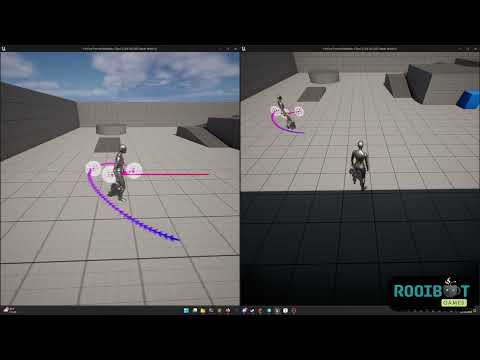
Trajectory:
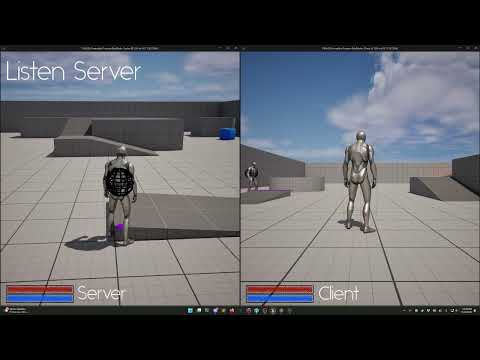
Ragdoll:
Some details...
The component can be set to automatically keep stop/pivot predictions up-to-date via the Precalculate Distance Matches setting; they can also be manually calculated by calling UpdateStopPredictions and UpdatePivotPredictions instead. The calculated results are available via IsStopPredicted and IsPivotPredicted. In addition, the PivotPredictionAngleThreshold can be set to ensure pivots are only predicted if the predicted trajectory is offset by more than a certain amount from the current velocity. By default, it is set to 90 degrees, but for some situations people may find 135 degrees more suitable.
(The calculations can also manually be done via the Blueprint thread-safe functions PredictGroundedStopLocation and PredictGroundedPivotLocation.)
If Draw Debug Predictions is enabled with precalculations enabled, the component will draw predicted stop and pivot points; predicted pivot points are yellow (turning to white at the final prediction), while predicted stop points are blue (turning to black at the final prediction).
If Trajectory Enabled is true, the component will keep historical samples; if Precalculate Future Trajectory is also true, the component will keep a constantly-updated version of the predicted trajectory available in Predicted Trajectory.
There's also an FGMCE_MovementSample which serves as the data storage container for the trajectory, and which can be cast into a stock Unreal FTrajectorySample or the newer FPoseSearchQueryTrajectorySample as-needed, as well as an FGMCE_MovementSampleCollection which can similarly be cast into an FTrajectorySampleRange or the newer FPoseSearchQueryTrajectory.
For blueprint use, there are also two blueprint functions provided to turn the GMCEx structures into standard Epic Motion Trajectory ones. The resulting trajectory can be fed directly into the Motion Matching animation node.
If Draw Debug Predictions is enabled with precalculations enabled, the component will draw a pathway showing historical movement and predicted trajectory.
This component uses the GMC Custom1 movement mode for ragdolling logic; Enable Ragdoll and Disable Ragdoll will toggle the character into ragdoll mode or back to normal grounded movement; it will make an attempt to preserve velocity when toggling ragdolling on. Which movement mode is used can be changed by overriding GetRagdollMovementMode to return something other than Custom1.
This differs significantly from the original ragdoll implementation that was in older versions of GMCExtended; enough people were using that basic example that it seemed worth replacing with a more solid solution. However, the functionality is backwards-compatible and thus if you were already using it, it should Just Work.
A blueprint function library providing some useful little oft-used calculations, such as calculating the angle of difference between two trajectories and returning a value in the range of -180 to 180 degrees.
This module provides useful animation implementations atop GMC. Right now, there's only the one thing really:
The motion warping component provides a fundamentally similar implementation to Epic's stock motion warping component, albeit automatically integrating with GMC; this allows the motion warp targets to be replicated in GMC moves alongside montage data, ensuring they stay in sync and the root motion warping can be applied with a minimal number of corrections. Currently, the implementation only provides Skew Warp and Scale warping operations; as these are really the only ones anyone uses in Epic's own plugin, that seemed a sufficient start.
It is worth noting that for this functionality to work, you will need to either add some functionality to your own GMC movement component in C++, or have it inherit from the GMCEx version of the Organic Movement Component.