Real-time focus monitoring that tracks your posture and attention during work sessions. Uses computer vision to detect distractions and keeps you accountable with a clean dashboard.
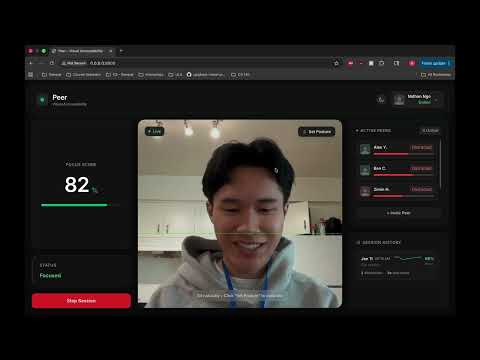
Click to watch the demo video


- Real-time focus score tracking
- AI-powered distraction detection (phones, posture)
- Session history with sparklines showing focus patterns over time
- Wall of shame screenshots captured when you get distracted
- Expandable session details to review individual distraction events
- Posture calibration to set your baseline
- Peer connections and social accountability
- Modern dashboard UI with live camera feed
- Python 3.8+
- pip
- Webcam (for actual monitoring, though it will run without one)
- Clone the repo:
git clone https://github.com/ngostream/peer
cd peer- Install dependencies:
pip install -r requirements.txt- Run the app:
python main.py- Open your browser:
http://localhost:8000
- Click login to access the dashboard (mock auth for demo)
- Login: Click the login button to get into the dashboard
- Calibrate: Sit naturally and click "Set Posture" to calibrate your baseline
- Start Session: Click "Start Session" to begin monitoring
- Monitor: Watch your focus score update in real-time as the AI tracks your posture and detects phones
- Review History: Check session history to see when you got distracted, view sparklines to see focus patterns, and click on sessions to see individual distraction events
The system uses MediaPipe for computer vision to detect:
- Phones: Always triggers distraction (blacklist)
- Study materials (books, laptops): Allows you to look down without triggering (whitelist)
- Posture: Detects when you're slouching or looking away by tracking nose position relative to shoulders
Distractions are logged with screenshots saved to static/shame/. Each session tracks focus scores over time to generate sparkline visualizations.
peer/
├── main.py              # FastAPI app and API endpoints
├── camera.py            # Camera feed, AI inference, session tracking
├── templates/
│   └── index.html      # Frontend dashboard
├── static/
│   └── shame/          # Distraction screenshots (gitignored)
├── screenshots/         # App screenshots for documentation
├── models/              # MediaPipe model files (gitignored)
├── requirements.txt     # Python dependencies
└── README.md           # This file
- Backend: FastAPI, Python
- Frontend: HTML, TailwindCSS, JavaScript
- Computer Vision: OpenCV, MediaPipe
- AI Models: Pose Landmarker (posture), Object Detector (phones/books)
Built for SB Hacks XII