






With SwiftyVersionTracker, you can track which versions previously installed. Convenient methods are also available.
let tracker = try! SwiftyVersionTracker<SwiftyVersionIntInt>()

if tracker.isFirstLaunchEver {
  // do something
  // e.g. shows welcome screen
}

if tracker.isFirstLaunchForVersion {
  // do something
  // e.g. shows release note
}

if tracker.last?.major == 1 {
  // do something
  // e.g. migrate database
}- Track which versions of your application previously installed
- Support any type of versioning literals with Swift Generics
- Most of use case is covered out of the box with
SwiftyVersionIntInt
Japanese is here.
isFirstLaunchEver: Boolreturns whether it's first launch or not.isFirstLaunchForVersion: Boolreturns whether it's first launch for version or not.isFirstLaunchForBuild: Boolreturns whether it's first launch for build or not.current: Trepresents current version.previous: T?represents previously installed version. This value never change until different version will be launched.first: Trepresents first version user installed.last: T?represents a version which last launched.history: [T]represents all the history of installed versions.
SwiftyVersionTracker is build on Protocol Oriented Programming. We defined SwiftyVersion as protocol, so you can use SwiftyVersionTracker with any type of versioning rules and literals.
Before using SwiftyVersionTracker, you must implement class or struct which comfirms to SwiftyVersion. SwiftyVersion is simple protocol as described below.
public protocol SwiftyVersion: Equatable {
	associatedtype VersionLetters: Comparable
	associatedtype BuildLetters: Comparable

	var major: VersionLetters { get }
	var minor: VersionLetters { get }
	var release: VersionLetters { get }
	var build: BuildLetters { get }

	init(versionString: String?, buildString: String?) throws
}
If you need more explanation about software versioning, see Wikipedia. 😃
OK, We know you wanna just using SwiftyVersionTracker, without any effort as possible, and most of applications using just numbers something like version: 1.2.3, build: 10. For you, we implemented SwiftyVersionIntInt which supports versioning rule using Integers only. 😉
let version = try! SwiftyVersionIntInt(versionString: "1.2.3", buildString: "4")

XCTAssertEqual(version.major, 1)
XCTAssertEqual(version.minor, 2)
XCTAssertEqual(version.release, 3)
XCTAssertEqual(version.build, 4)Finally, it's time to use SwiftyVersionTracker!! You have two ways to initialize SwiftyVersionTracker.
First way is with bundle, and this is the best way for most applications. Initialize SwiftyVersionTracker without parameters, initializer will try initialize YourVersion: SwiftyVersion
with bundle version strings. Bundle version strings are defined in target general settings in Xcode, just like below.
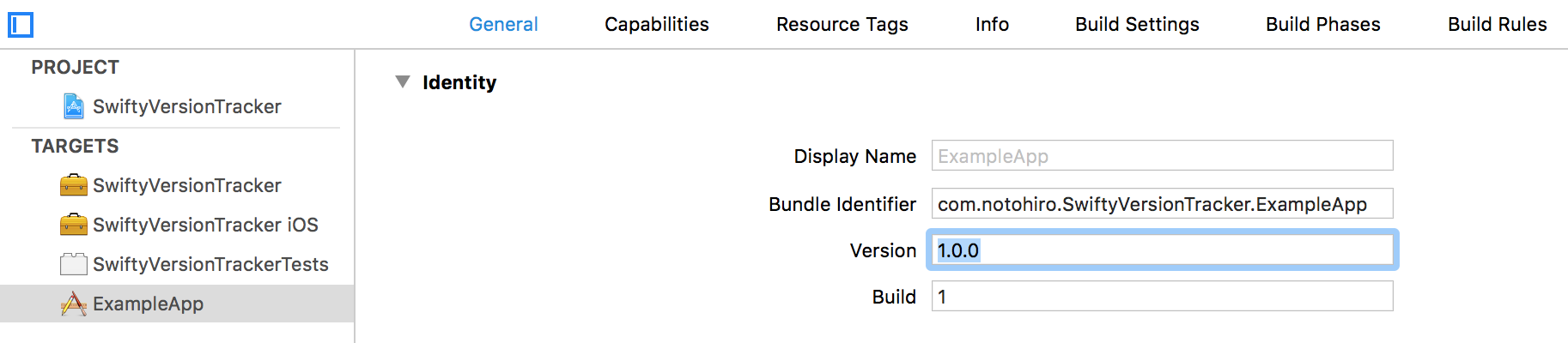
And example code is below.
let tracker = try! SwiftyVersionTracker<YourVersion>()Looks pretty cool, huh? 😆
If you have version strings in database, code or something like that, initialize SwiftyVersionTracker with parameters versionString and buildString.
Example below.
let tracker = try! SwiftyVersionTracker<YourVersion>(versionString: "1.2.3", buildString: "a123")If you wanna track versions even within App Extension, you can specify userDefaults parameter for sharing tracking data between application and extension.
- iOS 8.0+
- Xcode 9.3+
SwiftyVersionTracker is available through CocoaPods and Carthage.
To install, simply add the following line to your Podfile:
platform :ios, '11.0'
use_frameworks!

pod 'SwiftyVersionTracker'To integrate NowCastMapView into your Xcode project using Carthage, specify it in your Cartfile:
github "notohiro/SwiftyVersionTracker"
Run carthage update to build the framework and drag the built SwiftyVersionTracker.framework into your Xcode project.
Don't forget ⭐️, and if you like this, thanks donation for coffee. ☕️


SwiftyVersionTracker is available under the MIT license. See the LICENSE file for more info.