A drop-in Docker CLI for macOS, powered by Apple container. Speak docker, run on Apple's per-container VMs from one ~6.2 MB static binary.


curl -fsSL https://raw.githubusercontent.com/o1x3/dcon/main/install.sh | bashdcon system start # start the backend (once)
dcon system kernel set --recommended # install a guest kernel (once)
dcon run --rm alpine echo "hello from dcon" # …and you're running containers
If your fingers and scripts already type docker, alias it:
alias docker=dcon # or: curl … | DCON_LINK_DOCKER=1 bashApple's container runs Linux containers in per-container VMs on Apple silicon,
but its CLI is its own dialect. dcon is the translation layer: a static binary
that implements the Docker command surface (run, ps, images, build,
compose, …), maps each call to container, and re-renders output in the Docker
format.
flowchart LR
    A["you / CI / Makefile<br/>docker run · compose up · build"] -->|docker-style args| B["dcon<br/>(this, ~6.2 MB static binary)"]
    B -->|container args| C["Apple container<br/>apiserver + plugins"]
    C -->|Virtualization.framework| D["per-container<br/>Linux microVM"]
A fresh microVM per container means a higher cold start (~700 ms) than a
shared-VM engine. dcon's warm pool closes the gap: pre-boot a single-use microVM
and exec the workload into it. Each member is handed out once then destroyed,
so isolation is identical to a cold run; only the VM boot moves off your critical
path. The result starts in ~90 ms, under an always-warm shared-VM engine, while
still giving every container its own VM.
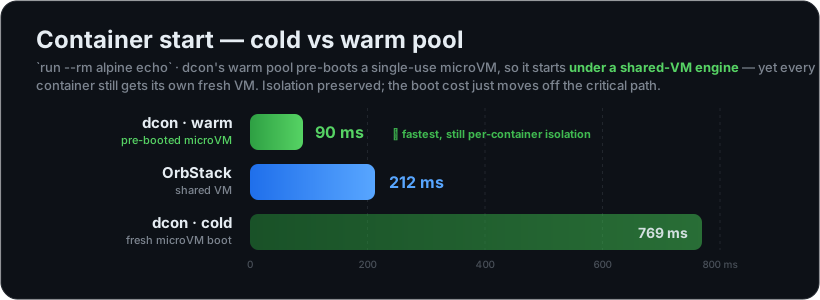
dcon is also ~12× lighter at idle than OrbStack. See the full numbers, memory, and pull benchmarks in Benchmarks & Comparison.
dcon warm alpine                       # pre-boot 1 warm microVM (~700 ms, once)
dcon run --rm alpine echo hi           # served from the pool → ~90 ms
export DCON_WARM=auto                  # or: self-prime after every eligible run
Simple --rm runs are served from the pool; runs that need bind mounts, ports,
resource limits, or custom networking fall back to a cold boot. Full eligibility
rules, env knobs, and internals: Warm Pool.
One-liner (recommended):
curl -fsSL https://raw.githubusercontent.com/o1x3/dcon/main/install.sh | bashKnobs: DCON_VERSION=v1.2.3, DCON_PREFIX=/usr/local, DCON_LINK_DOCKER=1
(also symlink docker), DCON_FROM_SOURCE=1 (build with Go).
Homebrew:
brew tap o1x3/dcon https://github.com/o1x3/dcon
brew install dcon          # installs the binary + shell completions
From source:
git clone https://github.com/o1x3/dcon.git && cd dcon
make install            # builds + installs /usr/local/bin/dcon
make link-docker        # optional: symlink docker -> dcon
Shell completions ship for bash, zsh, and fish: dcon completion zsh|bash|fish
(Homebrew installs them automatically).
dcon needs Apple's container runtime (it is the engine). The one-line installer
above sets it up for you; to do it by hand, install the signed package from
https://github.com/apple/container/releases, then:
dcon system start                       # start the backend (once)
dcon system kernel set --recommended    # install a guest kernel (once)
dcon doctor                             # verify backend, kernel, builder, warm pool
Read-only commands (ps, images, volume ls, …) work without a kernel;
booting containers needs it.
Everything else lives in the wiki:
- Warm Pool — eligibility, env knobs, correctness, and the daemonless internals.
- Benchmarks & Comparison — start, memory, and pull numbers vs OrbStack and Docker Desktop.
- Command Parity — the command/flag matrix, compose support, Apple-native extras, and compatibility shims.
- Architecture — the translation pipeline, source layout, development, and releases.
- Cookbook (SECONDARY.md) — 15 end-to-end scenarios: compose stacks, profiles, scaling, multi-arch builds, private registries, Rosetta, debugging, and more.
MIT. dcon is an independent project, not affiliated with Apple or Docker.