
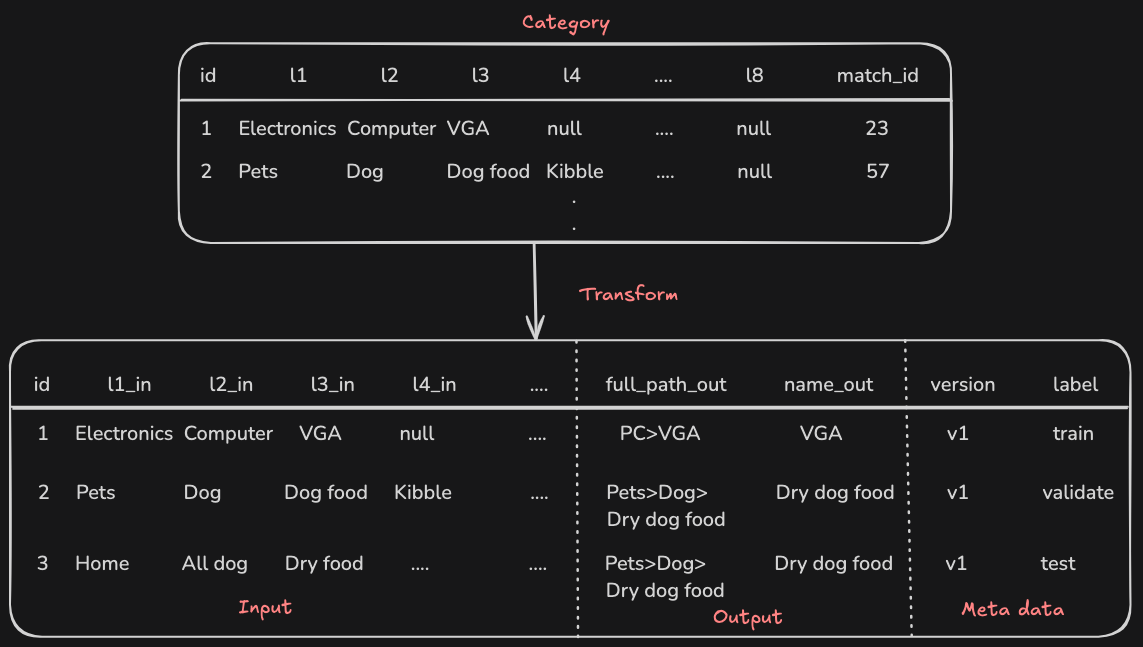
bb-transform is a small but powerful tool designed to transform raw data from a database into a structured machine learning dataset. It is deployed as a serverless function on AWS Lambda and triggered by messages from AWS SQS. The entire AWS infrastructure is provisioned using Terraform, ensuring consistent and reproducible deployments.
This project demonstrates a typical workflow for preparing data for machine learning, leveraging cloud-native technologies for scalability and efficiency.
├── cmd
│   └── lambda
│       └── main.go  # Entry point for the AWS Lambda function.
├── internal
│   ├── lambdahandler
│   │   └── lambdahandler.go # Handles SQS events and triggers data transformation.
│   ├── store
│   │   ├── category.go  # Manages interactions with the category data in the database.
│   │   └── db.go  # Handles database connection and configuration.
│   └── transform
│       ├── transform.go
├── terraform # Terraform configurations for AWS infrastructure.- Database Integration: Connects to a PostgreSQL database (using Supabase in this example) to retrieve raw data.
- Data Transformation: Processes raw category data and matched category data to create a structured dataset, including:
- Handling hierarchical category structures.
- Generating train, validation, and test datasets with configurable ratios.
- Optional shuffling of data for better model training.
- Serverless Deployment: Deploys as an AWS Lambda function for scalability and cost-effectiveness.
- SQS Trigger: Triggered by messages from an AWS SQS queue, enabling event-driven processing.
- Infrastructure as Code: Uses Terraform to manage and provision all necessary AWS resources.
- Local Development: Supports local development for testing and debugging using environment variable for development env
- Go: Version 1.23.3 or higher.
- Terraform: Version 1.10.0 or higher.
- AWS Account: An active AWS account with permissions to create Lambda functions, SQS queues, IAM roles, and other necessary resources.
- Supabase Account: A Supabase project for the PostgreSQL database. Or you can use your own Postgres DB.
- Jet: For database schema management using
jet, install it following their official documentation. scheme can be found here - (Optional) Golangci-lint: For code linting, install
golangci-lint.
Please visit here
Create a .env file in the root directory of the project and add the following environment variables:
BUYBETTER_DEV_SUPABASE_DSN="your_supabase_dsn" # Replace with your Supabase DSN
SQS_QUEUE_URL="your_sqs_queue_url" # Replace with your SQS queue URL
ENV="dev" # Set to "dev" for local development-
Backend Configuration (
backend-config.tfvars): Create aterraform/backend-config.tfvarsfile to configure your Terraform backend (e.g., S3 bucket for storing Terraform state).bucket = "your-terraform-state-bucket" # Replace with your bucket name key = "terraform.tfstate" region = "your-aws-region" # Replace with your AWS region -
Variables (
terraform.tfvars): Create aterraform/terraform.tfvarsfile to define variables for your AWS infrastructure.aws_region = "us-east-2" # Replace with your desired AWS region sqs_queue_name = "bb-transform-queue" sqs_dlq_name = "bb-transform-dlq" lambda_function_name = "transform-category" BUYBETTER_DEV_SUPABASE_DSN = "your_supabase_dsn" # Same as in .env
-
Database Setup:
-
Ensure your Supabase database is set up with the necessary tables.
-
Use
jet-gento generate the necessary Go code for database interactions:make jet-gen
-
-
Run Locally:
go run ./cmd/lambda/main.go
-
Initialize Terraform:
make terraform-init
-
Plan Infrastructure Changes:
make terraform-plan
-
Apply Infrastructure Changes:
make terraform-apply
-
Build the Lambda Function:
make build-lambda
-
Deploy the Lambda Function:
make deploy-lambda
To trigger the data transformation process, send a message to the configured SQS queue with the following JSON payload:
{
    "version": "v1-lambda",
    "shuffle": true,
    "train_ratio": 60,
    "validate_ratio": 20,
    "test_ratio": 20
}
- version: A string representing the version of the dataset (used for cleanup).
- shuffle: A boolean indicating whether to shuffle the data before splitting.
- train_ratio, validate_ratio, test_ratio: Integers (0-100) representing the percentage of data to use for each dataset split. These should add up to 100.
You can use the following command to send a message:
make sent-messageRun unit tests:
make testRun linter:
make lintTo destroy the AWS infrastructure created by Terraform, run:
make terraform-destroy