DetectLlama is a local TUI application for checking whether a text looks human-written or AI-generated. It uses llama.cpp with Llama 3 8B GGUF models, so the full workflow can run on your own device without sending the text to an external API.
The goal is simple: open DetectLlama, let it choose the best model quantization for your machine, download it if needed,
then paste text directly or analyze a local .txt/.md file.

- Local by default: input files stay on your machine.
- Hardware-aware setup: DetectLlama profiles RAM, disk, CPU, NVIDIA VRAM, or Apple unified memory.
- Automatic model recommendation: the TUI highlights the Llama 3 8B model and quantization that best fits the detected device.
- One-screen workflow: model selection, llama.cpp cache discovery, download, loading, and analysis happen inside the terminal UI.
- Anonymous public downloads: missing public GGUF models are downloaded directly from Hugging Face without passing tokens.
Required:
- CMake 3.15+
- a C++20 compiler (
g++,clang++, or MSVC) - Git
Build DetectLlama:
./build.shThe build first looks for an installed llama.cpp CMake package. If none is
available, it asks whether to use an existing local source checkout or download
and build llama.cpp. The selected provider is stored in the CMake build cache,
so subsequent builds reuse it without asking again.
For non-interactive builds, choose the fallback explicitly:
./build.sh --llama-path /path/to/llama.cpp
./build.sh --download-llama
--llama-path must point to the llama.cpp source directory containing
CMakeLists.txt and include/llama.h; a standalone llama-cli executable is
not sufficient.
Run the TUI:
./run.shDetectLlama opens immediately in fullscreen mode. If the recommended model is already cached in the llama.cpp cache, it
loads it. If not, type /models, choose a quantization, and press Enter to download and load it.
After the model is ready, use the prompt field:
- type
/to open the command dropdown - enter
/modelsto open the model picker - enter
/path ./file.txtto analyze a local.txtor.mdfile - paste text directly to detect it without creating a file first
Most terminals implement drag and drop by pasting the file path; DetectLlama still normalizes quoted paths, escaped spaces,
and file:// URIs.
The build also produces build/DetectLlamaBackend, a non-interactive entry point that uses the same backend as the TUI
without linking or opening FTXUI. It is intended for automation and future end-to-end backend tests.
build/DetectLlamaBackend --model-path /path/to/model.gguf --text "Text to analyze" --json
build/DetectLlamaBackend --model-path /path/to/model.gguf --file ./sample.txt --json
Headless analysis requires an explicit local --model-path, so automated runs do not depend on downloads or the TUI
model picker.
- the recommended quantization for your device
- all available Llama 3 8B and Llama 3 8B Instruct GGUF variants
- extra local
.gguffiles already present in the llama.cpp cache - whether each catalog model is already cached or missing
- model selection and download through
/models - analysis status while inference is running
- AI probability estimate, discrepancy score, token count, elapsed time, and tokens/sec in the right sidebar
DetectLlama targets about 30 tokens/sec by default, but the selector now prefers local models first. It checks:
- available disk space in the llama.cpp model cache
- total and available system RAM
- NVIDIA VRAM when
nvidia-smiis available - Apple Silicon unified memory on macOS
- CPU core count and OS/architecture
- local GGUF files in the llama.cpp cache, Hugging Face snapshots, and
DETECT_LLAMA_MODEL_DIRS
If only CPU is usable, DetectLlama falls back to the smallest practical quantization and warns that 30 tokens/sec may be unlikely.
The built-in catalog includes both Llama 3 8B and Llama 3 8B Instruct, but only keeps 4-bit and larger GGUF
variants: base Q4_* through FP16, and the bartowski Instruct set from IQ4_*/Q4_* through FP32. On Apple
Silicon, the recommendation is intentionally more aggressive but keeps extra memory headroom: 8 GB machines prefer Q4_*,
16 GB machines can prefer Q8_0, and Max/Ultra machines can prefer FP16. FP32 is listed for manual selection but is not
selected automatically.
Startup selection is local-first:
- the previously loaded model wins if it still exists, is Llama 3 8B, is GGUF, and is 4-bit or larger
- otherwise DetectLlama picks the best compatible local Llama 3 8B GGUF
- otherwise it selects the best downloadable catalog model, but waits for the user to confirm the download
The previous model is stored in ~/.config/detectllama/config.json on every platform, but only after an analysis
completes successfully. Set
DETECT_LLAMA_MODEL_DIRS=/path/to/models:/another/path to add extra recursive search roots. Set
DETECT_LLAMA_CONFIG=/path/to/config.json only when you need a custom config file for testing or scripting.
You can inspect the launch command without opening the app:
DETECT_LLAMA_DRY_RUN=1 ./run.shOptional advanced commands:
./build.sh --gpu cuda --jobs 8
./build.sh --gpu cpu
./build.sh --llama-path ~/src/llama.cpp
./build.sh --download-llama
DetectLlama uses the same model cache convention as llama.cpp. By default this is ~/Library/Caches/llama.cpp on macOS,
$XDG_CACHE_HOME/llama.cpp on Linux when set, or ~/.cache/llama.cpp otherwise. Set LLAMA_CACHE=/path/to/cache to
override the primary download cache. Discovery still checks both LLAMA_CACHE and the default llama.cpp cache, plus
Hugging Face snapshots and any directory listed in DETECT_LLAMA_MODEL_DIRS.
DetectLlama intentionally does not use Hugging Face tokens. Model downloads are anonymous and only support public, ungated Hugging Face repos.
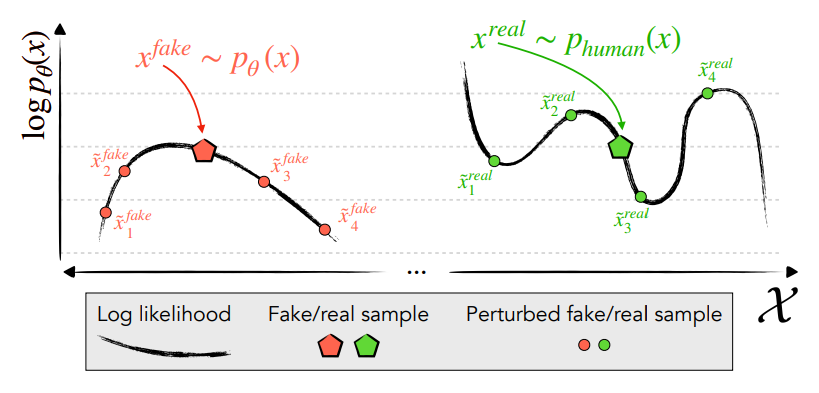
DetectLlama reports a discrepancy score. Higher scores mean the text looks more human-written to the scoring model. Lower scores mean it looks more model-like or AI-generated. Scores near zero are ambiguous and should be interpreted with a calibrated threshold for the dataset you care about.
DetectLlama follows the analytic Fast-DetectGPT approach. The original Fast-DetectGPT paper shows how to estimate whether text sits in high-curvature regions of a language model probability surface. AI-generated text often follows high-probability model patterns more closely, and this can be measured without generating many perturbed samples.
The core metric is Conditional Probability Curvature:
Where:
-
$x$ is the original input token -
$\log p_\theta(x)$ is the log likelihood of the original token -
$\tilde{\mu}$ is the expected log likelihood under the model distribution -
$\tilde{\sigma}$ is the standard deviation of those log likelihoods
Unlike DetectGPT-style methods that require extra sampling or perturbation passes, the analytic version evaluates the model distribution directly. DetectLlama implements this idea with llama.cpp so scoring can run on consumer hardware with a GGUF model.
- Fast-DetectGPT for the analytic detection method.
- Original Fast-DetectGPT implementation, which uses PyTorch.
- DetectGPT for the earlier probability-curvature detection framing.
- llama.cpp for local GGUF inference.