






PAR Scrape is a versatile web scraping tool with options for Selenium or Playwright, featuring AI-powered data extraction and formatting.
- Features
- Known Issues
- Prompt Cache
- How it works
- Site Crawling
- Prerequisites
- Installation
- Usage
- Roadmap
- What's New
- Contributing
- License


- Web scraping using Playwright or Selenium
- AI-powered data extraction and formatting
- Can be used to crawl and extract clean markdown without AI
- Supports multiple output formats (JSON, Excel, CSV, Markdown)
- Customizable field extraction
- Token usage and cost estimation
- Prompt cache for Anthropic provider
- Uses my PAR AI Core
- Selenium silent mode on windows still shows message about websocket. There is no simple way to get rid of this.
- Providers other than OpenAI are hit-and-miss depending on provider / model / data being extracted.
- OpenAI will auto cache prompts that are over 1024 tokens.
- Anthropic will only cache prompts if you specify the --prompt-cache flag. Due to cache writes costing more only enable this if you intend to run multiple scrape jobs against the same url, also the cache will go stale within a couple of minutes so to reduce cost run your jobs as close together as possible.
- Data is fetched from the site using either Selenium or Playwright
- HTML is converted to clean markdown
- If you specify an output format other than markdown then the following kicks in:
- A pydantic model is constructed from the fields you specify
- The markdown is sent to the AI provider with the pydantic model as the required output
- The structured output is saved in the specified formats
- If crawling mode is enabled this process is repeated for each page in the queue until the specified max number of pages is reached
Crawling has three implemented modes, with a fourth planned:
- Single page (default): scrape only the specified URL.
- Single level: crawl all links on the first page and add them to the queue. Links from any pages after the first are not added to the queue.
- Domain: crawl all links on all pages as long as they belong to the same host (subdomains are not followed).
- Paginated (planned, not yet implemented): crawl across paginated listings.
Crawling progress is stored in a sqlite database and all pages are tagged with the run name which can be specified with the --run-name / -n flag.
You can resume a crawl by specifying the same run name again.
The options --scrape-max-parallel / -P set the number of workers that fetch pages and run LLM extraction in parallel within each batch. Raising it (together with --crawl-batch-size) is the main way to speed up multi-page crawls, because the per-page LLM round-trips overlap instead of running one at a time. The default of 1 processes pages sequentially, identical to earlier versions.
The options --crawl-batch-size / -B should be set at least as high as the scrape max parallel option to ensure that the queue is always full.
The options --crawl-max-pages / -M can be used to limit the total number of pages crawled in a single run.
--respect-robots defaults to off; when enabled, if robots.txt cannot be fetched the crawler proceeds as if all URLs are allowed (fail-open).
Crawl state is persisted in an SQLite database at ~/.par_scrape/jobs.sqlite, and every page is tagged with its run name (--run-name / -n). Provider and other configuration is read from ~/.par_scrape.env (auto-migrated from the legacy ~/.par-scrape.env on first run). When the database schema is upgraded in a new release, the older database is renamed aside to jobs.sqlite.bak-v<version> (for example jobs.sqlite.bak-v1) rather than deleted, so crawl history survives an upgrade.
The queue command group inspects and repairs the resume queue from the CLI, so you no longer need to hand-edit jobs.sqlite:
par_scrape queue list                 # every run, with queued/active/completed/error counts
par_scrape queue status <run>         # per-status counts + the errored pages for a run (--all to include completed/queued)
par_scrape queue retry <run>          # reset every errored page in a run back to queued for the next resume
par_scrape queue reset <run>          # delete every page row for a run (asks for confirmation; --yes / -y to skip)
queue retry <run> resets errored pages to queued (clearing the recorded error and retry count) so the next resume picks them up; it prints the resume command to run. queue reset <run> is destructive — it removes the queue rows for a run (on-disk output files are left untouched) and asks for confirmation unless you pass --yes / -y; back up ~/.par_scrape/jobs.sqlite first if unsure. To start entirely fresh instead, use a new --run-name.
Re-running a crawl normally re-sends every page to the LLM even when nothing changed, because each --run-name is an isolated namespace that pays the full extraction cost again. Pass --if-changed to skip LLM extraction for pages whose content is unchanged since a previous completed run.
When enabled, each completed page records a SHA-256 of its converted Markdown (not the raw HTML, which carries volatile CSRF tokens and timestamps). On a later --if-changed run, a page whose Markdown hash matches a prior completed crawl of the same URL reuses that run's extracted outputs — they are copied into the new run's output folder and the row is marked complete without an LLM call. Pages whose content changed (different hash), pages that never ran before, and any page where a prior output file has since been deleted fall through to normal LLM extraction, so the result is always complete.
--if-changed is off by default; omit it for the original always-extract behavior. It has no effect on Markdown-only runs (no LLM is used there anyway).
Each page's converted Markdown is sent to the LLM in full, including navigation bars, footers, link farms, and other boilerplate that never contains the fields you want. Pass --prune to strip that boilerplate before extraction, which typically cuts input tokens 30–60% on docs/product pages with no loss in extracted fields, lowering both cost and latency on every LLM call.
The heuristics are deliberately conservative: headings, tables, and code blocks are kept verbatim, and any line containing a digit (prices, specs, model numbers) is always preserved. Only runs of four or more link-only list items (a nav menu or footer link farm), empty-text link items, and bare-URL / image-only lines are removed. Only the Markdown sent to the LLM is pruned — the saved raw file and the --if-changed content hash still use the full Markdown, so pruning never affects your on-disk artifact or incremental-rescrape matching. --prune is off by default and has no effect on Markdown-only runs.
To install PAR Scrape, make sure you have Python 3.11 or higher. Python 3.14 is the default and recommended version (supports Python 3.11-3.14).
uv is recommended
curl -LsSf https://astral.sh/uv/install.sh | shpowershell -ExecutionPolicy ByPass -c "irm https://astral.sh/uv/install.ps1 | iex"Then, follow these steps:
-
Clone the repository:
git clone https://github.com/paulrobello/par_scrape.git cd par_scrape -
Install the package dependencies using uv:
uv sync
To install PAR Scrape from PyPI, run any of the following commands:
uv tool install par_scrapepipx install par_scrapeTo use playwright as a scraper, you must install it and its browsers using the following commands:
uv tool install playwright
playwright install chromiumTo use PAR Scrape, you can run it from the command line with various options. Here's a basic example:
Ensure you have the AI provider api key in your environment.
You can also store your api keys in the file ~/.par_scrape.env as follows:
# AI API KEYS
OPENAI_API_KEY=
ANTHROPIC_API_KEY=
GROQ_API_KEY=
XAI_API_KEY=
GOOGLE_API_KEY=
MISTRAL_API_KEY=
GITHUB_TOKEN=
OPENROUTER_API_KEY=
DEEPSEEK_API_KEY=
# Used by Bedrock
AWS_PROFILE=
AWS_ACCESS_KEY_ID=
AWS_SECRET_ACCESS_KEY=


### Tracing (optional)
LANGCHAIN_TRACING_V2=false
LANGCHAIN_ENDPOINT=https://api.smith.langchain.com
LANGCHAIN_API_KEY=
LANGCHAIN_PROJECT=par_scrape- ANTHROPIC_API_KEY is required for Anthropic. Get a key from https://console.anthropic.com/
- OPENAI_API_KEY is required for OpenAI. Get a key from https://platform.openai.com/account/api-keys
- GITHUB_TOKEN is required for GitHub Models. Get a free key from https://github.com/marketplace/models
- GOOGLE_API_KEY is required for Google Models. Get a free key from https://console.cloud.google.com
- XAI_API_KEY is required for XAI. Get a free key from https://x.ai/api
- GROQ_API_KEY is required for Groq. Get a free key from https://console.groq.com/
- MISTRAL_API_KEY is required for Mistral. Get a free key from https://console.mistral.ai/
- OPENROUTER_API_KEY is required for OpenRouter. Get a key from https://openrouter.ai/
- DEEPSEEK_API_KEY is required for Deepseek. Get a key from https://platform.deepseek.com/
- AWS_PROFILE or AWS_ACCESS_KEY_ID and AWS_SECRET_ACCESS_KEY are used for Bedrock authentication. The environment must already be authenticated with AWS.
- No key required to use with Ollama, LlamaCpp, LiteLLM.
If a specific provider is not listed but has an OpenAI compatible endpoint you can use the following combo of vars:
- PARAI_AI_PROVIDER=OpenAI
- PARAI_MODEL=Your selected model
- PARAI_AI_BASE_URL=The providers OpenAI endpoint URL
uv run par_scrape --url "https://openai.com/api/pricing/" -f "Title" -f "Description" -f "Price" -f "Cache Price" --model gpt-4o-mini --display-output mdpar_scrape --url "https://openai.com/api/pricing/" -f "Title" -f "Description" -f "Price" -f "Cache Price" --model gpt-4o-mini --display-output md--url -u TEXT URL to scrape [default: https://openai.com/api/pricing/]
--output-format -O [md|json|csv|excel] Output format for the scraped data [default: md]
--fields -f TEXT Fields to extract from the webpage
[default: Model, Pricing Input, Pricing Output, Cache Price]
--scraper -s [selenium|playwright] Scraper to use: 'selenium' or 'playwright' [default: playwright]
--retries -r INTEGER Retry attempts for failed scrapes [default: 3]
--scrape-max-parallel -P INTEGER Max parallel fetch and extraction workers [default: 1]
--wait-type -w [none|pause|sleep|idle|selector|text] Method to use for page content load waiting [default: sleep]
--wait-selector -i TEXT Selector or text to use for page content load waiting. [default: None]
--headless -h Run in headless mode (for Selenium)
--sleep-time -t INTEGER Time to sleep before scrolling (in seconds) [default: 2]
--ai-provider -a [Ollama|LlamaCpp|OpenRouter|OpenAI|Gemini|Github|XAI|Anthropic|
Groq|Mistral|Deepseek|LiteLLM|Bedrock] AI provider to use for processing [default: OpenAI]
--model -m TEXT AI model to use for processing. If not specified, a default model will be used. [default: None]
--ai-base-url -b TEXT Override the base URL for the AI provider. [default: None]
--prompt-cache Enable prompt cache for Anthropic provider
--reasoning-effort [low|medium|high] Reasoning effort level to use for o1 and o3 models. [default: None]
--reasoning-budget INTEGER Maximum context size for reasoning. [default: None]
--display-output -d [none|plain|md|csv|json] Display output in terminal (md, csv, or json) [default: None]
--output-folder -o PATH Specify the location of the output folder [default: output]
--silent -q Run in silent mode, suppressing output
--run-name -n TEXT Specify a name for this run. Can be used to resume a crawl Defaults to YYYYmmdd_HHMMSS
--pricing -p [none|price|details] Enable pricing summary display [default: details]
--cleanup -c [none|before|after|both] How to handle cleanup of output folder [default: none]
--extraction-prompt -e PATH Path to the extraction prompt file [default: None]
--crawl-type -C [single_page|single_level|domain] Enable crawling mode [default: single_page]
--crawl-max-pages -M INTEGER Maximum number of pages to crawl this session [default: 100]
--crawl-batch-size -B INTEGER Maximum number of pages to load from the queue at once [default: 1]
--respect-rate-limits Whether to use domain-specific rate limiting [default: True]
--respect-robots Whether to respect robots.txt [default: False]
--crawl-delay INTEGER Default delay in seconds between requests to the same domain [default: 1]
--if-changed Skip LLM extraction for pages unchanged since a previous completed run (matched by content hash); reuses that run's extracted outputs. [default: False]
--prune Prune navigation/boilerplate from page content before LLM extraction to reduce token cost. [default: False]
--version -v
--help Show this message and exit.
- Basic usage with default options:
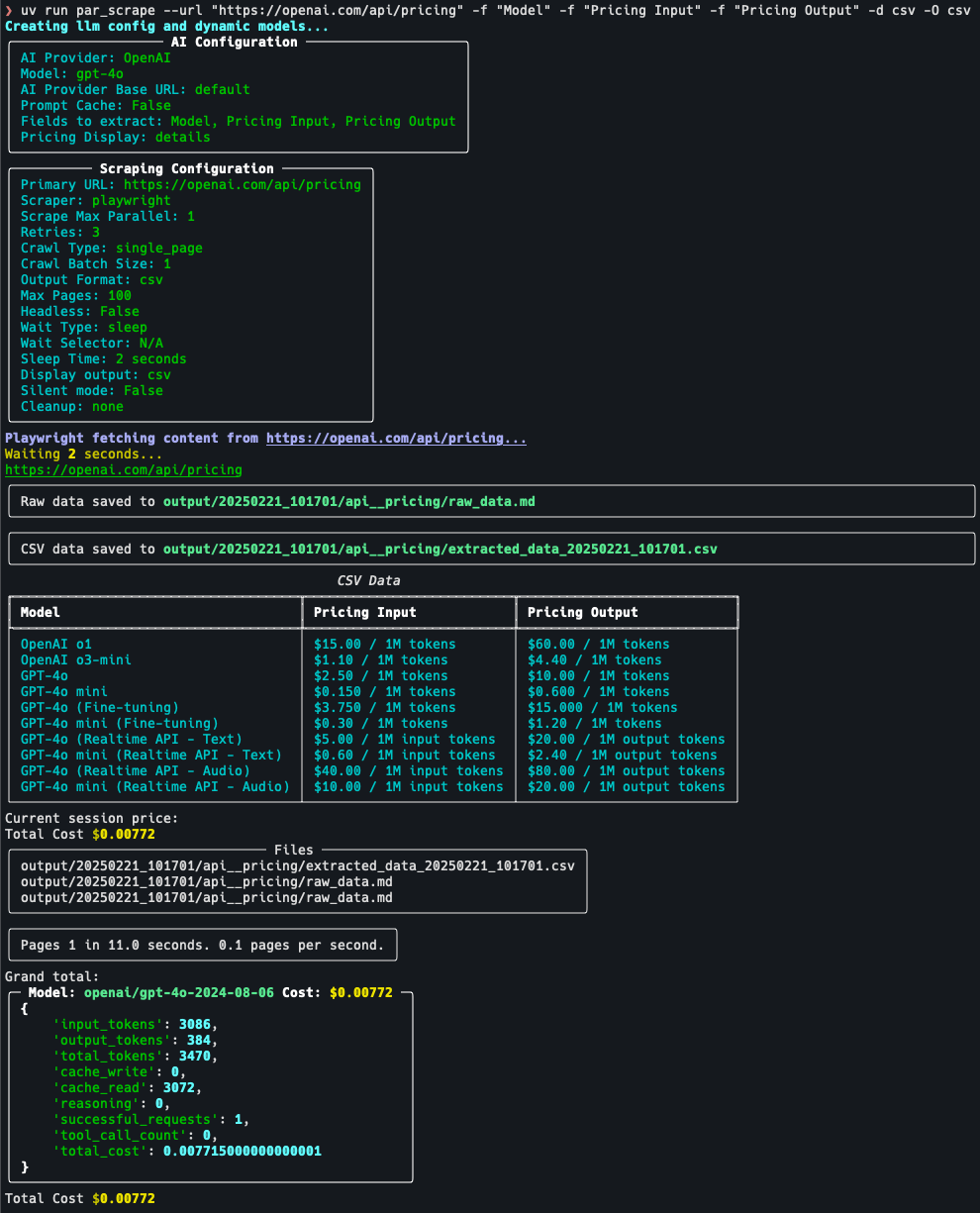
par_scrape --url "https://openai.com/api/pricing/" -f "Model" -f "Pricing Input" -f "Pricing Output" -O json -O csv --pricing details --display-output csv- Using Playwright, displaying JSON output and waiting for text gpt-4o to be in page before continuing:
par_scrape --url "https://openai.com/api/pricing/" -f "Title" -f "Description" -f "Price" --scraper playwright -O json -O csv -d json --pricing details -w text -i gpt-4o- Specifying a custom model and output folder:
par_scrape --url "https://openai.com/api/pricing/" -f "Title" -f "Description" -f "Price" --model gpt-4 --output-folder ./custom_output -O json -O csv --pricing details -w text -i gpt-4o- Running in silent mode with a custom run name:
par_scrape --url "https://openai.com/api/pricing/" -f "Title" -f "Description" -f "Price" --silent --run-name my_custom_run --pricing details -O json -O csv -w text -i gpt-4o- Using the cleanup option to remove the output folder after scraping:
par_scrape --url "https://openai.com/api/pricing/" -f "Title" -f "Description" -f "Price" --cleanup after --pricing details -O json -O csv- Using the pause option to wait for user input before scrolling:
par_scrape --url "https://openai.com/api/pricing/" -f "Title" -f "Description" -f "Price" --wait-type pause --pricing details -O json -O csv- Using Anthropic provider with prompt cache enabled and detailed pricing breakdown:
par_scrape --url "https://openai.com/api/pricing/" -a Anthropic --prompt-cache -d csv -p details -f "Title" -f "Description" -f "Price" -f "Cache Price" -O json -O csv- Crawling single level and only outputting markdown (No LLM or cost):
par_scrape --url "https://openai.com/api/pricing/" -O md --crawl-batch-size 5 --scrape-max-parallel 5 --crawl-type single_levelBy default the AI uses a built-in system prompt. Pass --extraction-prompt / -e with a path to a markdown file to replace it. The file's full contents become the system message sent to the model, so it must instruct the model to emit structured output for the dynamically generated DynamicListingsContainer schema (built from the -f / --fields values you supply).
The bundled default at src/par_scrape/extraction_prompt.md is the recommended starting template:
ROLE: You are an intelligent text extraction and conversion assistant.
TASK: Extract structured information from the user provided text into the format required to call DynamicListingsContainer.
Ensure you include all data points in the output.
If you encounter cases where you can't find the data for a specific field use an empty string "".
You *MUST* call the `DynamicListingsContainer` function with the extracted data.
par_scrape is also usable as a library — from par_scrape import scrape — for pipelines, notebooks, and other agents. The API is provisional for one release and may change before stabilization.
Markdown-only (no LLM, no API key needed):
from par_scrape import scrape

result = scrape("https://example.com/docs")
print(result.ok)                    # True when every page reached COMPLETED
for page in result.pages:
    print(page.url, page.status, page.file_paths)
Structured extraction with an LLM (provider API keys must be in the environment — the library does not load ~/.par_scrape.env):
from par_scrape import scrape
from par_scrape.enums import OutputFormat

result = scrape(
    "https://example.com/pricing",
    fields=["Model", "Price"],
    output_formats=[OutputFormat.JSON, OutputFormat.MARKDOWN],
    ai_provider="anthropic",
    model="claude-3-5-sonnet-latest",
)
if not result.ok:
    for page in result.pages:
        if page.status.value == "error":
            print(page.url, page.error_message)
Notes: configuration problems (unknown provider, an LLM format requested without a provider, a missing API key) raise ProviderConfigError / CrawlConfigError; per-page failures do not raise — they appear as PageResult entries with status == "error". quiet=True (the default) suppresses all console output. Advanced ScrapeConfig fields (e.g. scraper, wait_type, prune, respect_robots) can be passed as keyword arguments.
- API Server
- More crawling options
- Paginated Listing crawling
- Version 0.11.0
- New
par_scrape queuecommand group (list,status,retry,reset) to inspect and repair the resume queue without hand-editing~/.par_scrape/jobs.sqlite(ENH-006). Barepar_scrape -u URL ...still works;par_scrape scrape -u URL ...is also accepted. - New
--pruneflag strips nav/footer boilerplate before LLM extraction, cutting input tokens ~30–60% with no loss of extracted fields (ENH-003). - New library API:
from par_scrape import scrapefor pipelines, notebooks, and other agents (provisional) (ENH-005). - Concurrent LLM extraction:
--scrape-max-parallel/-Pgreater than 1 overlaps per-page LLM latency across a batch (ENH-001). --if-changedskips LLM extraction on pages unchanged since a previous run, so repeat crawls of static sites are near-free (ENH-002).- Per-thread SQLite WAL connections make queue writes concurrency-safe and eliminate
database is lockedunder parallel extraction (ENH-004). - See CHANGELOG.md for the full list
- New
- Version 0.10.0
⚠️ Breaking:--url/-uis now required. A barepar_scrapeinvocation no longer defaults to a third-party URL; pass--urlexplicitly. (Existing scripts and examples already pass--url/-uand are unaffected.)⚠️ Breaking: An implicit.envfile in the current working directory is no longer auto-loaded (an untrusted directory could otherwise redirect API traffic and exfiltrate provider keys). Use the new opt-in--env-file PATHoption to load a project-local env file;~/.par_scrape.envand the~/.par-scrape.envmigration are unchanged.- Critical fix: failed LLM extractions are no longer silently recorded as
COMPLETED— they now route to the retry/error path (mark_error) instead of losing data with a success exit code. - Hardened release pipelines (removed a mutable third-party action from privileged jobs), CSV/Excel formula-injection neutralization, scoped
--cleanup, and safer URL/host handling - Decomposed
main()into a testablerunner.py; splitcrawl.pyintoqueue_db/links/robots/paths; non-destructive database migration; test coverage rose from 51% to 80% - See CHANGELOG.md for the full list
- Version 0.9.3
- Fixed an SQLite connection leak (
ResourceWarning: unclosed database) by wrapping connections incontextlib.closing()acrosscrawl.py,__main__.py, and tests - Updated all dependencies to latest versions
- Fixed an SQLite connection leak (
- Version 0.9.2
- Updated all dependencies to latest versions
- Added
gitleakspre-commit hook for secret detection
See CHANGELOG.md for the full history.
Contributions are welcome! See CONTRIBUTING.md for development setup, the make checkall verification gate required before pull requests, pre-commit hooks, code style, and PR expectations. For bugs and feature requests, please open a GitHub issue.
This project is licensed under the MIT License - see the LICENSE file for details.
Paul Robello - probello@gmail.com