termotion turns deterministic YAML timelines into production-ready terminal, coding-agent, assistant-chat, VHS, and CRT motion graphics. It renders every frame through system Chrome or Chromium, optionally applies a stateful analog signal chain, and streams the result to FFmpeg.
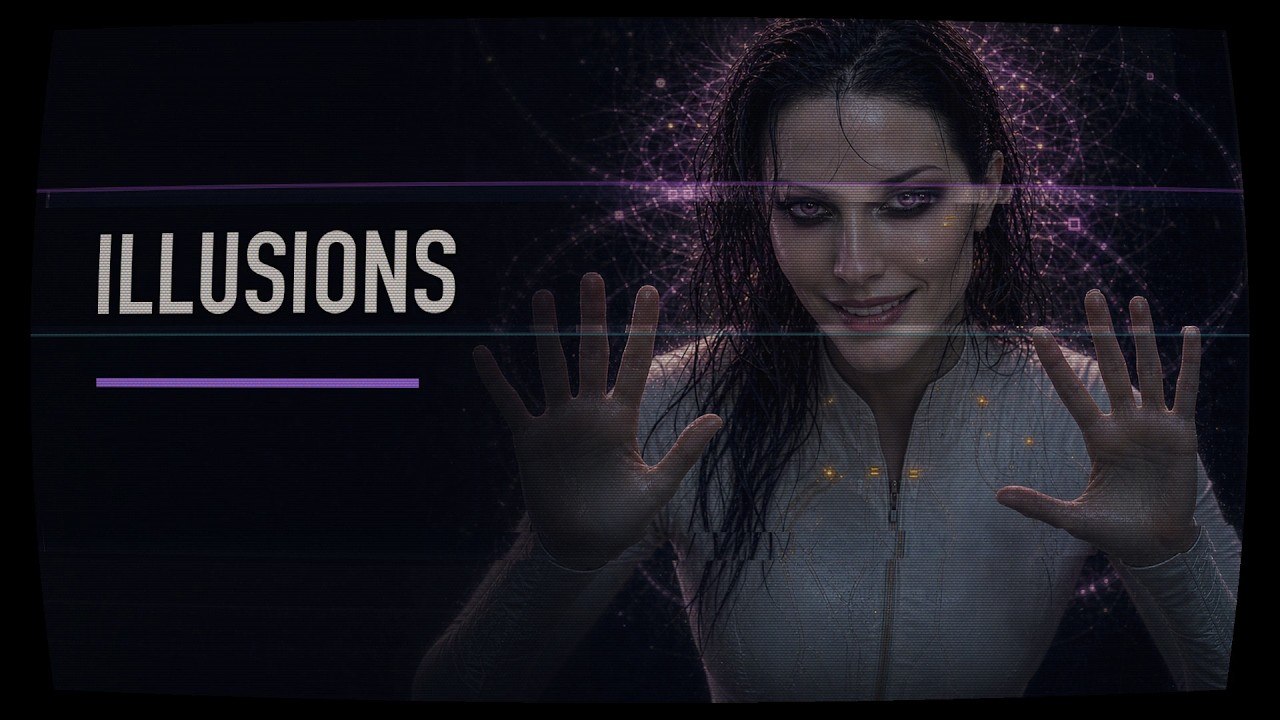
The terminal swarms, assistant conversations, coding-agent sessions, CRT treatment, and generated-footage CRT unification in KREEDLE — Illusions were built with this renderer.
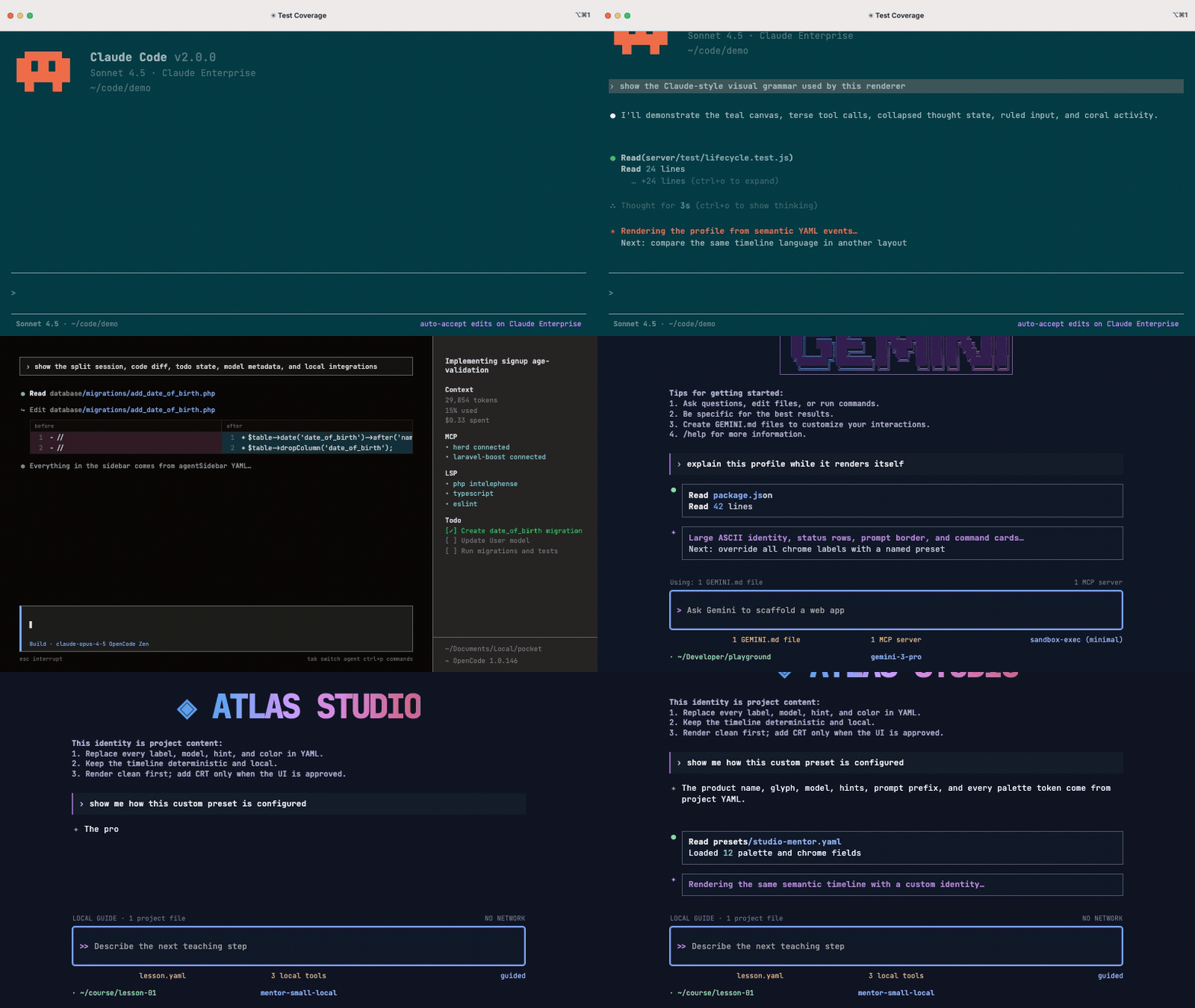
This demo renders Claude-style, OpenCode-style, Gemini-style, and fully custom agent identities from semantic events. Product names, model labels, glyphs, ASCII art, help text, prompt prefixes, hotkeys, and palette tokens are project content—not fixed renderer branding.
Status: public-preview quality on macOS and Linux. The renderer uses a system Chrome/Chromium and FFmpeg, while portable Inter Variable and JetBrains Mono Variable webfonts ship inside the browser artifact.
- Derives a frame from only
scene + time + seed; no wall-clock timers are involved. - Renders realistic ANSI terminals with Xterm.js, including 16/256/truecolor, cursor control, scrollback, carriage-return progress lines, and asciinema v2 output.
- Renders semantic coding-agent transcripts in
codex-cli,claude-code,opencode, andgemini-clivisual profiles. - Renders a brand-neutral helpful-assistant chat UI with deterministic typing, Markdown, attachments, and optional identity-glitch windows.
- Renders scriptless local web walkthroughs with deterministic page states, cursor movement, click pulses, highlights, and tooltips.
- Animates terminal grids, focus changes, independent workers, and
1 → 2 → 4 → 8 → 16swarms. - Applies one deterministic WebGL2 VHS → CRT signal chain to both generated UI and existing image/video footage.
- Exports H.264 previews, ProRes masters, ProRes 4444 alpha, PNG sequences, stills, contact sheets, and reproducibility manifests.
- Includes a live preview with play/pause, scrubber, frame stepping, scene/profile selectors, event markers, and independent VHS/CRT switches.
- macOS, Ubuntu 24.04, or a compatible glibc Linux distribution
- Node.js 22 or newer
- Google Chrome or Chromium
- FFmpeg and FFprobe
# macOS
brew install ffmpeg

# Debian 12
sudo apt-get update
sudo apt-get install --yes chromium ffmpeg

# Ubuntu: install FFmpeg plus Google Chrome or the Chromium snap
sudo apt-get update
sudo apt-get install --yes ffmpeg
sudo snap install chromium
Custom executable locations are supported through TERMOTION_CHROME_PATH, TERMOTION_FFMPEG_PATH, and TERMOTION_FFPROBE_PATH.
Linux discovery recognizes google-chrome, google-chrome-stable, chromium, chromium-browser, and the common /snap/bin/chromium path. TERMOTION_CHROME_NO_SANDBOX=1 exists only for isolated containers whose runtime cannot provide the Chrome sandbox; do not use it for ordinary desktop rendering.
From npm:
npm install --global @pintar-team/termotion
termotion doctor
termotion preview /path/to/your/project.yaml
From a source checkout:
npm install
npm run build
npm run termotion -- doctor
npm run termotion -- preview ./examples/basic/project.yaml
The preview server binds to 127.0.0.1. Edit YAML/JSON in your editor and restart validation or preview after content changes; v1 is not a visual scene editor.
termotion validate <project.yaml>
termotion preview <project.yaml> [--no-open]
termotion frame <project.yaml> [--scene id] [--time seconds] [--profile name] [--out frame.png] [--clean] [--force]
termotion render <project.yaml> [--scene id] [--profile name] [--out path] [--clean] [--force]
termotion media <project.yaml> --input source.mp4 [--profile name] [--vhs-preset name] [--vhs-standard ntsc|pal] [--no-vhs] [--preset name] [--no-crt] [--out path] [--force]
termotion media-crt <project.yaml> --input source.mp4 [--profile name] [--preset name] [--mode screen|transparent-phosphor] [--out path] [--force]
termotion contact-sheet <project.yaml> [--scene id] [--times 0,2,4] [--profile name] [--out contact.png] [--clean] [--force]
termotion doctor
--vhs-preset enables or overrides VHS, --vhs-standard selects decoder cadence, and --preset/--mode control CRT. --no-vhs and --no-crt disable individual passes; --clean disables the complete analog chain. media supports VHS-only, CRT-only, and VHS → CRT. media-crt remains the backward-compatible CRT-required command and may also place VHS before CRT. Existing outputs are protected unless --force is explicit. Tape damage and CRT instability use seed-driven, multi-scale burst processes: they are reproducible without settling into a visible repeating stripe grid.
When --profile is omitted, Termotion selects defaultProfile, then a profile named preview, then the first declared profile. This rule is shared by the CLI and live preview.
project.yaml owns the canvas, deterministic seed, optional theme, default CRT treatment, export profiles, and scene references. Each scene is an ordered event timeline. Long Markdown, ANSI, attachment previews, and asciinema recordings may live in external fixtures next to the scene.
name: My motion project
seed: 20260805
canvas: { width: 1920, height: 1080, fps: 30, background: '#07090c' }
crt: { preset: sega-royale, mode: screen }
vhs: { enabled: true, preset: vhs-sp-ntsc, standard: ntsc }
defaultProfile: preview
profiles:
  preview: { width: 1920, height: 1080, fps: 30, format: mp4, codec: h264 }
  alpha: { width: 3840, height: 2160, fps: 30, format: mov, codec: prores4444, transparent: true, crtMode: transparent-phosphor }
scenes:
  - { id: terminal-swarm, file: scenes/terminal-swarm.yaml }
Supported events are chat.message, chat.composer, agent.entry, agent.composer, agent.footer, surface, terminal.create, terminal.command, terminal.write, terminal.cast, terminal.close, layout.focus, web.state, web.cursor, web.highlight, and web.tooltip.
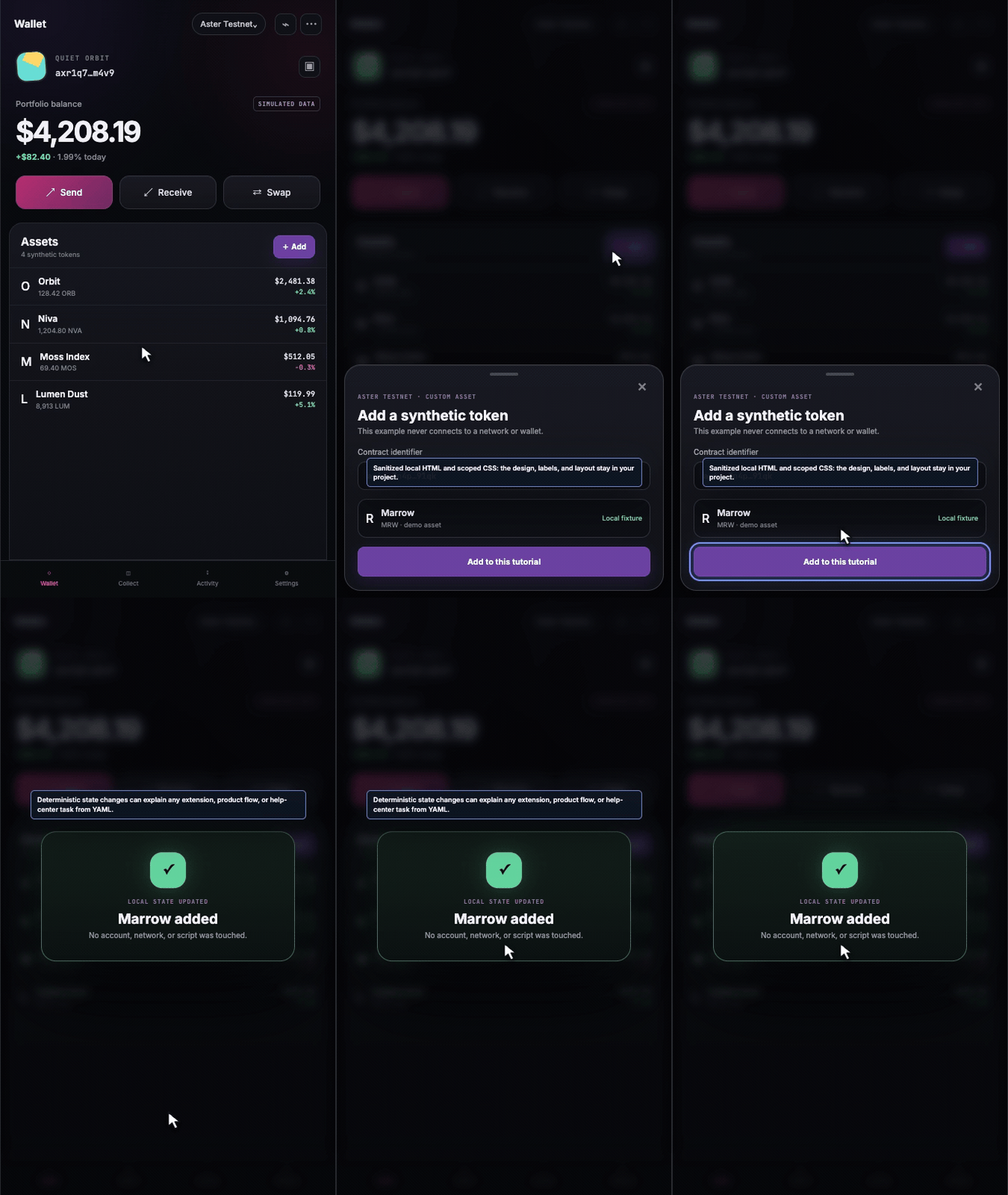
The wallet is an example project, not a built-in product preset. Termotion supplies deterministic state and annotation primitives; the sanitized local HTML, scoped CSS, labels, colors, and layout remain replaceable project files. The same surface can produce onboarding, help-center, product-tour, and internal training clips without recording a real account or executing page scripts.
The loader is strict: unknown fields, invalid event lifecycles, out-of-duration events, incompatible alpha codecs, duplicate scene IDs, malformed asciinema data, and fixture paths escaping the project directory are rejected before rendering.
See Project format, Architecture, the VHS signal-chain guide, the agent UI reference study, and the release checklist. Runnable projects live in examples/basic, examples/agent-profiles, and examples/vhs-calibration.
VHS is modeled as a separate two-pass signal/decode stage before CRT. The first pass converts RGB into NTSC YIQ or PAL YUV, applies independent luma/chroma bandwidth and post-line time-base error, and stores the synthetic tape signal. The decoder adds exact 59.94/50 Hz field cadence, PAL line alternation, chroma delay/phase error, tape SNR, sparse dropouts, head-switch disturbance, and previous-field history. It then hands decoded RGB to CRT; VHS never inherits CRT curvature, scanlines, phosphor mask, bloom, or persistence by accident.
Presets:
svhs-clean— restrained ≥400 TVL S-VHS sourcevhs-sp-ntsc— ordinary NTSC SP playback around 240 TVLvhs-pal-rental— PAL rental tape with stable PAL hue but more wearvhs-lp-worn— lower-bandwidth, multi-generation LP tapetracking-damaged— intentionally unstable tracking and head-switch region
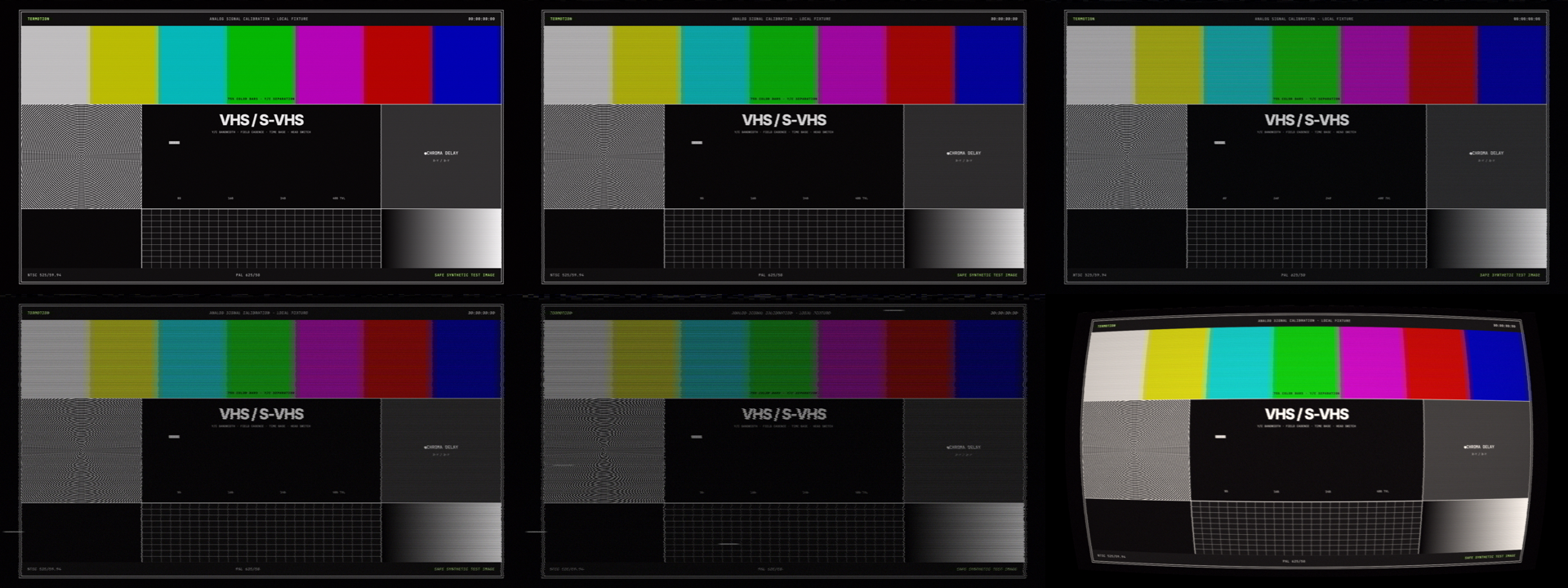
Top: svhs-clean, vhs-sp-ntsc, vhs-pal-rental. Bottom: vhs-lp-worn, tracking-damaged, and vhs-sp-ntsc → consumer-1996 CRT.
Use a 29.97 fps profile for native NTSC delivery and 25 fps for native PAL. Other export rates are allowed for editing workflows, while the virtual decoder still advances at the selected standard's field rate. See the calibration chart and research notes in the VHS guide.
The clean UI is rendered first. A separate WebGL2 pass adds barrel distortion, rounded glass, scanlines, RGB slot/aperture masks, chromatic convergence, bloom, vignette, rolling band, bounded sync displacement, noise, source-pixel quantization, and temporal persistence using a previous-frame ping-pong texture. transparent-phosphor is an alpha-output contract, not just a shader look: it automatically captures the UI over transparency and therefore requires ProRes 4444 or PNG.
CRT stills replay virtual frame history from scene start. At frame-aligned times, termotion frame therefore matches the corresponding frame from termotion render; later stills take proportionally longer to produce.
Presets:
pvm-clean— restrained broadcast monitorconsumer-1996— softer consumer glasssega-royale— visible source pixels and staggered RGB phosphor groupssecurity-greenandsecurity-amber— monochrome security displaysdamaged-sync— bounded displacement and chromatic damagephosphor-overload— stronger glow and persistence
media and media-crt decode arbitrary footage as a bounded PNG stream and immediately feed frames through the same effects. They do not materialize the whole source as a temporary image sequence. Audio is deliberately excluded; mux music and foley in the final edit.
| Output | Format | Alpha | Typical use |
|---|---|---|---|
| Preview | H.264 MP4 | No | Review and social upload |
| Master | ProRes 422 MOV | No | Edit/master pipeline |
| Overlay | ProRes 4444 MOV | Yes | Phosphor compositing |
| Frame sequence | PNG directory | Optional | VFX and interchange |
| Still/contact sheet | PNG | Optional | Inspection and thumbnails |
Every animation gets a JSON manifest containing the content hash, seed, scene, effective VHS standard/preset and CRT settings, requested output parameters, FFprobe/PNG-observed codec, dimensions, FPS, duration, frame count and alpha capability, operating-system platform, architecture, effective UI/terminal font stacks, Chrome/FFmpeg/FFprobe versions, output checksum, and renderer version. A mismatch aborts the render before a manifest is written.
npm run check          # strict TypeScript + unit tests
npm run test:visual    # deterministic Playwright snapshots
npm run test:e2e       # browser security + VHS/CRT history + codec/alpha/frame QA
npm run test:vhs       # 4K VHS → CRT and 1080p downscale QA
npm run test:package   # inspect the npm tarball contract
npm run test:docker    # install the tarball and render inside minimal Linux
npm run test:all       # release gate
Portable text fonts are bundled, but Chrome rasterization may still differ across operating systems and browser builds. Exact visual snapshots remain a reviewed target-Mac gate; native Ubuntu E2E and the Debian container verify the Linux runtime contract without pretending that unrelated Chrome builds are pixel-identical. Read CONTRIBUTING.md before changing timeline semantics or snapshots.
Termotion is a motion renderer, not a shell executor. Terminal commands and agent activity are rendered as content; the project loader does not execute them. The browser receives resolved content without local project paths, Markdown is sanitized, and the local server uses a restrictive CSP. Projects are still local inputs: review third-party fixtures before including them in a production repository.
See SECURITY.md for the reporting policy and trust boundaries.
MIT. Bundled dependency licenses are recorded in THIRD_PARTY_NOTICES.md and emitted in full with the browser build. The agent-style profiles are original visual interpretations and are not affiliated with or endorsed by OpenAI, Anthropic, Google, or the OpenCode project.