


Log4Net appender fo Azure Log Analytics (ALA)... sending data to Azure Log Analytics. The data will also be logged/sent asynchronously for high performance and to avoid blocking the caller thread.
You can obtain this project as a Nuget Package
Install-Package Log4ALA
Or reference it and use it according to the License.
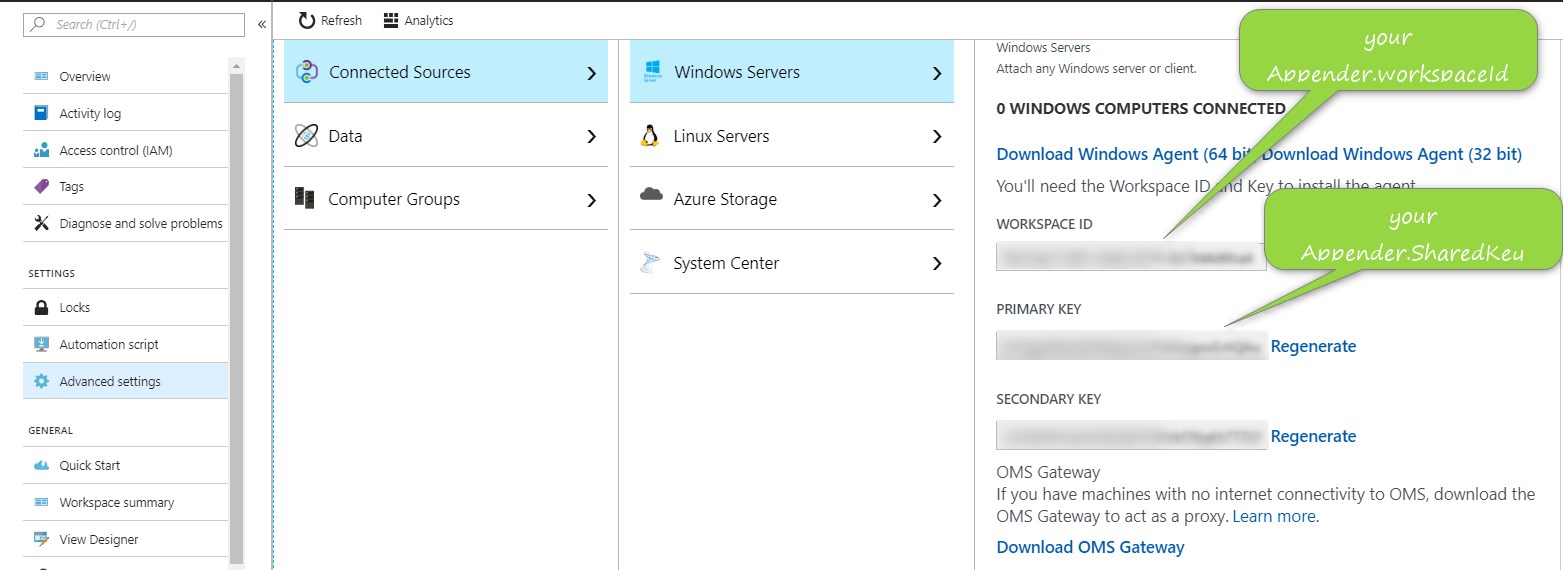
https://learn.microsoft.com/en-us/azure/azure-monitor/logs/logs-ingestion-api-overview
ingestionApi
To use the new Ingestion API set to true - default is false.
If true workspaceId and SharedKey can leave empty.
ingestionIdentityLogin
To use system or user managed identity login on Azure resources set to true - default is true.
If true tenanteId, appId and appSecret for the service principal can leave empty.
logType
The Custom table name without _CL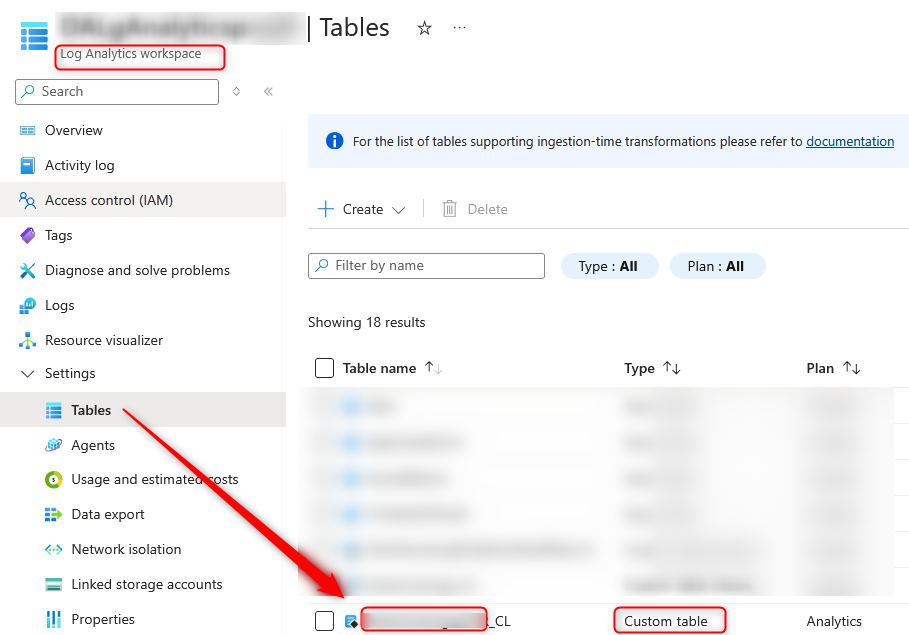 .
.
ingestionApiGzip
To compress the send ingestion logs - default is true.
tenantId
Tenant ID of your Microsoft Entra ID.
appId
Application ID of your registered Microsoft Entra Application and service principal.
appSecret
The secret of the above application ID.
dcEndpoint
The data collection endpoint (dce) URI.
dcrId
The data collection rule (dcr) id which should be used for the transformation.
dcEndpointApiVersion
The dce api version - default is 2023-01-01.
userManagedIdentityClientId
The optional Client ID of the assigned user managed identity which can be set if needed for containerized or standard Azure App/Function Service with enabled user assigned identity.
msiLogin
The should be true in case of containerized or standard Azure App/Function Service with enabled system assigned identity. - default is false
msiEndpointEnvName
The optional msi endpoint environment variable name which can be changed if needed but only if msiLogin=true and/or userManagedIdentityClientId is set - default is MSI_ENDPOINT (if not available fallback to the newer env var IDENTITY_ENDPOINT)
msiSecretEnvName
The optional msi secret environment variable name which can be changed if needed but only if msiLogin=true and/or userManagedIdentityClientId is set - default is MSI_SECRET (if not available fallback to the newer env var IDENTITY_HEADER)
msiIdentityHeaderName
The optional msi identity header name which can be changed if needed but only if msiLogin=true and/or userManagedIdentityClientId is set - default is X-IDENTITY-HEADER
msiApiVersion
The optional msi api version which can be changed if needed but only if msiLogin=true and/or userManagedIdentityClientId is set - default is 2019-08-01
Important ...if the Logs Ingestion API will be used instead of the deprecated HTTP Data Collector API the custom fields/ columns in the Log Analytics table won't be created automatically any longer and need to be created manually in the depending Log Analytics table and also added in the data collection rule (dcr) definition for the transformation.
Custom table schema, dce and dcr changes e.g. create/update/delete/change columns can be done with dcCrud.ps1
Please note to better keep the Azure dcr and dce resources in the same Azure resource group and add the Monitoring Metrics Publisher access role assignement to the Service Principal (appId) and/or the system/user managed identity of this resource group
to grant access to the Azure Logs Ingestion API from the depending service principal and/or managed identity 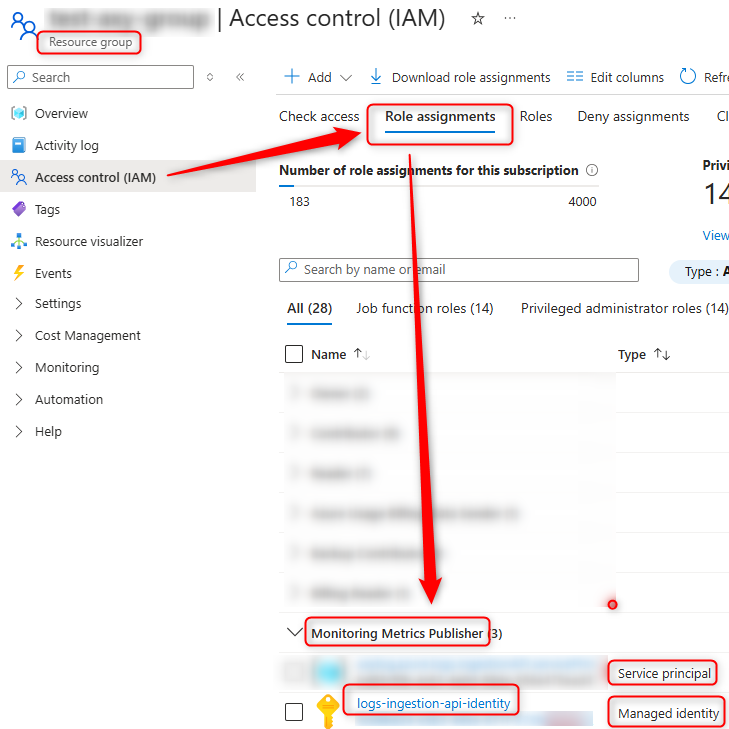 .
.
The (user) Managed Identity:
for example 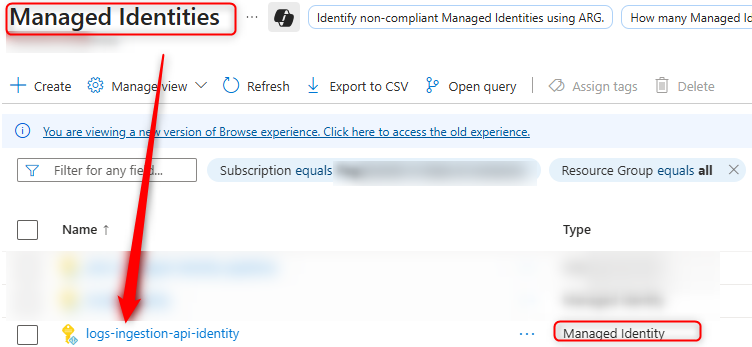 .
.
The enabled (user) Managed Identity on VMs, VMSSs, Azure Web/Function App...:
for example 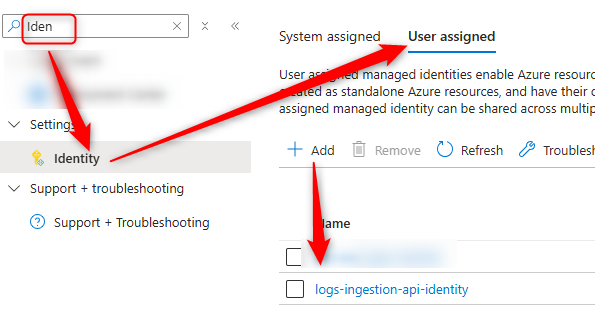 .
.
This example is also available as a LoggerTests.cs:
using log4net;
using System;

namespace Log4ALATest
{
    class LoggerTests
    {

        private static ILog alaLogger1 = LogManager.GetLogger("Log4ALALogger_1");
        private static ILog alaLogger2 = LogManager.GetLogger("Log4ALALogger_2");
        private static ILog alaLogger3 = LogManager.GetLogger("Log4ALALogger_3");

        static void Main(string[] args)
        {

            //Log message as anonymous type... the properties will then be mapped to Azure Log Analytic properties/columns.
            for (int i = 0; i < 10; i++)
            {
                alaLogger1.Info(new { id = $"log-{i}", message = $"test-{i}" });
            }

            System.Console.WriteLine("done1");

            //Log messages with semicolon separated key=value strings...the keys will then be mapped to Azure Log Analytic properties/columns.
            for (int i = 0; i < 10; i++)
            {
                alaLogger2.Info($"id=log-{i}; message=test-{i}");
            }

            System.Console.WriteLine("done2");

            //Log messages with semicolon separated key=value strings and duplicate key detection... the duplicate keys in the following example
            //will be mapped to Azur Log Analytic properties/columns message_Duplicate0 and message_Duplicate1.
            for (int i = 0; i < 10; i++)
            {
                alaLogger2.Info($"id=log-{i}; message=test-{i}; message=test-{i}; message=test-{i}");
            }

            System.Console.WriteLine("done3");

            //Log message as json string ...the json properties will then be mapped to Azure Log Analytic properties/columns.
            for (int i = 0; i < 10; i++)
            {
                alaLogger3.Info($"{{\"id\":\"log-{i}\", \"message\":\"test-{i}\"}}");
            }

            System.Console.WriteLine("done4");


			//log message if separators are changed from defaults = and ; to [=] and [;]
			//Log4ALAAppender_3.keyValueSeparator="[=]"
			//and
			//Log4ALAAppender_3.keyValuePairSeparator="[;]"
            for (int i = 0; i < 10; i++)
            {
                alaLogger3.Info($"id[=]log={i}[;]message[=]test={i}");
            }


            System.Console.WriteLine("done5");

            System.Threading.Thread.Sleep(new TimeSpan(0, 5, 0));
        }
    }
}At the the moment the default proxy could only be set by config (Web.config or App.config):
Refer to this article for more information.
<configuration>
    <system.net>
        <defaultProxy>
            <proxy
              proxyaddress="http://IP:PORT"
              bypassonlocal="true" />
        </defaultProxy>
    </system.net>
<configuration>
or by code:
System.Net.WebRequest.DefaultWebProxy = new System.Net.WebProxy("http://IP:PORT/", true);- You can batch multiple log messages together in a single request by configuration with the properties batchSizeInBytes, batchNumItems or batchWaitInSec (described further down). If batchSizeInBytes will be choosed the collecting of the log data will be stopped and send to Azure Log Analyitcs if batchSizeInBytes will be reached or the duration is >= BatchWaitMaxInSec with default 60s or batch size >= BatchSizeMax 30 mb (1 mb for Ingestion API) this conditions applies also if you choose batchNumItems. In case of batchWaitInSec collecting will be stopped and send if batchWaitInSec will be reached or the batch size will be >= BatchSizeMax 30 mb (1 mb for Ingestion API) .
- Auto detection/convertion of numeric, boolean, and dateTime string values to the Azure Log Analytics type _s, _g, _d, _b and _t().
- Field values greater than 32 KB (64 KB for Ingestion API) will be truncated (the value could be configured with maxFieldByteLength).
- Field names greater than 100 chars (45 chars for Ingestion API) will be truncated (the value could be configured with maxFieldNameLength).
- Configurable core field names (the value could be configured with coreFieldNames).
- Configurable background worker thread priority (the value could be configured with threadPriority).
- Configurable abortTimeoutSeconds - the time to wait for flushing the remaining buffered data to Azure Log Analytics if e.g. the Log4Net process will be shutdown.
- Configurable detection of json strings (e.g. "{"id":"log-1", "message":"test-1"}") or key value (e.g. "message=test-1") in the log messages with the properties jsonDetection (default true) and keyValueDetection (default true). Azure Log Analytics creates custom fields/ record types for each incoming json property or key name. Important ...if the Logs Ingestion API will be used the custom fields/ columns in the Log Analytics table won't be created automatically any longer and need to be created manually in the depending Log Analytics table and also added in the data collection rule (dcr) definition for the transformation.
- Configurable keyValue detection with keyValueSeparator and keyValuePairSeparator properties. To configure any other single char or multiple chars as separator for the keyValue detection in the log message. To avoid format conflicts e.g. with the semicolon separated key=value log message "Err=throws xy exception;Id=123" normally you will get two custom fields/records in Azure Log Analytics Err_s:"throws xy exception" and Id_d:123 but if you like to use one of the default keyValueSeparator "=" or the default keyValuePairSeparator ";" chars in the value itself e.g. "Err=throws exception = exception name;Id=123" you will run into a format conflict normally you expect to get Err_s:"throws exception = exception name" but for the Err key in the log message you will get Err_s:"throws" and MiscMsg_s:"exception exception name" and Id_d:123 as custom fields in Azure Log Analytics because of the keyValue separator char "=" contained in the value itself. To avoid this behaviour e.g. set the properties keyValueSeparator to "[=]" and keyValuePairSeparator to "[;]" and now your log message should look like "Err[=]throws exception = exception name[;]Id[=]123".
- Disable the MiscMessageFieldName of the coreFieldNames property (default is MiscMessageFieldName="MiscMsg") as custom field prefix with the property disableAnonymousPropsPrefix (true/false default is false) in case of using anonymous types as log message e.g. with alaLogger2.Info(new { Id=$"log-{i}", Message=$"test-{i}", Num=i, IsEnabled=true }) wich will lead to the following Azure Log Analytics Custom Fields: MiscMsg_Id_s, MiscMsg_Message_s, MiscMsg_Num_d, MiscMsg_IsEnabled_b to log without prefix set disableAnonymousPropsPrefix=true and you will get the custom fields Id_s, Message_s, Num_d, IsEnabled_b without MiscMsg_ prefix.
- Configurable workspace domain name default is ods.opinsights.azure.com (the domain name could be configured with logAnalyticsDNS). Now it's possible to change the domain name to Azure government workspaces ods.opinsights.azure.us.
- Configurable passthrough timestamp with enablePassThroughTimeStampField default is false if true the field should be contained in the log message e.g with "...;DateValue=2016-05-12T20:00:00.625Z;...".
- Use disableNumberTypeConvertion=true (default is false) to disable automatic type convertion of number values so it doesn't matter whether the value contains only numeric chars or alphanumeric chars to use the same key/column for both values this results in the column type string.
It's possible to configure multiple log4net Azure Log Analytics appender(s). The properties (e.g. workspaceId, SharedKey...) of each appender could be configured as appender properties, appSettings in App.config/Web.config or as Azure Configuration Setting (Azure settings are excluded from netstandard2.0 and netcoreapp2.0) with fallback strategy AzureSetting=>appSetting=>appenderProperty. If the properties will be configured as appSetting in App.config/Web.config or as Azure Configuration Settings it's important to attach the appender name as prefix to the property e.g. YourAppenderName.workspaceId
This configuration is also available as a App.config:
<?xml version="1.0" encoding="utf-8" ?>
<configuration>
  <startup>
    <supportedRuntime version="v4.0" sku=".NETFramework,Version=v4.5.2" />
  </startup>

  <appSettings>
    <!--
    don't forget to add [assembly: log4net.Config.XmlConfigurator()] to AssemblyInfo.cs
    -->
    <add key="log4net.Config" value="log4net.config"/>
    <add key="log4net.Config.Watch" value="True"/>

	<!--ALAAppender name (prefix) dependent settings-->
    <add key="Log4ALAAppender_1.workspaceId" value=""/>
    <add key="Log4ALAAppender_1.SharedKey" value=""/>

    <!-- +++++++++++++++++++++++++++++++++++ -->
    <!-- Properties to use the Ingestion API -->
    <!-- +++++++++++++++++++++++++++++++++++ -->

    <!-- to use the new Ingestion API set to true - default is false -->
    <!-- if true the above workspaceId and SharedKey can leave empty -->
    <add key="Log4ALAAppender_1.ingestionApi" value="false"/>
    <!-- To use system or user managed identity login on Azure resources set to true - default is true. -->
    <!-- If true tenanteId, appId and appSecret for the service principal can leave empty. -->
    <add key="Log4ALAAppender_1.ingestionIdentityLogin" value="true"/>
     <!--to compress the send ingestion logs - default is true-->
    <add key="Log4ALAAppender_1.ingestionApiGzip" value="true"/>
    <!-- Tenant ID of your Microsoft Entra ID  -->
    <add key="Log4ALAAppender_1.tenantId" value=""/>
    <!-- Application ID of your registered Microsoft Entra Application and service principal -->
    <add key="Log4ALAAppender_1.appId" value=""/>
    <!-- the secret of the above application ID-->
    <add key="Log4ALAAppender_1.appSecret" value=""/>
    <!-- the data collection endpoint (dce) -->
    <add key="Log4ALAAppender_1.dcEndpoint" value=""/>
    <!-- the data collection rule (dcr) id which should be used for the transformantion -->
    <add key="Log4ALAAppender_1.dcrId" value="dcr-..."/>
    <!-- the dce api version - default is 2023-01-01 -->
    <add key="Log4ALAAppender_1.dcEndpointApiVersion" value="2023-01-01"/>


    <!-- The optional Client ID of the assigned user managed identity which can be set if needed for containerized or standard Azure App/Function Service with enabled user assigned identity. -->
    <add key="Log4ALAAppender_1.userManagedIdentityClientId" value=""/>
    <!-- The should be true in case of containerized or standard Azure App/Function Service with enabled system assigned identity. - default is false -->
    <add key="Log4ALAAppender_1.msiLogin" value="false"/>
    <!-- The optional msi endpoint environment variable name which can be changed if needed but only if msiLogin=true and/or userManagedIdentityClientId is set - default is MSI_ENDPOINT (if not available fallback to the newer env var IDENTITY_ENDPOINT) -->
    <add key="Log4ALAAppender_1.msiEndpointEnvName" value="MSI_ENDPOINT"/>
    <!-- The optional msi secret environment variable name which can be changed if needed but only if msiLogin=true and/or userManagedIdentityClientId is set - default is MSI_SECRET (if not available fallback to the newer env var IDENTITY_HEADER) -->
    <add key="Log4ALAAppender_1.msiSecretEnvName" value="MSI_SECRET"/>
    <!-- The optional msi identity header name which can be changed if needed but only if msiLogin=true and/or userManagedIdentityClientId is set - default is X-IDENTITY-HEADER -->
    <add key="Log4ALAAppender_1.msiIdentityHeaderName" value="X-IDENTITY-HEADER"/>
    <!-- The optional msi api version which can be changed if needed but only if msiLogin=true and/or userManagedIdentityClientId is set - default is 2019-08-01 -->
    <add key="Log4ALAAppender_1.msiApiVersion" value="2019-08-01"/>

    <add key="Log4ALAAppender_1.logType" value=""/>
    <add key="Log4ALAAppender_1.logMessageToFile" value="true"/>


    <add key="Log4ALAAppender_2.workspaceId" value=""/>
    <add key="Log4ALAAppender_2.SharedKey" value=""/>
    <add key="Log4ALAAppender_2.logType" value=""/>
    <add key="Log4ALAAppender_2.logMessageToFile" value="true"/>

    <!-- optional log message key value separator e.g. "key=value" (default =) -->
    <add key="Log4ALAAppender_3.keyValueSeparator" value="[=]"/>
    <!-- optional log message key value pair separator e.g "key1=value1;key2=value2"  (default ;) -->
    <add key="Log4ALAAppender_3.keyValuePairSeparator" value="[;]"/>


    <!--Log4ALA common settings-->
    <add key="alaQueueSizeLogIntervalEnabled" value="false"/>
    <add key="alaQueueSizeLogIntervalInSec" value="100"/>
	<!--
    optional setting to avoid info log file if true (log4ALA_info.log or defined with infoAppenderFile) e.g on production system (default false).
    -->
    <add key="disableInfoLogFile" value="false"/>
    <!--
    optional setting to enable verbose/debug logging on console and in the log4ALA_error.log (default false).
    -->
    <add key="enableDebugConsoleLog" value="false"/>


  </appSettings>

</configuration>This configuration is also available as a appsettings.json:
{

  "Log4ALAAppender_2": {

    "workspaceId": "",
    "SharedKey": "",
    "ingestionApi": false,
    "ingestionIdentityLogin": true
    "ingestionApiGzip": true ,
    "tenantId": "",
    "appId": "",
    "appSecret": "",
    "dcEndpoint": "",
    "dcrId": "",
    "dcEndpointApiVersion": "",
    "logType": "",
    "userManagedIdentityClientId": "",
    "msiLogin": false,
    "msiEndpointEnvName": "MSI_ENDPOINT",
    "msiSecretEnvName": "MSI_SECRET",
    "msiIdentityHeaderName": "X-IDENTITY-HEADER",
    "msiApiVersion": "2019-08-01",
    "logMessageToFile": true,
    "jsonDetection": true,
    "batchWaitMaxInSec": "2",
    "coreFieldNames": "{'DateFieldName':'DateValue','MiscMessageFieldName':'MiscMsg','LoggerFieldName':'Logger','LevelFieldName':'Level'}",
	  "keyValueSeparator": "[=]",
    "keyValuePairSeparator": "[;]"
   },

   "alaQueueSizeLogIntervalEnabled": false,
   "alaQueueSizeLogIntervalInSec": "100",
   "disableInfoLogFile": false,
   "enableDebugConsoleLog": false,

    "Logging": {
      "IncludeScopes": false,
      "Debug": {
        "LogLevel": {
          "Default": "Warning"
        }
      },
      "Console": {
        "LogLevel": {
          "Default": "Warning"
        }
      }
    }
}
it's also possible to override all Log4ALA appsettings.json configuration settings during runtime by setting the depending environment variable with dotnetcore appsettings notation e.g.:
 // path = D:\home\LogFiles\Log4Net if your ASP.NET Core App will be deployid as Azure App Service
 var path = Path.Combine(System.Environment.GetEnvironmentVariable("HOME"), "LogFiles", "Log4Net");
 System.Environment.SetEnvironmentVariable("Log4ALAAppenderAll__errAppenderFile", Path.Combine(path, "log4ALA_error.log"));
 System.Environment.SetEnvironmentVariable("Log4ALAAppenderAll__infoAppenderFile", Path.Combine(path, "log4ALA_info.log"));
And why we need double underscore instead of colon ... because the : separator is not supported by bash e.g. in the docker environment. The double underscore __ is:
- Supported by all platforms.
- Automatically replaced by a colon
or by using appsettings.{env.EnvironmentName}.json (env.EnvironmentName => ASPNETCORE_ENVIRONMENT environment variable). The order of the appsettings loading strategy how the settings will be overwritten or extended is:
appsettings.shared_lnk.json <-- appsettings.json <-- appsettings.env_{EnvVars["ASPNETCORE_ENVIRONMENT"]}.json <-- appsettings.user_{System.Environment.UserName.ToLower()}.json <-- appsettings.env_{EnvVars["APPSETTINGS_SUFFIX"]}.json <-- EnvironmentVariables
inheritance: "<--"
Pitfall:
- don't forget to restart VS if you add or change any environment variable e.g. with Control Panel > System > Advanced system settings > Environment Variables... > New System Variable because without a restart the new environment variable couldn't be loaded in debug mode.
- don't forget to set the VS project file property "Copy to Output Directory: Copy if newer or Copy alway" of newly added appsetings.*.properties (not required for AspNetCore)
<?xml version="1.0" encoding="utf-8" ?>
<log4net>

  <appender name="Log4ALAAppender_1" type="Log4ALA.Log4ALAAppender, Log4ALA" >
    <filter type="log4net.Filter.LevelRangeFilter">
      <levelMin value="INFO" />
      <levelMax value="FATAL" />
    </filter>
  </appender>
  <appender name="Log4ALAAppender_2" type="Log4ALA.Log4ALAAppender, Log4ALA" />


  <appender name="Log4ALAAppender_3" type="Log4ALA.Log4ALAAppender, Log4ALA">

    <!--mandatory id of the Azure Log Analytics WorkspaceID -->
    <workspaceId value="" />
    <!--mandatory primary key Primary Key OMS Portal Overview/Settings/Connected Sources-->
    <SharedKey value="" />
    <!-- mandatory log type... the name of the record type that you'll be creating-->
    <logType value="" />
    <!-- optional API version of the HTTP Data Collector API (default 2016-04-01) -->
    <!--<azureApiVersion value="2016-04-01" />-->
    <!-- optional max retries if the HTTP Data Collector API request failed (default 6 retries) -->
    <!--<httpDataCollectorRetry value="6" />-->

    <!-- +++++++++++++++++++++++++++++++++++ -->
    <!-- Properties to use the Ingestion API -->
    <!-- +++++++++++++++++++++++++++++++++++ -->

    <!-- to use the new Ingestion API set to true - default is false -->
    <ingestionApi value="false"/>
    <!-- To use system or user managed identity login on Azure resources set to true - default is true. -->
    <!-- If true tenanteId, appId and appSecret for the service principal can leave empty. -->
    <ingestionIdentityLogin value="true"/>
    <!--to compress the send ingestion logs - default is true-->
    <ingestionApiGzip value="true"/>
    <!-- Tenant ID of your Microsoft Entra ID  -->
    <tenantId value=""/>
    <!-- Application ID of your registered Microsoft Entra Application and service principal -->
    <appId value=""/>
    <!-- the secret of the above application ID-->
    <appSecret value=""/>
    <!-- the data collection endpoint (dce)-->
    <dcEndpoint value=""/>
    <!-- the data collection rule (dcr) id which should be used for the transformantion -->
    <dcrId value="dcr-..."/>
    <!-- the dce api version - default is 2023-01-01 -->
    <dcEndpointApiVersion value="2023-01-01"/>

    <!-- The optional Client ID of the assigned user managed identity which can be set if needed for containerized or standard Azure App/Function Service with enabled user assigned identity. -->
    <userManagedIdentityClientId value=""/>
    <!-- The should be true in case of containerized or standard Azure App/Function Service with enabled system assigned identity. - default is false -->
    <msiLogin value="false">
    <!-- The optional msi endpoint environment variable name which can be changed if needed but only if msiLogin=true and/or userManagedIdentityClientId is set - default is MSI_ENDPOINT (if not available fallback to the newer env var IDENTITY_ENDPOINT) -->
    <msiEndpointEnvName value="MSI_ENDPOINT"/>
    <!-- The optional msi secret environment variable name which can be changed if needed but only if msiLogin=true and/or userManagedIdentityClientId is set - default is MSI_SECRET (if not available fallback to the newer env var IDENTITY_HEADER) -->
    <msiSecretEnvName value="MSI_SECRET"/>
    <!-- The optional msi identity header name which can be changed if needed but only if msiLogin=true and/or userManagedIdentityClientId is set - default is X-IDENTITY-HEADER -->
    <msiIdentityHeaderName value="X-IDENTITY-HEADER"/>
    <!-- The optional msi api version which can be changed if needed but only if msiLogin=true and/or userManagedIdentityClientId is set - default is 2019-08-01 -->
    <msiApiVersion value="2019-08-01"/>


    <!--
    optional debug setting which should only be used during development or on testsystem. Set
	logMessageToFile=true to inspect your messages (in log4ALA_info.log) which will be sent to the
	Azure Log Analytics Workspace (default false).
    -->
    <!--<logMessageToFile value="true"/>-->

    <!--
    optional name of an logger defined further down with an depending appender e.g. logentries to log internal
	errors. If the value is empty or the property isn't defined errors will only be logged to log4ALA_error.log
    -->
    <!--<errLoggerName value="Log4ALAErrors2LogentriesLogger"/>-->

    <!-- optional appendLogger to enable/disable sending the logger info
         to Azure Log Analytics (default true)
    <appendLogger value="true"/>
	  -->

    <!-- optional appendLogLevel to enable/disable sending the log level
         to Azure Log Analytics (default true)
    <appendLogLevel value="true"/>
	  -->

    <!-- optional error log file configuration (default relative_assembly_path/log4ALA_error.log)
    <errAppenderFile value="C:\ups\errApp.log"/>
	  -->

    <!-- optional info log file configuration (default relative_assembly_path/log4ALA_info.log)
    <infoAppenderFile value="C:\ups\infoApp.log"/>
	  -->

    <!-- optional batch configuration to send a defined byte size of log messages as batch to Azure Log Analytics
	(default 0)

    <batchSizeInBytes value="0"/>
	  -->
     <!-- optional batch configuration to send a defined number of log items as batch to Azure Log Analytics
	     (default 1)

     <batchNumItems value="1"/>
	  -->
     <!-- optional batch configuration to send a time based collection of log messages as batch to Azure Log Analytics
	     (default 0)

     <batchWaitInSec value="0"/>
	  -->
     <!-- optional interval after a batch process will be finished to send the collected of log messages as batch to
	     Azure Log Analytics (default 60)

     <batchWaitMaxInSec value="60"/>
	  -->
     <!-- optional trim field values to the max allowed size of 32 KB (default 32 KB)
     <maxFieldByteLength value="32000"/>
	  -->
     <!-- optional to change the core Azure Log Analytics field names
	     (default {'DateFieldName':'DateValue','MiscMessageFieldName':'MiscMsg','LoggerFieldName':'Logger','LevelFieldName':'Level'})

	 <coreFieldNames value="{'DateFieldName':'DateValue','MiscMessageFieldName':'MiscMsg','LoggerFieldName':'Logger','LevelFieldName':'Level'}"/>
	  -->

	 <!-- optional trim field values to the max allowed field name length of 100  (default 100)
     <maxFieldNameLength value="100"/>
	  -->

     <!-- optional priority of the background worker thread which collects and send the log messages to Azure Log Analytics
          possible values Lowest/BelowNormal/Normal/AboveNormal/Highest  (default Lowest)
     <threadPriority value="Lowest"/>
	  -->

     <!-- optional the time to wait for flushing the remaining buffered data to Azure Log Analytics if e.g. the Log4Net
	      process will be shutdown  (default 10 seconds)
     <abortTimeoutSeconds value="10"/>
	  -->

     <!-- optional log message key value separator e.g. "key=value" (default =)
     <keyValueSeparator value="[=]"/>
	  -->

     <!-- optional log message key value pair separator e.g "key1=value1;key2=value2"  (default ;)
     <keyValuePairSeparator value="[;]"/>
	  -->

	 <!-- optional property disableAnonymousPropsPrefix (true/false default is false) to disable the MiscMessageFieldName
	      (default is MiscMsg) as prefix in case of logging with anonymous types
     <disableAnonymousPropsPrefix value="false"/>
	  -->

	 <!-- optional property disableAnonymousPropsPrefix (default is ods.opinsights.azure.com) to change the workspace domain name
     <logAnalyticsDNS value="ods.opinsights.azure.com"/>
	  -->

	 <!-- optional property enablePassThroughTimeStampField (default is false) to passthrough the timestamp field (which will be used as Log Analytics TimeGenerated field)
	      if true the field should be contained in the log message e.g with "...;DateValue=2016-05-12T20:00:00.625Z;...".
     <enablePassThroughTimeStampField value="false"/>
	  -->


  </appender>

  <!--
  <appender name="LeAppender" type="log4net.Appender.LogentriesAppender, LogentriesLog4net">
    <immediateFlush value="true" />
    <useSsl value="true" />
    <token value="YOUR_LOGENTRIES_TOKEN" />
    <layout type="log4net.Layout.PatternLayout">
      <param name="ConversionPattern" value="%d{yyyy-MM-dd HH:mm:ss.fff zzz};loglevel=%level%;operation=%m;" />
    </layout>
    <filter type="log4net.Filter.LevelRangeFilter">
      <levelMin value="INFO" />
      <levelMax value="FATAL" />
    </filter>
  </appender>

  <logger name="Log4ALAErrors2LogentriesLogger" additivity="false">
    <level value="ALL" />
    <appender-ref ref="LeAppender" />
  </logger>
  -->

  <!--<logger name="Log4ALALoggerAllInOne" additivity="false">
    <appender-ref ref="Log4ALAAppender_1" />
    <appender-ref ref="Log4ALAAppender_2" />
    <appender-ref ref="Log4ALAAppender_3" />
  </logger>-->

  <logger name="Log4ALALogger_1" additivity="false">
    <appender-ref ref="Log4ALAAppender_1" />
  </logger>

  <logger name="Log4ALALogger_2" additivity="false">
    <appender-ref ref="Log4ALAAppender_2" />
  </logger>

  <logger name="Log4ALALogger_3" additivity="false">
    <appender-ref ref="Log4ALAAppender_3" />
  </logger>

</log4net>Data ingestion time in Log Analytics Keep in mind that this library won't assure that your JSON payloads are being indexed, it will make sure that the Logs Ingestion API and the HTTP Data Collection API responds an Accept typically it takes just a few seconds for the data/payload to be indexed, to know how much time does it take until the posted data has been indexed completely go to the Azure Portal and select the depending Log Analytics Workspace/Usage and estimated costs and then click Insights then tab Usage scroll over to the bottom and the tab Ingestion Latency ... There can be Live Site issues causing some delays, hence the official SLA is longer than this see also SLA for Log Analytics.
- .NETFramework >= 4.5
- .NETStandard >= 2.0