








Geo-trax (GEO-referenced TRAjectory eXtraction) is a comprehensive pipeline for extracting high-accuracy georeferenced vehicle trajectories from high-altitude drone imagery. Designed specifically for quasi-stationary aerial monitoring in urban traffic scenarios, Geo-trax transforms raw, bird's-eye view (BEV) video footage into precise, real-world vehicle trajectories. The framework integrates state-of-the-art computer vision and deep learning modules for vehicle detection, tracking, and trajectory stabilization, followed by a georeferencing stage that employs image registration to align the stabilized video frames with an orthophoto. This registration enables the accurate mapping of vehicle trajectories to real-world coordinates. The resulting pipeline supports large-scale traffic studies by delivering spatially and temporally consistent trajectory data suitable for traffic behavior analysis and simulation. Geo-trax is optimized for urban intersections and arterial corridors, where high-fidelity vehicle-level insights are essential for intelligent transportation systems and digital twin applications.
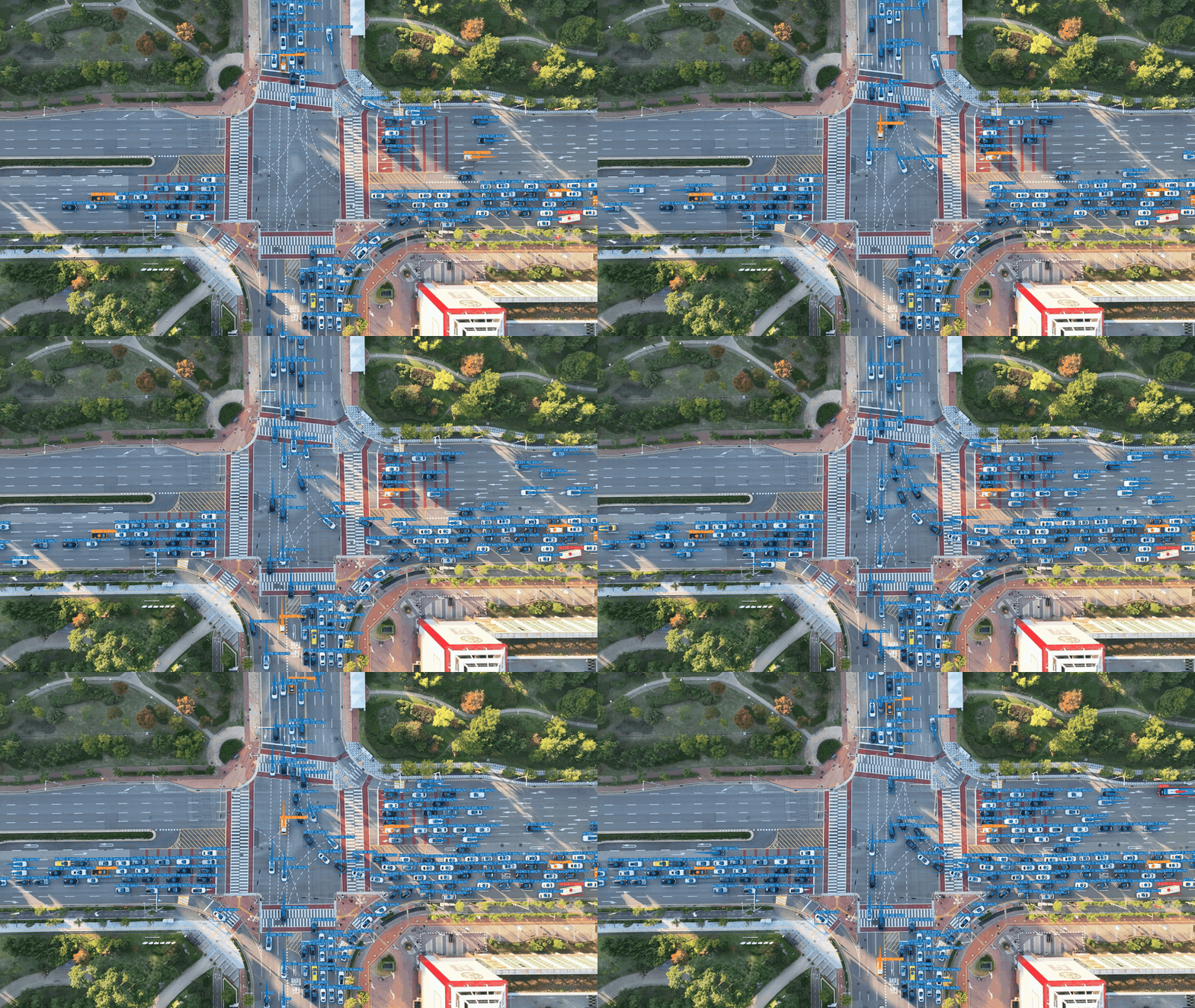
🎬 This animation previews some of the capabilities of Geo-trax. Watch the full demonstration (~4 min) on YouTube.

🔍 This diagram shows a high-level overview of the Geo-trax processing pipeline — from raw drone footage to georeferenced vehicle trajectories; it also highlights optional human annotation and auxiliary vision-data generation steps.
- Vehicle Detection: Utilizes a pre-trained YOLO model to detect vehicles (cars, buses, trucks, and motorcycles) in the video frames.
- Vehicle Tracking: Implements a selected tracking algorithm to follow detected vehicles, ensuring robust trajectory data and continuity across frames.
- Trajectory Stabilization: Corrects for unintentional drone movement by aligning trajectories to a reference frame, using bounding boxes of detected vehicles to enhance stability. Leverages the Stabilo 🌀 library, fine-tuned by Stabilo-Optimize 🎯, to achieve reliable, consistent stabilization.
- Georeferencing: Maps stabilized trajectories to real-world coordinates using an orthophoto and image registration technique.
- Dataset Creation: Compiles trajectory and related metadata (e.g., velocity, acceleration, dimension estimates) into a structured dataset.
- Visualization Tools: Visualizes extracted trajectories, overlays paths on video frames, and generates plots for traffic data analysis.
- Auxiliary Tools: Data wrangling, analysis, and model training scripts/tools provided to support dataset preparation, advanced analytics, and custom model development.
- Customization and Configuration: Flexible configuration options to adjust pipeline settings, including detection/tracking parameters, stabilization methods, and visualization modes.
Note: This is a preliminary version of the pipeline. Some functionalities, especially auxiliary tools for data wrangling, analysis, and model training, are under development (👷🏼) and will be included in future releases.
🚀 Planned Enhancements
-
Version =1.0.0
- Tools for comparing extracted trajectories with on-board sensor data.
- Release all auxiliary tools for data wrangling, analysis, and (re-)training the detection model.
- Basic documentation and examples covering all core functionalities.
- Sample data for testing and demonstration purposes.
-
Version >1.0.0
- Pre-processing tools for raw video input.
- Expanded documentation, tutorials (docs folder), and sample examples.
- List of known limitations, e.g., ffmpeg backend version discrepancies in OpenCV.
- Comprehensive unit tests for critical functions and end-to-end tests for the entire pipeline.
- Publishing on PyPI for simplified installation and distribution.
-
Version 2.0.0
- Upgrades to the latest ultralytics (>8.2) and numpy (>2.0) versions.
- Support for additional tracking algorithms and broader vehicle type recognition.
- Transition to a modular package layout for enhanced maintainability.
- Implementation of batch inference and multi-thread processing to improve scalability.
- Automated testing workflows with GitHub Actions.
🔗 Related Projects
Geo-trax integrates with and complements several specialized tools:
-
Stabilo 🌀 — Python library for video and trajectory stabilization using robust homography transformations. Supports various feature detectors, RANSAC algorithms, and user-defined masks. Used as Geo-trax's core stabilization engine.
-
Stabilo-Optimize 🎯 — Benchmarking and hyperparameter optimization framework for Stabilo. Evaluates stabilization performance through ground truth-free assessment using random perturbations. Used to fine-tune Geo-trax stabilization parameters.
-
HBB2OBB 📦 — Converts horizontal bounding boxes to oriented bounding boxes using SAM segmentation models. Can enhance Geo-trax outputs when object orientation is needed for downstream analysis.
Geo-trax was validated in a large-scale urban traffic monitoring experiment conducted in Songdo, South Korea. In this study, Geo-trax was used to process aerial video data captured by a fleet of 10 drones, resulting in the creation of the Songdo Traffic dataset. The underlying vehicle detection model in Geo-trax was trained using the Songdo Vision dataset. Both datasets are described in detail in the associated publication, see the citation section below.
🎥 Demo video of Geo-trax applied to the Songdo field experiment: https://youtu.be/gOGivL9FFLk
-
Clone or fork the repository:
git clone https://github.com/rfonod/geo-trax.git cd geo-trax -
Create and activate a Python virtual environment (Python >= 3.9 and <= 3.12), e.g., using Miniconda3:
conda create -n geo-trax python=3.11 -y
conda activate geo-trax
or using venv:
python3.11 -m venv .venv
source .venv/bin/activate  # On Windows, use `.venv\Scripts\activate`
-
Install dependencies from
pyproject.toml:pip install -e .Note: Installing in editable mode (
-e) is recommended, as it allows immediate reflection of code changes. -
[Optional] Install development dependencies (for development, testing, or other non-core auxiliary scripts):
pip install -e .[dev]
Note: In
zsh, use quotes to prevent shell expansion:pip install -e '.[dev]'
The batch_process.py script can process multiple videos in a directory, including subdirectories, or a single video file.
To view the help message and available options, run:
python batch_process.py -hBelow are some example commands to demonstrate its usage.
python batch_process.py path/to/videos/ --no-geopython batch_process.py video.mp4 -c cfg/custom_config.yamlpython batch_process.py video.mp4 --savepython batch_process.py video.mp4 --viz-only --savepython batch_process.py path/to/videos/ --plot-only --plotTip
See data/README.md for sample data and testing examples.
📁 Output File Formats
Suppose the input video is named `video.mp4`. The output files will be saved in the `results` folder relative to the input video. The following files will be generated:-
video.txt: Contains the extracted vehicle trajectories in the following format:
frame_id, vehicle_id, x_c(unstab), y_c(unstab), w(unstab), h(unstab), x_c(stab), y_c(stab), w(stab), h(stab), class_id, confidence, vehicle_length, vehicle_widthwhere:
frame_id: Frame number (0, 1, ...).vehicle_id: Unique vehicle identifier (1, 2, ...).x_c(unstab),y_c(unstab): Unstabilized vehicle centroid coordinates.w(unstab),h(unstab): Unstabilized vehicle bounding box width and height.x_c(stab),y_c(stab): Stabilized vehicle centroid coordinates.w(stab),h(stab): Stabilized vehicle bounding box width and height.class_id: Vehicle class identifier (0: car (incl. vans), 1: bus, 2: truck, 3: motorcycle)confidence: Detection confidence score (0-1).vehicle_length,vehicle_width: Estimated vehicle dimensions in pixels.
-
video_vid_transf.txt: Contains the transformation matrix for each frame in the format:
frame_id, h11, h12, h13, h21, h22, h23, h31, h32, h33where
frame_id: Frame number (1, 2, ...).hij: Elements of the 3x3 homography matrix that maps each frame (frame_id) to the reference frame (frame 0).
-
video.yaml: Video metadata and the configuration settings used for processing the
video.mp4. (this file is saved in the same directory as the input video.) -
video_mode_X.mp4: Processed video in various visualization modes (X = 0, 1, 2):
- Mode 0: Results overlaid on the original (unstabilized) video.
- Mode 1: Results overlaid on the stabilized video.
- Mode 2: Results plotted on top of the static reference frame.
Each version can display vehicle bounding boxes, IDs, class labels, confidence scores, and short trajectory trails that fade and vary in thickness to indicate the recency of the movement. If an input
video.csvfile is available in the same directory as the input video, i.e., the converted flight logs, vehicle speed and lane information can be also displayed. -
video.csv: Contains the georeferenced vehicle trajectories in a tabular format. This file includes both geographic and local coordinates, estimated real-world dimensions, kinematic data, road section, and lane information. The columns are:
Vehicle_ID, Timestamp, Ortho_X, Ortho_Y, Local_X, Local_Y, Latitude, Longitude, Vehicle_Length, Vehicle_Width, Vehicle_Class, Vehicle_Speed, Vehicle_Acceleration, Road_Section, Lane_Number, Visibilitywhere:
Vehicle_ID: Unique vehicle identifier.Timestamp: Timestamp of the frame (YYYY-MM-DD HH:MM:SS.ms).Ortho_X,Ortho_Y: X and Y coordinates of the vehicle centroid in the orthophoto's pixel coordinate system.Local_X,Local_Y: X and Y coordinates of the vehicle centroid in a local projected coordinate system (e.g., EPSG:32633 for UTM zone 33N).Latitude,Longitude: Geographic coordinates of the vehicle centroid (WGS84).Vehicle_Length,Vehicle_Width: Estimated vehicle dimensions in meters.Vehicle_Class: Vehicle class identifier (0: car (incl. vans), 1: bus, 2: truck, 3: motorcycle).Vehicle_Speed: Estimated vehicle speed in km/h.Vehicle_Acceleration: Estimated vehicle acceleration in m/s$^2$.Road_Section: Identifier for the road segment the vehicle is on.Lane_Number: Identifier for the lane the vehicle is in.Visibility: Boolean indicating if the vehicle's bounding box is fully visible within the frame.
-
video_geo_transf.txt: Contains the 3x3 georeferencing transformation matrix (homography) that maps points from the video's reference frame to the orthomap. The format is a comma-separated list of the 9 matrix elements:
h11, h12, h13, h21, h22, h23, h31, h32, h33
Note: All output files (except video.yaml) are saved in the results folder relative to the input video.
If you use Geo-trax in your research, software, or to generate datasets, please cite the following resources appropriately:
-
Preferred Citation: Please cite the associated article for any use of the Geo-trax framework, including research, applications, and derivative work:
@article{fonod2025advanced,
  title = {Advanced computer vision for extracting georeferenced vehicle trajectories from drone imagery},
  author = {Fonod, Robert and Cho, Haechan and Yeo, Hwasoo and Geroliminis, Nikolas},
  journal = {Transportation Research Part C: Emerging Technologies},
  volume = {178},
  pages = {105205},
  year = {2025},
  publisher = {Elsevier},
  doi = {10.1016/j.trc.2025.105205},
  url = {https://doi.org/10.1016/j.trc.2025.105205}
}
-
Repository Citation: If you reference, modify, or build upon the Geo-trax software itself, please also cite the corresponding Zenodo release:
@software{fonod2025geo-trax,
  author = {Fonod, Robert},
  license = {MIT},
  month = may,
  title = {Geo-trax: A Comprehensive Framework for Georeferenced Vehicle Trajectory Extraction from Drone Imagery},
  url = {https://github.com/rfonod/geo-trax},
  doi = {10.5281/zenodo.12119542},
  version = {0.7.0},
  year = {2025}
}
The georeferencing code was developed with contributions from Haechan Cho.
Contributions from the community are welcome! If you encounter any issues or have suggestions for improvements, please open a GitHub Issue or submit a pull request.
This project is distributed under the MIT License. See the LICENSE file for more details.