Foodiebear PetFeeder helps pet owners to stay connected with their loved ones whenever, wherever. This project includes a DIY pet feeder powered by Raspberry Pi, a MERN web app powered by Azure cloud platform, and an Alexa skill powered by AWS. Whether your pets need to be fed breakfast before you wake up, dinner while you're working late, or simply a treat when you are busy in the house, you should stay tuned to this awesome project 🐶🐱🐼
To learn more about this project, please read the initial product plan here or the final architecture diagram below:
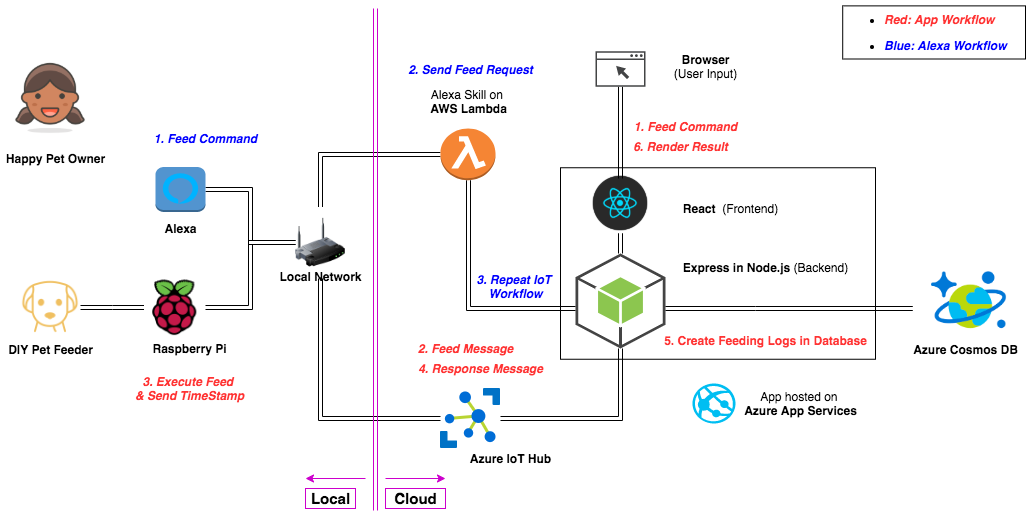
This is the web app part of the FoodieBear Pet Feeder project. This repo contains the code for the MERN(Mongo-Express-React-Node.js) web app and instructions to deploy to Azure App Services, along with some learning resources for Azure cloud platform.
For reference, please see the live example here: https://foodiebear.azurewebsites.net/
Git clone this repo to the desired folder on your computer and use the latest version of VS Code to edit:
Open an account with Azure and add the following services to your account:
- App Service
- IoT hub
- Cosmos DB
Create .env file in root folder and update the the following variables accordingly:
- IOTHUB_CONNECTION_STRING
- PORT
- DB_USERNAME
- DB_PASSWORD
- DB_CONNECTION_STRING
NOTE: TARGET_DEVICE=PyPi should be the default unless you update the device name entirely throughout the project.
For the Express backend:
- axios
- azure-iothub
- body-parser
- cors
- cowsay
- dotenv
- express
- express-pino-logger
- mongoose
- node-schedule
For the React frontend:
- testing-library/jest-dom
- testing-library/react
- testing-library/user-event
- bootstrap
- react
- react-bootstrap
- react-flash-message
- serialize-javascript
NOTE: Please use $ npm install <library-name> for needed libraries or $ npm install all for all libraries in the package.json file.
- cd to "react-fronted" folder and run the command
$ npm run build - cd back to root folder and run the command
$ npm start
- add "Azure Tools" extension to VS Code
- deploy from VS code directly
MERN App & Azure App Services:
- Creating MERN Stack App and Hosting In Microsoft Azure using Create-React-App w/ Continuous Integration
- Deploy to Azure App Service using Visual Studio Code
- How to connect your React app to a backend on the same origin
- Deploying a Client-Side Rendered create-react-app to Microsoft Azure
Azure IoT Hub:
- What is Azure IoT Hub?
- Quickstart: Send telemetry from a device to an IoT hub and read it with a back-end application (Node.js)
Azure Cosmo DB:
- Part I. Hardware & Raspberry Pi: https://github.com/rinostar/capstone_petfeeder
- Part III. Alexa Skill & Lambda Function: https://github.com/rinostar/capstone-petfeeder-alexa
Github: @rinostar
Email: [email protected]
In addition to authors of the links mentioned above, I want to thank:
- diy petfeeder on Youtube for the inspiration,
- redklouds on Github for the collaboration,
- and Ada community for the support.
Thank you! Until next time 🌟