Speech-to-Text for GNOME/Wayland

Dikt is a native speech-to-text application for GNOME on Wayland. It integrates directly with IBus, letting you dictate into any application with a global keyboard shortcut.
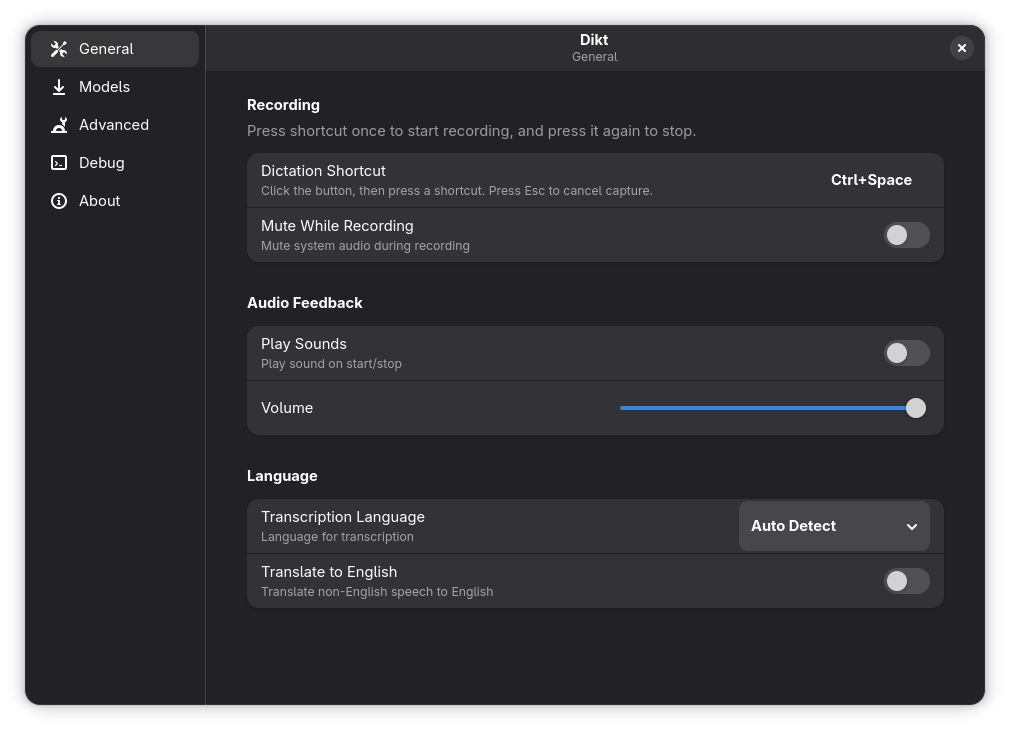
- Native IBus Integration — Seamless input method switching during dictation
- Global Dictation Shortcut — Toggle recording from anywhere, automatic input switching
- Offline Processing — All speech recognition runs locally on your device
- Multi-language Support — 50+ languages supported
- Multiple Recognition Engines — Whisper, Parakeet, Moonshine, SenseVoice
- GNOME-Native UI — Built with GTK4 and Libadwaita
- AI Post-Processing — Optional LLM-based cleanup of transcripts
# Add the repository
sudo dnf config-manager addrepo --from-repofile=https://rohithmahesh3.github.io/dikt-rpm/dikt.repo

# Install
sudo dnf install ibus-dikt# Dependencies (Fedora)
sudo dnf install -y \
rustc cargo \
gtk4-devel libadwaita-devel graphene-devel \
alsa-lib-devel ibus-devel glib2-devel \
openssl-devel cmake clang-devel glslc
# Build
git clone https://github.com/rohithmahesh3/Dikt.git
cd Dikt
cargo build --release- Install Dikt (see Installation above)
- Open Dikt from your application menu
- Configure your dictation shortcut
- Download a recognition model
That's it. Dikt automatically handles input method switching during transcription.
- Press your dictation shortcut to start recording
- Speak naturally
- Press the shortcut again to transcribe and insert text
Dikt automatically switches to its input method during transcription and switches back when done. The text appears in whichever application has focus.
Dikt supports multiple speech recognition backends:
| Model | Strengths | Languages |
|---|---|---|
| Whisper (Small/Medium/Turbo) | High accuracy | 50+ |
| Parakeet V3 | CPU-optimized, auto-detect language | 50+ |
| Moonshine | Fast, low-resource | English |
| SenseVoice | Optimized for CJK | Chinese, Japanese, Korean, English |
Models are downloaded on-demand from the preferences window.
Open Dikt from your application menu to configure:
- Language — Primary recognition language
- Dictation Shortcut — Global keybinding to toggle recording
- Audio Feedback — Sounds for start/stop events
- Model Selection — Choose and download recognition models
- Post-Processing — Optional AI cleanup via LLM
- GNOME on Wayland
- IBus (default on most GNOME installations)
- PulseAudio or PipeWire audio system
- Microphone
Dictation shortcut not working
# Check daemon status
systemctl --user status dikt.service

# Restart if needed
systemctl --user restart dikt.service
Also ensure no other application is capturing your shortcut key.
No microphone access
# Add user to audio group
sudo usermod -aG audio $USER

# Log out and back in
Manual model installation
Place models in ~/.local/share/dikt/models/:
- Whisper:
.binfiles directly - Parakeet/SenseVoice: extract
.tar.gzto subdirectory
# Build
cargo build

# Run daemon
cargo run -- --daemon

# Run GUI
cargo run

# Run IBus engine
cargo run --bin ibus-dikt-engine -- --ibus- Additional distribution packages (Arch, Debian, openSUSE)
- Custom vocabulary GUI integration
- Real-time transcription preview
- Global shortcuts on Wayland
This project was built for personal use and shared in case others find it useful. As a hobbyist in this domain, the implementation may not follow all best practices. Bug reports and suggestions are welcome.
Contributions are welcome! Please feel free to submit issues or pull requests.
MIT License — see LICENSE for details.
Website • Issues • Discussions