The FreeCAD MCP plugin integrates the Model Control Protocol (MCP) into FreeCAD, enabling automation of model creation, macro execution, and view management through a server-client architecture. It provides a GUI control panel and a command-line client to streamline FreeCAD workflows, supporting tasks like creating/running macros, adjusting views, and integrating with external tools (e.g., Claude, Cursor, Trace, CodeBuddy).

- Features
- Quick Start
- Installation
- MCP Configuration
- Usage
- Tool Functions
- Use Cases
- External Tool Integration
- Assets
- Troubleshooting
- Contributing
- License
- API Reference - Comprehensive API documentation with detailed function signatures, parameters, return values, examples, and workflows
The FreeCAD MCP plugin (v0.1.0) offers the following features:
- MCP Server: Provides a GUI control panel (
FreeCADMCPPanel) and processes commands likecreate_macro,update_macro,run_macro,set_view, andget_report(implemented infreecad_mcp_server.py). - MCP Client: Command-line tool to send commands via
stdioor TCP, manage.FCMacrofiles (create, update, run, validate), and control FreeCAD remotely (implemented infreecad_mcp_client.py). - Macro Normalization: Automatically adds imports (
FreeCAD,FreeCADGui,Part,math) and post-execution steps (recompute, view adjustment) for macros. - GUI Control Panel: Includes buttons to start/stop the server, clear logs, and switch views (front, top, right, axonometric).
- Logging System: Records messages and errors to
freecad_mcp_log.txtin the temporary directory (e.g.,%TEMP%\freecad_mcp_log.txt) and a GUI report browser (100-line limit). - Workbench Integration: Adds a
FreeCADMCPWorkbenchwith toolbar and menu commands (implemented inInitGui.py). - Visual Assets: Includes workbench icon (
icon.svg), example models (gear.png,flange.png,boat.png,table.png), and demo animation (freecad.gif,freecad.mp4).
Watch the demo animation:
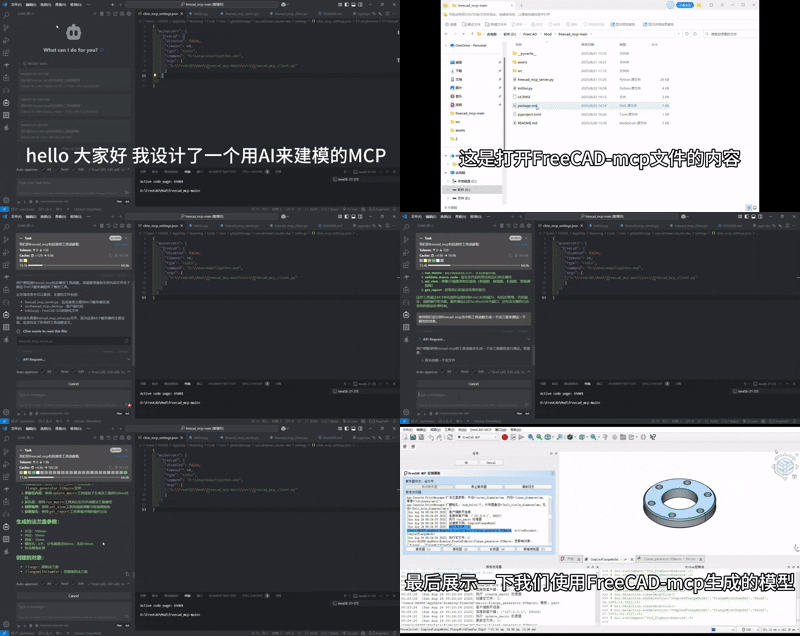 Download the demo video: FreeCAD MCP Demo MP4
-
Navigate to the installation directory:
cd ~/Library/Application\ Support/FreeCAD/Mod/FreeCAD-MCP
-
Create virtual environment and install dependencies:
uv venv .venv --python 3.12 source .venv/bin/activate uv pip install mcp-server httpx -
Start the MCP server:
./start.sh
-
Configure MCP client (see MCP Configuration)
-
Use from Claude Code or run examples:
python ~/Library/Application\ Support/FreeCAD/Mod/FreeCAD-MCP/src/freecad_mcp_client.py --get-report
For Windows and Linux setup, see Installation section below.
- FreeCAD: Version 0.21 or higher, Download FreeCAD
- Python: Version 3.10+ (system Python or via uv/pyenv)
- uv (recommended): Fast Python package installer, Install uv
# macOS/Linux
curl -LsSf https://astral.sh/uv/install.sh | sh

# Or using Homebrew (macOS)
brew install uv
- Python Dependencies:
mcp-server>=0.1.4,httpx>=0.24.1(auto-installed viauv pip install)
-
Clone the Repository:
git clone https://github.com/ATOI-Ming/FreeCAD-MCP.git
-
Copy to FreeCAD Mod Directory: Copy the
FreeCAD-MCPfolder to:- Windows:
D:\FreeCAD\Mod\FreeCAD-MCP - Linux:
~/.local/share/FreeCAD/Mod/FreeCAD-MCP - macOS:
~/Library/Application Support/FreeCAD/Mod/FreeCAD-MCP
# Windows example
xcopy FreeCAD-MCP D:\FreeCAD\Mod\FreeCAD-MCP /E /H /C /I
Note: Adjust
D:\FreeCAD\Modbased on your FreeCAD installation path. - Windows:
-
Launch FreeCAD:
- Open FreeCAD and switch to the
FreeCAD MCPworkbench (icon:assets/icon.svg). - Verify that
FreeCAD-MCPis loaded in Edit > Preferences > Add-ons.
- Open FreeCAD and switch to the
-
Verify Installation:
- Click
FreeCAD_MCP_Showto open the control panel. - Check the temporary directory (e.g.,
%TEMP%\freecad_mcp_log.txt) for startup messages.
- Click
Configure MCP clients (Claude Desktop, Claude Code, Cursor, etc.) to communicate with FreeCAD.
Add to your MCP settings file (~/Library/Application Support/Claude/claude_desktop_config.json):
{
  "mcpServers": {
    "freecad": {
      "disabled": false,
      "timeout": 60,
      "type": "stdio",
      "command": "/Users/rajamans/Library/Application Support/FreeCAD/Mod/FreeCAD-MCP/.venv/bin/python",
      "args": ["/Users/rajamans/Library/Application Support/FreeCAD/Mod/FreeCAD-MCP/src/freecad_mcp_client.py"]
    }
  }
}Windows:
{
  "mcpServers": {
    "freecad": {
      "type": "stdio",
      "command": "D:\\FreeCAD\\Mod\\FreeCAD-MCP\\.venv\\Scripts\\python.exe",
      "args": ["D:\\FreeCAD\\Mod\\FreeCAD-MCP\\src\\freecad_mcp_client.py"]
    }
  }
}Linux:
{
  "mcpServers": {
    "freecad": {
      "type": "stdio",
      "command": "/home/<user>/.local/share/FreeCAD/Mod/FreeCAD-MCP/.venv/bin/python",
      "args": ["/home/<user>/.local/share/FreeCAD/Mod/FreeCAD-MCP/src/freecad_mcp_client.py"]
    }
  }
}Notes:
- Replace
<user>with your username - Adjust paths based on your FreeCAD Mod directory location
- For TCP mode, set
"type": "tcp","host": "localhost","port": 9876
macOS/Linux:
cd ~/Library/Application\ Support/FreeCAD/Mod/FreeCAD-MCP  # or your install path
./start.shWindows:
cd D:\FreeCAD\Mod\FreeCAD-MCP
.venv\Scripts\activate
python src\freecad_mcp_client.py
Alternative (GUI Method):
- In FreeCAD, switch to
FreeCAD MCPworkbench - Click
FreeCAD_MCP_Showand then "Start Server"
Test the client connection:
# macOS/Linux
python ~/Library/Application\ Support/FreeCAD/Mod/FreeCAD-MCP/src/freecad_mcp_client.py --get-report

# Windows
python D:\FreeCAD\Mod\FreeCAD-MCP\src\freecad_mcp_client.py --get-report
Check logs:
- macOS:
/tmp/freecad_mcp_log.txt - Windows:
%TEMP%\freecad_mcp_log.txt - Linux:
/tmp/freecad_mcp_log.txt
- In FreeCAD, switch to the
FreeCAD MCPworkbench (icon:assets/icon.svg). - Click
FreeCAD_MCP_Showto open the control panel (FreeCADMCPPanel). - Use the control panel:
- Start/Stop Server: Control the MCP server.
- Clear Logs: Clear the report browser and
%TEMP%\freecad_mcp_log.txt. - View Switching: Select front, top, right, or axonometric views.
- Run a macro:
- Click
FreeCAD_MCP_RunMacro, select an.FCMacrofile, and execute it with automatic normalization.
- Click
macOS/Linux:
# Activate virtual environment
source ~/Library/Application\ Support/FreeCAD/Mod/FreeCAD-MCP/.venv/bin/activate

# Run client commands
python ~/Library/Application\ Support/FreeCAD/Mod/FreeCAD-MCP/src/freecad_mcp_client.py <command>Windows:
# Activate virtual environment
D:\FreeCAD\Mod\FreeCAD-MCP\.venv\Scripts\activate

# Run client commands
python D:\FreeCAD\Mod\FreeCAD-MCP\src\freecad_mcp_client.py <command>Examples:
- Create macro:
--create-macro my_macro --template-type part - Run macro:
--run-macro my_macro.FCMacro --params '{"radius": 10}' - Set view:
--set-view '{"view_type": "7"}' - Get report:
--get-report
The following tool functions are provided by freecad_mcp_client.py, sending commands via stdio or TCP (localhost:9876), processed by freecad_mcp_server.py.
| Function | Parameters | Description |
|---|---|---|
create_macro |
macro_name, template_type |
Creates an .FCMacro file, validates name (letters, numbers, underscores, hyphens), supports templates (default, basic, part, sketch). |
update_macro |
macro_name, code |
Updates macro content, auto-adds FreeCAD, FreeCADGui, Part, math imports. |
run_macro |
macro_path, params (optional) |
Runs a macro, normalizes code, recomputes document, adjusts to axonometric view. |
validate_macro_code |
macro_name (optional), code (optional) |
Validates macro code syntax, returns success or error (with traceback). |
set_view |
params (e.g., {"view_type": "7"}) |
Sets view: 1 (front), 2 (top), 3 (right), 7 (axonometric). |
get_report |
None | Retrieves server logs (from %TEMP%\freecad_mcp_log.txt and report browser). |
Set the client path for your platform:
# macOS/Linux
CLIENT="~/Library/Application Support/FreeCAD/Mod/FreeCAD-MCP/src/freecad_mcp_client.py"

# Windows
# set CLIENT=D:\FreeCAD\Mod\FreeCAD-MCP\src\freecad_mcp_client.py-
Create Macro:
python "$CLIENT" --create-macro gear --template-type partOutput:
{"status": "success", "result": "Macro created"} -
Update Macro:
python "$CLIENT" --update-macro gear --code "import FreeCAD, Part\nradius = 10\ngear = Part.makeCylinder(radius, 5)\nPart.show(gear)"
Output:
{"status": "success", "result": "Macro updated"} -
Run Macro:
python "$CLIENT" --run-macro gear.FCMacro --params '{"radius": 15}'
Output:
{"status": "success", "result": {...}} -
Validate Code:
python "$CLIENT" --validate-macro-code gear --code "import FreeCAD\nApp.newDocument()"
Output:
{"status": "success"} -
Set View:
python "$CLIENT" --set-view '{"view_type": "7"}'
Output:
{"status": "success", "result": "view set to axonometric"} -
Get Report:
python "$CLIENT" --get-reportOutput:
{"status": "success", "result": {...}}
-
Automated Gear Model Creation:
- Scenario: Generate a parametric gear model for engineering design.
- Steps:
- Create macro:
--create-macro gear --template-type part - Update macro:
--update-macro gear --code "import FreeCAD, Part\nradius = 15\ngear = Part.makeCylinder(radius, 5)\nPart.show(gear)" - Run macro:
--run-macro gear.FCMacro --params '{"radius": 15}'
- Create macro:
- Result: Gear model generated, displayed in axonometric view.
- Output:

-
Generating a Flange Model:
- Scenario: Automate creation of a flange with holes for mechanical design.
- Steps: Run macro:
--run-macro flange.FCMacro - Result: Flange model generated with automatic normalization.
- Output:

-
Text-Based Model Generation:
- Scenario: Generate a boat model from a text description (e.g., "create a boat with a curved hull").
- Steps:
- Use Claude to generate
boat.FCMacro. - Run macro:
--run-macro boat.FCMacro
- Use Claude to generate
- Result: Boat model generated with automatic view adjustment.
- Output:

-
CAD Drawing Recognition:
- Scenario: Recreate a table model from a CAD drawing.
- Steps:
- Use Trace to convert drawing to
table.FCMacro. - Run macro:
--run-macro table.FCMacro
- Use Trace to convert drawing to
- Result: Table model generated.
- Output:

-
Batch Processing Models:
- Scenario: Automate creation of multiple models (e.g., gear and flange).
- Steps:
CLIENT="~/Library/Application Support/FreeCAD/Mod/FreeCAD-MCP/src/freecad_mcp_client.py"
for macro in gear.FCMacro flange.FCMacro; do
    python "$CLIENT" --run-macro $macro
done
- Result: Models generated sequentially, logged to system temp directory.
- Output: See
gear.pngandflange.png.


FreeCAD MCP supports integration with external tools to enhance model generation:
- Claude: AI model for generating
.FCMacrofiles from text descriptions.- Example: Input "create a gear with 10mm radius," generates:
Save as
import FreeCAD, Part
radius = 10
gear = Part.makeCylinder(radius, 5)
Part.show(gear)
gear.FCMacro, run:--run-macro gear.FCMacro.
- Example: Input "create a gear with 10mm radius," generates:
- Trace: CAD drawing processing tool to convert drawings to
.FCMacrofiles.- Example: Convert a table drawing to
table.FCMacro, run:--run-macro table.FCMacro.
- Example: Convert a table drawing to
- Cursor/CodeBuddy: Code editing tools for writing and debugging macro code.
- Example: Edit
flange.FCMacroin Cursor, update:--update-macro flange.FCMacro --code "<code>".
- Example: Edit
The assets/ directory contains the following resources:
- icon.svg: Icon for
FreeCADMCPWorkbench, used inInitGui.pyandpackage.xml.
- gear.png: Example gear model.
- flange.png: Example flange model.
- boat.png: Example boat model.
- table.png: Example table model.
- freecad.gif: Demo animation showing GUI panel, macro execution, and view switching.
- freecad.mp4: Demo video, available for download. Download: FreeCAD MCP Demo MP4
-
Dependencies Not Installed:
- Issue:
ModuleNotFoundError: No module named 'mcp' - Solution: Run
uv pip install mcp-server httpxin your virtual environment
- Issue:
-
Virtual Environment Not Found:
- Issue:
.venvdirectory doesn't exist - Solution: Run
uv venv .venv --python 3.12in the plugin directory
- Issue:
-
Server Fails to Start:
- Issue: Port 9876 is in use (TCP mode only)
- Solution:
- macOS/Linux:
lsof -i :9876to find process,kill <PID>to terminate - Windows:
netstat -ano | findstr 9876, thentaskkill /PID <PID> /F
- macOS/Linux:
-
Client Connection Failure:
- Issue: Incorrect paths in MCP config
- Solution: Verify paths in
claude_desktop_config.json:- macOS:
~/Library/Application Support/FreeCAD/Mod/FreeCAD-MCP/.venv/bin/python - Windows:
D:\FreeCAD\Mod\FreeCAD-MCP\.venv\Scripts\python.exe - Linux:
~/.local/share/FreeCAD/Mod/FreeCAD-MCP/.venv/bin/python
- macOS:
-
Macro Execution Errors:
- Issue: Syntax errors or missing imports
- Solution: Use
--validate-macro-codeto check code, review traceback in log file:- macOS/Linux:
/tmp/freecad_mcp_log.txt - Windows:
%TEMP%\freecad_mcp_log.txt
- macOS/Linux:
-
Permission Issues:
- Issue: Can't write to log file
- Solution: Check permissions on temp directory or modify log path in
freecad_mcp_server.py
-
More Help: Submit issues on GitHub (Bug Tracker)
Contributions are welcome! Follow these steps:
- Fork the repository:
https://github.com/ATOI-Ming/FreeCAD-MCP. - Create a branch:
git checkout -b feature/your-feature. - Commit changes:
git commit -m "Add your feature". - Push and create a Pull Request.
For questions or collaborations, please open an issue or contact [1757772673@qq.com, Douyin: huhushuxue95]
This project is licensed under the MIT License. See LICENSE for details.