tpick is a simple, curses-based, interactive utility for picking one of a
number of things at the terminal. See the examples in the examples directory.
Here are some of its (simple, but) great features:
- Hit
SPACEto add the*wildcard; so, super-fast matching of multiple parts of the thing you're looking for. - Two consecutive
qcharacters quits (by default); super easy and quick to type. - Pick your favourite with one key,
;. Use the-foption to set your favourite text. Then, when;is pressed, that text is added to the search. I use this for returning to my "home" tmux session. - And smartcase, of course.
And here are a couple of examples...
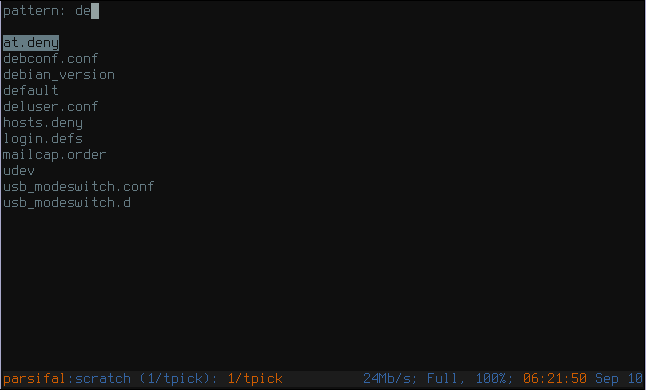
cd /etc
tpick *
Then type de, and the screen looks like...
Interactively pick a file (with zsh-style globing and read):
tpick **/*.gpg | read file
Interactively pick from standard input (with zsh-style read):
seq 1000 | tpick -i | read number
With a POSIX shell or bash you can use command expansion:
number=$(seq 100 | tpick -i)
Execute a command with the picked thing as an argument:
ls -1 *.coffee | tpick -i coffee -c
tpick works like dmenu or slmenu: just start typing characters, and only entries containing those characters are displayed. Matching uses fnmatch and is smartcase (if your fnmatch supports GNU extensions).
Use ENTER to exit and write the selected thing (the one at the top of the list) to standard output. You can also exit (and fail) using either ESCAPE, Control-C or qq. You never search for two consecutive q characters, right?
There are more details in the manual page.