
A link to the documentation: a link
Bluesky: a link
The KoiCom library focuses on building interfaces using components with a standardized lifecycle, which streamlines development and facilitates testing.
Frontend interfaces built with the KoiCom library can run entirely on the client side (in the browser), interacting with the server only for data exchange.
The following is an example of a CRUD panel created using the library's basic components.
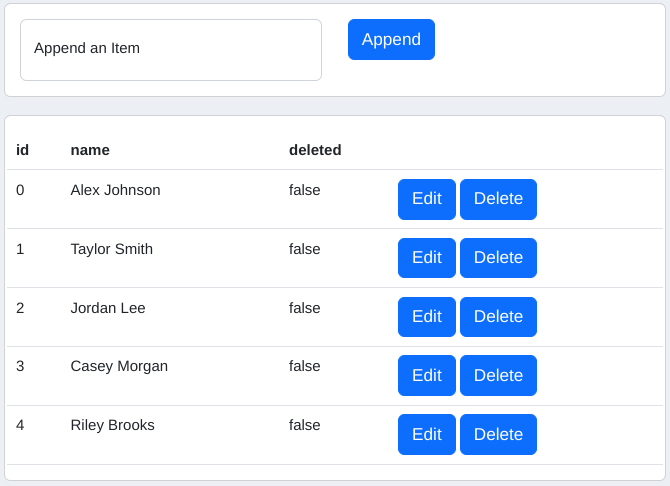
A link to the CRUD panel: a link
The KoiCom library includes documentation and a set of fundamental components.
The documentation outlines the methodology for developing frontend interfaces and explains the principles behind the selection of specific solutions.
The fundamental components demonstrate the library's principles and can serve as a basis for building more complex components and interfaces.
- The library is built on web-components technology and standardizes the component lifecycle, enabling you to quickly create custom components by following the standard.
- The component lifecycle emphasizes data exchange between components rather than their visual appearance. You can customize the look of components using your own CSS frameworks.
- Components are functionally specialized to be easily combined into more complex structures, allowing you to encapsulate elements such as cards, lists, forms, modals, and more.
- Each component is a combination of individual behaviors, a data object, and a visual representation, giving you the flexibility to mix existing behaviors and rapidly develop new components.
- Behaviors consist of intuitive, easy-to-understand method sets.
- Components can be seamlessly swapped, enabling you to test hypotheses and iterate on project versions quickly.
- Components retain the simplicity of standard HTML elements, eliminating the need to learn new syntax for their implementation.
The KoiCom library does not require package managers for installation.
The library operates independently of third-party libraries or frameworks. It is built entirely with vanilla JavaScript.
The library consists of JavaScript files that can be stored anywhere in your project's directory structure and imported directly into your code.
Download link: a link
Below are examples of the fundamental components.
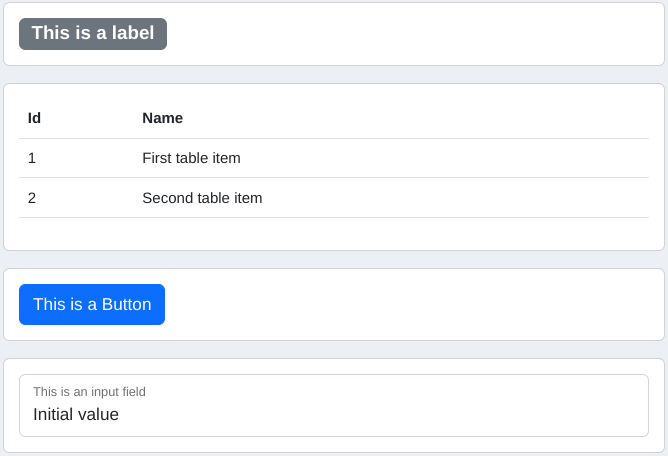
Working examples here: a link
Below is an example of a component that displays the product of two numbers as text.

The component is implemented with the code shown below.
import { KoiDataElementInteger } from "../../../../libs/web-components-lib/data_element.js";
import { KoiData, KoiDataCapable } from "../../../../libs/web-components-lib/data.js";
import { KoiLabelStencil, KoiLabelSocket, KoiLabelSocketConnectable } from "../../../../libs/web-components-lib/controls/labels/control_label.js";

class KoiColorableLabelSocket extends KoiLabelSocket {

	displayError(){
		super.displayError();
		this._removeClass('text-bg-secondary');
		this._addClass('text-bg-danger');
	}

	displayText(text){
		super.displayText(text);
		this._removeClass('text-bg-danger');
		this._addClass('text-bg-secondary');
	}

}

const KoiColorableLabelSocketConnectable = Sup => class extends KoiLabelSocketConnectable(Sup) {

	_constructSocket(){
		return new KoiColorableLabelSocket({
			holder: this
		});
	}

}

class DocsMultiplyLabelData extends KoiData {

	constructProperties(){
		this._properties = {
			value1: new KoiDataElementInteger({
				localized_name: 'value1',
				type: 'integer',
				default_value: null,
				allow_empty: true
			}),
			value2: new KoiDataElementInteger({
				localized_name: 'value2',
				type: 'integer',
				default_value: null,
				allow_empty: true
			})
		};
	}

	getValue1(){
		return this._getValueOrDefaultValue('value1');
	}

	getValue2(){
		return this._getValueOrDefaultValue('value2');
	}

	getMultiplicationProduct(){
		return this._getValueOrDefaultValue('value1') * this._getValueOrDefaultValue('value2');
	}

}

const KoiMultiplyTwoIntegersDataCapable = Sup => class extends KoiDataCapable(Sup) {

	_constructData(){
		return new DocsMultiplyLabelData();
	}

}

export class DocsMultiplyLabel extends KoiMultiplyTwoIntegersDataCapable(
	KoiColorableLabelSocketConnectable(
		KoiLabelStencil
	)
) {

	static getTagName(){
		return 'docs-multiply-label';
	}

	static getTag({element_id, value1, value2, element_class, debug_mode}){
		let tag_name = this.getTagName();
		let str_element_class = (element_class != undefined) ? 'class="' + element_class + '"' : 'class="mb-3 d-block"';
		let str_debug_mode = debug_mode ? 'debug_mode="true"' : '';
		return '<' + tag_name +
			' id="' + element_id +
			'" value1="' + value1 +
			'" value2="' + value2 +
			'" ' + str_element_class +
			' ' + str_debug_mode +
			'></' + tag_name + '>';
	}

	_getDataToDisplayInSocket(){
		return this.data;
	}

	_generateExpression(data){
		let value1 = data.getValue1();
		let value2 = data.getValue2();
		let product = data.getMultiplicationProduct();
		return String(value1) + ' * ' + String(value2) + ' = ' + String(product);
	}

	_convertDataToText(data){
		return this._generateExpression(data);
	}

}
The component can be embedded in an HTML document using the following code.
<docs-multiply-label id="sample_multiply_label_1" value1="2" value2="3"></docs-multiply-label>

<script type="module">
import { DocsMultiplyLabel } from "/js/docs/controls/labels/docs_multiply_label.js";
if (customElements.get(DocsMultiplyLabel.getTagName()) === undefined) {
	customElements.define(DocsMultiplyLabel.getTagName(), DocsMultiplyLabel);
}
</script>MIT © Koi
javascript html components web webcomponents web-components custom-elements