Keeps your Mac awake for as long as the work actually lasts, on battery and with the lid shut, then lets it sleep again without being told.



You start a long build, close the lid, and put the laptop in a bag. Ten minutes later the Mac is asleep and the build is not running. So next time you turn on a keep-awake app first. That works, and then you forget to turn it off, and the Mac spends the night awake in the bag on battery.
Those two are the same bug. Every keep-awake app hands you a switch and asks a question you cannot answer: how long will this take? Two hours? Until you say stop? You do not know how long the render takes, and the app knows less than you do.
The job knows. So let the job say it.
$ nosleep hold --id render --ttl 7200 --label "final render"
$ nosleep hold --id sync   --ttl 600  --label "photo sync"

  two jobs alive      the Mac stays up, lid shut, on battery
  sync finishes       still up, the render is still alive
  render finishes     asleep a moment later, nobody had to remember
Sleep is the default here. Staying awake is a claim, claims are counted, and every claim expires.
Two ways in. The zip is quicker; building from source is what most people reading this will do anyway, and it is the only path that needs no ritual.
Grab NoSleep-x.y.z.zip from the latest release,
unzip it, drag NoSleep.app into /Applications — and then read the next paragraph, because the
first launch is going to fail.
It is signed, but not by Apple. The app carries a stable certificate of mine, and it is not notarized, so Gatekeeper stops the first launch with a panel saying macOS cannot verify the app is free of malware and offering to move it to the Bin. Since macOS 15 the old Control-click-Open trick no longer covers this case. The way through, once and for all:
System Settings → Privacy & Security, scroll down to the line naming NoSleep, Open Anyway.
What the certificate is worth: every release is the same identity to macOS, so an update is recognized as the same app rather than as a stranger. What it is not worth: Gatekeeper's blessing. That needs an Apple Developer ID, which this project does not have and does not want to need. If that trade is not for you, build from source below — same app, no panel.
One command does all of it:
git clone https://github.com/xmasyx/nosleep.git
cd nosleep
Scripts/build-app.sh
That compiles, signs, installs NoSleep.app into /Applications, and puts the
nosleep command in ~/.local/bin — add that to your PATH if it isn't there
already. You need macOS 15 or later and the Xcode command line tools; run
xcode-select --install first if swift --version comes back empty.
Nothing asks for sudo while installing. The first time you switch on "work with
the lid closed", the app asks for your admin password once, and that installs the
small root watchdog described below: the thing that puts sleep back the way it
found it if the app ever dies. Everything else runs as you.
Anything can take one. A shell script, a Makefile, a cron job, your editor's build task, an AI agent working through a queue:
nosleep hold --id nightly --ttl 3600 --label "nightly build"
nosleep status          # 1 job running
nosleep list            # ids, labels, and how long each has left
nosleep release --id nightly
They are counted, so with two sessions alive the first one to leave turns nothing off. And a claim always has a deadline. Without one, a process that dies mid-flight would leave its claim behind and your Mac would never sleep again, with nothing to tell you why. The deadline is the difference between a job that forgot to clean up and a machine that is broken until you reboot it.
| When | |
|---|---|
zzz |
the Mac is free to sleep |
| the hollow bolt | work is running, the display may switch off |
| the filled bolt | work is running and the display stays on |
The filled glyph marks the heavier state, which is what makes the two readable at a glance without a legend.
There used to be a horse there. For a few days the working state was
Muybridge's galloping horse, redrawn as a halftone of dots, fifteen poses
generated from masks. It left the menu bar on 12 August because it cost 19.9% of
a core: an animated icon is not paid for in drawing it, it is paid for in
interface redraws, and measuring that was the interesting part. The code is still
here and still green under --selftest-horse. Putting it back is one line in
Icons.glyph.
This is the part most tools get wrong, and the reason is worth stating. Close the lid and macOS puts the Mac to sleep in a fraction of a second, while an app polling every few seconds finds out about it after the fact, from the wrong side of being asleep. There is no reacting to it. The only moment the decision can still be made is before.
So the lid is armed ahead of time, together with "keep awake", and released with it. The price, stated plainly: while armed, sleep stays disabled with the lid open too. What closes that loop is "release when the work ends", which is on by default.
The rule works on the edge, not the state. A lid switch you turned off by hand does not come back on a second later, and a lid switch you turned on by hand is never turned off by the rule. An app that fights your hand is worse than one that does nothing.
The watchdog. Working with the lid shut means writing SleepDisabled into
system power preferences, and that key outlives the app that wrote it. If the
return to normal depended on the app, then "the app crashed" would be exactly the
case left uncovered, and your Mac would stay awake forever without telling anyone.
So the decision belongs to a small root process instead: the app sends it a
heartbeat every five seconds, and after thirty seconds of silence it puts sleep
back the way it found it. It does the same at boot, before reading any request.
The thermal release. When macOS reports serious thermal pressure, NoSleep
drops everything. Not because something is about to break, since 100°C on the die
is ordinary on Apple Silicon and the chip already defends itself by slowing down.
It drops because at that point you are paying heat for less work, so keeping the
Mac awake has stopped serving the purpose you turned it on for.
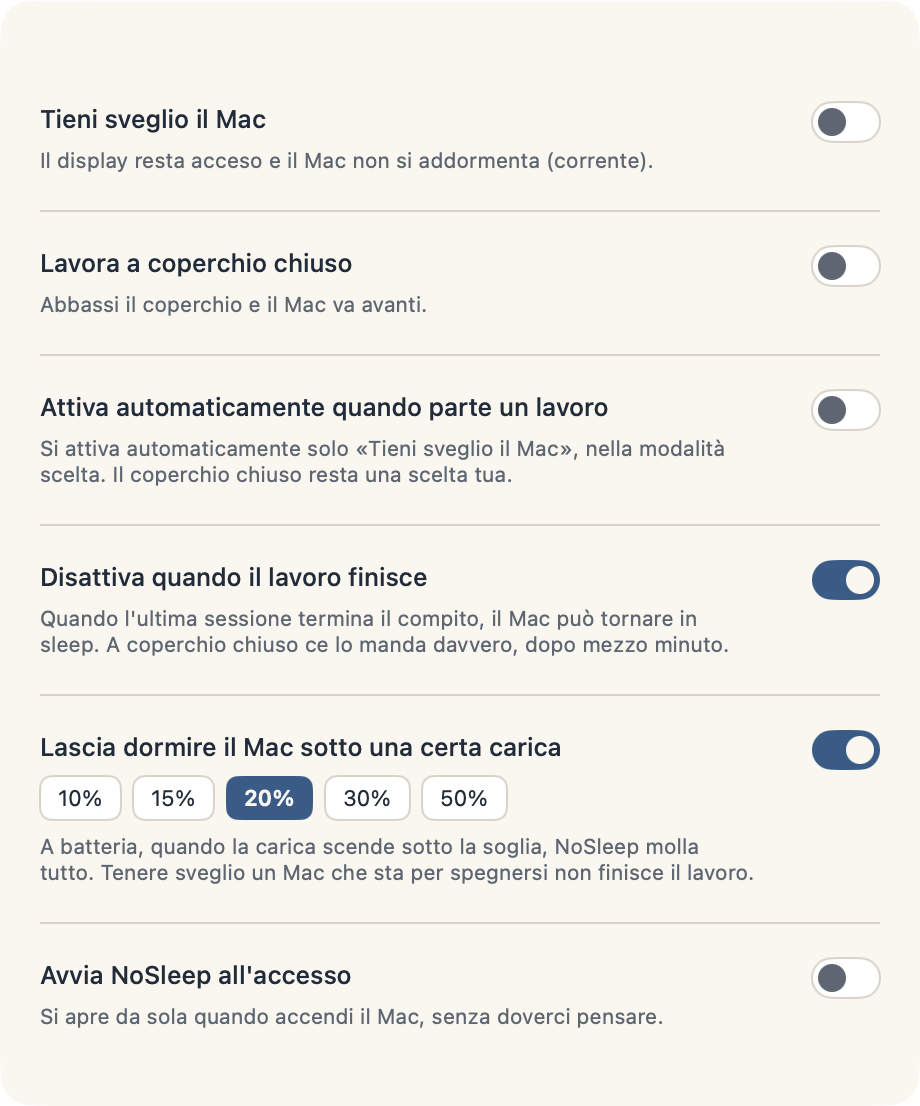
There is a third one you can switch off but probably should not: on battery, below 20%, everything is released.
| Switch | What it does | Ships |
|---|---|---|
| Keep the Mac awake | Holds the display on and blocks idle sleep. Works on battery. | off |
| Work with the lid closed | The Mac does not sleep with the lid down, and wifi stays connected. | off |
| Arm the lid whenever the Mac is kept awake | Shut the screen and the work carries on, without having planned for it. | off |
| Release when the work ends | When the last claim goes, drop everything. | on |
| Arm automatically when work starts | The first claim turns "keep awake" on by itself. | off |
| Release below 20% on battery | A floor, chosen from 10/15/20/30/50. | on |
Pick 1, 2 or 5 minutes and the keyboard stops answering: the screen goes black, a line from a book sits in the middle of it, and you can wipe the keys — and the screen — without typing anything anywhere. The black is the point. It is what makes the dust visible while you take it off.
It always ends on its own. Three ways out that share no code: the timer runs out, an independent watchdog closes it three seconds later if the timer never fired, and killing the process drops everything with it, because the event tap belongs to the process. Two doors are left open on purpose — ⌃⌥⌘ esc (control-option-command-escape) ends it immediately, and macOS's own ⌘⌥Esc is deliberately not swallowed, because a force-quit panel is the last door anyone has.
Letters, clicks and ⌘Q are blocked by the window itself and need no permission at all. The function row — brightness, volume, Dictation — needs Accessibility, and NoSleep asks for it the first time you clean, never at launch. Say no and cleaning still works; the preferences row tells you exactly which keys stay alive instead of pretending.
The quotes are twenty lines of public-domain Italian literature, each with its author and work.
Claims are taken and returned for you, so agent sessions keep the Mac up exactly while they are working:
| Event | What happens |
|---|---|
| session starts | a short claim, five minutes, covering startup jobs rather than the whole session |
| you send a prompt | renewed for six hours, because now there is real work |
| the turn ends | cut back to two minutes of grace |
| session ends | returned |
Opening a terminal is not working, which is why the claim at startup is small. The turn ending is not the work ending either: a session that fires off a background agent and waits would lose its claim while the work is still running, so when the turn ends a small watcher checks whether the session still has live child processes and holds the claim up while it does. It extends but never creates, raises but never lowers, and has to see the work twice before believing in it.
swift test              # 60 tests
Scripts/build-app.sh    # builds, signs, installs to /Applications, puts `nosleep` in ~/.local/bin
The panel photographs itself, and so does the menu bar:
.build/release/NoSleepApp --scatta panel.png --chiaro --sveglio   # or --scuro
.build/release/NoSleepApp --barra bar.png                         # three shots of the real menu bar
Each probe runs in a home of its own and never touches the running app.
Both assertions are named so you can find them:
pmset -g assertions | grep "NoSleep - "
defaults read /Library/Preferences/com.apple.PowerManagement SystemPowerSettingsThe closed lid is meant for short windows. With the Mac in a bag the heat has
nowhere to go, and the part that really ages in the heat is the battery. Low power
mode helps, and on a stock Mac it is already on for battery (pmset -g custom, the
powermode line).
macOS 15 or later. Built and verified on macOS 26.5.2, Apple M4 Max.
No network, no telemetry, no account.
CHANGELOG.md. Current version 1.1.0.