



Logger for Mobx 6+. It logs Mobx actions, observables and computeds. It uses custom Chrome formatters, so you won't see awkward [Proxy, Proxy] in your console anymore. Supports useLocalObservable and stores created with a factory function. It also provides access to store in browser console, so you can log store, call actions and computeds. Works only in dev mode.

npm i mobx-log
- Add
makeLoggableto a store:
class SomeStore {
  ...

  constructor() {
    makeAutoObservable(this);
+   makeLoggable(this);
  }
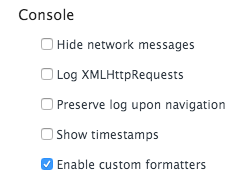
}- In Chrome DevTools, press F1 to load the Settings. Scroll down to the Console section and check "Enable custom formatters":
In order to customize mobx-log use configureMakeLoggable function.
It is a recommended option:
import { configureMakeLoggable } from 'mobx-log';

configureMakeLoggable({
  storeConsoleAccess: true,
});
After it all the stores marked as loggable become accessible as global variables. Example:
class AuthStore {
  constructor() {
    makeLoggable(this);
  }
}
Then you can type store.authStore in your browser console. Feel free to log store, call actions and computeds in the console. Works only in dev mode.
An example how to log only actions and computeds:
import { configureMakeLoggable } from 'mobx-log';

configureMakeLoggable({
  filters: {
    computeds: true,
    actions: true,
    observables: false,
  }
});An example how to log only changes in computeds of a store Counter.
import { makeLoggable } from 'mobx-log';

class Counter {
  value = 0;

  constructor() {
    makeAutoObservable(this);
    makeLoggable(this, {
      filters: {
        events: {
          computeds: true,
          observables: false,
          actions: false,
        },
      },
    });
  }
}Example - add time for each log entry:
import { configureMakeLoggable, DefaultLogger, LogWriter } from 'mobx-log';

export const now = () => {
  const time = new Date();
  const h = time.getHours().toString().padStart(2, '0');
  const m = time.getMinutes().toString().padStart(2, '0');
  const s = time.getSeconds().toString().padStart(2, '0');
  const ms = time.getMilliseconds().toString().padStart(3, '0');

  return `${h}:${m}:${s}.${ms}`;
};

class MyLogWriter implements LogWriter {
  write(...messages: unknown[]) {
    console.log(now(), ...messages);
  }
}

configureMakeLoggable({
  logger: new DefaultLogger(new MyLogWriter()),
});Useful for library contributors:
import { configureMakeLoggable } from 'mobx-log';

configureMakeLoggable({
  debug: true
});With Mobx 6 you can create stores without classes using makeAutoObservable / makeObservable:
export const createDoubler = () => {
  return makeAutoObservable({
    value: 0,
    get double() {
      return this.value * 2
    },
    increment() {
      this.value++
    }
  })
}
You can also log such stores using makeLoggable:
export const createDoubler = () => {
  return makeLoggable(makeAutoObservable({
    loggableName: 'doubler', // <-- Required
    value: 0,
    get double() {
      return this.value * 2
    },
    increment() {
      this.value++
    }
  }))
}
The store also become available in console if you turn on storeConsoleAccess option.
Before:
import { useLocalObservable } from 'mobx-react-lite'

...

const counterStore = useLocalObservable(() => {
  count: 0,
  increment: () => this.count++,
})
After:
import { useLoggableLocalObservable } from 'mobx-log'

...

const counterStore = useLoggableLocalObservable(() => {
  loggableName: 'counter', // <-- Required. You'll get TS type error if you forget about it
  count: 0,
  increment: () => this.count++,
})
The store also become available in console if you turn on storeConsoleAccess option.
This package installs Chrome formatters automatically after first makeLoggable call. If you'd like to use Chrome formatters only without logging functionality you can call applyFormatters:
import { applyFormatters } from 'mobx-log';

applyFormatters();
You need to call this function only once.
- mobx-logger doesn't show observables and computeds with Mobx 6 due to changes in Mobx internals.
- mobx-remotedev is not maintained anymore. It also doesn't show computeds.
- mobx-devtools does not show changes in computeds
- mobx-react-devtools is deprecated
- mobx-formatters doesn't support Map & Set. Also it's just a proxy formatter, not a logger
This library has example project located in ./example folder. It is used for development purposes. To run it go to ./example folder and run npm run start.
Prior to Mobx 6.3.4 bound actions didn't appear in the log. If you are using store destructuring and want your actions appear in the log please update your Mobx to 6.3.4. See the discussion for details: mobxjs/mobx#3140