Warm Pool
A pool of pre-booted, single-use Apple-container microVMs lets a simple dcon run exec its workload into a VM that is already up (~90 ms) instead of cold-booting a fresh one (~700 ms), while keeping per-container isolation. dcon warm alpine once, then dcon run --rm alpine echo hi is served from the pool in ~90 ms. Each warm VM is handed out exactly once and then destroyed, so every run still gets a pristine, never-used microVM. The boot cost moves off your critical path.
dcon adds essentially zero overhead: container run --rm alpine echo (~700 ms) and dcon run … (~690 ms) are indistinguishable. The whole cost is Apple's per-container microVM cold boot, which is not dcon's to optimize:
| phase | cost | note |
|---|---|---|
container create |
~40 ms | pre-creating does not help |
container start |
~650 ms | the boot: kernel + init + vminitd + network |
Two things make this hard to avoid:
- Pre-creating doesn't help: the cost is entirely in
start, notcreate. - Apple serializes VM boots: 4 concurrent
container run -dare only ~11% faster than sequential. You cannot parallelize the boot path.
There is a much cheaper floor: exec-ing into an already-running VM is ~60–90 ms (bounded by the container CLI's own Swift startup, ~70 ms). The warm pool lands on that floor while keeping isolation intact.
dcon warm cold-boots one or more microVMs for an image ahead of time and keeps them idle. When you later dcon run --rm IMAGE …, dcon execs your workload into a ready VM and skips the boot.
The boot cost doesn't disappear; it is paid in advance, in the background, off your critical path.
This is what separates the warm pool from a shared-VM engine (OrbStack, Docker Desktop):
- Single-use. Each pool member is handed out exactly once, then destroyed. Every
dcon rungets a fresh, never-used microVM, the same guarantee as a normal cold run. - No shared kernel. There is no long-lived VM that many containers share. The pool just front-loads the boot of per-container VMs.
You get OrbStack's always-warm latency with per-container VMs.
Medians on this host (Apple silicon Mac16,12, macOS 26). Reproduce with make bench.
| start path | latency | isolation |
|---|---|---|
dcon — warm pool (run --rm exec) |
~90 ms | per-container microVM |
| docker (OrbStack) — always-warm shared VM | ~212 ms | shared Linux VM |
| dcon — cold (fresh microVM) | ~769 ms | per-container microVM |
dcon warm beats an always-warm shared-VM engine by ~2.2×, and keeps every container in its own VM.
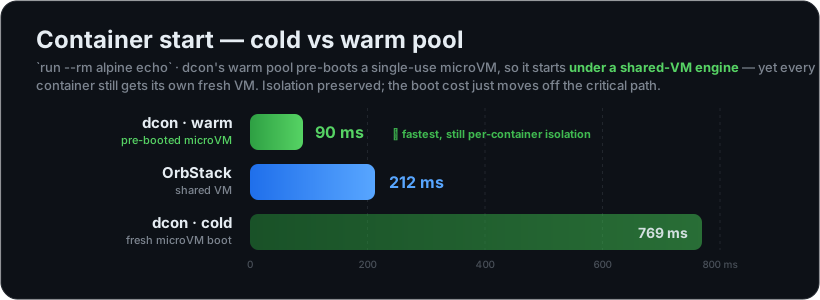
See Benchmarks and Comparison for the full numbers and methodology.
dcon warm alpine                     # pre-boot 1 warm alpine VM (pays the ~700 ms boot, once)
dcon run --rm alpine echo hi         # served from the pool → ~90 ms
Pre-boot several, inspect, and tear down:
dcon warm -n 3 python:3.12           # keep 3 warm python VMs ready
dcon warm ls                         # show the pool
dcon warm prune                      # tear the whole pool down
dcon warm prune python:3.12          # …or just one image's members
dcon warm ls reports each member's id, image, age, and liveness:
CONTAINER ID   IMAGE                  AGE   STATE
a1b2c3d4e5f6   alpine:latest          12s   ready
9f8e7d6c5b4a   python:3.12            4s    ready
warm, warm ls, and warm prune are top-level commands (dcon warm …).
By default the pool is manual: it drains as you consume it and you re-run dcon warm to refill. Opt into a self-sustaining pool:
export DCON_WARM=auto                 # self-prime the pool after eligible runs
dcon run --rm alpine echo hi          # first run is cold (empty pool), then primes
dcon run --rm alpine echo hi          # subsequent runs land warm → ~90 ms
In auto mode, after every eligible run dcon spawns a detached background dcon warm to top the pool back up to DCON_WARM_DEPTH, and reaps members idle past DCON_WARM_TTL. Auto mode is off by default to preserve dcon's ~92 MB idle footprint.
To force always-cold (e.g. for guaranteed fresh-boot semantics or a cold-path benchmark):
export DCON_WARM=off # ignore the pool entirely, even if seededA run is served warm only when everything it asks for can be reproduced by exec into an already-booted VM. The allow-list is deliberately conservative: anything outside it takes the normal cold path, so the fast path can never silently change semantics.
A run is warm-eligible when all of these hold:
- it uses
--rm(the VM is single-use; we destroy it afterward), - it is not detached (no
-d/--detach), - it sets only flags that
execcan honor (below).
These set process-level options that exec applies directly to the running VM:
-e/--env · --env-file · -w/--workdir · -u/--user · --uid · --gid · -i/--interactive · -t/--tty · --ulimit
(--pull and --detach-keys are accepted as no-ops on the warm path; global flags like --debug/--host/--context/--log-level/--config have no effect on execution.) A command is optional: a no-command run is served via the image's CMD (see Correctness).
These are bound at VM-boot time and cannot be applied by exec, so a run using any of them cold-boots:
-v/--mount (bind mounts) · -p/--publish (ports) · -m/--memory · --cpus · --network (custom) · --name · --entrypoint · --cap-add · --privileged · … and anything else not in the allow-list.
The fallback gives you the right result either way; eligible runs are just faster.
The warm path produces the same result as a cold run. The subtle parts:
- Image ENV / WORKDIR / USER are inherited.
execruns inside the booted VM, so the image's environment, working directory, and user are already in effect. - ENTRYPOINT / CMD are reproduced explicitly.
execdoes not auto-apply the image ENTRYPOINT, so dcon resolves the image'sENTRYPOINT/CMDat boot time (off the hot path, viaimage inspect, stored on the pool member) and on the hot path prepends the entrypoint, then:- appends your command if you gave one, or
- falls back to the image CMD if you didn't, matching
docker runsemantics.
- No-command runs work.
dcon run --rm img(no command) is served via the image's CMD. If an image has neither an entrypoint nor a CMD and you give no command, that run falls back to cold.
Edge case: the keepalive that holds a warm VM up relies on a
sleepbinary in the image (busybox/coreutils, which virtually every base image ships). An image withoutsleepcan't stay warm and falls back to the cold path.
| variable | default | effect |
|---|---|---|
DCON_WARM |
(unset) |
auto/1/on/true/yes → self-prime the pool after eligible runs (and reap stale members). off/0/no/false → ignore the pool entirely (always cold). Unset → manual pool: used if seeded, never auto-refilled. |
DCON_WARM_DEPTH |
1 |
Sustained warm members kept per image in auto mode. Clamped to 1..8. |
DCON_WARM_TTL |
600 |
Idle seconds before an auto-mode member is reaped. 0 disables reaping. Reaping happens only in auto mode; a manually seeded pool is yours to manage. |
Each idle warm VM costs roughly ~35 MB of host RAM until it is claimed or pruned. This is the trade for skipping the boot, and it's why auto mode is opt-in: dcon's baseline idle footprint is ~92 MB (see Benchmarks and Comparison), and you only pay the ~35 MB/VM when you ask for warmth.
In auto mode, members idle past DCON_WARM_TTL are reaped, so a forgotten pool can't pin memory indefinitely. A manually seeded pool drains as you consume it (and is never reaped out from under you); dcon warm prune tears it down on demand.
dcon has no daemon of its own; the warm pool is daemonless. (See Architecture for the full runtime picture.)
- State is a flock-guarded JSON file. Bookkeeping lives at
~/Library/Application Support/dcon/pool.json, guarded by an advisory lock on a companionpool.lock. The warm VMs themselves are owned by Apple's apiserver, which persists acrossdconinvocations. - The file lists only available members. Claiming a member pops it out of the file under the lock, so two concurrent
dcon runs can never hand out the same VM (atomic across processes). - Single-use claim → destroy. A served run
execs the workload, then retires that VM. Teardown runs in a detached background process so the run returns as soon as the workload finishes; the ~100 ms VM teardown happens afterward. - Background boot and replenish are detached. Both priming (
dcon warm) in auto mode and replenishment spawnsetsidbackground processes that outlive the short-lived CLI invocation. - Members are label-tagged
dcon.pool=1(plusdcon.pool.image), so even a VM leaked by a crashed process is found and reaped bydcon warm prune, independent of the state file. - Cold fallback is transparent. If a claimed VM is already gone before its command can run, dcon falls back to a genuine cold run so you still get your result.
- Benchmarks and Comparison — full latency/memory numbers and methodology
- Architecture — the daemonless translation-layer design
- Command Parity — the full Docker command surface
- Home
- Cookbook: https://github.com/o1x3/dcon/blob/main/SECONDARY.md · README: https://github.com/o1x3/dcon